程序设计实验室
微信公众号
程序设计实验室
微信公众号

前言
前端开发的准备工作在前面已经完成了,接下来就要开启写页面(Copy/Paste)操作了~
用ElementUI写页面很简单,对照着官网文档代码一顿复制粘贴就完事了。
写代码
没啥好说的,直接代码
布局
<template>
  <el-form :model="loginForm" :rules="fieldRules" ref="loginForm" label-position="left" label-width="0px"
           class="demo-ruleForm login-container">
    <span class="tool-bar">
    </span>
    <h2 class="title">系统登录</h2>
    <el-form-item prop="account">
      <el-input type="text" v-model="loginForm.account" auto-complete="off" placeholder="账号"></el-input>
    </el-form-item>
    <el-form-item prop="password">
      <el-input type="password" v-model="loginForm.password" auto-complete="off" placeholder="密码"></el-input>
    </el-form-item>
    <el-form-item style="width:100%;">
      <el-button type="primary" style="width:48%;" @click.native.prevent="reset">重 置</el-button>
      <el-button type="primary" style="width:48%;" @click.native.prevent="login" :loading="loading">登 录</el-button>
    </el-form-item>
  </el-form>
</template>
js
import Cookies from "js-cookie"

export default {
  name: "Login",
  data() {
    return {
      loading: false,
      loginForm: {
        account: 'admin',
        password: 'admin',
        src: ''
      },
      fieldRules: {
        account: [
          {required: true, message: '请输入账号', trigger: 'blur'}
        ],
        password: [
          {required: true, message: '请输入密码', trigger: 'blur'}
        ]
      },
      checked: true
    }
  },
  methods: {
    login() {
      this.loading = true
      let userInfo = {
        account: this.loginForm.account,
        password: this.loginForm.password,
      }
      this.$api.login.login(userInfo).then((res) => {  // 调用登录接口
        if (res.msg != null) {
          this.$message({message: res.msg, type: 'error'})
        } else {
          Cookies.set('token', res.data.token) // 放置token到Cookie
          sessionStorage.setItem('user', userInfo.account) // 保存用户到本地会话
          this.$router.push('/')  // 登录成功,跳转到主页
        }
        this.loading = false
      }).catch((res) => {
        this.$message({message: res.message, type: 'error'})
      })
    },
    reset() {
      this.$refs.loginForm.resetFields()
    }
  },
}
样式
.login-container {
  -webkit-border-radius: 5px;
  border-radius: 5px;
  -moz-border-radius: 5px;
  background-clip: padding-box;
  margin: 100px auto;
  width: 350px;
  padding: 35px 35px 15px 35px;
  background: #fff;
  border: 1px solid #eaeaea;
  box-shadow: 0 0 25px #cac6c6;

  .title {
    margin: 0px auto 30px auto;
    text-align: center;
    color: #505458;
  }
}
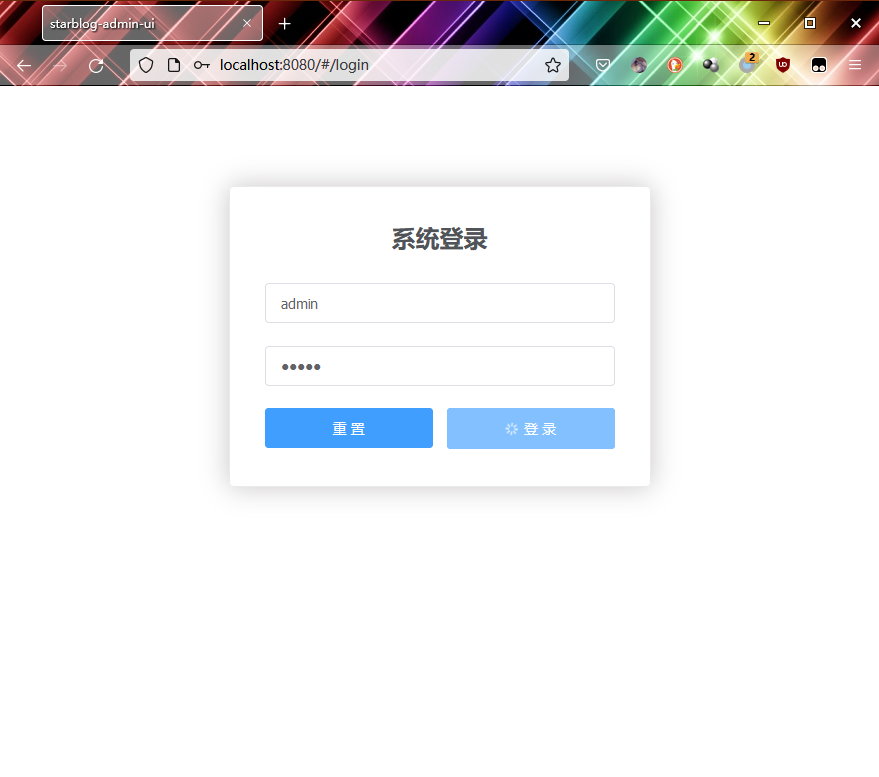
效果
看图