

Integrating Python with WeCom to Push Messages to Internal Groups
Preface A previous article mentioned using the wechatpy library to implement WeCom app login: Implementing WeCom Login in a Django + Taro Separated Frontend-Backend Project In fact, this library can do a great deal; basically all features involved in WeChat development can be implemented. This article introduces a very common scenario: pushing messages to WeCom groups in real time. Installation First install the wechatpy library pip install wechatpy If you get prompted to install other libraries at runtime (such as those related to encryption/decryption), just follow the prompts and install them,
目录15 个章节
Preface
A previous article mentioned using the wechatpy library to implement WeCom app login: Implementing WeCom Login in a Django + Taro Separated Frontend-Backend Project
In fact, this library can do a great deal; basically all features involved in WeChat development can be implemented.
This article introduces a very common scenario: pushing messages to WeCom groups in real time.
Installation
First install the wechatpy library
pip install wechatpy
If you get prompted to install other libraries at runtime (such as those related to encryption/decryption), just follow the prompts and install them. I won't belabor that here.
Create a WeCom App
First, go to the WeCom admin console and create an app, then note down the app ID (app_id)
While you're there, also note down the corp ID (corp_id) and secret from the admin console
Let's Get to the Code
Nothing else to it—let's start writing code
Create the App Object
Straight to the code
from wechatpy.work import WeChatClient
from wechatpy.work.client.api import WeChatAgent

client = WeChatClient('corp_id', 'secret')

agent: WeChatAgent = client.agent.get('app_id')
The IDs you need to fill in here are the ones mentioned above
With this agent object you can operate this WeCom app~
Create the Chat Object
To send messages, you first need a chat object. Well then, let's create one
from wechatpy.work.client.api import WeChatAppChat

chat = WeChatAppChat(client=client)
Create a Group Chat
As mentioned earlier, to send messages to a group, we still need to create a group
CHAT_ID = 'test'

result = chat.create(chat_id=CHAT_ID, name='群里名称', owner='群主ID',
                     user_list=['群主ID', '群员ID1', '群员ID2', '群员ID3'])
That's it—simple and easy to understand. When creating the group, specify the member IDs to invite in the user_list parameter
(Please look up these owner IDs and member IDs yourself in the WeCom admin console—they're the member IDs)
Wrap Up Some Common Operations
Send Text Messages
def send_text(content):
    print(chat.send_text(CHAT_ID, content))
It's just simply sending a text message. The result looks like this:
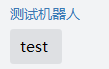
Send Text Cards
def send_text_card(title, description, url, btn_text):
    print(chat.send(CHAT_ID, 'textcard',
                    title=title,
                    description=description,
                    url=url,
                    btntxt=btn_text))
Here I used the official example
send_text_card('中秋节礼品领取',
               '<div class=\"gray\">2016年9月26日</div> <div class=\"normal\"> 恭喜你抽中iPhone 7一台,领奖码:520258</div><div class=\"highlight\">请于2016年10月10日前联系行 政同事领取</div>',
               'https://work.weixin.qq.com/', '谨防上当')
The result looks like this:

Send Images
def send_image(image_file):
    media = WeChatMedia(client)
    with open(image_file, 'rb') as f:
        result = media.upload('image', f)
        print(result)
    if 'media_id' in result:
        print(chat.send(CHAT_ID, 'image', media_id=result['media_id']))
Very simple—just pass the image path as the argument
The result looks like this

Send Markdown-Formatted Content
I tested this and found that the supported markdown format is quite limited, so don't get your hopes up too much
def send_markdown(md_file):
    with open(md_file, 'r', encoding='utf-8') as f:
        print(chat.send(CHAT_ID, 'markdown', content=f.read()))
I grabbed a random snippet to send. The result looks like this
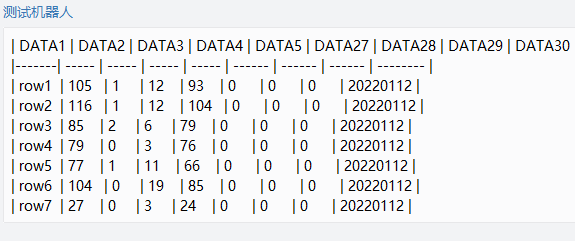
As you can see, even markdown tables aren't supported……
Rename the Group Chat
Not much to say here
def rename_chat(new_name):
    print(chat.update(CHAT_ID, name=new_name))
    send_text(f'群聊名称已修改为:{new_name}')
Invite Users
def invite(user_id):
    print(chat.update(CHAT_ID, add_user_list=[user_id]))
    send_text(f'邀请用户:{user_id}')
OK
OK, that's it—all written. Pretty simple
There are quite a few scenarios for using WeCom push notifications. For example, add a webhook in Sentry monitoring so that when a project error is detected, the error info gets pushed to the group, making it easy to stay on top of project errors at any time~
Another use case we currently have is pushing some reports to the group. As you can see, these tables are all in image format (can't be helped—WeCom doesn't support full markdown……)
The result looks like this
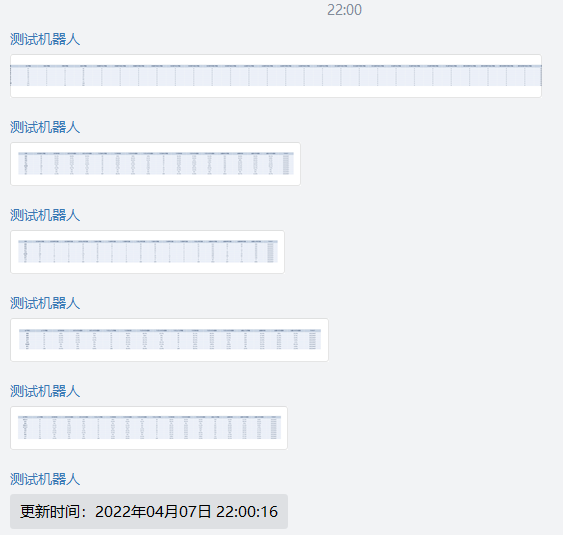
Oh right, as for generating table images with Python, I'll write (fluff) another post next time. I'm out~
_EOF_
Integrating Python with WeCom to Push Messages to Internal Groups
- 本文作者:
- 程序设计实验室
- 版权声明:
- 本博客所有文章除特别声明外,均采用 BY-NC-SA 许可协议。转载请注明出处!
相关文章
我用Qt和Python开发了一个视频合并工具
想合并视频,但是却找不到比较好用的工具,很多都要收费,我想着「这破功能还得收费?」,于是决定自己搞一个,一开始用Python做了一个,效果还不错,完美完成了我的视频合并任务,不过没有图形界面,想分享给朋友一起用也没办法,于是昨天用Qt写了个图形界面套上去,中间还是遇到一些问题的,通过这篇文章记录一下。 软件的界面就是这样啦,用Qt Designer随便拖出来的,和VS拖控件也差不了多少。 用起来挺
2021-12-18 · Python · 约 1 分钟
Python创建压缩文件
代码实现 # 创建一个目录来保存这些东西 temp_path = os.path.join(settings.MEDIA_ROOT, 'temp', str(uuid.uuid4())) os.makedirs(temp_path) # 创建压缩文件 archive_path = os.path.join(temp_path, 'archive.zip') with zipfile.ZipFile
2022-09-30 · Python · 约 1 分钟
Python-缓存机制与-functools-lru_cache
缓存是一种将定量数据加以保存以备迎合后续获取需求的处理方式,旨在加快数据获取的速度。数据的生成过程可能需要经过计算,规整,远程获取等操作,如果是同一份数据需要多次使用,每次都重新生成会大大浪费时间。所以,如果将计算或者远程请求等操作获得的数据缓存下来,会加快后续的数据获取需求。 先来一个简单的例子以了解缓存机制的概念: # -*- coding: utf-8 -*- import random
2022-05-27 · Python · 约 1 分钟
配置pip国内镜像加快python第三方库安装速度~
现在这网络对于开发者来说有点不太友好,下载什么东西都慢慢,pip install慢,git clone也慢,难受…… 不过还好有各种代替的国内镜像源可以加速 临时配置 在使用pip的时候加参数-i https://pypi.tuna.tsinghua.edu.cn/simple 例如:pip install -i https://pypi.tuna.tsinghua.edu.cn/simple d
2022-11-12 · Python · 约 1 分钟
讨论
共 0 条加载评论中…