

Personal Data Preservation Plan: A Beginner's Guide to the ZFS File System
ZFS is not just a file system but also a built-in storage solution? Data integrity verification and snapshot mechanisms sound somewhat unnecessary. The self-healing feature is quite appealing, though, but the complexity is not something everyone can handle.
目录22 个章节
Introduction to ZFS
One sentence to understand: ZFS is not just a file system; it is an intelligent storage solution.
ZFS (Zettabyte File System) is an advanced, open-source file system and logical volume manager developed by Sun Microsystems.
Unlike traditional file systems (such as ext4, NTFS), ZFS integrates the file system + RAID + volume management into one.
Keywords: self-healing, snapshots, high reliability, large-capacity support.
Advantages
Data Safety
- Copy-on-Write (COW) Mechanism: Prevents file corruption caused by power outages during write operations.
- Data Integrity Checksumming: Automatically detects and repairs silent corruption (files that are silently corrupted).
- RAID-Z Support: Avoids the traditional RAID 5 write hole vulnerability.
Snapshots and Rollback
- Snapshots have extremely low overhead and can be used for point-in-time backups.
- Supports fast rollback and cloning, making it a powerful tool for development and testing environments.
Resource Management
- Built-in compression (LZ4/ZSTD), deduplication (optional), and caching (ARC) mechanisms.
- Supports setting quotas or reservations for specific datasets.
Performance and Scalability
- Supports capacities up to the zettabyte (10²¹ bytes) level.
- Supports SSD acceleration (L2ARC/ZIL).
- Strong horizontal scalability (especially when using mirrored vdevs).
Why ZFS and NAS are a perfect match
- Large file storage like 4K videos, photos, backup images → Uses ZFS's built-in compression and snapshots to reduce space waste and prevent accidental deletion.
- Important document backups → Relies on data integrity checksums and snapshots to prevent bit rot.
- Multi-person shared folders + multi-device access → Uses ZFS snapshots to roll back accidental changes, so data is always recoverable.
- Managing storage pools with TrueNAS/PVE → A dual approach of CLI + Web interface, the underlying system remains ZFS, rock solid.
Deep Dive: ZFS Principles
ZFS Pool Hierarchy
This diagram visually illustrates the ZFS hierarchy: physical hard drives (Devices) form vdevs, and multiple vdevs combine to form a zpool
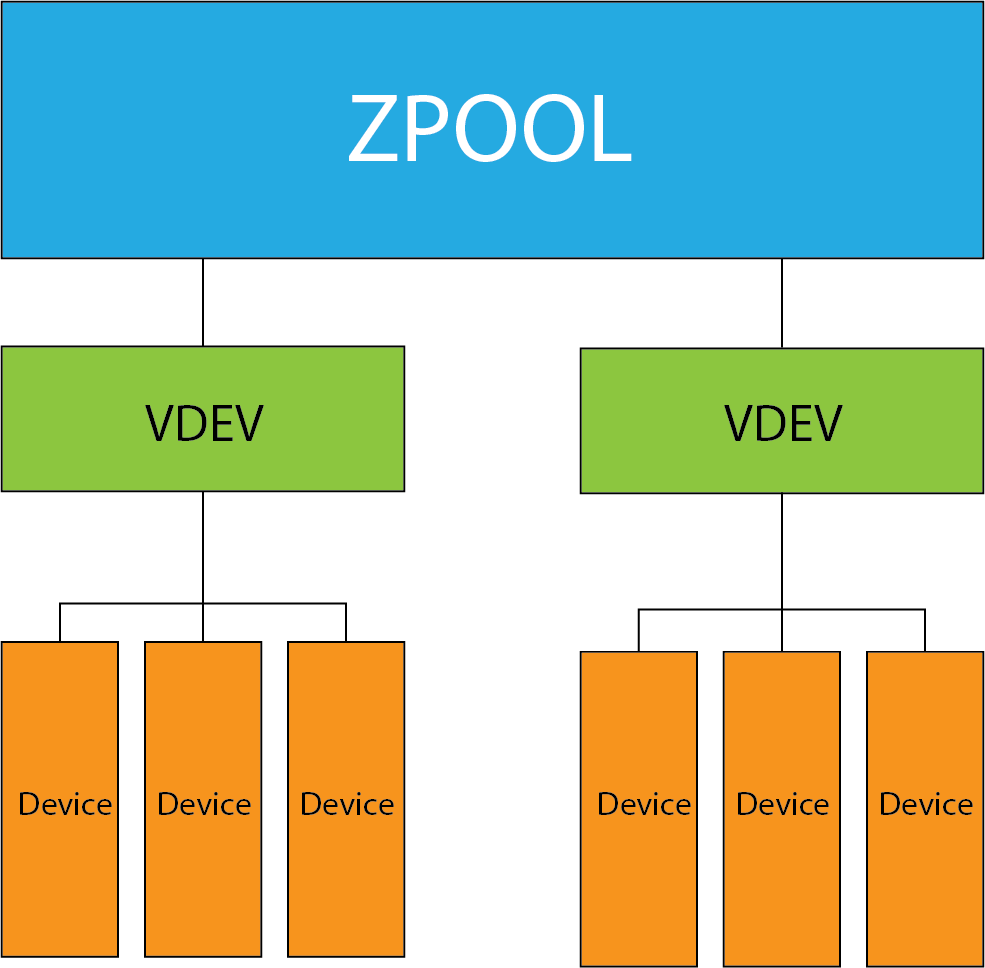
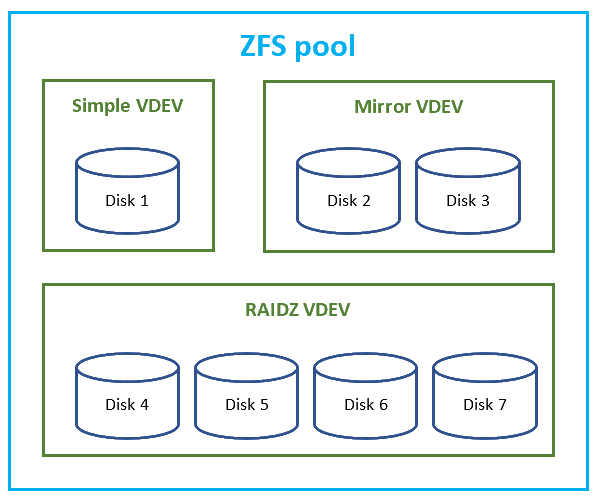
Diagram of Common vdev Types
This diagram illustrates three commonly used configurations: single disk, mirror, and RAID-Z (similar to RAID5/6/7), providing a clear visual comparison of their advantages and disadvantages. From this diagram, it is easy to see:
- Mirrors offer high performance but involve significant storage overhead
- RAID-Z provides better fault tolerance but requires longer rebuild times
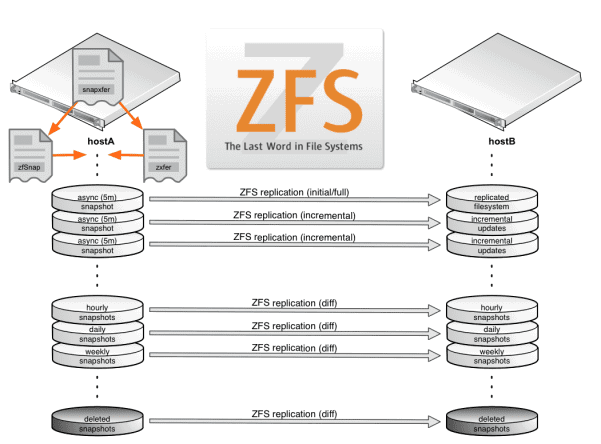
Snapshot and Replication Logic Flow
This diagram illustrates the process of snapshot creation, sending (zfs send), and receiving (zfs recv).
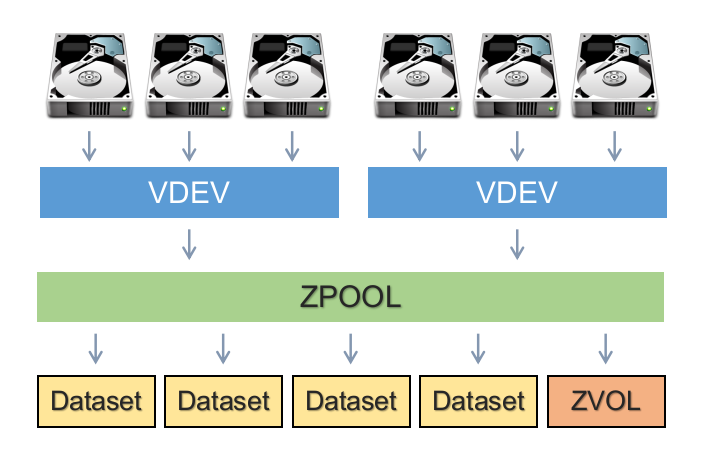
Dataset Hierarchy
The diagram unfolds from vdev → zpool → dataset, clearly illustrating the logical structure of dataset mounting, compression, quotas, and other related configurations.
Summary
As someone who wants to safely store my photos, documents, and project files, I don’t want to risk everything being lost if a disk fails. ZFS gave me a reliable, self-healing, and rollback-capable system—once you use it, there’s no going back.
Recommended Learning Resources
Brother Bird's Linux Private Kitchen (ZFS Chapter)
Although the focus is on FreeBSD/Linux, it is explained very clearly and is suitable for beginners.
The OpenZFS Documentation
Official documentation
Address: https://openzfs.github.io/openzfs-docs/
The content is authoritative and covers core technical points such as zpool, zfs, snapshots, dedup, ARC/L2ARC, etc.
The ZFS on Linux HOWTO
Address: https://zfsonlinux.org/ (now part of OpenZFS)
ZFS Book by Michael W. Lucas & Allan Jude
Book Titles: FreeBSD Mastery: ZFS and FreeBSD Mastery: Advanced ZFS
Even if you don't use FreeBSD, the explanations of principles in the book are exceptionally clear and suitable for in-depth learning.
Proxmox Official Documentation (Including ZFS Storage Configuration)
Link: https://pve.proxmox.com/wiki/ZFS_on_Linux
Building a virtualization platform with ZFS is an excellent learning scenario, and Proxmox serves as a great example.
TrueNAS CORE / SCALE Official Documentation
TrueNAS is an enterprise-level NAS system that comes with ZFS.
Address: https://www.truenas.com/docs/
It supports both GUI and CLI, making it suitable for beginners to try.
zpool.org
zpool.org is a website personally maintained by a tech blogger (Phil Steinbach) dedicated to sharing experiences and tutorials related to ZFS. While it is not the official ZFS project homepage, its content focuses on:
- ZFS snapshots and remote replication;
- Configuring ZFS in real-world environments (e.g., Home Lab, Proxmox, SmartOS, etc.);
- Daily management tips, such as how to create, export, import, and upgrade zpool and vdev settings;
- Various practical project examples, such as "Using a UDM-Pro Docker container as a Proxmox quorum device."
These articles have been continuously updated from 2013 to the present, aiming to help programmers and system administrators interested in ZFS better understand zpool operations and maintenance practices.
This blog is a valuable resource, especially for in-depth explanations and experience sharing on zpool management, snapshot backups, vdev architecture design, and related topics.
References
_EOF_
Personal Data Preservation Plan: A Beginner's Guide to the ZFS File System
- 本文作者:
- 程序设计实验室
- 版权声明:
- 本博客所有文章除特别声明外,均采用 BY-NC-SA 许可协议。转载请注明出处!
相关文章
个人数据保全计划:部署joplin server笔记同步服务
在这个数据爆炸的时代,个人数据的价值愈发凸显,成为我们生活与工作中无可替代的重要资产。上一篇文章里,我介绍了从印象笔记迁移至 Joplin 的过程,这是我寻求数据自主掌控的关键一步。在探索同步方案时,我尝试了 OneDrive,原以为它能提供稳定高效的同步服务,可实际使用时却发现它对小文件缺乏优化,同步速度极慢,极大影响了使用体验。虽说目前还不确定是否存在数据丢失问题,但这样的效率实在难以满足我的
2025-02-02 · 个人数据保全计划 · 约 1 分钟
个人数据保全计划:(2)NAS基础知识
前言 距离去年国庆入手了NAS至今有好几个月时间了,NAS折腾起来有点麻烦,且实际作用因人而异,并没有想象中的好用,所以说好的这个系列一直没有更新~ 还有另一方面的原因,这些NAS的系统基于Linux深度定制,对于我这种习惯用Linux的人来说,用着很别扭不自在,处处受限制… 所以在使用了这台威联通的NAS几个月后,我决定把系统重装成正常的Linux Server系统,或者Proxmox VE,真
2023-03-12 · 个人数据保全计划 · 约 1 分钟
为什么我给虚拟机分了 32G 硬盘,Ubuntu 却只识别 16G?
32G硬盘在PVE里明明分配好了,到Ubuntu就变15G,LVM这鬼东西把空间藏哪儿去了?根目录就分了一半?这算哪门子逻辑,简直离谱。扩容三步走倒是简单,但谁特喵会用到这种坑爹设计。
2025-10-10 · 个人数据保全计划 · 约 1 分钟
个人数据保全计划:安装本地DNS
SmartDNS SmartDNS 是一个运行在本地的 DNS 服务器,它接受来自本地客户端的 DNS 查询请求,然后从多个上游 DNS 服务器获取 DNS 查询结果,并将访问速度最快的结果返回给客户端,以此提高网络访问速度。 SmartDNS 同时支持指定特定域名 IP 地址,并高性匹配,可达到过滤广告的效果。 与 DNSmasq 的 all-servers 不同,SmartDNS 返回的是访问
2022-11-12 · 个人数据保全计划 · 约 1 分钟
讨论
共 0 条加载评论中…