

Set Pageant to Auto-Start on Windows Boot and Load Keys
Scenario When using Linux, ssh and git are very convenient, because a single ssh-add is enough once and for all; later when authentication is needed, ssh-agent will take care of it for us, without needing to enter the key password. Actually Windows can also achieve this kind of productivity liberation, by using Pageant from the tools that come with PuTTY. Pageant is mainly responsible for authenticating with the server, but each time after starting Pageant you need to manually load the key file. This article is to introduce making Pageant automatically loa
目录7 个章节
Scenario
When using Linux, ssh and git are very convenient, because a single ssh-add is enough once and for all; later when authentication is needed, ssh-agent will take care of it for us, without needing to enter the key password.
Actually, Windows can also achieve this kind of productivity liberation, by using Pageant from the tools that come with PuTTY.
Pageant is mainly responsible for authenticating with the server, but each time after starting Pageant you need to manually load the key file. This article introduces how to make Pageant automatically load keys on boot.
Install PuTTY
Official site: https://www.putty.org/
Just download and install, and you're done.
Auto-start Pageant on Boot
Windows 7
First open the Windows 7 startup folder: Win key -> All Programs -> Startup -> right-click -> Open,
Windows 10
In the address bar of a This PC window, enter
C:\ProgramData\Microsoft\Windows\Start Menu\Programs\StartUp
You can also press Win+R and enter: shell:startup to open the startup folder
Then find the location of pageant.exe, right-click -> Create shortcut, and a pageant.exe shortcut will appear in the directory
Drag the shortcut into the startup folder mentioned above
Make Pageant Automatically Load Key Files
First, the key file that Pageant needs to load is a ppk file generated by puttygen.exe from an SSH private key. If you don't have one, run puttygen.exe first to generate it~
Find the Pageant shortcut we created in the first step, right-click it, and in the dialog that appears, select the "Shortcut" tab, find the "Target" field, which should show the program path
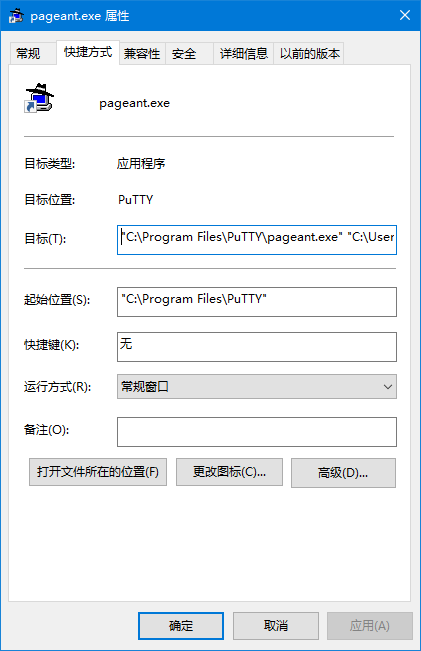
"C:\Program Files\TortoiseGit\bin\pageant.exe"
Then append the private key file id_rsa.ppk after it, as follows:
"C:\Program Files\TortoiseGit\bin\pageant.exe" "C:\Users\[你的用户名]\.ssh\id_rsa.ppk"
Click OK to save, and you're done.
Welcome to Discuss
Programming Lab focuses on exploring popular new internet technologies and team agile development practices. Reply with linux, flutter, c#, netcore, android, kotlin, java, python, etc. in the backend of the WeChat official account 「程序设计实验室」 to get related technical articles and materials. If you have any questions, you can also leave a message in the official account backend~

- Cnblogs: https://www.cnblogs.com/deali/
- Coding livestream: https://live.bilibili.com/11883038
- Zhihu: https://www.zhihu.com/people/dealiaxy
_EOF_
Set Pageant to Auto-Start on Windows Boot and Load Keys
- 本文作者:
- 程序设计实验室
- 版权声明:
- 本博客所有文章除特别声明外,均采用 BY-NC-SA 许可协议。转载请注明出处!
相关文章
忘记WSL的root密码怎么办
解决方法 首先,打开WSL是不需要输入密码的,如果你打开WSL时的默认用户不是root,请按照一下方式修改。 修改默认登录WSL用户 以管理员权限启动Powershell lxrun /setdefaultuser root 此时重新打开WSL就是root用户了,并且不需要密码。 然后输入以下命令修改密码。 passwd root About 了解更多有趣的操作请关注我的微信公众号:DealiA
2021-12-18 · Windows · 约 1 分钟
Windows平台下Git的安装与配置
一、下载 Git for Windows,主页:http://gitforwindows.org/ 点击页面中“Download”进入下载列表。可根据个人喜好选择下载版本。 这里选择下载最新版:Git-1.8.3-preview20130601.exe. 二、安装 下载完毕,双击开始安装: 1、除了AdvancedXXX选项,其余全选中 2、选择“Use Git Bash only” 3、选择
2021-12-18 · Windows · 约 1 分钟
使用命令行删除 Windows 网络映射驱动器
Windows 这破系统至今还卡死右键菜单?命令行删映射盘算个事。真就没人修复这 XP 时代的老问题?
2025-10-02 · Windows · 约 1 分钟
Win10安装Ubuntu子系统教程
一、启用“适用于Linux的Windows子系统” 通过Win10任务栏中的Cortana搜索框搜索打开“启用或关闭Windows功能”,向下滚动列表,即可看到“适用于Linux的Windows子系统”项。 勾选它,确定,然后按提示重启系统。 二、启用开发人员模式 然后进入“设置 - 更新和安全 - 针对开发人员”设置页面,选中“开发人员模式”。如图: 然后就会下载安装开发人员模式程序包,等待安装
2021-12-18 · Windows · 约 1 分钟
讨论
共 0 条加载评论中…