

Set Pageant to Auto-Start on Windows Boot and Load Keys
Scenario When using Linux, ssh and git are very convenient, because a single ssh-add is enough once and for all; later when authentication is needed, ssh-agent will take care of it for us, without needing to enter the key password. Actually Windows can also achieve this kind of productivity liberation, by using Pageant from the tools that come with PuTTY. Pageant is mainly responsible for authenticating with the server, but each time after starting Pageant you need to manually load the key file. This article is to introduce making Pageant automatically loa
目录7 个章节
Scenario
When using Linux, ssh and git are very convenient, because a single ssh-add is enough once and for all; later when authentication is needed, ssh-agent will take care of it for us, without needing to enter the key password.
Actually, Windows can also achieve this kind of productivity liberation, by using Pageant from the tools that come with PuTTY.
Pageant is mainly responsible for authenticating with the server, but each time after starting Pageant you need to manually load the key file. This article introduces how to make Pageant automatically load keys on boot.
Install PuTTY
Official site: https://www.putty.org/
Just download and install, and you're done.
Auto-start Pageant on Boot
Windows 7
First open the Windows 7 startup folder: Win key -> All Programs -> Startup -> right-click -> Open,
Windows 10
In the address bar of a This PC window, enter
C:\ProgramData\Microsoft\Windows\Start Menu\Programs\StartUp
You can also press Win+R and enter: shell:startup to open the startup folder
Then find the location of pageant.exe, right-click -> Create shortcut, and a pageant.exe shortcut will appear in the directory
Drag the shortcut into the startup folder mentioned above
Make Pageant Automatically Load Key Files
First, the key file that Pageant needs to load is a ppk file generated by puttygen.exe from an SSH private key. If you don't have one, run puttygen.exe first to generate it~
Find the Pageant shortcut we created in the first step, right-click it, and in the dialog that appears, select the "Shortcut" tab, find the "Target" field, which should show the program path
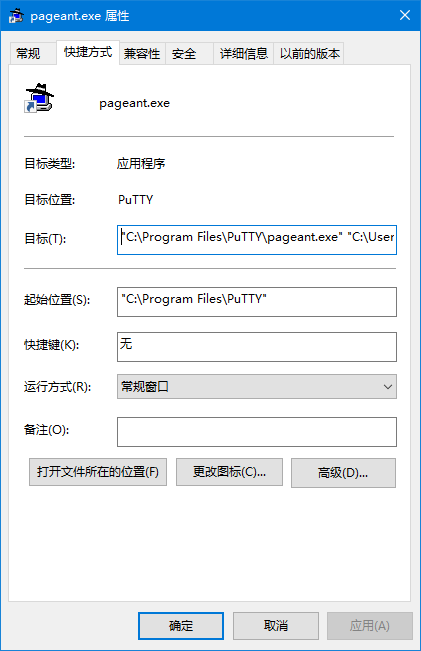
"C:\Program Files\TortoiseGit\bin\pageant.exe"
Then append the private key file id_rsa.ppk after it, as follows:
"C:\Program Files\TortoiseGit\bin\pageant.exe" "C:\Users\[你的用户名]\.ssh\id_rsa.ppk"
Click OK to save, and you're done.
Welcome to Discuss
Programming Lab focuses on exploring popular new internet technologies and team agile development practices. Reply with linux, flutter, c#, netcore, android, kotlin, java, python, etc. in the backend of the WeChat official account 「程序设计实验室」 to get related technical articles and materials. If you have any questions, you can also leave a message in the official account backend~

- Cnblogs: https://www.cnblogs.com/deali/
- Coding livestream: https://live.bilibili.com/11883038
- Zhihu: https://www.zhihu.com/people/dealiaxy
_EOF_
Set Pageant to Auto-Start on Windows Boot and Load Keys
- 本文作者:
- 程序设计实验室
- 版权声明:
- 本博客所有文章除特别声明外,均采用 BY-NC-SA 许可协议。转载请注明出处!
相关文章
这是演习:Win10蓝屏,随你召唤
蓝屏似乎是很多IT之家用户不希望看到的东西,虽然在Win10中你还可以扫描屏幕下方二维码参与微软互动赢取大……那个,蓝屏的好处就是为专业人员提供问题信息,比如当前的内存转储,有助于排查和解决问题。当然,可能光是默认蓝屏给出的信息不够,此时可以开启Win10蓝屏详细信息显示。 ▲这二维码居然“上位”了……VM12虚拟机测试结果 微软在Windows10中安排了手动“调取”蓝屏的方式,那就是**按住右
2021-12-18 · Windows · 约 1 分钟
使用EarTrumpet代替windows默认的音量调节功能
Windows 默认的音量调节功能挺弱的,要分别调节各个应用的音量得进入二级菜单,麻烦得很。有了这个功能就很方便了
2025-01-26 · Windows · 约 1 分钟
2024年,提升Windows开发和使用体验的实践经验 - RIME输入法
上一篇文章介绍了 Windows 下的包管理器,本文继续介绍输入法。 事实上 Windows 的输入法生态比 Linux/Mac 丰富很多,不过很多国产输入法存在窃取隐私、植入广告、乱安装流氓软件等问题,现在有开源的 RIME 输入法可以选择,何必受这气呢
2024-02-29 · Windows · 约 1 分钟
IT之家学院:让Win10文件管理器的详细信息窗格显示更多信息
当你在Windows的资源管理器中将详细信息窗格设置为可用,然后选中一个文件时(IT之家小编选中了一个exe文件),你将在窗口的右半部分看到这个文件的一些信息,包括修改日期、创建日期、文件大小和可用性,不过对于一些用户来说,这些信息十分有限,还是不够详细。 在这篇文章中,IT之家将为大家演示如何进行设置,以使文件资源管理器可在详细信息窗格中显示更多的关于已被选中的文件的有用信息。 下文中的方法适用
2021-12-18 · Windows · 约 1 分钟
讨论
共 0 条加载评论中…