

Configure static IP for Linux virtual machines in VMware.
Preface Recently, when using VMware with bridged mode, for some reason—whether due to router issues or otherwise—the virtual machine connections are not displayed in the router. Although both the virtual machine and the host are assigned different IP addresses by the router, every time after resuming, the virtual machine's IP address always changes, which is quite troublesome. VMware Settings Uncheck the following option. Then click on NAT Settings. Record the gateway. Virtual Machine Settings. Change the network to VMnet8. Configuring Static IP in Linux System Debian nano /e
目录9 个章节
Preface
Recently, while using VMware with bridge mode, I'm not sure if it's a router issue or something else, but the virtual machine connection doesn't show up in the router. Although both the virtual machine and the host are assigned different IP addresses by the router, the virtual machine's IP address always changes after every resume, which is quite troublesome.
VMware Settings
Uncheck the following box.
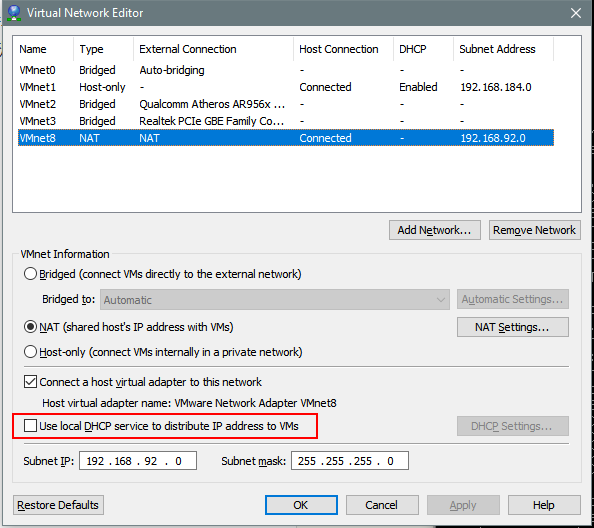
Then click Nat Settings.
Note the gateway.
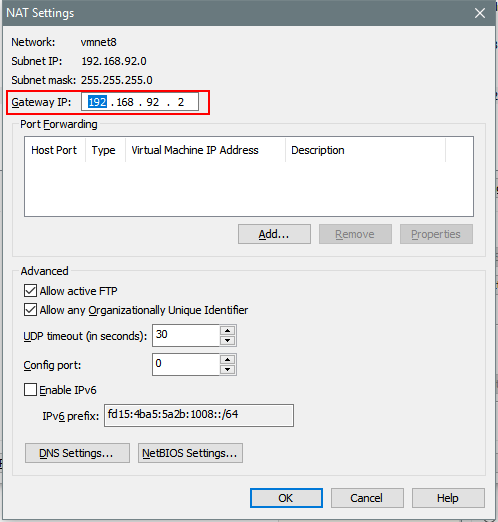
Virtual machine settings. Change the network to VMnet8.
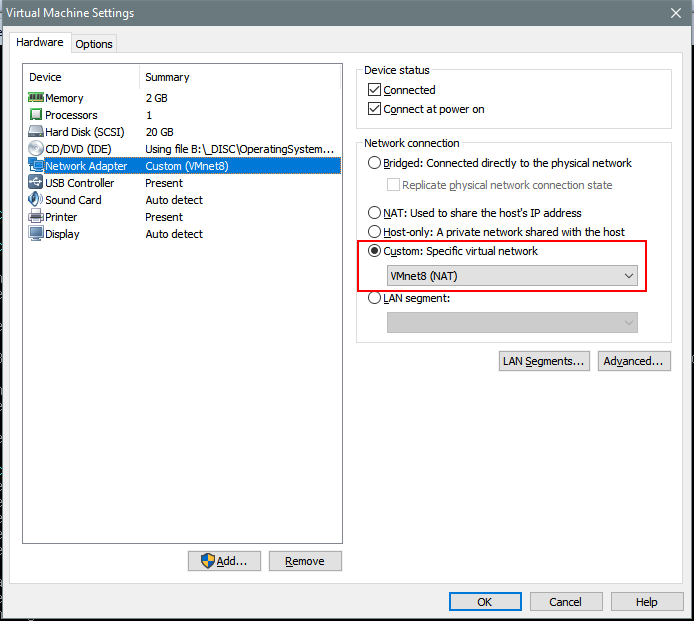
Configuring Static IP in Linux System
Debian
nano /etc/network/interfaces
Modify the file content:
auto lo
iface lo inet loopback

auto ens33
iface ens33 inet static
address 192.168.8.100
netmask 255.255.255.0
gateway 192.168.8.2
CentOS
Modify /etc/sysconfig/network
NETWORKING=yes
HOSTNAME=localhost.localdomain
GATEWAY=192.168.92.2
Modify /etc/sysconfig/network-scripts/ifcfg-eth0
DEVICE="eth0"
#BOOTPROTO="dhcp"
BOOTPROTO="static"
IPADDR=192.168.129.129
NETMASK=255.255.255.0
HWADDR="00:0C:29:56:8F:AD"
IPV6INIT="no"
NM_CONTROLLED="yes"
ONBOOT="yes"
TYPE="Ethernet"
UUID="ba48a4c0-f33d-4e05-98bd-248b01691c20"
DNS1=192.168.92.2
Configure DNS
Edit: /etc/resolv.conf
Configure it with the DNS servers you wish to use.
nameserver 192.168.92.2
Restart Network
/etc/init.d/networking restart
About

For more interesting content, follow my WeChat Official Account: DealiAxy Every article is also featured on my blog: blog.deali.cn
_EOF_
Configure static IP for Linux virtual machines in VMware.
- 本文作者:
- 程序设计实验室
- 版权声明:
- 本博客所有文章除特别声明外,均采用 BY-NC-SA 许可协议。转载请注明出处!
相关文章
在Linux系统上一键配置DoH,解决DNS解析被污染
DNS解析被污染?换DoH不就得了。云flare那破工具简单得可笑,国内DNS上游直接用就行。一行配置搞定,谁还不会啊?
2025-10-02 · 系统配置 · 约 1 分钟
Ubuntu-18-04-修复-Telegram-中文输入法
前言 Ubuntu 18.04,新的 Gnome 桌面的确好看很多。但同时出现了很多之前在 Unity 没有出现过的 BUG,例如在 Telegram 下无论怎么切换输入法都不能输入中文。 大概是所有 QT 编写的应用程序在 Gnome3 下都会出现这个问题,解决方法是引入 QT_IM_MODULE 变量。大致 步骤如下 编辑~/.local/share/applications/telegram
2025-10-27 · 系统配置 · 约 1 分钟
Debian配置默认不开启图形界面
前言 Linux的图形界面实在是太耗资源了,同时开几个虚拟机感觉已经hold不住了,赶紧把这些Linux服务器的图形界面都关掉。 CLI:command Line Interface,命令行界面。 现在的Linux发行版默认登陆界面几乎都是默认为GUI界面,如果按照旧版本的修改inittab文件,在一些比较新的版本是没有这个文件的(Linux的启动服务机制发生改变) 修改Grub配置文件 打开gr
2025-10-27 · 系统配置 · 约 1 分钟
内存不够用?在Linux上使用swapfile配置交换空间
前言 几个月前我还兴高采烈写了篇文章说给笔记本升级了内存配置,从乞丐版的4G一跃成为16G高富帅,然而,这几个月来我备受电脑死机的折磨,我现在有理由怀疑我可能买了假的内存条,于是没有办法,只能换回原厂的4G内存条,~~(然后准备赚部台式机)~~,问题不大。 换上4G内存条之后效果显著,只开了一个谷歌浏览器,内存占用就已经到了80%了,JB家的IDE是决计不敢再用了,可是这样还是难以满足系统对内存空
2025-10-27 · 系统配置 · 约 1 分钟
讨论
共 0 条加载评论中…