

Configure static IP for Linux virtual machines in VMware.
Preface Recently, when using VMware with bridged mode, for some reason—whether due to router issues or otherwise—the virtual machine connections are not displayed in the router. Although both the virtual machine and the host are assigned different IP addresses by the router, every time after resuming, the virtual machine's IP address always changes, which is quite troublesome. VMware Settings Uncheck the following option. Then click on NAT Settings. Record the gateway. Virtual Machine Settings. Change the network to VMnet8. Configuring Static IP in Linux System Debian nano /e
目录9 个章节
Preface
Recently, while using VMware with bridge mode, I'm not sure if it's a router issue or something else, but the virtual machine connection doesn't show up in the router. Although both the virtual machine and the host are assigned different IP addresses by the router, the virtual machine's IP address always changes after every resume, which is quite troublesome.
VMware Settings
Uncheck the following box.
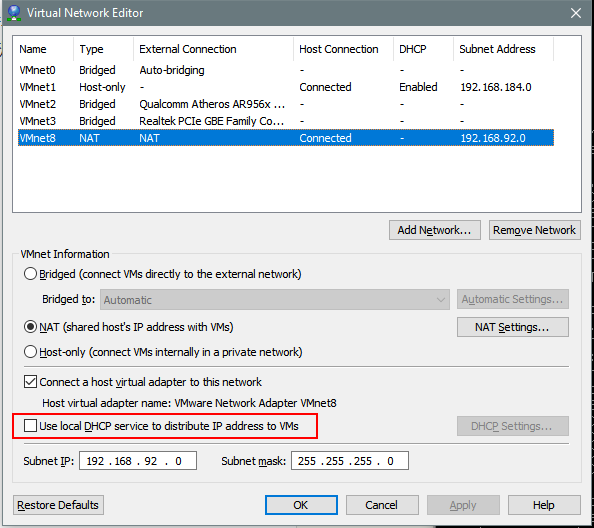
Then click Nat Settings.
Note the gateway.
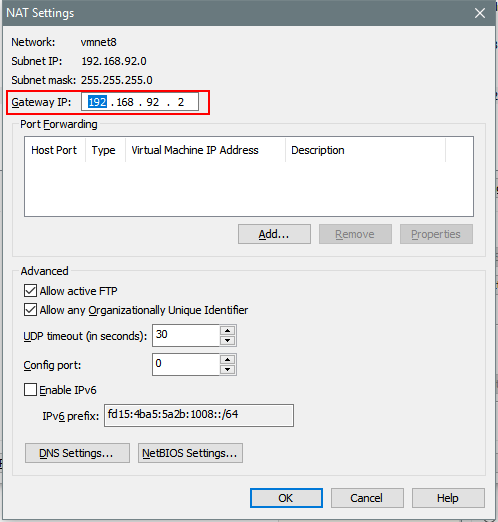
Virtual machine settings. Change the network to VMnet8.
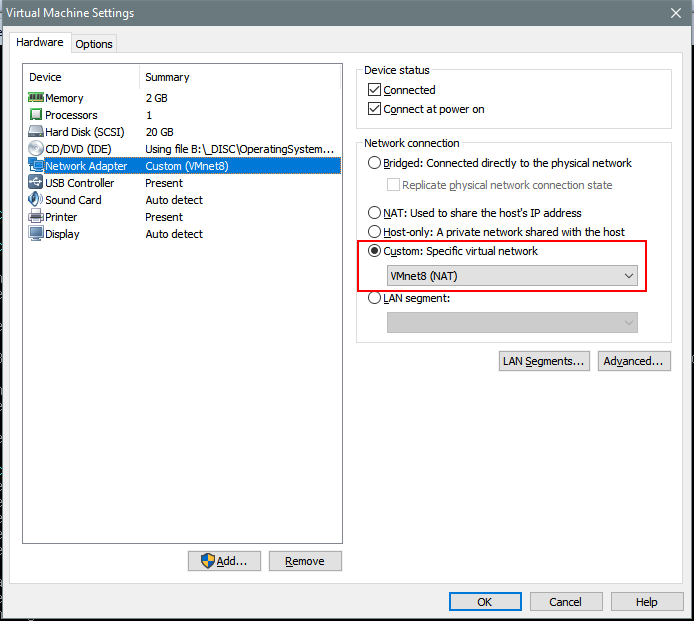
Configuring Static IP in Linux System
Debian
nano /etc/network/interfaces
Modify the file content:
auto lo
iface lo inet loopback

auto ens33
iface ens33 inet static
address 192.168.8.100
netmask 255.255.255.0
gateway 192.168.8.2
CentOS
Modify /etc/sysconfig/network
NETWORKING=yes
HOSTNAME=localhost.localdomain
GATEWAY=192.168.92.2
Modify /etc/sysconfig/network-scripts/ifcfg-eth0
DEVICE="eth0"
#BOOTPROTO="dhcp"
BOOTPROTO="static"
IPADDR=192.168.129.129
NETMASK=255.255.255.0
HWADDR="00:0C:29:56:8F:AD"
IPV6INIT="no"
NM_CONTROLLED="yes"
ONBOOT="yes"
TYPE="Ethernet"
UUID="ba48a4c0-f33d-4e05-98bd-248b01691c20"
DNS1=192.168.92.2
Configure DNS
Edit: /etc/resolv.conf
Configure it with the DNS servers you wish to use.
nameserver 192.168.92.2
Restart Network
/etc/init.d/networking restart
About

For more interesting content, follow my WeChat Official Account: DealiAxy Every article is also featured on my blog: blog.deali.cn
_EOF_
Configure static IP for Linux virtual machines in VMware.
- 本文作者:
- 程序设计实验室
- 版权声明:
- 本博客所有文章除特别声明外,均采用 BY-NC-SA 许可协议。转载请注明出处!
相关文章
配置MariaDB数据库服务端远程访问
操作步骤 开启远程访问权限 连接MariaDB数据库,执行以下命令开启远程访问。 grant all privileges on *.* to 'root'@'192.168.248.248' identified by 'password'; flush privileges; 如果需要任意IP地址访问,就把IP地址换成%。 修改配置文件 在网络上能搜索到的资料都只说了第一点,然而亲测之后并没有
2025-10-27 · 系统配置 · 约 1 分钟
在Linux上安装Windows字体
前言 Linux系统下为安装WPS后,由于版权问题并没有自带字体,而这些字体又是平时必须使用的,下面介绍为Linux系统添加字体的方法。 操作 由于Windows系统自带了完善的字体,所以可以从安装的windows系统下拷贝。首先执行命令: mkdir /usr/share/fonts/wps_symbol_fonts/ //创建WPS的字体目录 然后到windows字体目录下,C:/Win
2025-10-27 · 系统配置 · 约 1 分钟
Linux--使用Snap安装第三方微信客户端Electronic-Wechat
前言 腾讯估计是不会给Linux系统开发任何软件了,不过问题不大。我们有很多好用的第三方软件替代~~(无奈之举,摊手)~~ 关于Snap Ubuntu官网上的介绍 Snaps are applications packaged with all their dependencies to run on all popular Linux distributions from a single bu
2025-10-27 · 系统配置 · 约 1 分钟
Ubuntu-16-04-安装配置Docker
安装相关包 $ sudo apt-get update # 先更新一下软件源库信息 $ sudo apt-get install \ apt-transport-https \ ca-certificates \ curl \ software-properties-common 添加软件仓库 官方仓库 # 添加 Docker 官方的 GPG 密钥(为了确认所下载
2025-10-27 · 系统配置 · 约 1 分钟
讨论
共 0 条加载评论中…