

Using twinkle-tray to quickly adjust the brightness of multiple monitors.
Ever since I installed this little gadget, I've never used the keyboard shortcuts on my laptop again~
目录5 个章节
Preface
Since installing this small tool, I haven't used the laptop keyboard shortcuts anymore~
Introduction
Twinkle Tray enables brightness control on external displays in Windows 10 & 11. Even though Windows is capable of adjusting the backlight on most monitors, it doesn't support external monitors natively. Windows also lacks any options to manage the brightness of multiple displays. This app inserts a new icon into your system tray, where you can click to have instant access to the brightness levels of all compatible displays.
Twinkle Tray allows for brightness control of external monitors in Windows 10 and 11. Although Windows can adjust the backlight on most displays, it does not natively support external monitors. Windows also lacks any options for managing the brightness of multiple displays. This application inserts a new icon into your system tray, which you can click to instantly access the brightness levels of all compatible displays.
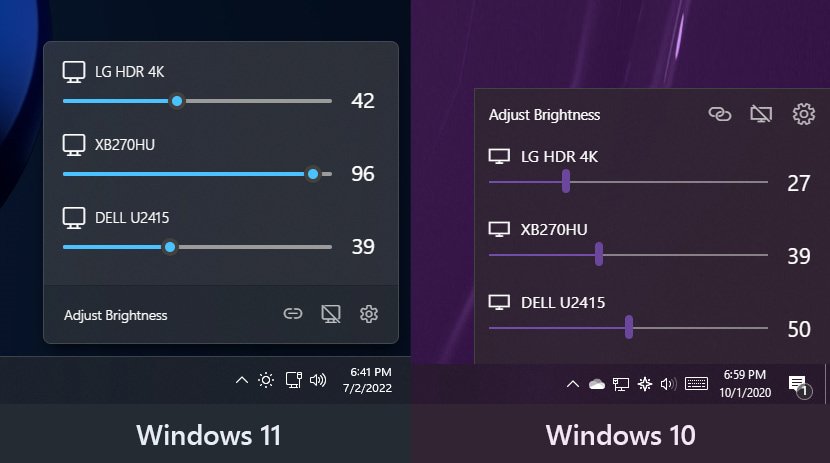
Screenshots
Slightly different under Windows 11 and Windows 10
Though both look pretty nice
Installation
Multiple methods are provided
- Download the installation package directly from Github: https://github.com/xanderfrangos/twinkle-tray
- Install from Microsoft Store
- Install via scoop
References
_EOF_
Using twinkle-tray to quickly adjust the brightness of multiple monitors.
- 本文作者:
- 程序设计实验室
- 版权声明:
- 本博客所有文章除特别声明外,均采用 BY-NC-SA 许可协议。转载请注明出处!
相关文章
忘记WSL的root密码怎么办
解决方法 首先,打开WSL是不需要输入密码的,如果你打开WSL时的默认用户不是root,请按照一下方式修改。 修改默认登录WSL用户 以管理员权限启动Powershell lxrun /setdefaultuser root 此时重新打开WSL就是root用户了,并且不需要密码。 然后输入以下命令修改密码。 passwd root About 了解更多有趣的操作请关注我的微信公众号:DealiA
2021-12-18 · Windows · 约 1 分钟
Windows的Linux子系统上配置SSH服务器
安装openssh 这个不用啰嗦太多,首先需要安装openssh-server和openssh-client。 修改sshd-config配置 需要关注的就是这三行。 UsePrivilegeSeparation no #因为wsl没有实现chroot PasswordAuthentication yes ListenAddress 0.0.0.0
2021-12-18 · Windows · 约 1 分钟
IT之家学院:让你的Win10桌面比macOS还简洁漂亮高大上
感谢IT之家网友 yiyueduzui 的原创投稿 直奔主题,先给大家看看我的电脑桌面: 有人开始骂了:你特么逗我呢?这明明就是一张图片好不啦! 我读书那么多,怎么会骗你,这真的是我的电脑桌面,不还有个桌面数字时钟呢嘛!论简洁,还有谁? 那这啥都没有,要怎么用啊? 看好啦,当我的鼠标移动到屏幕下方的时候, 出现了一个Dock栏,跟苹果系统的一样一样的。 有些图标其实是一个目录或者文件夹,当它展开的
2021-12-18 · Windows · 约 1 分钟
Kali-Linux-on-WSL2安装与简单配置指南
Windows在更新到2004版本之后正式开启了WSL2的支持,这次是完整的运行在HyperV虚拟机中的Linux系统了,可以称之为真正的Linux了,难不成Windows即将成为最好的Linux发行版? 实际体验下来还是可以的,不过小问题不少,爱折腾的同学安排一手,对提高Windows平台下的开发体验还是有很大帮助的~ Kali on WSL2安装指南 升级系统 首先检查当前系统版本,按Win+
2021-12-18 · Windows · 约 1 分钟
讨论
共 0 条加载评论中…