

Using twinkle-tray to quickly adjust the brightness of multiple monitors.
Ever since I installed this little gadget, I've never used the keyboard shortcuts on my laptop again~
目录5 个章节
Preface
Since installing this small tool, I haven't used the laptop keyboard shortcuts anymore~
Introduction
Twinkle Tray enables brightness control on external displays in Windows 10 & 11. Even though Windows is capable of adjusting the backlight on most monitors, it doesn't support external monitors natively. Windows also lacks any options to manage the brightness of multiple displays. This app inserts a new icon into your system tray, where you can click to have instant access to the brightness levels of all compatible displays.
Twinkle Tray allows for brightness control of external monitors in Windows 10 and 11. Although Windows can adjust the backlight on most displays, it does not natively support external monitors. Windows also lacks any options for managing the brightness of multiple displays. This application inserts a new icon into your system tray, which you can click to instantly access the brightness levels of all compatible displays.
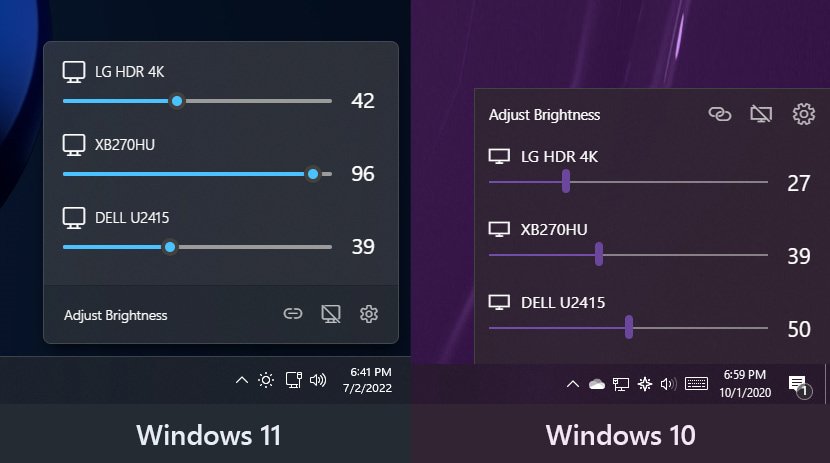
Screenshots
Slightly different under Windows 11 and Windows 10
Though both look pretty nice
Installation
Multiple methods are provided
- Download the installation package directly from Github: https://github.com/xanderfrangos/twinkle-tray
- Install from Microsoft Store
- Install via scoop
References
_EOF_
Using twinkle-tray to quickly adjust the brightness of multiple monitors.
- 本文作者:
- 程序设计实验室
- 版权声明:
- 本博客所有文章除特别声明外,均采用 BY-NC-SA 许可协议。转载请注明出处!
相关文章
Windows平台下Git的安装与配置
一、下载 Git for Windows,主页:http://gitforwindows.org/ 点击页面中“Download”进入下载列表。可根据个人喜好选择下载版本。 这里选择下载最新版:Git-1.8.3-preview20130601.exe. 二、安装 下载完毕,双击开始安装: 1、除了AdvancedXXX选项,其余全选中 2、选择“Use Git Bash only” 3、选择
2021-12-18 · Windows · 约 1 分钟
2024年,提升Windows开发和使用体验的一些实践 - 包管理器篇
Windows包管理器?scoop开源自定义,winget官方凑合,WingetUI图形界面总算不用手动折腾了。效率提升?哼,总算不是Linux小众玩家的专利。
2024-02-29 · Windows · 约 1 分钟
使用命令行删除 Windows 网络映射驱动器
Windows 这破系统至今还卡死右键菜单?命令行删映射盘算个事。真就没人修复这 XP 时代的老问题?
2025-10-02 · Windows · 约 1 分钟
在Windows上部署OpenSSH服务
Windows终于学会了没羞没臊地用命令行装OpenSSH,结果设置界面还是卡得像屎,算了,至少比以前强点。不过这SSH连上去还是CMD,是哪个脑回路觉得这操作体验没问题啊?
2025-06-12 · Windows · 约 1 分钟
讨论
共 0 条加载评论中…