

StarBlog Development Notes (11): Implementing Visit Statistics
Series Articles Developing a Blog Project with .NetCore: StarBlog - (1) Why Write Your Own Blog? Developing a Blog Project with .NetCore: StarBlog - (2) Environment Setup and Project Creation Developing a Blog Project with .NetCore: StarBlog - (3) Model Design Developing a Blog Project with .NetCore: StarBlog - (4) Batch Import of Markdown Blog Posts Developing a Blog Project with .NetCore: StarBl
目录7 个章节
Series Articles
- Developing a Blog Project with .NetCore: StarBlog - (1) Why Write Your Own Blog?
- Developing a Blog Project with .NetCore: StarBlog - (2) Environment Setup and Project Creation
- Developing a Blog Project with .NetCore: StarBlog - (3) Model Design
- Developing a Blog Project with .NetCore: StarBlog - (4) Batch Import of Markdown Blog Posts
- Developing a Blog Project with .NetCore: StarBlog - (5) Starting to Build the Web Project
- Developing a Blog Project with .NetCore: StarBlog - (6) Page Development: Blog Post List
- Developing a Blog Project with .NetCore: StarBlog - (7) Page Development: Post Detail Page
- Developing a Blog Project with .NetCore: StarBlog - (8) Displaying the Category Hierarchy
- Developing a Blog Project with .NetCore: StarBlog - (9) Batch Image Import
- Developing a Blog Project with .NetCore: StarBlog - (10) Image Waterfall Layout
- Developing a Blog Project with .NetCore: StarBlog - (11) Implementing Visit Statistics
- ...
Preface
Back from the Dragon Boat Festival holiday, my blog still isn't live. Seeing how well all the experts' sites are doing, I feel a faint sense of urgency—time to hurry up and write some code~!
The previous articles have already implemented the basic features of the blog site. We're just one step away from going live, but there are still some minor details that have a big impact on site operations or user experience and must be completed, such as:
- Site visit statistics
- Image hosting
In that order, this article will first solve the visit statistics problem.
When it comes to visit statistics, the well-known options are Google Analytics or Baidu Analytics. The former can't be used in China, so the latter should be the only choice. But considering the feature gap between the two as well as that company's reputation, for my little site, I'd rather implement one myself~
Implementation
It shouldn't be hard to implement. To enable statistics and analysis, we first need to record data. The recorded content includes the user's IP, device, visit path, and visit time. Then, by analyzing this data, we can get the view/visit counts for each article, image, and category.
To record this data, we need to process every request the user makes. In AspNetCore there are several implementations, such as Filter, such as Middleware
Here I chose the middleware approach
PS: I saw an article online about implementing visit statistics in Django. The author wrote a method and called it once in every endpoint—it made my scalp tingle
Inject the Repo in the middleware, then on every request save the IP, device, request path, and other data to the database. This looks like it would have some impact on performance, but considering a blog site's concurrency should be quite small, the resulting performance loss should be negligible. (To be honest, I'm just being lazy)
We'll optimize later if we hit a performance bottleneck~
Model Definition
Create a new VisitRecord.cs in StarBlog.Data/Models
To save space, comments and such aren't included; see github for the full code
public class VisitRecord {
    public int Id { get; set; }
    public string Ip { get; set; }
    public string RequestPath { get; set; }
    public string? RequestQueryString { get; set; }
    public string RequestMethod { get; set; }
    public string UserAgent { get; set; }
    public DateTime Time { get; set; }
}
Write a Middleware
Create a new VisitRecordMiddleware.cs in StarBlog.Web/Middlewares
public class VisitRecordMiddleware {
    private readonly RequestDelegate _next;

    public VisitRecordMiddleware(RequestDelegate requestDelegate) {
        _next = requestDelegate;
    }

    public Task Invoke(HttpContext context, IBaseRepository<VisitRecord> visitRecordRepo) {
        var request = context.Request;
        var response = context.Response;

        visitRecordRepo.InsertAsync(new VisitRecord {
            Ip = context.Connection.RemoteIpAddress?.ToString().Split(":").Last(),
            RequestPath = request.Path,
            RequestQueryString = request.QueryString.Value,
            RequestMethod = request.Method,
            UserAgent = request.Headers.UserAgent,
            Time = DateTime.Now
        });

        return _next(context);
    }
}
There's one thing to note here: my visitRecordRepo is injected in the Invoke method. Why not inject it in the constructor?
Because the constructor of an AspNetCore middleware is Singleton, so it can only inject Singleton services, while FreeSQL's Repository is Scoped. Injecting it in the constructor would throw an error
So it can only be injected in the Invoke method~
Using the Middleware
Edit StarBlog.Web/Programs.cs and add the middleware configuration
app.UseMiddleware<VisitRecordMiddleware>();
PS: This project is based on .Net6, where Startup and Program have been merged into one; if you're on .NetCore 3.1 or below, configure the middleware in Startup.cs.
Results
I haven't done any analysis based on the visit records yet, so I can only screenshot the database
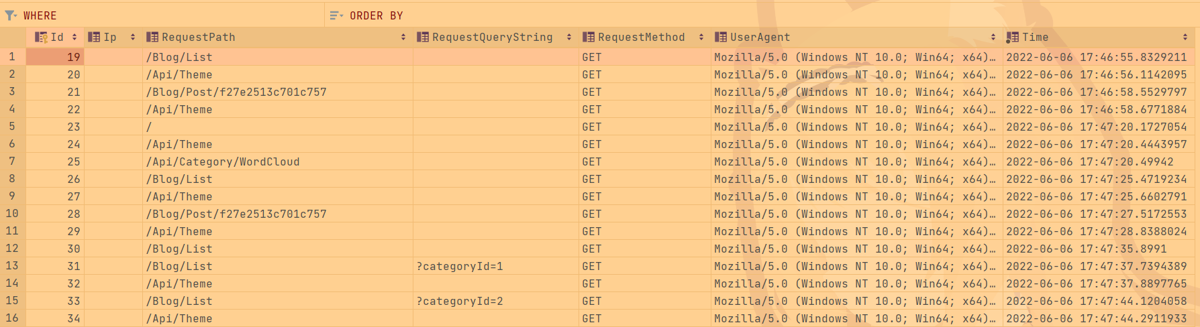
OK, next we can analyze this data (I'll write about that later in the admin backend development section)
_EOF_
StarBlog Development Notes (11): Implementing Visit Statistics
- 本文作者:
- 程序设计实验室
- 版权声明:
- 本博客所有文章除特别声明外,均采用 BY-NC-SA 许可协议。转载请注明出处!
相关文章
StarBlog博客开发笔记(19):Markdown渲染方案探索
前言 笔者认为,一个博客网站,最核心的是阅读体验。 在开发StarBlog的过程中,最耗时的恰恰也是文章的展示部分功能。 最开始还没研究出来如何很好的使用后端渲染,所以只能先用Editor.md组件做前端渲染,过渡一下。前端渲染我是不满意的,因为性能较差,页面加载出来还会闪一下,有割裂感,影响体验。 现在我已经做出了比较完善的后端渲染方案,前端渲染就可以直接退休了。本文介绍StarBlog博客开发
2022-10-28 · StarBlog博客开发笔记 · 约 1 分钟
StarBlog博客开发笔记(15):生成随机尺寸图片
系列文章 基于.NetCore开发博客项目 StarBlog - (1) 为什么需要自己写一个博客? 基于.NetCore开发博客项目 StarBlog - (2) 环境准备和创建项目 基于.NetCore开发博客项目 StarBlog - (3) 模型设计 基于.NetCore开发博客项目 StarBlog - (4) markdown博客批量导入 基于.NetCore开发博客项目 StarBl
2022-07-18 · StarBlog博客开发笔记 · 约 1 分钟
StarBlog博客开发笔记(5):开始搭建Web项目
系列文章 基于.NetCore开发博客项目 StarBlog - (1) 为什么需要自己写一个博客? 基于.NetCore开发博客项目 StarBlog - (2) 环境准备和创建项目 基于.NetCore开发博客项目 StarBlog - (3) 模型设计 基于.NetCore开发博客项目 StarBlog - (4) markdown博客批量导入 基于.NetCore开发博客项目 StarBl
2023-02-08 · StarBlog博客开发笔记 · 约 1 分钟
StarBlog博客开发笔记(9):图片批量导入
系列文章 基于.NetCore开发博客项目 StarBlog - (1) 为什么需要自己写一个博客? 基于.NetCore开发博客项目 StarBlog - (2) 环境准备和创建项目 基于.NetCore开发博客项目 StarBlog - (3) 模型设计 基于.NetCore开发博客项目 StarBlog - (4) markdown博客批量导入 基于.NetCore开发博客项目 StarBl
2022-05-30 · StarBlog博客开发笔记 · 约 1 分钟
讨论
共 0 条加载评论中…