

StarBlog Development Notes (10): Image Display - Waterfall Layout - Homepage Cards
Series Articles Developing Blog Project StarBlog with .NetCore - (1) Why Do You Need to Write Your Own Blog? Developing Blog Project StarBlog with .NetCore - (2) Environment Setup and Creating the Project Developing Blog Project StarBlog with .NetCore - (3) Model Design Developing Blog Project StarBlog with .NetCore - (4) Batch Import of Markdown Blogs Developing Blog Project StarBl
目录8 个章节
Series Articles
- Developing Blog Project StarBlog with .NetCore - (1) Why Do You Need to Write Your Own Blog?
- Developing Blog Project StarBlog with .NetCore - (2) Environment Setup and Creating the Project
- Developing Blog Project StarBlog with .NetCore - (3) Model Design
- Developing Blog Project StarBlog with .NetCore - (4) Batch Import of Markdown Blogs
- Developing Blog Project StarBlog with .NetCore - (5) Starting to Build the Web Project
- Developing Blog Project StarBlog with .NetCore - (6) Page Development: Blog Post List
- Developing Blog Project StarBlog with .NetCore - (7) Page Development: Post Detail Page
- Developing Blog Project StarBlog with .NetCore - (8) Displaying Category Hierarchy
- Developing Blog Project StarBlog with .NetCore - (9) Batch Image Import
- Developing Blog Project StarBlog with .NetCore - (10) Image Waterfall Layout
- ...
Preface
The previous article covered batch image import. I saw some readers commenting asking why there was no introduction to uploading images, so let me explain: the order of this series is:
- From the blog frontend to the admin backend
- From backend C# code to frontend Vue+ElementUI
So the image upload part will be covered later in the admin backend development. Stay tuned~
Picking up from the previous article, I’ll continue covering the photography module. After images are imported, they need to be displayed. This article covers (filler) implementing the image waterfall layout.
PS: The techniques involved are quite simple, so this article will be a bit lightweight. Feel free to skip it if you’re a pro~
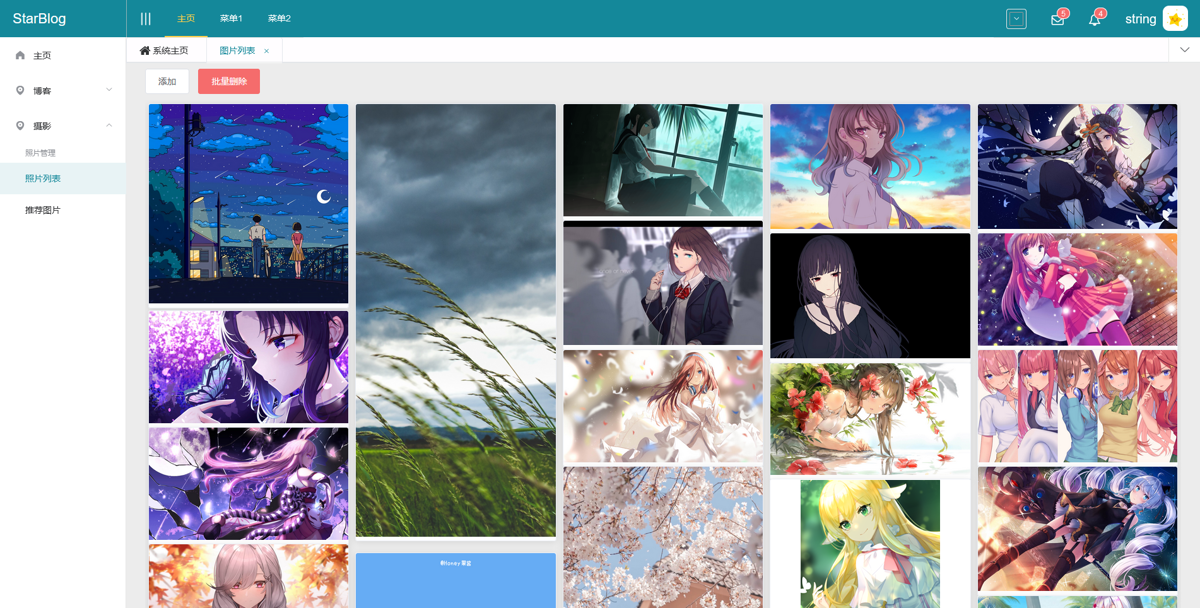
Take a Look at the Result First
I imported some wallpapers collected by a crawler as test data. Let’s look at the waterfall layout first.
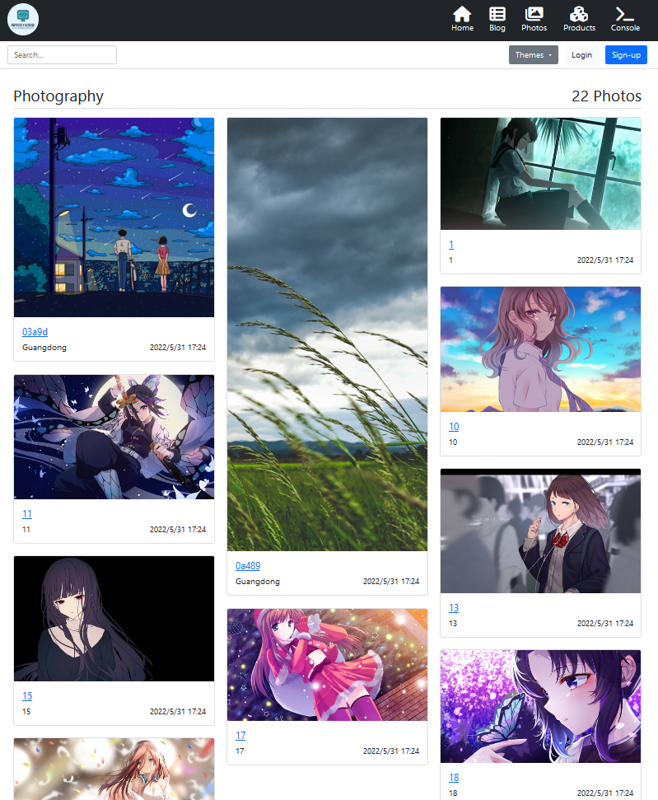
Admin backend waterfall layout
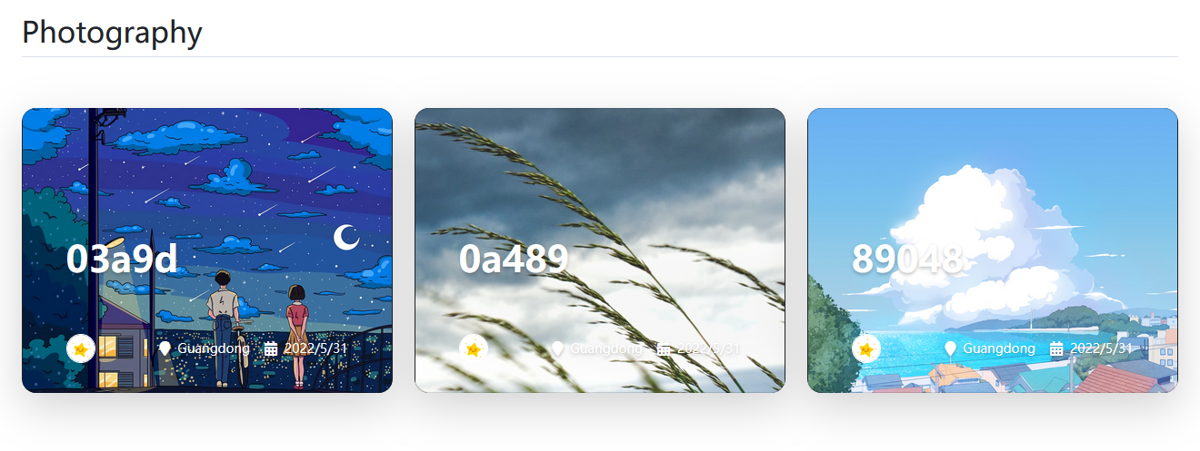
This is the homepage card effect
Implementation
The waterfall layout principle is simple, and there are plenty of ready-made wheels to use, so I won’t reinvent the wheel (just copy-paste) haha
Frontend
For the blog frontend waterfall layout I chose masonry-layout. Project homepage: https://github.com/desandro/masonry
I picked this component because I saw Bootstrap 5’s example code using it for the waterfall layout, so I just copied it over (flees)
Usage is very simple
<div class="row" data-masonry='{"percentPosition": true }'>
    @foreach (var photo in Model.Photos) {
    <div class="col-sm-6 col-lg-4 mb-4">
        <partial name="Widgets/PhotoCard" model="photo"/>
    </div>
    }
</div>
There are many options you can configure; I didn’t look into them in depth
Its GitHub homepage doesn’t really introduce it much either; the docs are all on the official site: https://masonry.desandro.com/
The official site’s style is quite distinctive too (flees)
Admin Backend
The admin backend waterfall layout is implemented with the vue-waterfall component, which I’ll cover in a later article~
Finally, these homepage cards were also tweaked from Bootstrap 5 examples
The code is as follows
@model Photo

<div class="card card-cover h-100 overflow-hidden text-white bg-dark rounded-5 shadow-lg"
     style="background-image: url('media/@Model.FilePath.Replace("\\", "/")');">
    <div class="d-flex flex-column h-100 p-5 pb-3 text-white text-shadow-1">
        <h2 class="pt-5 mt-5 mb-5 display-6 lh-1 fw-bold">
            @Model.Title
            <p></p>
        </h2>
        <ul class="d-flex list-unstyled mt-auto">
            <li class="me-auto">
                <img src="~/images/star.jpg" alt="Bootstrap" width="32" height="32" class="rounded-circle border border-white">
            </li>
            <li class="d-flex align-items-center me-3">
                <span class="bi me-2">
                    <i class="fa-solid fa-location-pin"></i>
                </span>
                <small>@Model.Location</small>
            </li>
            <li class="d-flex align-items-center">
                <span class="bi me-2">
                    <i class="fa-solid fa-calendar-days"></i>
                </span>
                <small>@Model.CreateTime.ToShortDateString()</small>
            </li>
        </ul>
    </div>
</div>
Done~
Advanced
The frontend uses masonry + infinite-scroll to implement load-on-scroll
You must use the imagesLoaded library to handle events after images load. Official site: https://imagesloaded.desandro.com/
Closing
Today happens to be June 1st Children’s Day. I saw lots of kids out playing on the street — wonderful. Wishing all the grown-ups and little ones happiness every day~
_EOF_
StarBlog Development Notes (10): Image Display - Waterfall Layout - Homepage Cards
- 本文作者:
- 程序设计实验室
- 版权声明:
- 本博客所有文章除特别声明外,均采用 BY-NC-SA 许可协议。转载请注明出处!
相关文章
StarBlog博客开发笔记(26):集成Swagger接口文档
前言 这是StarBlog系列在2023年的第一篇更新😃~ 在之前的文章里,我们已经完成了部分接口的开发,接下来需要使用 curl、Postman 这类工具对这些接口进行测试,但接口一多,每次测试都要一个个填入地址和对应参数会比较麻烦… 我们需要一种直观的方式来汇总项目里的所有接口,并且如果能直接在里面调试接口,那就更好了。 Swagger:诶嘿,说的不就是我吗?😎 Swagger介绍 来一段
2023-03-11 · StarBlog博客开发笔记 · 约 1 分钟
StarBlog博客开发笔记(27):使用JWT保护接口
前言 这是StarBlog系列在2023年的第二篇更新😂 这几个月都在忙,更新变得很不勤快,但是拖着不更新我的心里更慌,很久没写,要开头就变得很难😑 说回正题,之前的文章里,我们已经把博客关键的接口都开发完成了,但还少了一个最关键的「认证授权」,少了这东西,网站就跟筛子一样,谁都可以来添加和删除数据,乱套了~ 关于「认证授权」的知识,会比较复杂,要学习这块的话,建议分几步: 基础概念 AspN
2023-05-03 · StarBlog博客开发笔记 · 约 1 分钟
基于.NetCore开发博客项目 StarBlog - (28) 开发友情链接相关接口
之前介绍的友情链接功能,只实现了友情链接的展示和管理接口。 还缺失友情链接申请、审核管理、通知,现在把这块功能补全。 Model 什么的之前那篇文章都有,本文直接补全逻辑代码~
2023-06-02 · StarBlog博客开发笔记 · 约 1 分钟
基于.NetCore开发博客项目 StarBlog - (31) 发布和部署
部署?老生常谈。dotnet8的AOT吹得天花乱坠,StarBlog还没用上,只能选框架依赖或自包含。supervisor、docker、流水线,随便选,反正都一样麻烦。
2024-02-08 · StarBlog博客开发笔记 · 约 1 分钟
讨论
共 0 条加载评论中…