

I Developed a Video Merging Tool with Qt and Python
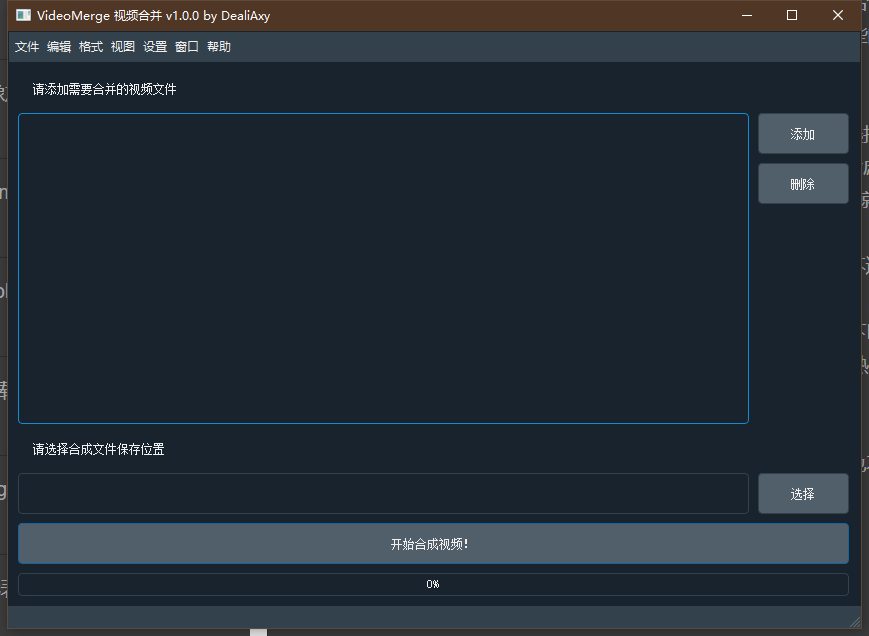
I wanted to merge videos, but I couldn't find a decent tool—many of them charge money. I thought, "You're charging for this crappy feature?" So I decided to build one myself. At first I made one in Python; it worked pretty well and perfectly completed my video merging task. But it had no GUI, so there was no way to share it with friends. Yesterday I wrote a Qt GUI and slapped it on. I ran into some issues along the way, so I'm recording them in this article. The software's UI looks like this—I just dragged it together in Qt Designer, not much different from dragging controls in VS. It's pretty
目录6 个章节
I wanted to merge videos, but I couldn't find a decent tool—many of them charge money. I thought, "You're charging for this crappy feature?" So I decided to build one myself. At first I made one in Python; it worked pretty well and perfectly completed my video merging task. But it had no GUI, so there was no way to share it with friends. Yesterday I wrote a Qt GUI and slapped it on. I ran into some issues along the way, so I'm recording them in this article.
The software's UI looks like this—I just dragged it together in Qt Designer, not much different from dragging controls in VS.
It's pretty convenient to use. I've already uploaded it to a cloud drive; anyone who needs it can reply "视频合并" in the WeChat official account backend to get the download link directly.
Qt
First, Qt. If you want to develop a GUI (and of course I need it cross-platform), there don't seem to be many options these days. Forget Electron—system calls are too much of a hassle, otherwise it would still be worth considering, after all who doesn't know a bit of frontend, right? .NET is also out—there's no mature cross-platform GUI library. Flutter Desktop is still in Preview, so pass. Counting them all up, only Qt is presentable. So Qt it is.
A while back when I was preparing for interviews I learned some C++ and Qt, so I could put that to use. But my video processing library is in Python—you want me to drive ffmpeg from C++? no. I chose PyQt. But there's almost no Chinese documentation for PyQt5 these days, so what to do? I had found a book earlier, one of the few PyQt5 textbooks, though the typesetting is terrible. I spent about a day on it, added bookmarks to every chapter, and got familiar with Python's Qt bindings. Usage is similar to C++, except you don't have to free objects yourself, which is nice. But because of Python's dynamic typing, some unfamiliar APIs aren't as convenient to use. Luckily I have years of Python experience, so I could still figure it out with pydoc.
I'll write a dedicated blog post about this book next time; it's worth noting a few things.
Python
Python's language design is decent, and there really are a lot of libraries. I wanted to merge videos and immediately found a video editing library, moviepy. This library can not only merge videos, but also cut, add transition effects, resize, and more. Pretty nice—with a bit of work you could even develop a video editing tool.
Let me paste the video merging code:
class ProcThread(QThread):
    progress = pyqtSignal(int)
    message = pyqtSignal(str)
    finished = pyqtSignal()

    def __init__(self, videos: list, output_path='', parent=None):
        super(ProcThread, self).__init__(parent)
        self.videos = []
        self.output_path = output_path
        for video_file in videos:
            print(video_file)
            self.videos.append(VideoFileClip(video_file))

    def run(self) -> None:
        final_clip = concatenate_videoclips(self.videos)
        my_logger = MyBarLogger(self.message, self.progress)
        final_clip.write_videofile(self.output_path, logger=my_logger)
        self.finished.emit()
Here I used a thread, Qt's thread class QThread, so the UI won't freeze while processing video. I also defined a few signals, using Qt's signals and slots mechanism to report progress and completion back to the GUI main thread.
This part is pretty simple. I'll also paste the signal-slot connection code (some code omitted):
    def start(self):
        self.thread.message.connect(self.thread_message)
        self.thread.progress.connect(self.thread_progress)
        self.thread.finished.connect(self.thread_finished)

    def thread_message(self, value):
        self.statusBar.showMessage(value)

    def thread_progress(self, value):
        self.progressBar.setValue(value)

    def thread_finished(self):
        self.btn_start.setEnabled(True)
        QMessageBox.information(self, '处理完成', '操作完成', QMessageBox.Yes)
This part is simple, nothing much to say. Next I'll talk about a few pitfalls.
moviepy Progress Display
moviepy originally outputs video processing to the console, so progress is also printed to the console. But I wrote a GUI here, so I need its progress to show on a progress bar. At first I had no idea, so I had to Google it.
I found a GitHub issue with the same need as mine. He wanted to write a GUI, needed to get video processing progress, and customize the progress bar output, as shown:
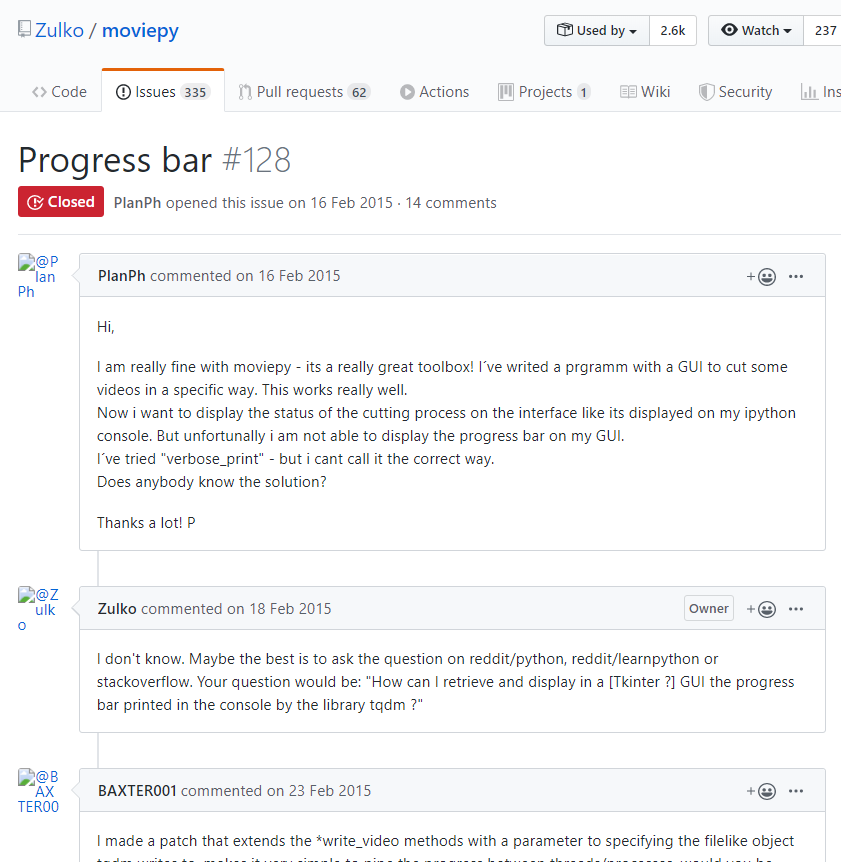
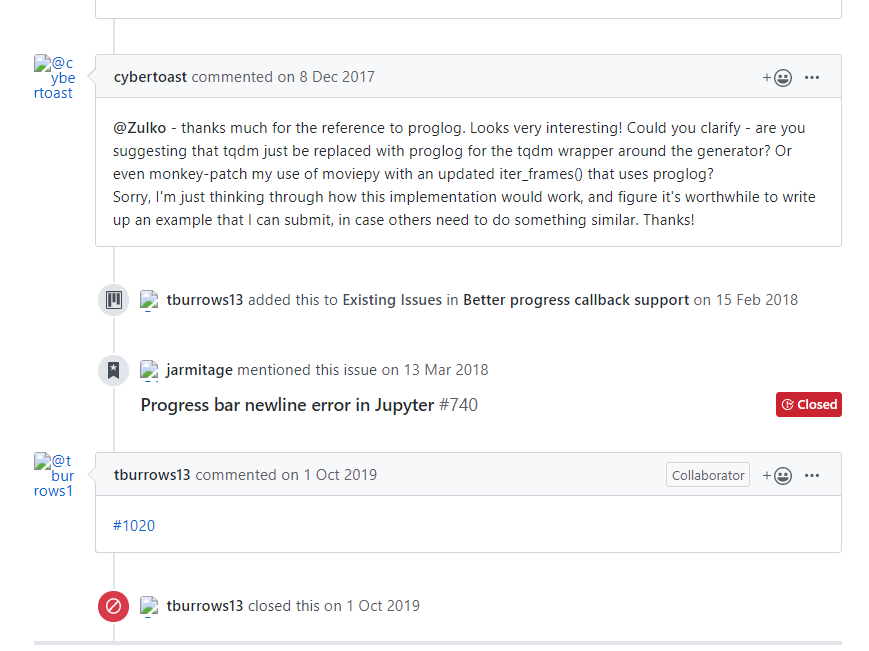
Then I looked at the replies below. This issue was first raised in 2015, and people were still following up in 2017—looks like it still wasn't solved. Finally someone suggested replacing moviepy's original progress library with proglog, and the problem could finally be solved, as shown:
Then in 2019 someone posted another issue, and this issue was closed by the development team.
The new issue looks like this:
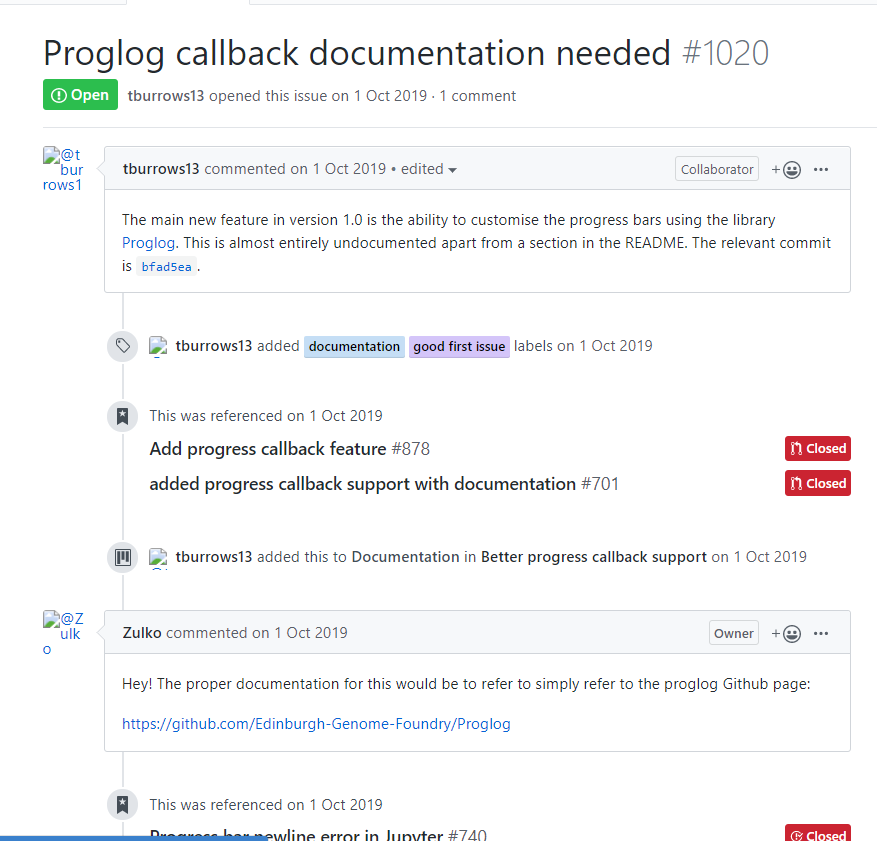
Meaning even though they switched to proglog, there's no documentation—now what? I took a look, and proglog really has very little documentation. A bit of a pitfall.
But someone below still posted a URL, the proglog project address. Let's click in and take a look. https://github.com/Edinburgh-Genome-Foundry/Proglog
Hmm, found the place for custom callback functions:
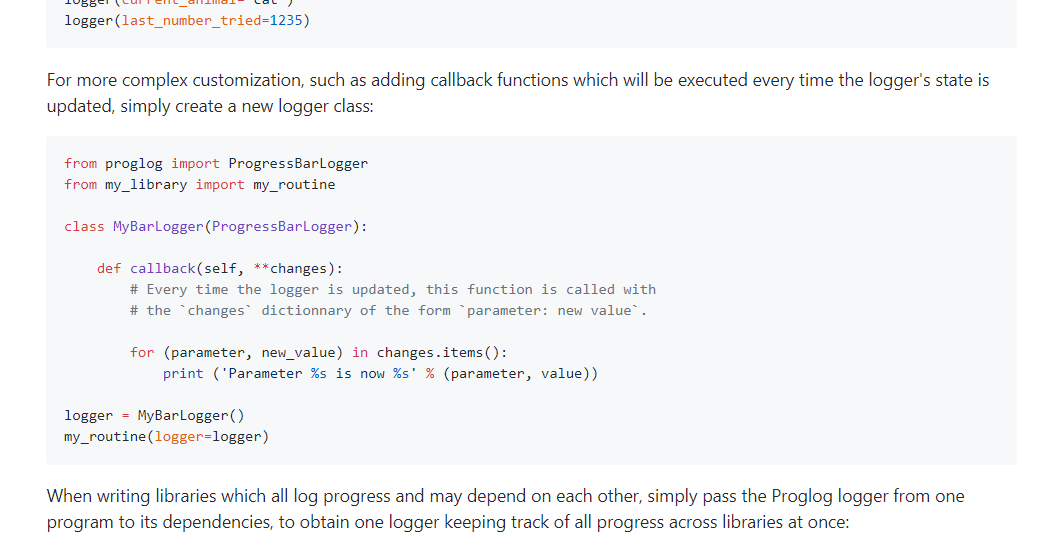
Looks like writing it this way should work, but it's a trap. I tried it, and this only outputs the message—i.e. which step it's on—not the progress. The author is messing with people.
But there clearly is progress, so I had to set breakpoints and trace through while debugging. I won't include that process. Anyway, when I set a breakpoint I found that the ProgressBarLogger class has a state attribute. The description is:
Instance attribute state of proglog.proglog.ProgressLogger
I looked at its contents and there was a bars field. Taking it out, it's an OrderedDict object. I hadn't encountered this data structure before, so I was a bit confused. It's actually just an ordered dict, but iterating over it was really a pain. It took me quite a while (maybe also because I was coding late at night and my brain wasn't working well) to get it right.
When moviepy updates progress, it passes it in this state["bars"]—one dict per task. The dict contains fields like title, index, total, etc. total is the amount of work, index is how far it's gotten. At this point the problem is OK. I just divide index by total and multiply by 100—isn't that the percentage? And that's done. Then I emit the thread's signal to display progress in real time. Perfect~!
Here's the code:
class MyBarLogger(ProgressBarLogger):
    actions_list = []

    def __init__(self, message, progress):
        self.message = message
        self.progress = progress
        super(MyBarLogger, self).__init__()

    def callback(self, **changes):
        bars = self.state.get('bars')
        index = len(bars.values()) - 1
        if index > -1:
            bar = list(bars.values())[index]
            progress = int(bar['index'] / bar['total'] * 100)
            self.progress.emit(progress)
        if 'message' in changes: self.message.emit(changes['message'])
Packaging with pyinstaller
Originally there wasn't much to say, but after packaging it was way too big—600+ MB, who can handle that? And the packaging process also errored out. The first error was:
RecursionError: maximum recursion depth exceeded
That's exceeding Python's maximum recursion depth. Nothing you can do—maybe too many packages, directories too deep. The solution is to raise the recursion depth limit.
Run pyinstaller, which generates a filename.spec file. Add this code at the beginning of the filename.spec file to set the recursion depth to 100,000:
import sys
sys.setrecursionlimit(100000)
That solved the problem, then the second issue came. Because my code uses Chinese, but Windows cmd is not UTF-8 by default, I got this error:
UnicodeDecodeError: 'utf-8' codec can't decode byte 0xce in position 130: invalid continuation b
The solution is:
- Switch to Linux (just kidding)
- Change the console encoding (temporary): use the command chcp 65001
That did it.
One more thing: a single-file package came out to 600+ MB, too big to even run, so don't package as a single file. That way the size is over 1 GB, but compressing with 7z brings it down to 200+ MB, which is acceptable, hhh.
Summary
PyQt is barely usable for development. It can't compare to C# and the like, but the cross-platform support is pretty good. It's just that after packaging it's too large.
The related code is already open source: https://github.com/Deali-Axy/VideoMerge
Welcome to Discuss
If you have questions, please leave a message in the WeChat official account backend. I'll reply to every message~
- WeChat official account: 画星星高手
- Coding livestream: https://live.bilibili.com/11883038
- Zhihu: https://www.zhihu.com/people/dealiaxy
- Jianshu: https://www.jianshu.com/u/965b95853b9f
_EOF_
I Developed a Video Merging Tool with Qt and Python
- 本文作者:
- 程序设计实验室
- 版权声明:
- 本博客所有文章除特别声明外,均采用 BY-NC-SA 许可协议。转载请注明出处!
相关文章
现代 Python 程序优雅处理日期时间的避坑指南
Python 时间处理还是得踩坑?`datetime`、`time`、`calendar` 搞得人头大,Naive vs Aware 时区陷阱更是坑爹。2026 年了还用 `pytz`?标准库 `ZoneInfo` 加上 `Pendulum`、`Arrow` 才叫现代化,至少不用再写反人类的时间字符串解析。数据库存 UTC,前端传 ISO 8601,简单点行不行?
2026-03-25 · Python · 约 1 分钟
Python创建压缩文件
代码实现 # 创建一个目录来保存这些东西 temp_path = os.path.join(settings.MEDIA_ROOT, 'temp', str(uuid.uuid4())) os.makedirs(temp_path) # 创建压缩文件 archive_path = os.path.join(temp_path, 'archive.zip') with zipfile.ZipFile
2022-09-30 · Python · 约 1 分钟
Python:使用logging模块记录日志
先看看基本用法例子 # -*- coding: utf-8 -*- import logging import sys # 获取logger实例,如果参数为空则返回root logger logger = logging.getLogger(AppName) # 指定logger输出格式 formatter = logging.Formatter('%(asctime)s %(levelna
2022-05-27 · Python · 约 1 分钟
自己动手开发简单消息队列(异步任务队列):Python实现
又是造轮子系列咯,Python上有很多成熟完善的异步任务队列框架可以用,比如Celery,或者RQ,不过这些都不自带消息队列服务,都需要使用Redis、RabbitMQ之类的消息队列才行,我用到小项目中又不需要附带这么多东西,于是自己动手来实现咯。 思路 将需要异步执行的任务添加到队列 自动从队列中取出任务,创建新线程执行 保存任务的执行结果和输出 任务完成,调用回调函数,处理返回的数据 使用输出
2021-12-18 · Python · 约 1 分钟
讨论
共 0 条加载评论中…