

Windows + AMD GPU, Finally Can Train Models with PyTorch
This hellish combo of Windows+AMD+ROCm+PyTorch actually got running. All it took was official ROCm and conservative PyTorch 2.9.1, dodging the mess of newer versions. Next? Finally get to try training models and AI image generation.
目录7 个章节
Preface
In the previous article, I started tinkering with compiling a ROCm build of PyTorch on Windows 11. The attempt failed, but I picked up some experience along the way.
And sure enough, the very next day the build succeeded.
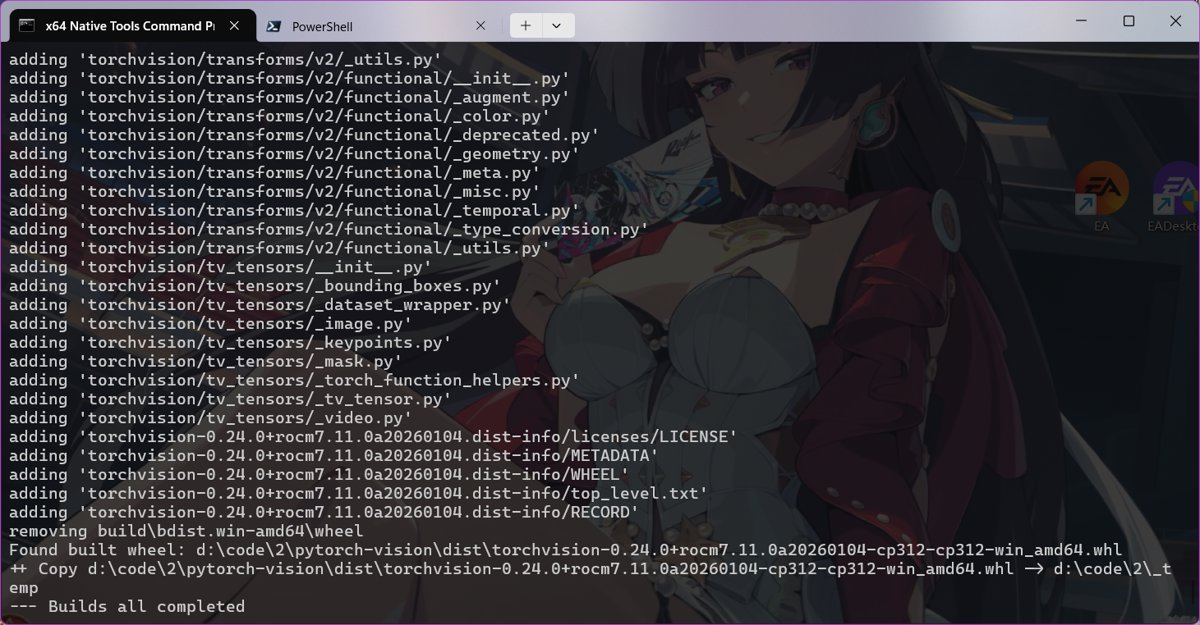
Build Artifacts
So good!
-a---            2026/1/5    15:58      151148776 torch-2.9.1+rocm7.11.0a20260104-cp312-cp312-win_amd64.whl
-a---            2026/1/5    15:59         514989 torchaudio-2.9.0+rocm7.11.0a20260104-cp312-cp312-win_amd64.whl
-a---            2026/1/5    16:01        1247290 torchvision-0.24.0+rocm7.11.0a20260104-cp312-cp312-win_amd64.whl
Windows + AMD + ROCm + PyTorch,
Do you even get how valuable it is to have these words together?!! 😄
Key Points
To sum it up, there were just two key points to this successful build.
Use the Official Version of ROCm
Previously, because everything I found online said AMD still hadn't released ROCm for gfx103x, I installed a third-party prebuilt version. Maybe it was too old or whatever, but compiling PyTorch kept failing.
This time I installed with this command:
pip install --index-url https://rocm.nightlies.amd.com/v2-staging/gfx103X-dgpu/ --pre rocm[libraries,devel]
You can try looking for the corresponding ROCm packages at these locations:
- https://rocm.nightlies.amd.com/v2-staging/
- https://rocm.nightlies.amd.com/v2/
- https://rocm.devreleases.amd.com/v2
- https://rocm.devreleases.amd.com/v2-staging
Don't put blind faith in third-party packages. Use the official ones if you can; if not, compile ROCm yourself. Luckily my card has an official ROCm package.
Use an Older Version of PyTorch
I mentioned this in the previous article too: the latest version might not work. I saw someone online who successfully compiled version 2.10.
I actually had a vague sense of this while struggling last time: the newer the PyTorch version, the more likely you are to hit pitfalls on the Windows + ROCm path.
People online have already confirmed:
- 2.10: someone succeeded
- 2.11: various uncertainties exist
This time I went straight for the more conservative option: PyTorch 2.9.1
Turns out this was the right call.
As for whether 2.11 works?
I'll mess with that later if I have the energy. For now, I'll just enjoy the results.
Installing the Wheels
Now that it's compiled, I can install and try it out.
Install these three files in order (note: torch must be installed first)
pip install .\torch-2.9.1+rocm7.11.0a20260104-cp312-cp312-win_amd64.whl
pip install .\torchvision-0.24.0+rocm7.11.0a20260104-cp312-cp312-win_amd64.whl
pip install .\torchaudio-2.9.0+rocm7.11.0a20260104-cp312-cp312-win_amd64.whl
Windows + AMD GPU: the training pipeline is now open.
What's Next?
Now that GPU acceleration works, there's a lot I can do.
Get deep learning running, start playing with AI image generation~
Next I want to try:
- Some simple deep learning model training tasks
- Getting back into AI image generation
- Especially trying Z-Image : https://huggingface.co/Comfy-Org/z_image_turbo
There's still a lot worth documenting and sharing in this series. Stay tuned.
_EOF_
Windows + AMD GPU, Finally Can Train Models with PyTorch
- 本文作者:
- 程序设计实验室
- 版权声明:
- 本博客所有文章除特别声明外,均采用 BY-NC-SA 许可协议。转载请注明出处!
相关文章
AMD显卡也能畅玩AI画图!ROCm+ComfyUI部署全指南
用StabilityMatrix在AMD显卡上部署ComfyUI,总算让ROCm派上点正经用场。可视化工作流比早期那堆破烂配置界面强多了,虽然启动时还得手动补依赖。看着GPU利用率拉满生成图像,这才算没白折腾。
2026-05-09 · ROCm · 约 1 分钟
打包ROCm环境的相关Wheel方便后续使用
呵,折腾半天才发现没法从site-packages直接提取Wheel,还得从官方源重新拖。几个G的ROCm全家桶,预编译好的二进制乐高,省得下次再对着源码干等几小时。
2026-05-09 · ROCm · 约 1 分钟
告别N卡CUDA垄断,Windows+AMD显卡ROCm跑深度学习:手把手实现 MNIST 手写数字识别
在Windows+AMD的debuff下硬是编译了ROCm版PyTorch,拿MNIST这种“Hello World”来验货。用CNN而不是老掉牙的全连接网络,总算对得起显卡算力。跑完500个batch损失降到0.03,这种基础任务也就测个环境能用罢了。
2026-05-09 · ROCm · 约 1 分钟
ROCm on Windows 性能排查:RX 6650 XT 跑 PyTorch,为什么加速不明显?
自编译折腾半天,加速不到2倍?小模型+Windows+gfx1032非官方支持,能有这个速度算给面子了。别指望生产环境,当实验玩具玩吧。
2026-05-09 · ROCm · 约 1 分钟
讨论
共 0 条加载评论中…