

Python-Web-Django: Building the First Web App
View Rendering Edit views.py in the App directory from django.shortcuts import render from django.http import HttpResponse # Create your views here. def hello(request): return HttpResponse(Hello Django!) URL Resolution Configuration Edit urls
目录10 个章节
View Rendering
Edit views.py in the App directory
from django.shortcuts import render
from django.http import HttpResponse

# Create your views here.
def hello(request):
    return HttpResponse("Hello Django!")
URL Resolution Configuration
Edit urls.py:
Add a URL resolution rule path('', views.hello) to urlpatterns
from django.contrib import admin
from django.urls import path
from hello_app import views

urlpatterns = [
    path('admin/', admin.site.urls),
    path('', views.hello)
]
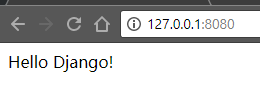
Open the Browser to Test
Building with Templates
Above we used django.http.HttpResponse() to output "Hello Django!". This approach mixes data with the view, which does not conform to Django's MVC philosophy.
Next we will use an html template to build the App.
In the previous article, we already configured the templates (templates) directory in settings.py. Now, create a home.html file in the templates directory.
Write the template file:
{% block main %}
    <h1>
        {{ home }}
    </h1>
{% endblock main %}
Define it in views.py
def home(request):
    context = {}
    context['home'] = "home"
    return render(request, 'home.html', context)
Configure URL resolution in urls.py
As mentioned earlier, this will not be repeated.
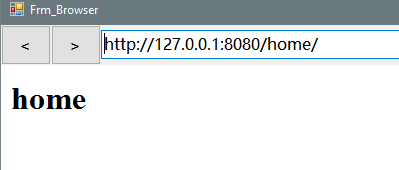
Browser test
About

To learn more interesting operations, please follow my WeChat official account: DealiAxy Every article is collected on my blog: blog.deali.cn
_EOF_
Python-Web-Django: Building the First Web App
- 本文作者:
- 程序设计实验室
- 版权声明:
- 本博客所有文章除特别声明外,均采用 BY-NC-SA 许可协议。转载请注明出处!
相关文章
Python-Web:Django模板继承
模板可以用继承的方式来实现复用。 接下来我们先创建之前项目的 templates 目录中添加 base.html 文件,代码如下: !DOCTYPE html html head meta charset=utf-8 title标题/title /head body h1Hello World!/h1 pDA Django 测试。/p {% block mainbody %
2021-12-18 · 0_Python-Web-Django入门系列笔记 · 约 1 分钟
Python-Web:Django-模板标签
if/else 标签 基本语法格式如下: {% if condition %} ... display {% endif %} 或者: {% if condition1 %} ... display 1 {% elif condition2 %} ... display 2 {% else %} ... display 3 {% endif %} 根据条件判断是否输出。
2021-12-18 · 0_Python-Web-Django入门系列笔记 · 约 1 分钟
Python-Web-Django:开始Django之旅
前言 开源的Web框架Django简单易用,稳定性和灵活性高,因此被广泛应用于商业化环境,它充分利用了Python拥有丰富的库这一优势。 Django的安装和服务器的搭建 安装Django库: pip install django 新建Web应用: django-admin startproject hello_django 以上命令会在当前文件夹下建立hello_django目录。 目录结构如下
2021-12-18 · 0_Python-Web-Django入门系列笔记 · 约 1 分钟
Python-Web-Django:settings-py-配置
安装REST框架 pip install djangorestframework pip install django-rest-swagger 安装了REST Framework之后,之前创建的Django App(hello_app)就可以使用REST API进行通信。 我们所有创建的App都要添加到INSTALLED_APPS这个字段里面。 INSTALLED_APPS = [ #
2021-12-18 · 0_Python-Web-Django入门系列笔记 · 约 1 分钟
讨论
共 0 条加载评论中…