

My New Blog Is Live, Plus a Record of Wrestling with Hexo
Since Jianshu and Zhihu often delete my blog posts for various reasons, and my previous WordPress blog has already broken, I've been wanting to set up a new blog. That's when I took a liking to Hexo static blogs—hosting them directly on GitHub is both convenient and free. The official docs already cover configuration in plenty of detail, so I won't repeat that here. Blog URL: http://blog.deali.cn/ Besides all the configuration, I also spent a day writing scripts to import my old blog, download images, do replacements, and so on. Plenty of problems came up along the way—it felt annoying and like a waste of time,
目录7 个章节
Since Jianshu and Zhihu often delete my blog posts for various reasons, and my previous WordPress blog has already broken, I've been wanting to set up a new blog. That's when I took a liking to Hexo static blogs—hosting them directly on GitHub is both convenient and free.
The official docs already cover configuration in plenty of detail, so I won't repeat that here.
Blog URL: http://blog.deali.cn/
Besides all the configuration, I also spent a day writing scripts to import my old blog, download images, do replacements, and so on. Plenty of problems came up along the way—it felt annoying and like a waste of time. But once I'd started, not seeing it through would have made all the previous work feel wasted, so as of today it's finally up and running~
I've written an article before about extracting images from Markdown. This time I upgraded it so it can download all remote images in Markdown and replace them with local relative paths. I'll write a separate post about it when I have time.
Reference: https://zhuanlan.zhihu.com/p/87811246
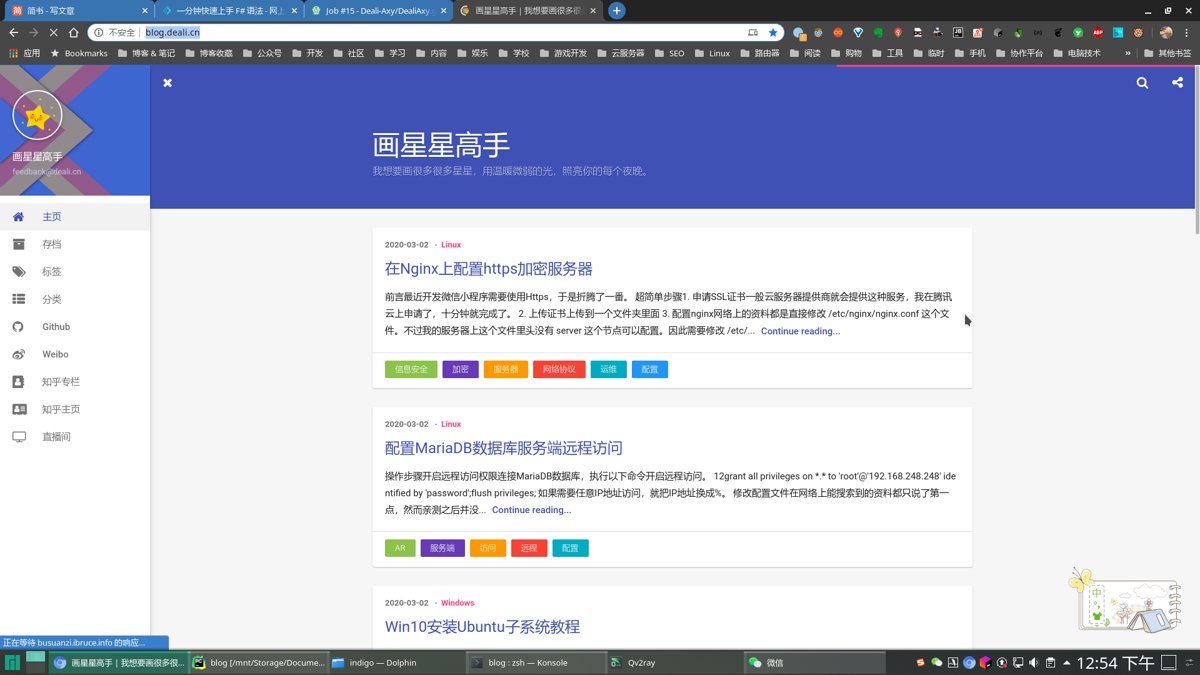
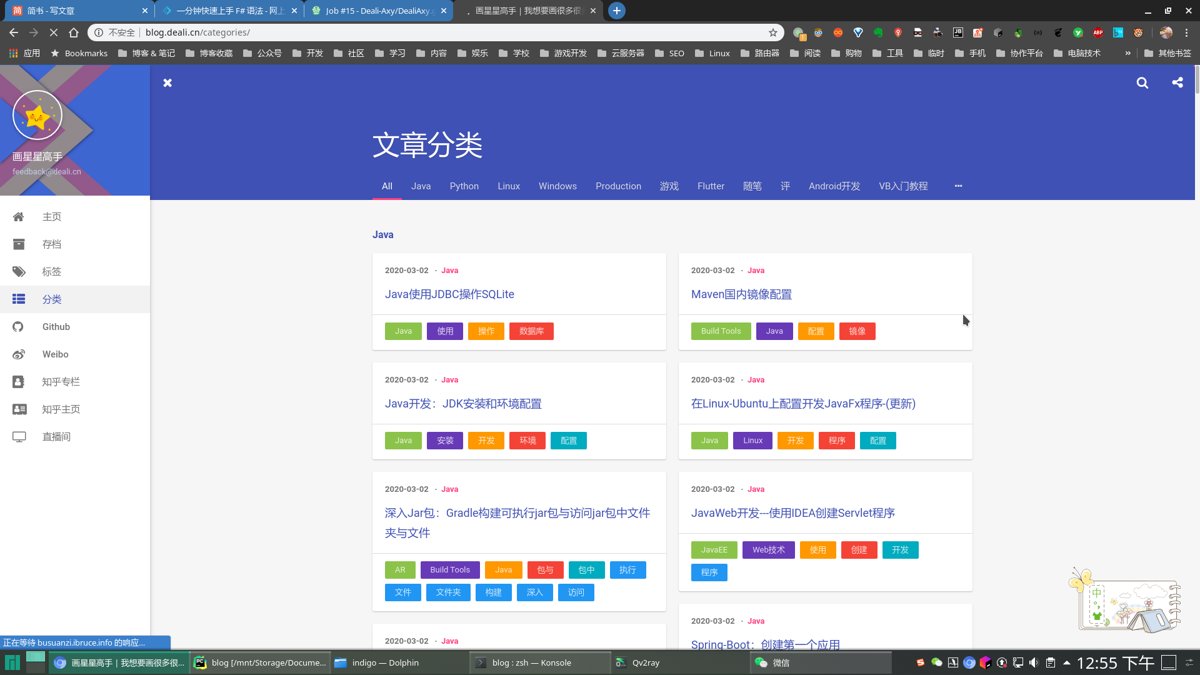
Screenshots First
Here's the final result—not bad, right?
Home
Categories
Choosing a Theme
Hexo official docs: https://hexo.io/zh-cn/docs/
The theme I chose is hexo-theme-indigo. Homepage: https://github.com/yscoder/hexo-theme-indigo
Generating Permalinks for Posts
Use Grunt, a common Node.js automated build tool, to generate permalinks based on file hash values.
You need to install Grunt first and configure it a bit. Just check the official docs for that: https://gruntjs.com/getting-started
Reference: http://blog.jvaeyhcd.wang/posts/05c9df7e0c47bd64.html
Travis CI Continuous Integration
To auto-deploy the blog, you ideally need two GitHub repositories: one named whatever you like, and one named github用户名.github.io, so it can be accessed directly.
Here's the config:
First, the .travis.yml file
# 语言
language: node_js
# node版本
node_js:
  - 8
# 指定缓存模块
cache:
  directories:
    - node_modules
# 监听分支
branches:
  only:
    - master
install:
  - npm install
script:
  - hexo clean
  - hexo generate
after_script:
  - git config user.name "用户名"
  - git config user.email "邮箱"
  - sed -i "s/{GH_TOKEN}/${GH_TOKEN}/g" ./_config.yml
  - hexo deploy
Then, at the end of the _config.yaml file, the deploy section:
# Deployment
## Docs: https://hexo.io/docs/deployment.html
deploy:
  - type: git
    repository: https://{GH_TOKEN}@这里放上第二个github仓库的链接
    branch: master
The rest of the steps are pretty simple. Refer to these two docs: (By the way, the official docs seem to have it wrong—go by mine instead)
Welcome to Discuss
I've put together a series of technical articles and materials. Reply with linux, flutter, c#, netcore, android, java, python, etc. in the WeChat official account 「程序设计实验室」 to get the related technical articles and materials.
_EOF_
My New Blog Is Live, Plus a Record of Wrestling with Hexo
- 本文作者:
- 程序设计实验室
- 版权声明:
- 本博客所有文章除特别声明外,均采用 BY-NC-SA 许可协议。转载请注明出处!
相关文章
修改_Inotify-Watches-Limit_提高idea性能
官网说明 For an intelligent IDE, it is essential to be in the know about any external changes in files it is working with - e.g. changes made by VCS, or build tools, or code generators etc. For that reaso
2021-12-18 · 杂七杂八 · 约 1 分钟
youtube-dl下载太慢了,我选yt-dlp
前言 最近过年嘛,过年前照例来下载一些贺岁歌曲,现在国内没啥人做贺岁专辑,这方面还得看马来西亚华人,他们每年都有出专辑,质量很不错! 国内平台自然是没有(或者不全的),需要在YouTube下载~ 之前我都是用Chrome插件下载完再使用脚本合并视频,有点繁琐,今年试试自动下载的黑科技~ 作为对比的这俩工具,都用 pip 安装即可 pip install youtube-dl pip install
2023-01-24 · 杂七杂八 · 约 1 分钟
Nokia-5230的远古截图,怀念一下S60v5
Nokia 5230的截图,S60v5的怀旧盛宴?呵,像素低得像石器时代。怀念那些界面?现在看真是‘经典’的反义词。
2023-01-22 · 杂七杂八 · 约 1 分钟
Git-Commit-Emoji
| emoji | emoji 代码 | commit 说明 | | :---------------- | :---------------------------- | :-------------------- | | 🎉 (庆祝) | :tada:
2023-01-02 · 杂七杂八 · 约 1 分钟
讨论
共 0 条加载评论中…