

Resolve the issue where Markdig cannot recognize images with filenames containing spaces
Markdig can't even handle images with spaces in filenames? This library really hit a new low. I'll just fix it myself—adding a regex switch should do the trick. Also, gotta say, this framework is as primitive as a brick.
目录10 个章节
Preface
Yesterday, while publishing the article "Installing Linux on Ji-Ge 14x: A Hands-On Experience with Fedora 42",
(I was using the StarBlog Publisher tool to publish the article) I noticed that the webp images were not being uploaded automatically.
At first, I thought it might be due to an inability to recognize the webp format.
Regarding the StarBlog Publisher tool: It is a cross-platform Markdown article publishing tool for StarBlog. It features built-in intelligent assistants from various major AI models, supports writing and publishing in real-time, and offers intuitive content management to assist in efficient creation.
Project open-source address: https://github.com/star-blog/starblog-publisher
For more information, you can check out these articles:
- StarBlog Special (3): StarBlog Publisher, Cross-Platform One-Click Publishing, a DeepSeek-Powered Article Creation Tool
- StarBlog Special (4): Major Upgrade to the One-Click Publishing Tool Publisher, Enhanced AI Features and Interface Optimization
- AOT Compiling Avalonia Applications: StarBlog Publisher Project Practice and Challenges
Problem Resolution
After writing a few demo tests, I realized the issue was due to spaces in the file name. Markdig is very strict and does not support recognizing file names with spaces 😂. The solution was either to escape the file names when inserting images (in Typora) or to handle image parsing manually.
The images in the article are in the following format:

Later, I modified the method for analyzing images in starblog-publisher and made the following improvements:
- Used the regular expression
@"!\[([^\]]*)\]\(([^)]+)\)"to match image syntax. - Supported special characters in paths, such as spaces and Chinese characters.
- Automatically handled paths enclosed in quotes and URL encoding.
Code
Let's get straight to the code.
First, take a look at the original image parsing code, which is entirely implemented using Markdig.
/// <summary>
/// Extracts all image paths from the Markdown content
/// </summary>
/// <returns>An array of image paths</returns>
public string[] ExtractImagePaths() {
    if (post.Content == null) {
        return Array.Empty<string>();
    }

    var document = Markdig.Markdown.Parse(post.Content);
    var imagePaths = new List<string>();
    var baseDir = Path.GetDirectoryName(filepath) ?? "";

    foreach (var node in document.AsEnumerable()) {
        if (node is not ParagraphBlock { Inline: { } } paragraphBlock) continue;
        foreach (var inline in paragraphBlock.Inline) {
            if (inline is not LinkInline { IsImage: true } linkInline) continue;
            if (string.IsNullOrWhiteSpace(linkInline.Url)) continue;

            var imgUrl = Uri.UnescapeDataString(linkInline.Url);

            // If it's a local image path, convert it to an absolute path
            if (!imgUrl.StartsWith("http")) {
                // Normalize the path
                imgUrl = imgUrl.Replace('/', Path.DirectorySeparatorChar) // Unify path separators
                    .Replace(".\\\\", "") // Remove relative path prefix
                    .Replace("./", ""); // Remove relative path prefix

                imgUrl = Path.GetFullPath(Path.Combine(baseDir, imgUrl));
                imagePaths.Add(imgUrl);
            }
        }
    }

    return imagePaths.ToArray();
}
Implementing Image Parsing Ourselves
But Markdig really struggles with this.
So I had to implement the parsing myself.
It's not difficult—you can just use regular expressions.
/// <summary>
/// Extract image paths with spaces (cases that Markdig cannot parse correctly)
/// </summary>
/// <param name="content">Markdown content</param>
/// <param name="baseDir">Base directory</param>
/// <returns>List of image paths</returns>
private List<string> ExtractImagePathsWithSpaces(string content, string baseDir) {
var imagePaths = new List<string>();
// Use regex to match image syntax: 
// Supports paths with spaces, Chinese characters, etc.
var imagePattern = @"!\[([^\]]*)\]\(([^)]+)\)";
var matches = System.Text.RegularExpressions.Regex.Matches(content, imagePattern);
foreach (System.Text.RegularExpressions.Match match in matches) {
if (match.Groups.Count >= 3) {
var imagePath = match.Groups[2].Value.Trim();
// Remove possible quotes
if ((imagePath.StartsWith('"') && imagePath.EndsWith('"')) ||
(imagePath.StartsWith('\'') && imagePath.EndsWith('\''))) {
imagePath = imagePath.Substring(1, imagePath.Length - 2);
}
// URL decoding
imagePath = Uri.UnescapeDataString(imagePath);
// Only process local paths
if (!imagePath.StartsWith("http")) {
// Normalize path
imagePath = imagePath.Replace('/', Path.DirectorySeparatorChar)
.Replace(".\\\\", "")
.Replace("./", "");
var fullPath = Path.GetFullPath(Path.Combine(baseDir, imagePath));
imagePaths.Add(fullPath);
}
}
}
return imagePaths;
}
Supplementing the Original Method
Then, let's supplement the code for the original ExtractImagePaths method.
Change the bottom code to this:
// 添加自定义解析逻辑处理带空格的图片路径
// Markdig 无法正确解析带空格的图片路径,需要手动处理
var customPaths = ExtractImagePathsWithSpaces(post.Content, baseDir);
imagePaths.AddRange(customPaths);

// 去重并返回
return imagePaths.Distinct().ToArray();
Implementation Effect
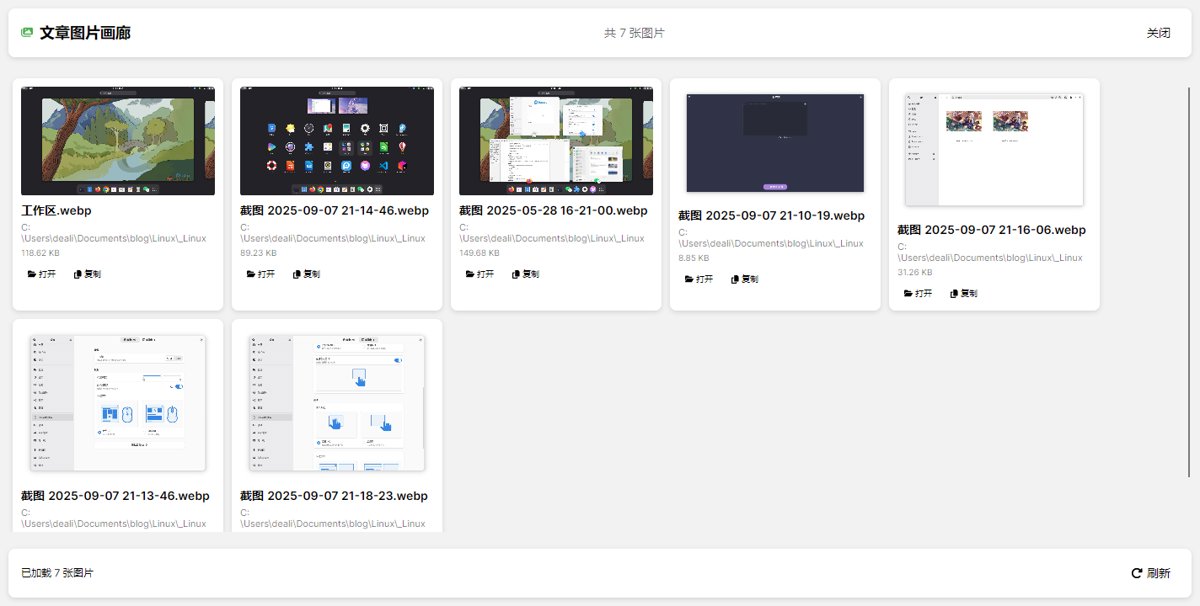
After the problem was resolved, all images can now be properly recognized.
Previously, I implemented a gallery feature in starblog-publisher, which conveniently displays all the images contained within an article.
Existing Issues
Using regular expressions is simple and direct, but sometimes it can be overly sensitive.
For example, the line of comment // 使用正则表达式匹配图片语法: posted in the code in this article would also be detected.
It's quite annoying, and the temporary solution is to make it a toggle, allowing users to decide whether to enable regex recognition.
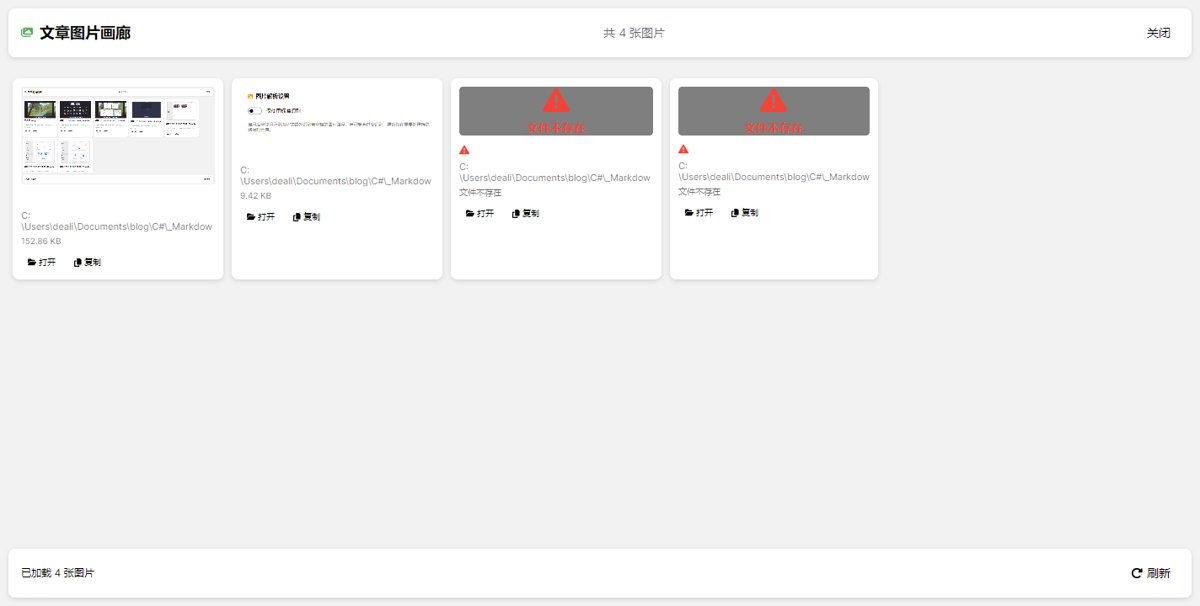
It should only be enabled when Markdig fails to recognize it. Then, adding an option to ignore nonexistent images would resolve the issue.
Toggle
I added a toggle in the settings without hesitation.
<!-- 图片解析设置卡片 -->
<Border Classes="Card">
    <StackPanel Spacing="15" Margin="15">
        <StackPanel Orientation="Horizontal" Spacing="8">
            <i:Icon Value="fa-solid fa-image" Foreground="#FF9800" />
            <TextBlock Text="图片解析设置" FontWeight="Bold" FontSize="16" />
        </StackPanel>

        <StackPanel Spacing="10">
            <ToggleSwitch OnContent="启用正则识别" OffContent="仅使用标准识别"
                          IsChecked="{Binding EnableRegexImageParsing}" />
            <TextBlock Text="启用后将使用正则表达式额外识别带空格的图片路径,但可能会过度识别。建议仅在需要处理特殊路径时开启。"
                       TextWrapping="Wrap"
                       FontSize="12"
                       Foreground="{DynamicResource SystemBaseMediumColor}"
                       Margin="0,5,0,0" />
        </StackPanel>
    </StackPanel>
</Border>
The effect looks like this.
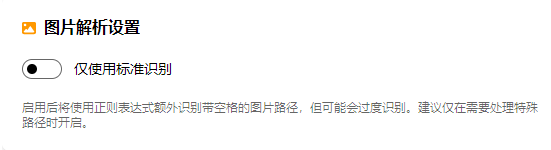
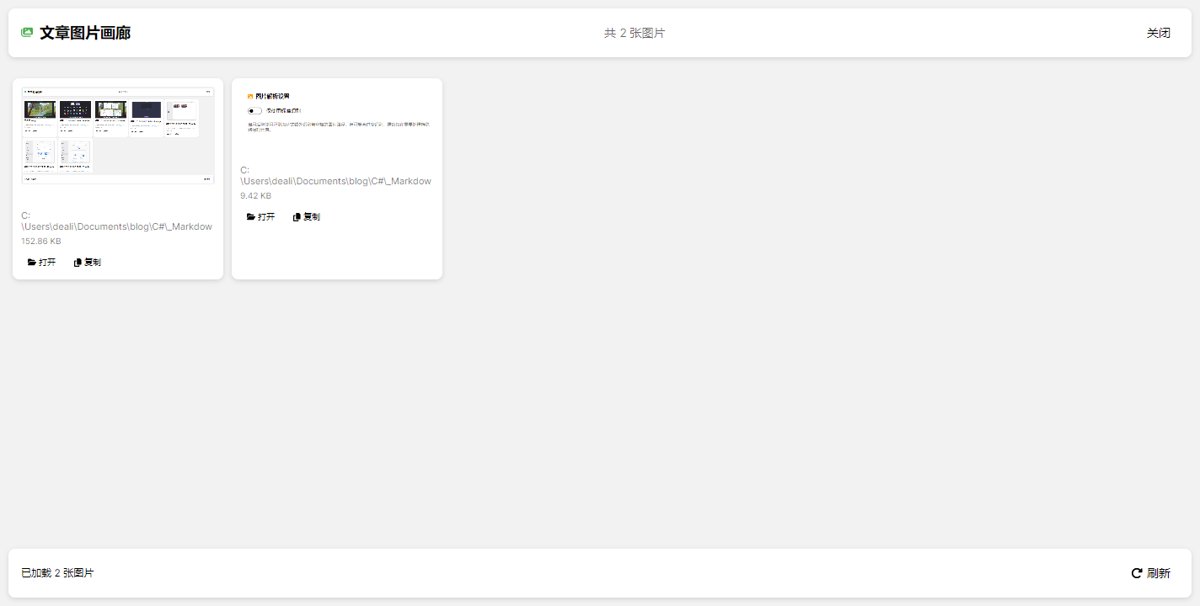
When disabled, it recognizes the images in this text like this.
When enabled, it looks like this. I've also added annotations for non-existent images.
Skip non-existent
Add code in the MarkdownParse method of StarBlogPublisher/Services/MarkdownProcessor.cs
// Check if the file exists, skip non-existent images
if (!File.Exists(imgUrl)) {
    Console.WriteLine($"Skipping non-existent image file: {imgUrl}");
    continue;
}
Summary
Building a useful tool requires continuous iteration and optimization.
That said, I still have to complain a bit—Markdig feels like a bare-bones house 🤣
_EOF_
Resolve the issue where Markdig cannot recognize images with filenames containing spaces
- 本文作者:
- 程序设计实验室
- 版权声明:
- 本博客所有文章除特别声明外,均采用 BY-NC-SA 许可协议。转载请注明出处!
相关文章
LLM探索:使用DeepSeek免费平替cursor
Cursor太贵?DeepSeek+Cline勉强能用,但token烧得比我还快。生成的代码bug一堆,还不如自己敲。32k上下文调整后总算不报错,效果嘛,也就那样。
2026-05-09 · LLM · 约 1 分钟
我最后悔看的电影之一《挪威的森林》
最近开始金工实习,每天早出晚归超级忙,而且身体还有点不舒服,所以难得有点空闲时间的时候,和我家猪猪看了一下这个电影,全程感觉超级压抑(结果看完就开始发烧),这谁顶得住啊。 可能是电影时长太短的缘故,剧情很紧凑,场景的切换很突兀,没读过原著的人可能很难跟得上。 这电影总的来说,对原著的还原度算挺高的,几个主要角色的代入感都很强,特别是直子,她刚刚出场的时候,还感觉她不如原著描述的漂亮,虽然有几个画面
2022-11-27 · 评 · 约 1 分钟
macOS 微信多开太麻烦?我用 DeepSeek 写了个工具一键搞定
知乎那套手动改Bundle ID再签名的操作,每回更新都得重来,不嫌烦?一行 `wechat-clone create 3` 搞定三开,还带TUI界面——写个Go工具十分钟,省得你终端敲坏键盘。
2026-05-23 · Mac · 约 1 分钟
Django的信号机制入门
概念 django自带一套信号机制来帮助我们在框架的不同位置之间传递信息。也就是说,当某一事件发生时,信号系统可以允许一个或多个发送者(senders)将通知或信号(signals)发送给一组接受者(receivers)。 (感觉就很像Qt的信号与槽机制) 信号系统包含以下三要素: 发送者-信号的发出方 信号-信号本身 接收者-信号的接受者 Django内置了一整套信号,下面是一些比较常用的: 在
2022-08-26 · Django · 约 1 分钟
讨论
共 0 条加载评论中…