

Improving User Experience from the Details: Setting Android and iOS Splash Screens in Flutter Cross-Platform App Development
Preface Developing apps with Flutter is convenient and fast, except that during a cold start the Dart engine needs to load, causing a brief white screen that seriously affects the user experience. At this point we need to set a splash image, like most domestic apps (for example WeChat's globe), so that this image is shown when launching the app, and only after loading is complete do we enter the app, so as not to affect the user experience. Android Splash Screen First, prepare the splash image, named splash.png in this article, and add it according to different resolutions to the corresponding mipmap-hdpi / mipmap
目录5 个章节

Preface
Developing apps with Flutter is convenient and fast, except that during a cold start the Dart engine needs to load, causing a brief white screen that seriously affects the user experience. At this point we need to set a splash image, like most domestic apps (for example WeChat's globe), so that this image is shown when launching the app, and only after loading is complete do we enter the app, so as not to affect the user experience.
Android Splash Screen
First, prepare the splash image, named splash.png in this article, and add it according to different resolutions into the corresponding mipmap-hdpi / mipmap-mdpi / mipmap-xhdpi / mipmap-xxhdpi / mipmap-xxxhdpi directories.
Then edit the /android/app/src/main/res/drawable/launch_background.xml file. By default it should look like this:
<?xml version="1.0" encoding="utf-8"?>
<!-- Modify this file to customize your launch splash screen -->
<layer-list xmlns:android="http://schemas.android.com/apk/res/android">
    <item android:drawable="@android:color/white"/>
</layer-list>
As you can see, it was originally a white background, no wonder there's a brief white screen on launch. Now we comment out that white background line of code and change it to the following:
<?xml version="1.0" encoding="utf-8"?>
<!-- Modify this file to customize your launch splash screen -->
<layer-list xmlns:android="http://schemas.android.com/apk/res/android">
    <!-- <item android:drawable="@android:color/white"/>-->

    <!-- You can insert your own image assets here -->
    <item>
        <bitmap
                android:gravity="fill"
                android:mipMap="true"
                android:src="@mipmap/splash"/>
    </item>
</layer-list>
This way the image will be displayed when the Android app launches. Nice.
iOS Configuration
(Note: Since I don't have a Mac computer, I cannot test the iOS running effect. The configuration method comes from reference materials)
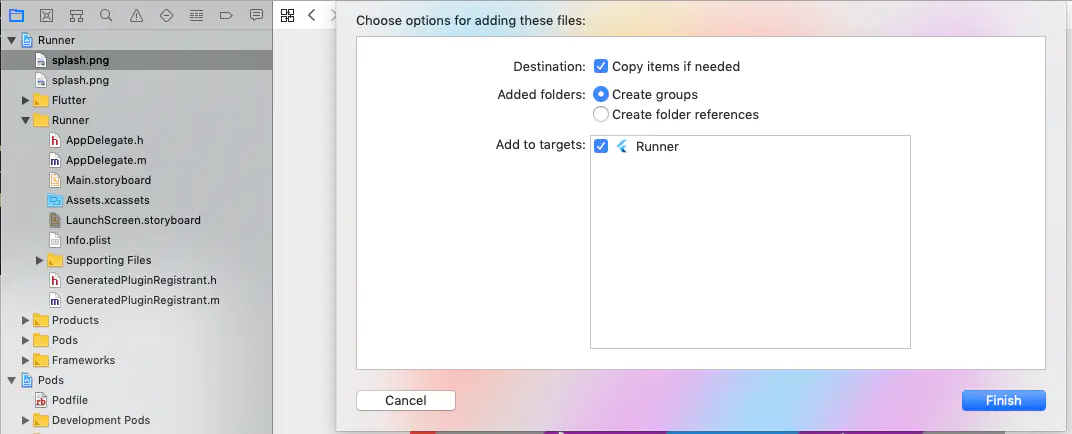
First, open the ios directory with Xcode, drag the image into the Runner root directory on the left side of the interface, check Copy items if needed, select Create groups and check Runner below.
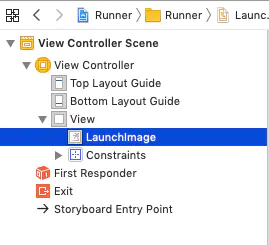
After that, in the Project navigator on the left, open the file Runner/Runner/LaunchScreen.storyboard. Then in the middle section expand the view tree and find LaunchImage.
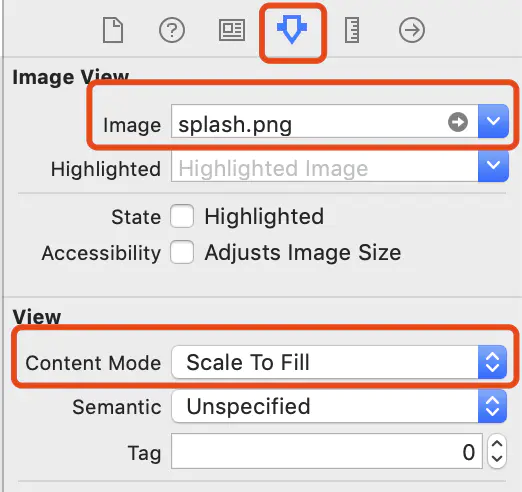
After clicking, look at the Attributes inspector on the right, fill in splash.png in the image field, and change Content Mode to Scale To Fill.
Select the image, then in the View Controller scene on the left, select and cut the image splash.png and paste it, to clear the crosshairs (constraints).
Edit the image's constraints so that it fills the entire screen.
Click the constraint editor in the lower right corner of the screen:
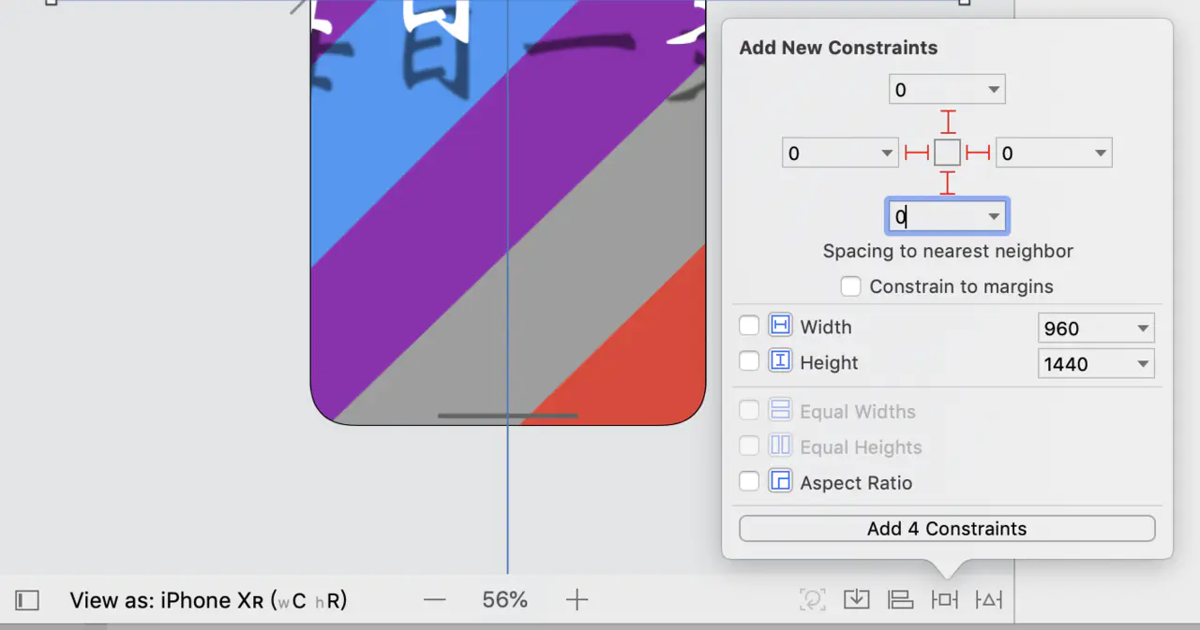
Fill in 0 in all the blanks above, then click Add 4 Constraints.
And that's it~
Flutter Splash Screen
After setting this up we'll find that although we now have a splash image, because today's phones are all so high-performance it finishes loading in an instant, so every time you open it the splash image just flashes by, which isn't a great experience either. So we need to display this splash screen again inside Flutter. We could even, like many domestic rogue apps, add an ad lasting as long as 5 seconds on the splash screen (just kidding)
Below is the Dart code for my app's splash page, for everyone's reference. With Future.delayed(Duration(seconds: 1)) you can stay on this page for 1 second; if you want it displayed a bit longer, just change it to more.
import 'package:flutter/services.dart';
import 'package:flutter/material.dart';
import 'package:font_awesome_flutter/font_awesome_flutter.dart';

class SplashRoute extends StatefulWidget {
  @override
  _SplashRouteState createState() => _SplashRouteState();
}

class _SplashRouteState extends State<SplashRoute> {
  @override
  void initState() {
    super.initState();
    Future.delayed(Duration(seconds: 1)).then((e) {
      Navigator.of(context).pushReplacementNamed('home');
    });
  }

  @override
  Widget build(BuildContext context) {
    // 隐藏状态栏
    SystemChrome.setEnabledSystemUIOverlays([SystemUiOverlay.bottom]);

    return Container(
      color: Colors.lightBlue,
      child: Column(
        mainAxisAlignment: MainAxisAlignment.center,
        children: <Widget>[
          FaIcon(FontAwesomeIcons.cat, size: 100, color: Colors.grey[200]),
          Text(
            '壹喵',
            textAlign: TextAlign.center,
            style: TextStyle(
              fontSize: 30,
              color: Colors.grey[200],
              decorationStyle: TextDecorationStyle.dotted,
              decorationThickness: 0,
            ),
          ),
        ],
      ),
    );
  }
}
ok
That's it. Although it's just a very small detail, it can greatly improve the user experience. Especially at night, the apps we develop all adapt to the system's dark mode, but in that instant of launch there's a white screen. If it flash-blinds the user's eyes, our app probably won't be far from getting 1-star ratings and being taken down...
_EOF_
Improving User Experience from the Details: Setting Android and iOS Splash Screens in Flutter Cross-Platform App Development
- 本文作者:
- 程序设计实验室
- 版权声明:
- 本博客所有文章除特别声明外,均采用 BY-NC-SA 许可协议。转载请注明出处!
相关文章
Flutter开发:ListView手动滚动到底部
这个问题搜了很久都没找到,国内关于flutter的研究好像还没多少,不过stackoverflow真的是万能的,这里记录一下~ 原文 Use ScrollController.jumpTo() or ScrollController.animateTo() method to achieve this. Here is code snippet (After 1 second, the ListV
2021-12-18 · Flutter · 约 1 分钟
初见Flutter!框架简单介绍以及构建可发布的签名Apk包
哈喽!好久不见,算起来我已经一个多月没更新博客了,近期刚刚完成了一个项目,正好抽出时间整理一下学到的东西并且写写博客。 关于flutter 开始使用flutter还是春节后的事情,其实之前很早就想学一下flutter了,毕竟谷歌出的技术总是不会太差的,无奈一直没有时间和做app的需求,这次接触了flutter之后仿佛发现了新大陆,原来开发app还能这么方便,真的颠覆了我原来的认知啊,热更新也太好用
2021-12-18 · Flutter · 约 1 分钟
把爬虫放到手机上跑!Flutter爬虫框架初探~
最近做毕设需要大量数据训练模型,很多网站又要反爬机制,得爬一会停一会,所以特别慢,要是我用电脑24小时爬虫太费电了,于是想到利用手机~ 然后就想到flutter,安卓苹果旧手机都能利用起来做数据采集。 ok,然后就开始做,折腾了一天做了一个大概的框架。总算可以方便的添加爬虫任务了,集成了配置、日志、数据持久化这些基本的功能,然后封装网络请求、网页解析的功能,用起来还行。 只不过众所周知的,dart
2021-12-18 · Flutter · 约 1 分钟
Flutter移动应用快速构建实践——状态管理、国际化、数据持久化、性能优化(二)
继续上一篇:极简诗词开发背后:Flutter移动应用快速构建实践——状态管理、国际化、数据持久化、性能优化(一) 前文中说到了项目结构、状态管理和国际化的方案,本文继续聊聊数据持久化和粗略的性能优化。 数据持久化 目前的话,flutter用的比较多比较成熟的数据持久化就是shared_preferences和SQFLite,一个是ini配置文件,一个是SQLite数据库,小应用我比较倾向只用前者,
2021-12-18 · Flutter · 约 1 分钟
讨论
共 0 条加载评论中…