

Effortlessly Solve Linux+Windows Dual-Boot Time Inconsistency Issue
Foreword Many Linux users likely use dual-boot systems, as there are still many software applications that require opening Windows. However, there has always been a persistent issue: the time displays correctly in Linux, but when switching to Windows, the time is 8 hours behind = = This happens because Windows uses the hardware clock by default, whereas Linux uses network time. Now, a single command can resolve this issue. Solution Open a terminal in Linux and enter the command: timedatectl set-local-
目录3 个章节
Preface
Many Linux users probably use dual-boot setups, after all, there are still quite a few software applications that are only available on Windows and require you to switch over. However, there's always been a nagging issue: the time displays correctly in Linux, but when you switch back to Windows, the time is off by 8 hours ==. This happens because Windows uses the hardware clock by default, while Linux uses network time. The good news is, you can fix this problem with just a single command.
Solution
Open a terminal under Linux and enter the command:
timedatectl set-local-rtc 1
Then enter the following to verify (not strictly necessary):
timedatectl
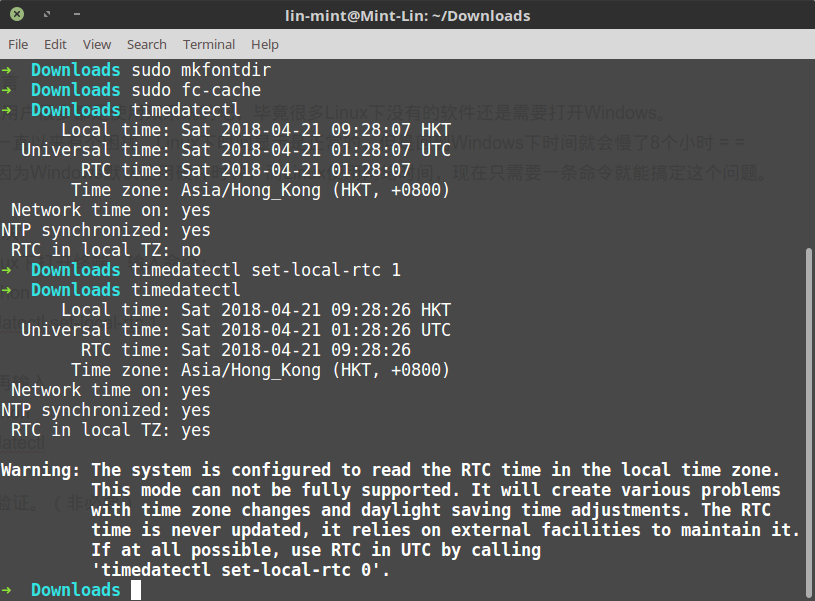
And just like that, the problem is solved—super simple, right?
About

Discover more interesting operations by following my WeChat official account (微信公众号): DealiAxy Every article is recorded on my blog: blog.deali.cn
_EOF_
Effortlessly Solve Linux+Windows Dual-Boot Time Inconsistency Issue
- 本文作者:
- 程序设计实验室
- 版权声明:
- 本博客所有文章除特别声明外,均采用 BY-NC-SA 许可协议。转载请注明出处!
相关文章
Linux下查看dd命令写入进度
前言 Linux下有一个强力工具,dd,用来操作镜像,简直神器,唯一的不足是没有显示操作进度,不过也不是没有办法,下面介绍几个查看写入进度的方法。 status选项查看进度 如果你使用的是GNU版本的dd,并且coreutils版本高于8.24,那么可以使用status选项。例如: sudo dd if=/dev/sda of=/dev/zero status=progress 上面命令在Mac
2025-10-27 · FAQ & Tips · 约 1 分钟
某些软件中无法切换fcitx输入法的问题
gsettings set org.gnome.settings-daemon.plugins.xsettings overrides "{'Gtk/IMModule':<'fcitx'>}"
2025-10-27 · FAQ & Tips · 约 1 分钟
Manjaro-Linux安装Virtualbox的那些坑与解决方案~
前言 不久之前,由于我的Ubuntu安装盘空间满了,于是想在新的SSD上装另一个系统,于是就又回到了Manjaro的怀抱,KDE桌面真好用,不过很多配置的地方还是要研究一下的,毕竟以前主要用的桌面还是Gtk系的~ 进入正题 安装virtualbox Manjaro的官方源里面是有virtualbox的,直接打开Octopi搜一下就有了~ 或者输入命令安装: sudo pacman -S virtu
2025-10-27 · FAQ & Tips · 约 1 分钟
KDE下OBS直播闪屏解决
关闭避免撕裂即可。 直播效果
2025-10-27 · FAQ & Tips · 约 1 分钟
讨论
共 0 条加载评论中…