

Installation, Configuration, and Usage of ExceptionLess
Preface Exceptionless is an open-source real-time log collection framework. It can be used in applications developed with technologies such as ASP.NET, ASP.NET Core, Web API, Web Forms, WPF, Console, and ASP.NET MVC, and it also provides a REST API that can be used with Javascript and Node.js. (Basically a set of tools for the .NET tech stack) Project address: https://github.com/ex
目录9 个章节
Preface
Exceptionless is an open-source real-time log collection framework. It can be used in applications developed with technologies such as ASP.NET, ASP.NET Core, Web API, Web Forms, WPF, Console, and ASP.NET MVC, and it also provides a REST API that can be used with Javascript and Node.js. (Basically a set of tools for the .NET tech stack)
Project address: https://github.com/exceptionless/Exceptionless
It makes log collection simple and easy to use without requiring much knowledge of the related technical details and configuration. For applications with a microservices architecture, establishing a unified log collection system is even more necessary.
To use it, you just need to register an account on its official website and then configure an APIKey in your code. However, the free version has a limited quota, so of course it's better to deploy your own instance. This time I'll still deploy with Docker.
Installation
For Docker deployment, you can download the code from GitHub and build it yourself, or use the official packaged image. For convenience, I'll just use the official packaged image here.
The contents of docker-compose.yml are as follows
As you can see, it contains 5 containers: ExceptionLess App, ExceptionLess Job, elasticsearch, kibana, and Redis
version: '3.7'

services:
  app:
    depends_on:
      - elasticsearch
      - redis
    image: exceptionless/app:latest
    environment:
      EX_AppMode: Production
      EX_ConnectionStrings__Cache: provider=redis
      EX_ConnectionStrings__Elasticsearch: server=http://elasticsearch:9200
      EX_ConnectionStrings__MessageBus: provider=redis
      #EX_ConnectionStrings__Metrics: provider=statsd;server=statsd;
      EX_ConnectionStrings__Queue: provider=redis
      EX_ConnectionStrings__Redis: server=redis,abortConnect=false
      EX_ConnectionStrings__Storage: provider=folder;path=/app/storage
      # 官方配置默认包含HTTPS,我把它关了
      #ASPNETCORE_URLS: http://+;https://+
      ASPNETCORE_URLS: http://+
      # 关了HTTPS,这个端口也不用配置了
      #ASPNETCORE_HTTPS_PORT: 5001
      # 关了HTTPS,证书也不用配置
      #ASPNETCORE_Kestrel__Certificates__Default__Password: password
      #ASPNETCORE_Kestrel__Certificates__Default__Path: /https/aspnetapp.pfx
      EX_RunJobsInProcess: 'false'
    ports:
      - 5000:80
      # 关了HTTPS,不需要映射443端口
      #- 5001:443
    volumes:
      - ex_appdata:/app/storage
      - ex_ssldata:/https

  jobs:
    depends_on:
      - app
    image: exceptionless/job:latest
    environment:
      EX_AppMode: Production
      # UI地址,修改这里的IP地址为你的服务器IP地址
      EX_BaseURL: http://你的IP:5000
      EX_ConnectionStrings__Cache: provider=redis
      EX_ConnectionStrings__Elasticsearch: server=http://elasticsearch:9200
      # 邮件配置
      EX_ConnectionStrings__Email: smtps://邮箱地址:密码@SMTP服务器:端口
      EX_SmtpFrom: 发件邮箱地址
      EX_ConnectionStrings__MessageBus: provider=redis
      #EX_ConnectionStrings__Metrics: provider=statsd;server=statsd;
      EX_ConnectionStrings__Queue: provider=redis
      EX_ConnectionStrings__Redis: server=redis,abortConnect=false
      EX_ConnectionStrings__Storage: provider=folder;path=/app/storage
    volumes:
      - ex_appdata:/app/storage

  elasticsearch:
    image: exceptionless/elasticsearch:7.15.2
    environment:
      discovery.type: single-node
      xpack.security.enabled: 'false'
      ES_JAVA_OPTS: -Xms1g -Xmx1g
    ports:
      - 9200:9200
      - 9300:9300
    volumes:
      - ex_esdata:/usr/share/elasticsearch/data

  kibana:
    depends_on:
      - elasticsearch
    image: docker.elastic.co/kibana/kibana:7.15.2
    ports:
      - 5601:5601

  redis:
    image: redis:6.0-alpine
    ports:
      - 6379:6379

volumes:
  ex_esdata:
    driver: local
  ex_appdata:
    driver: local
  ex_ssldata:
    driver: local
Email Configuration
Email configuration is one of the more troublesome parts; I had to look up some materials before I got it working
Configure them in these two environment variables in the jobs container
EX_ConnectionStrings__Email: smtps://邮箱地址:密码@SMTP服务器:端口
EX_SmtpFrom: 发件邮箱地址
The gotcha is that the email address in the EX_ConnectionStrings__Email variable needs to have the @ symbol escaped, replacing the @ symbol with %40
Taking my self-hosted email as an example, the email address is: test@dealiaxy.com, so the configuration looks like this
EX_ConnectionStrings__Email: smtps://test%40dealiaxy.com:密码@SMTP服务器:端口
EX_SmtpFrom: test@dealiaxy.com
Once configured this way, emails can be sent normally~
PS: You can also configure a Webhook to automatically push errors to platforms like WeChat, DingTalk, and the like. I won't go into details.
AspNetCore Integration
The .NET tech stack I mainly use is AspNetCore. For other projects, you can refer to the integration tutorials in the official documentation.
First, create a project in ExceptionLess and copy the APIKey
Edit the AspNetCore project's appsettings.json file and add the following configuration
"Exceptionless": {
    "ServerUrl": "http://12.0.0.1:5000",
    "ApiKey": "Rajo99MksQTS6zZK81238jTkNHNOQP33A3iW45JC"
}
Then edit Program.cs to add the service and middleware
builder.Services.AddExceptionless(builder.Configuration);
app.UseExceptionless();
That's the integration step done
Recording Events
Events in Exceptionless have the following types:
- Log messages: recorded logs, which can be any text content
- Feature usage: records of feature usage, such as API call statistics
- Exceptions: records of exception information
- Broken links: recorded when the page being accessed does not exist
In addition, each event can also have tags, object, UserIdentity, Description, and similar information attached. With the help of this information, subsequent troubleshooting becomes more convenient.
The simplest usage
ExceptionlessClient.Default.CreateLog("message").Submit();
The CreateLog method returns an object of type EventBuilder. Most subsequent operations on this object support method chaining.
You can chain it in a single line of code as shown above, or do it like this
// 先创建
var eventBuilder = ExceptionlessClient.Default.CreateLog("message");
// 再来慢慢添加
eventBuilder.AddObject(...);
eventBuilder.AddTags(...);
// 最后提交
eventBuilder.Submit();
There is a lot of information that can be attached to an event. Below are some examples provided by the official site
// Set the reference id of the event so we can search for it later (reference:id).
// This will automatically be populated if you call ExceptionlessClient.Default.Configuration.UseReferenceIds();
.SetReferenceId(Guid.NewGuid().ToString("N"))
// Add the order object but exclude the credit number property.
.AddObject(order, "Order", excludedPropertyNames: new [] { "CreditCardNumber" }, maxDepth: 2)
// Set the quote number.
.SetProperty("Quote", 123)
// Add an order tag.
.AddTags("Order")
// Mark critical.
.MarkAsCritical()
// Set the coordinates of the end user.
.SetGeo(43.595089, -88.444602)
// Set the user id that is in our system and provide a friendly name.
.SetUserIdentity(user.Id, user.FullName)
// Set the users description of the error.
.SetUserDescription(user.EmailAddress, "I tried creating an order from my saved quote.")
For example, after setting user information with SetUserIdentity, you can see the username in the exception list, as shown below

Use AddTags to add tags, which are displayed as badges on the page
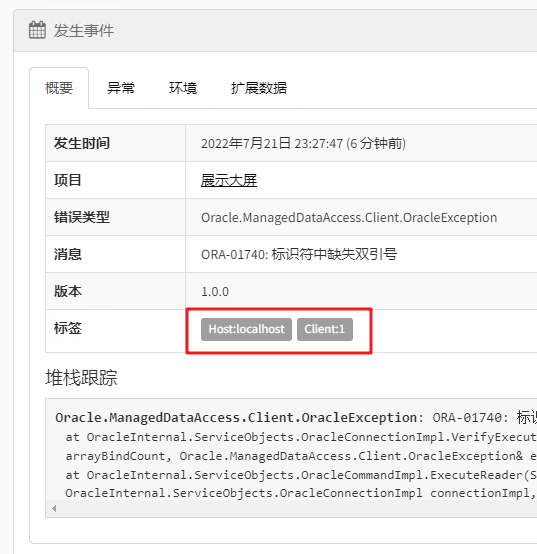
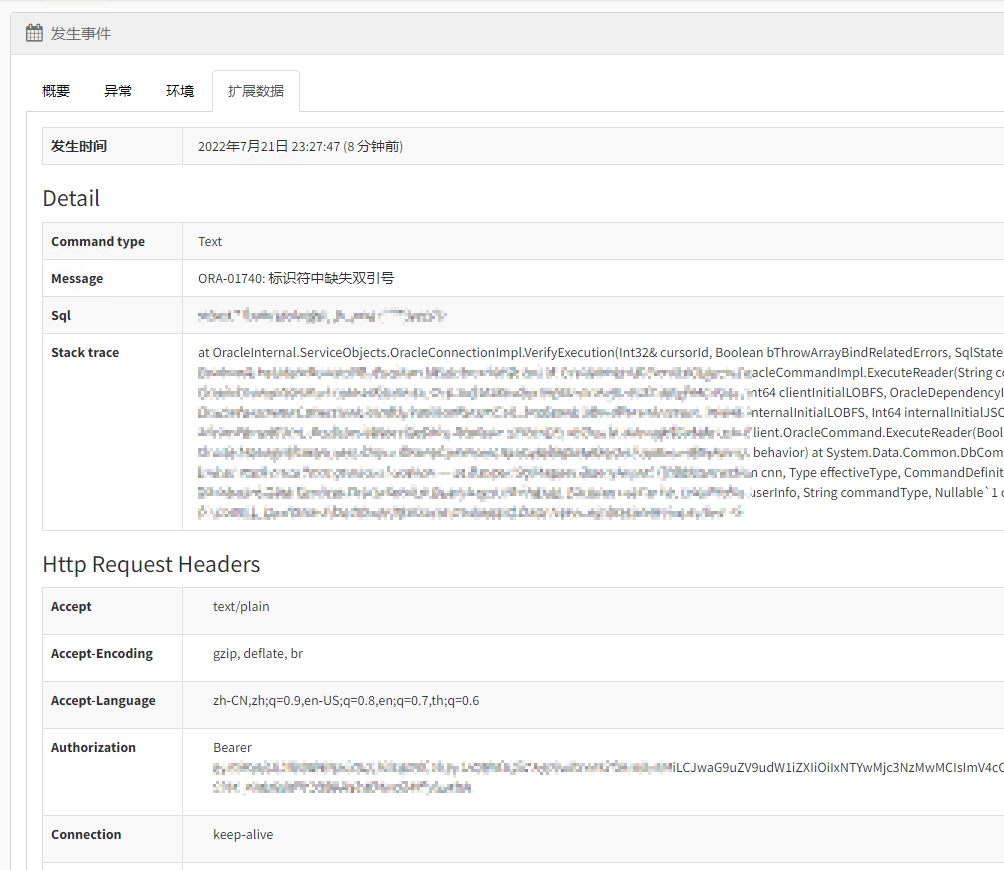
There's also AddObject, which is very convenient—you can pass an object in directly. Since C# has anonymous objects, it's even more convenient. You can see it on the "Extended Data" tab of the page; ExceptionLess will process the object into a table format, which is more intuitive
Submitting Error Information
ExceptionLess provides extension methods for the Exception object
You can catch an error and Submit it directly
try {}
catch (Exception ex) {
    ex.ToExceptionless().Submit();
}
Of course, you can also attach some extra information
ex.ToExceptionless().AddObject(...).Submit();
Integrating Logging Frameworks
Besides submitting events manually, it also provides ways to integrate with existing logging frameworks
Just install the corresponding NuGet package (I did a quick search; at least the support for Log4net and NLog should be fine)
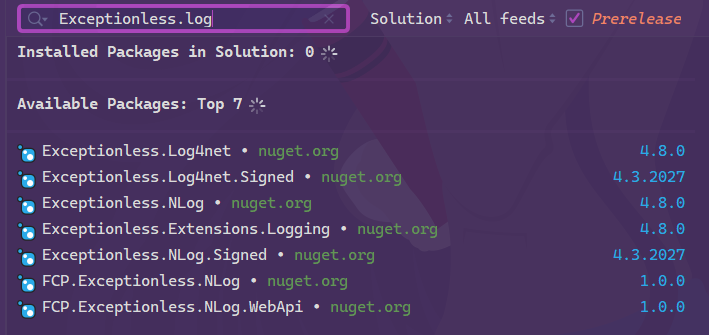
Taking integration with Log4net as an example, first install the NuGet package: Exceptionless.Log4net
Here's a simple Log4net configuration
<log4net>
<appender name="exceptionless" type="Exceptionless.Log4net.ExceptionlessAppender,Exceptionless.Log4net">
  <layout type="log4net.Layout.PatternLayout">
    <conversionPattern value="%-4timestamp [%thread] %-5level %logger %ndc - %message%newline"/>
  </layout>
</appender>

<root>
  <level value="DEBUG"/>
  <appender-ref ref="exceptionless"/>
</root>
</log4net>
Can it be used with other languages?
Although official support is only for the .NET platform and the frontend (JS calls, Vue 3), ExceptionLess provides a large number of HTTP APIs. If you want to use it in projects in other languages, you only need to call the corresponding APIs, and you can even wrap them yourself.
However, for projects in other languages, I recommend using Sentry (which I'll introduce in the next article). It supports more languages/frameworks. ExceptionLess's advantage is that it integrates better with .NET platforms such as AspNetCore, and the results pages are more intuitive~
That said, ExceptionLess's API documentation (Swagger) is at /docs/index.html. Visit it based on your deployment address and you'll see it; it basically has all the features you need.
References
-
Official Self Hosting Wiki: https://github.com/exceptionless/Exceptionless/wiki/Self-Hosting
-
Distributed logging in .NET Core microservices based on Exceptionless: https://www.cnblogs.com/edisonchou/p/exceptionless_foundation_and_quick_start.html
-
Tutorial on using the open-source logging framework Exceptionless: https://www.cnblogs.com/youring2/p/11546485.html
-
Solving the problem of Exceptionless 5.x being unable to send emails properly: https://www.cnblogs.com/edisonchou/p/solve_the_problem_of_exceptionless_on_cannot_send_emails.html
_EOF_
Installation, Configuration, and Usage of ExceptionLess
- 本文作者:
- 程序设计实验室
- 版权声明:
- 本博客所有文章除特别声明外,均采用 BY-NC-SA 许可协议。转载请注明出处!
相关文章
单点认证(SSO)方案调研总结
单点登录(SSO)是一种身份验证解决方案,可让用户通过一次性用户身份验证登录多个应用程序和网站。这意味着用户只需输入一次用户名和密码,即可访问所有相互信任的系统,而无需在每个系统中单独登录。
2025-01-14 · DevOps · 约 1 分钟
持续集成指南:GitHubAction 自动构建+部署AspNetCore项目
又一个无聊的自动化教程:GitHub Actions构建AspNetCore Docker镜像推送到阿里云,再用本地runner部署。简化workflow?谁在乎这些细节?代理配置太烦人。
2023-11-15 · DevOps · 约 1 分钟
重启sentry+升级ExceptionLess版本,docker排坑记录
折腾的过程真的是究极折磨,写这篇文章仿佛又被折磨了一遍……
2024-07-19 · DevOps · 约 1 分钟
极大提高项目部署的生产力!分享一个半自动化的CICD实现方案
半自动CICD?听起来就像是对完全自动化方案的妥协。用脚本一键发布,还真能省事,不过得忍受服务器内网访问等麻烦。国内环境下的CI/CD,果然还是得自己想办法。
2025-07-11 · DevOps · 约 1 分钟
讨论
共 0 条加载评论中…