

Modding the editor.md Component to Optimize ToC Rendering
Introduction My StarBlog currently uses the editor.md component to render markdown articles on the frontend, but the ToC (table of contents) automatically generated by this component isn't very pretty. I previously modded a tree component called BootStrap-TreeView, so I wanted to use that tree component to display the ToC. The original look was like this image-20221020112752560 The result after my modding image-20221020112914518 Let's analyze first First look
目录7 个章节
Introduction
My StarBlog currently uses the editor.md component to render markdown articles on the frontend, but the ToC (table of contents) automatically generated by this component isn't very pretty. I previously modded a tree component called BootStrap-TreeView, so I wanted to use that tree component to display the ToC.
The original look was like this
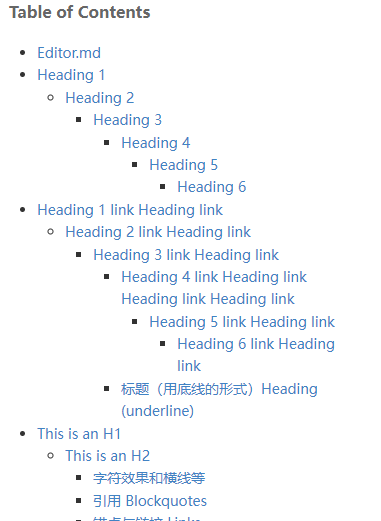
The result after my modding

Let's Analyze First
First, let's see how the editor.md component renders markdown, based on the official example.
First write a textarea and put the markdown in it
<div id="post-markdown-content" class="post-content">
    <textarea style="display:none;">@Model.Content</textarea>
</div>
Also need a div to hold the table of contents
<div id="post-toc-container"></div>
Then use js to call its render method
let editorMdView = editormd.markdownToHTML("post-markdown-content", {
    htmlDecode: true,
    tocm: true,    // Using [TOCM]
    tocContainer: "#toc-container", // 自定义 ToC 容器层
    emoji: true,
    taskList: true,
    tex: true,  // 默认不解析
    flowChart: true,  // 默认不解析
    sequenceDiagram: true,  // 默认不解析
});
This way both the article content and the table of contents appear.
My first thought was that since it can render the table of contents, there must be a ToC tree structure I could use.
But after console.logging in the console for quite a while, I still didn't see this tree structure.
The data returned by the editormd.markdownToHTML method is simply a div element object...
Time to Tinker
Speechless. No other choice, I had to look at the source code.
The entire component's source code is in a single js file, luckily the readability is decent~
I went straight to the definition of the markdownToHTML method, starting at line 3885, then found a variable markdownToC inside, which should be what we need. Printed it out to take a look, the approximate structure is as follows
[
    {"text": "Node1", "slug": "node1", "level": 2},
    {"text": "Django-Dev", "slug": "django-dev", "level": 3},
    {"text": "Java-Dev", "slug": "java-dev", "level": 3},
    {"text": "Spring-Dev", "slug": "spring-dev", "level": 3}
]
Not a tree structure, just an array
It simply traverses the entire markdown document, and the level field is determined by the heading type, that is, the number of #s.
And the Bootstrap-Treeview component I previously modded needs a tree-structured object passed in for rendering, so I need to process it further.
Processing the Tree Structure
At first I was stubborn and directly threw that blob generated by editor.md into recursion.
Didn't work out.
Later I changed my approach: first modify this array, adding id and pid to each item, then recursively generating the tree becomes much easier to handle~
First define the node object; this is the data structure that Bootstrap-Treeview needs
class TocNode {
    constructor(text, href, tags, nodes) {
        this.text = text
        this.href = href
        this.tags = tags
        this.nodes = nodes
    }
}
Then iterate through that markdownToC blob, set the pid of top-level nodes to -1, assign ids to each node sequentially starting from 0, then for each node look backwards for a node whose level is 1 less; that's the parent, set the pid, done~
let toc = markdownToC
for (let i = 0; i < toc.length; i++) {
    let item = toc[i]
    item.id = i
    item.pid = -1
    for (let j = i; j >= 0; j--) {
        let preItem = toc[j]
        if (item.level === preItem.level + 1) {
            item.pid = j
            break
        }
    }
}
Generating the tree structure is pretty simple, so I won't say much
function getNodes(pid = -1) {
    let nodes = toc.filter(item => item.pid === pid)
    if (nodes.length === 0) return null
    return nodes.map(item => new TocNode(item.text, `#${item.text}`, null, getNodes(item.id)))
}
Done~
Modding
Then, based on this approach, I forked a copy of the code and modded it.
The original version returns a div element directly after the markdownToHTML method finishes executing. I added two properties to the returned div element, then return the div:
div.markdownToc = markdownToC
div.markdownTocTree = editormd.tocListToTree(markdownToC)
return div
This way it's convenient to integrate the Bootstrap-Treeview component when using it.
Usage
First install the NPM packages I published
// 魔改的 editor.md 组件
npm i editor.md-ext
// 魔改的树形列表组件
npm i bootstrap5-treeview
Include CSS on the page
<link rel="stylesheet" href="~/lib/editormd/css/editormd.preview.css">
Include JS
<!-- jQuery -->
<script src="~/lib/jquery/dist/jquery.min.js"></script>

<!-- 树形列表组件 -->
<script src="~/js/bootstrap-treeview.js"></script>

<!-- editor.md 需要的依赖 -->
<script src="~/lib/editormd/lib/marked.min.js"></script>
<script src="~/lib/editormd/lib/prettify.min.js"></script>
<script src="~/lib/editormd/lib/raphael.min.js"></script>
<script src="~/lib/editormd/lib/underscore.min.js"></script>
<script src="~/lib/editormd/lib/sequence-diagram.min.js"></script>
<script src="~/lib/editormd/lib/flowchart.min.js"></script>
<script src="~/lib/editormd/lib/jquery.flowchart.min.js"></script>
<script src="~/lib/editormd/editormd.js"></script>
Prepare a div as the ToC container
<div id="post-toc-container"></div>
Prepare a div to hold the article content, and put the Markdown content into this textarea.
<div id="post-markdown-content" class="post-content">
    <textarea style="display:none;">@Model.Content</textarea>
</div>
Write a piece of JS code to enable rendering
$(function () {
    // 渲染文章
    let editorMdView = editormd.markdownToHTML("post-markdown-content", {
        htmlDecode: true,
        tocm: true,    // Using [TOCM]
        emoji: true,
        taskList: true,
        tex: true,  // 默认不解析
        flowChart: true,  // 默认不解析
        sequenceDiagram: true,  // 默认不解析
    });

    // 渲染目录
    $('#post-toc-container').treeview({
        data: editorMdView.markdownTocTree,
        levels: 2,
        enableLinks: true,
        highlightSelected: false,
        showTags: true,
    })
})
For usage of the tree list component, you can check my GitHub: https://github.com/Deali-Axy/bootstrap5-treeview
Related Links
_EOF_
Modding the editor.md Component to Optimize ToC Rendering
- 本文作者:
- 程序设计实验室
- 版权声明:
- 本博客所有文章除特别声明外,均采用 BY-NC-SA 许可协议。转载请注明出处!
相关文章
开始开发一个新博客了,复古风Metro风格,顺便diss一下js
emmm 我原本的博客是用wordpress搭建的,当年七牛云还是免费时用它做的CDN,但是现在收费了,如果维持目前的博客流量的话每个月都要支付不少费用,于是只好把七牛云给停了= =,这也导致我博客里面很多图片都访问不了,页面布局也出问题了,不想折腾了,而且wordpress用起来总觉得不顺手,还是自己做一个吧~ 计划 最近刚好在学SpringBoot啥的,本来想用springboot搭建一个博客
2022-07-18 · Web前端 · 约 1 分钟
在HTML中引入React和JSX
Vue 可以非常方便地与 Pure HTML 结合,代替 jQuery 的功能,有一次遇到类似的场景时,我就想 React 能不能也以这种方式接入 HTML 网页,从而提高开发效率。 结果当然是可以的,只不过在 HTML 里直接 JSX 似乎会降低一些性能… 凑合用吧
2023-07-16 · Web前端 · 约 1 分钟
在TypeScript项目中搭配Axios封装后端接口调用
封装axios?TypeScript下不过是加些类型声明,真当创新了。拦截器自动加token和401跳转,标准操作而已。统一返回值?又是后端那套,麻烦。
2024-01-24 · Web前端 · 约 1 分钟
主流 nodejs 包管理器 pnpm vs bun vs npm vs yarn 简单横评
pnpm还真是会玩空间魔术?单项目里它领先优势就这么点?Node.js 20把npm喂肥了,现在谁还敢说npm是废物?这测试结果真是让人摸不着头脑。
2025-08-27 · Web前端 · 约 1 分钟
讨论
共 0 条加载评论中…