

Dreaming Home Decoration Platform Development Notes, Hands-on ASP.NET Core Practice
DreamingHome Dreaming Home 梦想家, a home decoration platform EF Core Concepts Model: data model, an ordinary C# class DbContext: the bridge for communicating with the database; one database corresponds to one DbContext Registering EF Core services services.AddEntityFrameworkSqlite() .AddDbContextMainContext(options = option
目录15 个章节
DreamingHome
Dreaming Home 梦想家, a home decoration platform
EF Core Concepts
Model: data model, an ordinary C# classDbContext: the bridge for communicating with the database; one database corresponds to oneDbContext
Registering EF Core Services
services.AddEntityFrameworkSqlite()
    .AddDbContext<MainContext>(options => options.UseSqlite(Configuration["database:connection"]));
Database Context DbContext
public class MainContext : DbContext
{
    public MainContext() { }
    public MainContext(DbContextOptions<MainContext> options) : base(options) { }

    protected override void OnConfiguring(DbContextOptionsBuilder optionsBuilder)
    {
        var builder = new ConfigurationBuilder().SetBasePath(Directory.GetCurrentDirectory()).AddJsonFile("appsettings.json");
        var configuration = builder.Build();
        optionsBuilder.UseSqlite(configuration["database:connection"]);
    }
}
Here I ran into a very strange problem: just registering EF Core in Startup.cs simply didn't work. At runtime it kept telling me No database provider. I had no choice but to override OnConfiguring again inside DbContext and configure the database all over again = =...
Database Migrations
Create a database migration:
dotnet ef migrations add InitialCreate -v
Check status:
dotnet ef migrations list
Apply the migration to update the database:
dotnet ef database update -v
Adding Swagger Support
Install Dependencies
Install-Package Swashbuckle.AspNetCore
Configure Middleware
using Swashbuckle.AspNetCore.Swagger;

// 在Startup.ConfigureServices中配置服务
services.AddSwaggerGen(c => { c.SwaggerDoc("v1", new OpenApiInfo {Title = "My Api", Version = "v1"}); });

// 在Startup.Configure中配置中间件
app.UseSwagger();
app.UseSwaggerUI(c => { c.SwaggerEndpoint("/swagger/v1/swagger.json", "My API V1"); });
Set the application's root path to Swagger UI, as follows:
app.UseSwaggerUI(c =>
{
    c.SwaggerEndpoint("/swagger/v1/swagger.json", "My API V1");
    c.RoutePrefix = string.Empty;
});
Start and Test
Start the application and navigate to http://localhost:<port>/swagger/v1/swagger.json. The generated document describing the endpoints is displayed in the following JSON format.
You can find Swagger UI at http://localhost:<port>/swagger. Browse the API documentation through Swagger UI.
Notes
- Every
Controllermethod needs to be annotated with a specificHttpmethod, otherwise an error will be thrown Swaggerwill automatically read the C# documentation of each API function, but only if an XML documentation file is generated
Customization and Extension
Modify the previously configured Swagger service:
services.AddSwaggerGen(c =>
{
    c.SwaggerDoc("v1",
        info: new OpenApiInfo
        {
            Version = "v1",
            Title = "Dreaming Home 智能家装平台",
            Description = "智能家装平台 Api 文档",
            TermsOfService = new Uri("http://blog.deali.cn"),
            Contact = new OpenApiContact
            {
                Name = "DealiAxy",
                Email = "dealiaxy@gmail.com",
                Url = new Uri("https://zhuanlan.zhihu.com/deali"),
            },
            License = new OpenApiLicense
            {
                Name = "GNU GENERAL PUBLIC LICENSE Version 2",
                Url = new Uri("https://www.gnu.org/licenses/old-licenses/gpl-2.0.html"),
            }
         });
});
To display the XML documentation of the APIs, you need to generate it first, then configure it inside services.AddSwaggerGen.
// 为 Swagger JSON and UI设置xml文档注释路径
//获取应用程序所在目录(绝对,不受工作目录影响,建议采用此方法获取路径)
var basePath = Path.GetDirectoryName(typeof(Program).Assembly.Location);
var xmlPath = Path.Combine(basePath, "Doc", "DreamingHome.xml");
c.IncludeXmlComments(xmlPath);
Recap
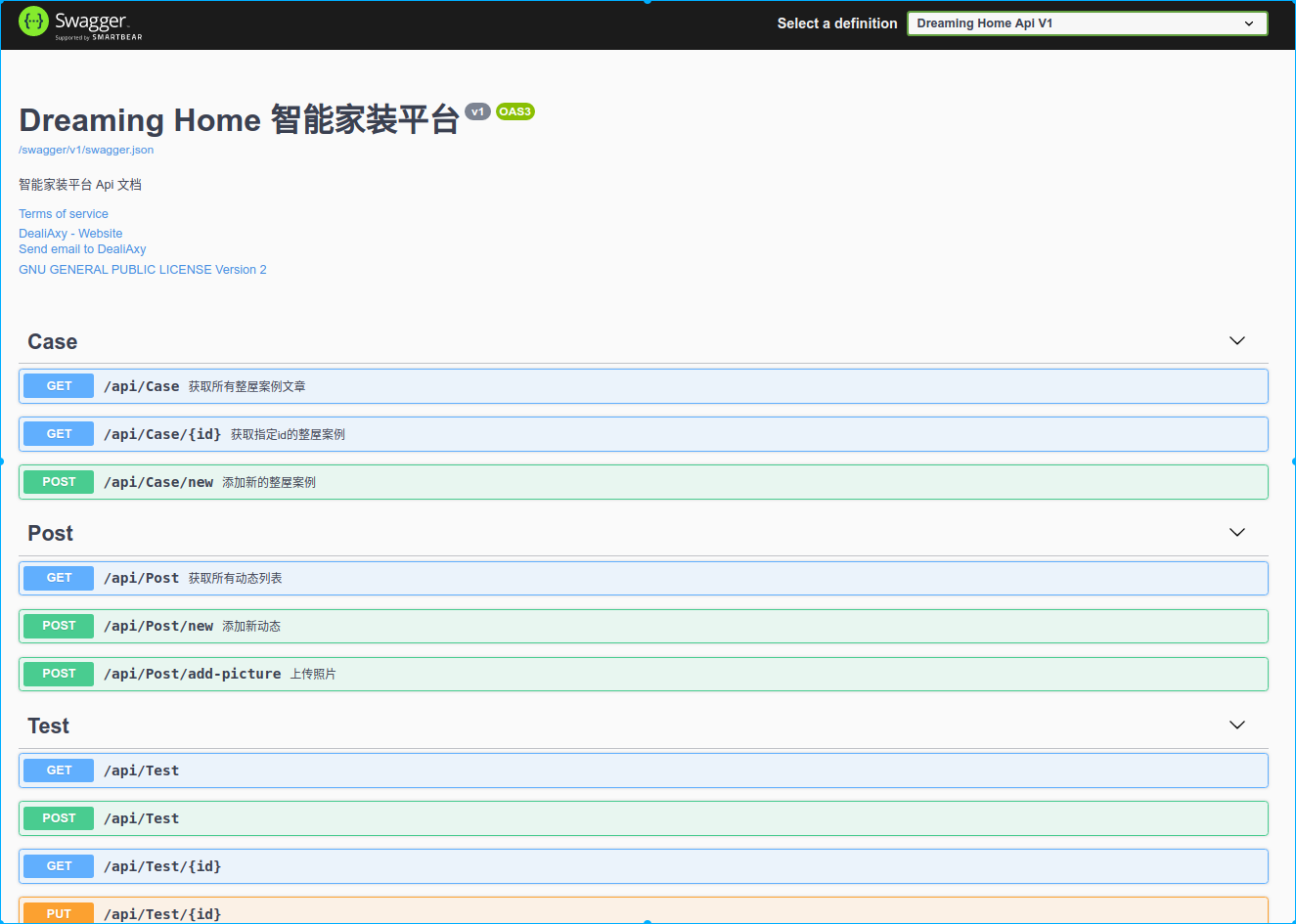
From the operations above, we can conclude that Swagger UI displays the inner text of the <summary> element in the comment code above as the API comments!
Of course, you can also add a remarks element to the Get action method documentation. It can supplement the information specified in the <summary> element and provide a more reliable Swagger UI. The content of the <remarks> element can include text, JSON, or XML. The code is as follows:
 /// <summary>
 /// 这是一个带参数的get请求
 /// </summary>
 /// <remarks>
 /// 例子:
 /// Get api/Values/1
 /// </remarks>
 /// <param name="id">主键</param>
 /// <returns>测试字符串</returns>
 [HttpGet("{id}")]
 public ActionResult<string> Get(int id)
 {
       return $"你请求的 id 是 {id}";
 }
Describing Response Types
Excerpted from: https://www.cnblogs.com/yanbigfeg/p/9232844.html
What API consumers care about most is the return content and response types of the API. Below is a simple example of the 201 and 400 status codes:
We need to add the following to our method:
[ProducesResponseType(201)]
[ProducesResponseType(400)]
Then add the corresponding status descriptions: return a value string if id is empty
The final code should look like this:
 /// <summary>
 /// 这是一个带参数的get请求
 /// </summary>
 /// <remarks>
 /// 例子:
 /// Get api/Values/1
 /// </remarks>
 /// <param name="id">主键</param>
 /// <returns>测试字符串</returns>
 /// <response code="201">返回value字符串</response>
/// <response code="400">如果id为空</response>
 // GET api/values/2
[HttpGet("{id}")]
[ProducesResponseType(201)]
[ProducesResponseType(400)]
public ActionResult<string> Get(int id)
{
     return $"你请求的 id 是 {id}";
}
Running Result
Welcome to Discuss
For questions, please leave a message on the WeChat official account backend. I'll reply to every message~
- WeChat Official Account: 画星星高手
- Live coding stream: https://live.bilibili.com/11883038
- Zhihu: https://www.zhihu.com/people/dealiaxy
- Jianshu: https://www.jianshu.com/u/965b95853b9f
_EOF_
Dreaming Home Decoration Platform Development Notes, Hands-on ASP.NET Core Practice
- 本文作者:
- 程序设计实验室
- 版权声明:
- 本博客所有文章除特别声明外,均采用 BY-NC-SA 许可协议。转载请注明出处!
相关文章
跨平台框架AspNetCore开发实践杂谈
前言 最近边学边做,初步上手了AspNetCore的开发,对MVC这套熟悉了一下,因为之前没有拿来做过独立项目,都是和别人合作开发,所以前后端分离,我都只做WebApi,而且还是很小的项目(课设级别),生产环境用最多的应该是Python的Django框架,这次我把一个之前做的Django项目用AspNetCore重写一遍,性能提升了不少,C#的性能真不是盖的,AspNetCore这个框架的性能也很
2022-08-28 · AspNetCore · 约 1 分钟
Blazor全栈是个陷阱
Blazor全栈?别逗了,这玩意儿就是陷阱。生态弱得可怜,AI都不给力,文档还老变。真以为能脱离前端?醒醒吧,小demo可以,真业务?省省吧。
2025-09-17 · AspNetCore · 约 1 分钟
Python实现给图片加水印功能
前言 最近忙得连轴转,很久没更新博客了,代码倒是没啥写,积累了好些东西,接下来一有时间就来更新吧~ 本文记录使用Python实现给图片添加水印的功能实现过程 先看效果 把公众号的封面作为素材 原图是这样的 codelab 加个水印的效果 temp 实现代码 主要实现是参考GitHub上一个项目的:https://github.com/2Dou/watermarker 用到了Pillow库,使用前请
2022-09-29 · Python · 约 1 分钟
特朗普真得新冠了?
美国当地时间10月1日,懂王发推说中招新冠了… 然后国内媒体集体沸腾,微博热搜都直接安排上了 这就赶在我们国庆节一起庆祝了呗~ 不过吃瓜的同时,作为键政小能手,我们不能盲目跟风,得理性分析一波:马上就到美国大选了,按理说这时候再难也要坚持过去啊,不然民众会说「你个新冠病人跟人凑什么热闹来竞选总统啊,赶紧回家养病」,但这时懂王突然高调宣布感染,要干哈啊?这时候不阴谋论一下都对不起这些年逛知乎政治历史
2022-11-07 · 2020 · 约 1 分钟
讨论
共 0 条加载评论中…