

Developing a Blog Project with .NetCore, StarBlog - (28) Developing APIs for Blogroll Links
The previously introduced blogroll feature only implemented the display and management interfaces for blogrolls. What's still missing are the blogroll application, review management, and notifications—this time, we'll complete this part. As for the Model and such, everything was covered in the previous article, so this one will directly focus on completing the logic code~
目录5 个章节
Preface
The previously introduced friend links feature only implemented the display and management interfaces for friend links.
It was still missing the friend link application, review management, and notifications. Now, this part of the functionality is being completed.
The Models and other aspects were covered in the previous article, so this one will directly complete the logical code~
For details, see: Developing a Blog Project with .NetCore StarBlog - (13) Adding Friend Links Functionality
Preview the Effect
Friendship Link Application Page
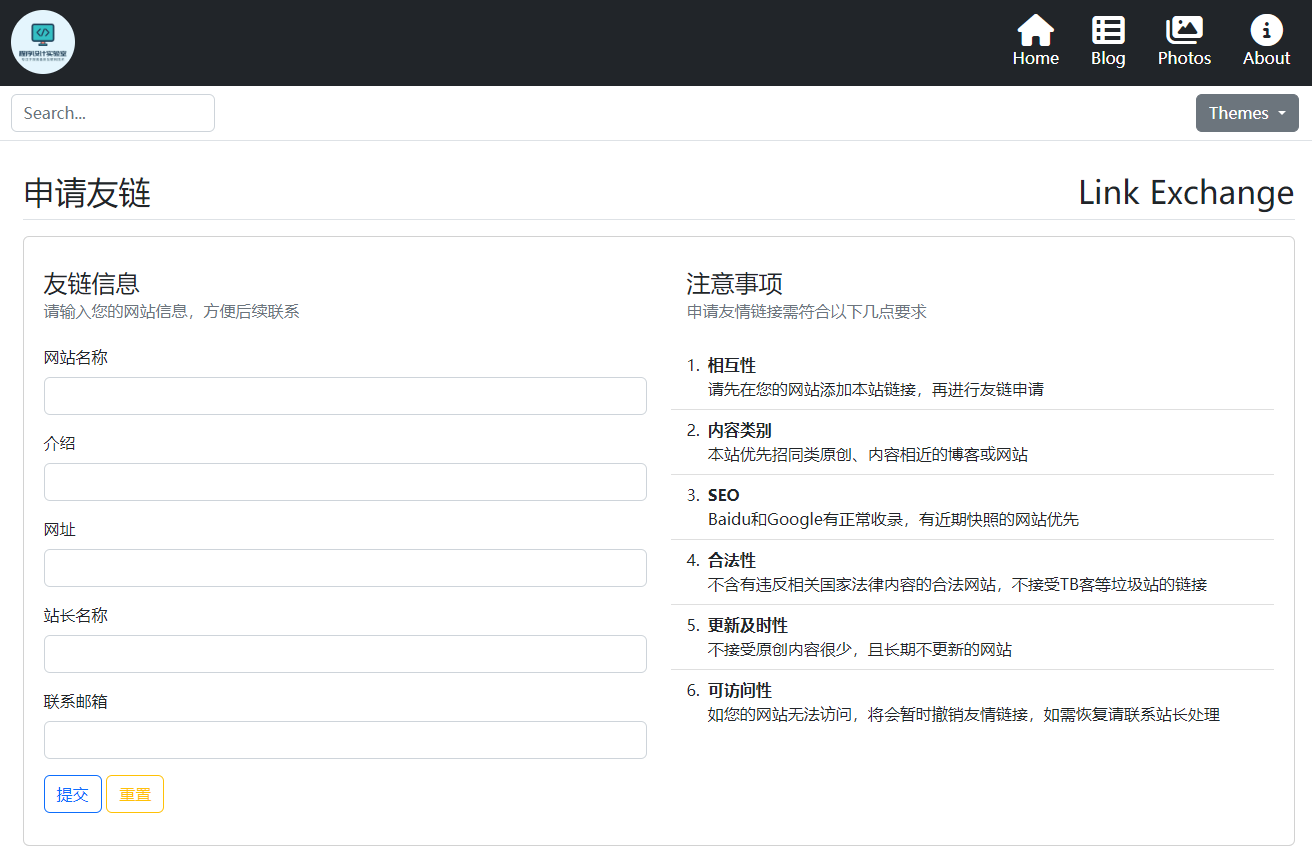
Email Notification
Implement a simple notification feature that sends an email to the applicant's email address after a friend link application is approved.
Using the MimeKit library, you can conveniently implement email sending functionality.
For easier use, I encapsulated an EmailUtils class and placed it in StarBlog.Share.Utils.
public class EmailAccountConfig {
  public string Host { get; set; }
  public int Port { get; set; }
  public string FromUsername { get; set; }
  public string FromPassword { get; set; }
  public string FromAddress { get; set; }
}

public static class EmailUtils {
  public static async Task<MessageSentEventArgs> SendEmailAsync(
    EmailAccountConfig config,
    string subject,
    string htmlBody,
    string toName,
    string toAddress,
    string fromName = "StarBlog"
  ) {
    return await SendEmailAsync(
      config,
      new MimeMessage {
        Subject = subject,
        From = {new MailboxAddress(fromName, config.FromAddress)},
        To = {new MailboxAddress(toName, toAddress)},
        Body = new BodyBuilder {
          HtmlBody = htmlBody
        }.ToMessageBody()
      }
    );
  }

  public static async Task<MessageSentEventArgs> SendEmailAsync(EmailAccountConfig config, MimeMessage message,
                                                                HttpProxyClient? proxyClient = null) {
    MessageSentEventArgs result = null;
    using var client = new SmtpClient {
      ServerCertificateValidationCallback = (s, c, h, e) => true,
    };
    if (proxyClient != null) {
      client.ProxyClient = proxyClient;
    }

    client.AuthenticationMechanisms.Remove("XOAUTH2");
    client.MessageSent += (sender, args) => { result = args; };

    await client.ConnectAsync(config.Host, config.Port, SecureSocketOptions.Auto);
    await client.AuthenticateAsync(config.FromUsername, config.FromPassword);
    await client.SendAsync(message);
    await client.DisconnectAsync(true);

    return result;
  }
}
It's straightforward to use: simply pass in the email configuration, email subject, content, and recipient address.
For specific details, you can continue looking at the code below.
Friend Link Application Management
The logic for managing friend link application records also includes CRUD operations. The code for this part is the same as above, so it is omitted here.
The constructor uses dependency injection to read email configuration from the configuration system. You can add the email configuration to appsettings.json yourself. Here is an example configuration for an Outlook mailbox:
"EmailAccountConfig": {
  "Host": "smtp-mail.outlook.com",
  "Port": 587,
  "FromUsername": "邮箱地址@outlook.com",
  "FromPassword": "邮箱密码",
  "FromAddress": "邮箱地址@outlook.com"
}
Below is the code for the service.
Here, only the code for setting whether to verify and sending email notifications is provided.
public class LinkExchangeService {
  private readonly IBaseRepository<LinkExchange> _repo;
  private readonly LinkService _linkService;
  private readonly EmailAccountConfig _emailAccountConfig;

  public LinkExchangeService(IBaseRepository<LinkExchange> repo, LinkService linkService, IOptions<EmailAccountConfig> options) {
    _repo = repo;
    _linkService = linkService;
    _emailAccountConfig = options.Value;
  }

  public async Task<LinkExchange?> SetVerifyStatus(int id, bool status, string? reason = null) {
    var item = await GetById(id);
    if (item == null) return null;

    item.Verified = status;
    item.Reason = reason;
    await _repo.UpdateAsync(item);


    var link = await _linkService.GetByName(item.Name);
    if (status) {
      await SendEmailOnAccept(item);
      if (link == null) {
        await _linkService.AddOrUpdate(new Link {
          Name = item.Name,
          Description = item.Description,
          Url = item.Url,
          Visible = true
        });
      }
      else {
        await _linkService.SetVisibility(link.Id, true);
      }
    }
    else {
      await SendEmailOnReject(item);
      if (link != null) await _linkService.DeleteById(link.Id);
    }

    return await GetById(id);
  }

  // This article only includes the code for acceptance; other scenarios are similar
  public async Task SendEmailOnAccept(LinkExchange item) {
    const string starblogLink = "<a href=\"https://deali.cn\">StarBlog</a>";
    var sb = new StringBuilder();
    sb.AppendLine($"<p>Hello, your friend link application has been approved! Thank you for your support. Welcome to visit each other's sites~</p>");
    sb.AppendLine($"<br>");
    sb.AppendLine($"<p>Below is the information for your friend link application:</p>");
    sb.AppendLine($"<p>Website Name: {item.Name}</p>");
    sb.AppendLine($"<p>Description: {item.Description}</p>");
    sb.AppendLine($"<p>URL: {item.Url}</p>");
    sb.AppendLine($"<p>Webmaster: {item.WebMaster}</p>");
    sb.AppendLine($"<p>Additional Information: {item.Reason}</p>");
    sb.AppendLine($"<br>");
    sb.AppendLine($"<br>");
    sb.AppendLine($"<br>");
    sb.AppendLine($"<p>This message was automatically sent by {starblogLink}. No reply is required.</p>");
    await EmailUtils.SendEmailAsync(
      _emailAccountConfig,
      "[StarBlog] Friend Link Application Result Feedback",
      sb.ToString(),
      item.WebMaster,
      item.Email
    );
  }
}
In the method for setting verification status, the following actions are implemented:
- Setting an application to verified automatically adds the link from that application to the friend links.
- Setting an application to unverified automatically deletes the corresponding friend link (if it exists).
The rest is similar to the friend links feature mentioned above.
After completing the code, don't forget to register the services.
builder.Services.AddScoped<LinkExchangeService>();
builder.Services.AddScoped<LinkService>();
Blogroll Application
The display feature is complete; next, we need to develop the friend link application feature to make it easier for passing site admins to apply for link exchanges.
Add the StarBlog.Web/ViewModels/LinkExchange/LinkExchangeAddViewModel.cs file.
We use the form validation functionality provided by the AspNetCore MVC framework.
public class LinkExchangeAddViewModel {
  /// <summary>
  /// Website Name
  /// </summary>
  [Display(Name = "Website Name")]
  [Required(ErrorMessage = "The Website Name field is required.")]
  public string Name { get; set; }
}
/// <summary> /// Introduction /// </summary> [Display(Name = "Introduction")] public string? Description { get; set; }
/// <summary>
/// URL
/// </summary>
[Display(Name = "URL")]
[Required(ErrorMessage = "URL is required")]
[DataType(DataType.Url)]
public string Url { get; set; }
/// <summary> /// WebMaster /// </summary> [Display(Name = "WebMaster Name")] [Required(ErrorMessage = "WebMaster Name is required")] public string WebMaster { get; set; }
  /// <summary>
  /// Contact Email
  /// </summary>
  [Display(Name = "Contact Email")]
  [Required(ErrorMessage = "The Contact Email field is required")]
  [DataType(DataType.EmailAddress)]
  public string Email { get; set; }
}
Next, let's write the page StarBlog.Web/Views/LinkExchange/Add.cshtml
@model StarBlog.Web.ViewModels.LinkExchange.LinkExchangeAddViewModel
@{
ViewData["Title"] = "Apply for Friend Link (Link Exchange)";
}
Lastly, add the Controller by creating the file StarBlog.Web/Controllers/LinkExchangeController.cs.
The code is as follows
public class LinkExchangeController : Controller {
  private readonly ILogger<LinkExchangeController> _logger;
  private readonly LinkExchangeService _service;
  private readonly IMapper _mapper;
  private readonly Messages _messages;
  public LinkExchangeController(
    ILogger<LinkExchangeController> logger, LinkExchangeService service, IMapper mapper,
    Messages messages) {
    _logger = logger;
    _service = service;
    _mapper = mapper;
    _messages = messages;
  }
The content you provided is entirely code with no Chinese text to translate. Per the rules, content inside code blocks should not be translated.
  [HttpGet]
  public IActionResult Add() {
    return View();
  }
[HttpPost] public async Task<IActionResult> Add(LinkExchangeAddViewModel vm) { if (!ModelState.IsValid) return View();
if (await _service.HasUrl(vm.Url)) { _messages.Error("A friend link application with the same URL has already been submitted!"); return View(); }
var item = _mapper.Map<LinkExchange>(vm);
item = await _service.AddOrUpdate(item);
    // Send email notification
    await _service.SendEmailOnAdd(item);
_messages.Info("Friend link request has been submitted and is being processed. Please check your email promptly for updates~"); return RedirectToAction("Index", "Home"); } }
Got it~
## Everything is Ready

Welcome, Webmaster Gurus, to exchange friend links~!
_EOF_
Developing a Blog Project with .NetCore, StarBlog - (28) Developing APIs for Blogroll Links
- 本文作者:
- 程序设计实验室
- 版权声明:
- 本博客所有文章除特别声明外,均采用 BY-NC-SA 许可协议。转载请注明出处!
相关文章
StarBlog博客开发笔记(14):实现主题切换功能
系列文章 基于.NetCore开发博客项目 StarBlog - (1) 为什么需要自己写一个博客? 基于.NetCore开发博客项目 StarBlog - (2) 环境准备和创建项目 基于.NetCore开发博客项目 StarBlog - (3) 模型设计 基于.NetCore开发博客项目 StarBlog - (4) markdown博客批量导入 基于.NetCore开发博客项目 StarBl
2022-07-03 · StarBlog博客开发笔记 · 约 1 分钟
StarBlog博客开发笔记(17):自动下载文章里的外部图片
系列文章 基于.NetCore开发博客项目 StarBlog - (1) 为什么需要自己写一个博客? 基于.NetCore开发博客项目 StarBlog - (2) 环境准备和创建项目 基于.NetCore开发博客项目 StarBlog - (3) 模型设计 基于.NetCore开发博客项目 StarBlog - (4) markdown博客批量导入 基于.NetCore开发博客项目 StarBl
2022-08-14 · StarBlog博客开发笔记 · 约 1 分钟
StarBlog开源博客项目 - 2023年底更新内容一览
前台UI勉强能看,后台总算不那么辣眼睛了。数据库分页改对了,不然性能差得离谱。新增slug检查?哦,终于知道避免重复了。
2023-12-16 · StarBlog博客开发笔记 · 约 1 分钟
StarBlog博客开发笔记(19):Markdown渲染方案探索
前言 笔者认为,一个博客网站,最核心的是阅读体验。 在开发StarBlog的过程中,最耗时的恰恰也是文章的展示部分功能。 最开始还没研究出来如何很好的使用后端渲染,所以只能先用Editor.md组件做前端渲染,过渡一下。前端渲染我是不满意的,因为性能较差,页面加载出来还会闪一下,有割裂感,影响体验。 现在我已经做出了比较完善的后端渲染方案,前端渲染就可以直接退休了。本文介绍StarBlog博客开发
2022-10-28 · StarBlog博客开发笔记 · 约 1 分钟
讨论
共 0 条加载评论中…