

Trying Out Machine Learning with .NET Core, Getting the ML-Net Framework Running
Introduction to ML.NET Official website: https://dotnet.microsoft.com/apps/machinelearning-ai/ml-dotnet Official introduction: The ML.NET command line interface (CLI), provides tools for building machine learning models with ML.NET. ML.NET is for .NET
目录7 个章节
Introduction to ML.NET
Official website: https://dotnet.microsoft.com/apps/machinelearning-ai/ml-dotnet
Official introduction: The ML.NET command line interface (CLI), provides tools for building machine learning models with ML.NET.
ML.NET is an open-source, cross-platform machine learning framework for .NET developers. ML.NET also includes Model Builder (a simple UI tool) and the CLI, making it very easy to build custom machine learning (ML) models using automated machine learning (AutoML).
First, install .NET Core; this is a must~
Installing ML.NET
dotnet tool install -g mlnet
Downloading the Training Set
The following is user comment data from Wikipedia; please download it yourself
After downloading, name it wikipedia-data.tsv~
Training the Model
mlnet auto-train --task binary-classification --dataset "wikipedia-data.tsv" --label-column-index 0 --has-header true --max-exploration-time 10
If training succeeds, the results will be displayed as follows:
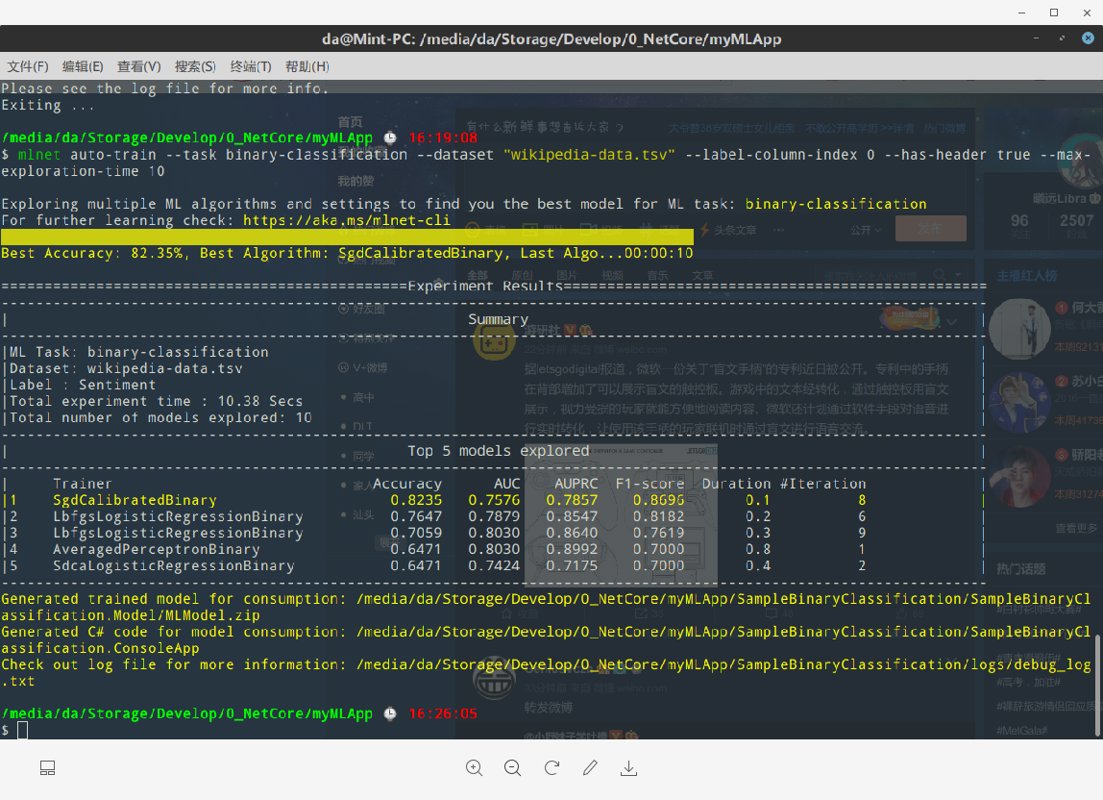
And it will generate code in the directory
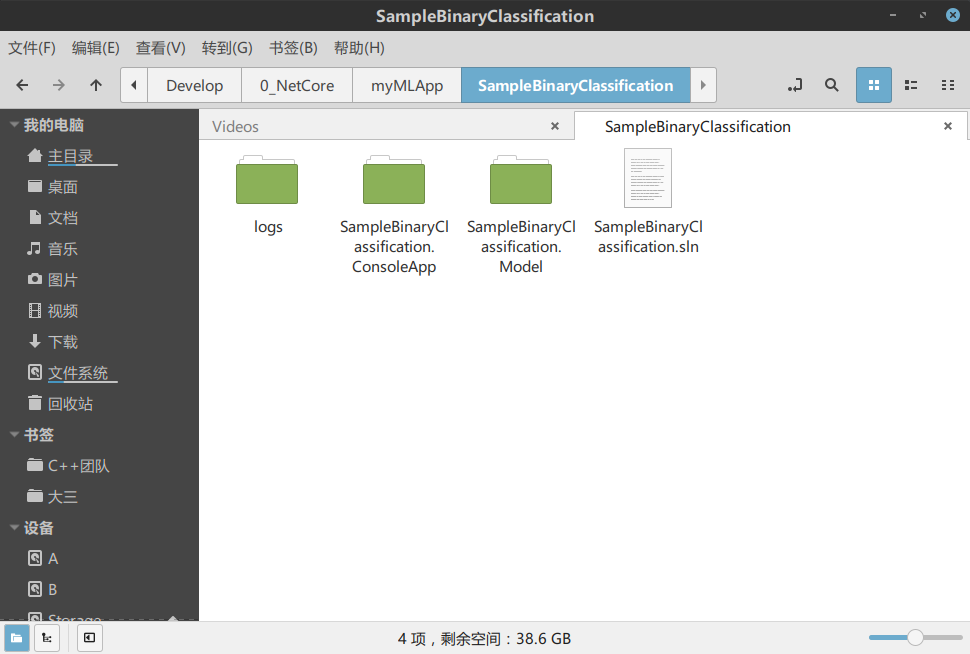
Model Code
Let's take a look at the model code automatically generated by ML.NET:
ModelInput.cs
using Microsoft.ML.Data;

namespace SampleBinaryClassification.Model.DataModels
{
    public class ModelInput
    {
        [ColumnName("Sentiment"), LoadColumn(0)]
        public bool Sentiment { get; set; }

        [ColumnName("SentimentText"), LoadColumn(1)]
        public string SentimentText { get; set; }
    }
}
ModelOutput.cs
using System;
using Microsoft.ML.Data;

namespace SampleBinaryClassification.Model.DataModels
{
    public class ModelOutput
    {
        // ColumnName attribute is used to change the column name from
        // its default value, which is the name of the field.
        [ColumnName("PredictedLabel")]
        public bool Prediction { get; set; }

        public float Score { get; set; }
    }
}
Leaving a Cliffhanger
I'll leave a cliffhanger for now and continue researching tomorrow.
References
_EOF_
Trying Out Machine Learning with .NET Core, Getting the ML-Net Framework Running
- 本文作者:
- 程序设计实验室
- 版权声明:
- 本博客所有文章除特别声明外,均采用 BY-NC-SA 许可协议。转载请注明出处!
相关文章
C#学习(二)匿名方法和委托的多种使用方式
前言 上次简单介绍了委托的概念和使用,今天继续,并且引入匿名方法的概念,匿名方法在很多语言里面都有,比如Python、js、java8,尤其js,前端小伙伴可能深受js回调地狱之苦,这里面匿名方法功不可没。 js的匿名方法就像这样: 这还没用lambda,因为我想下篇再介绍lambda。 document.querySelector('.btn').onclick = function () {
2021-12-18 · C# · 约 1 分钟
C#实现解析Markdown文档并处理图片链接
前言 又是好久没写博客了 其实也不是没写,是最近在「做一个博客」,从2月21日开始,大概一个多星期的时间,疯狂刷进度,边写代码边写了一整系列的博客开发笔记,目前为止已经写了16篇了,然后上3月之后工作有点忙~~加上有点沉迷原神~~,然后进度就暂时慢下来了 事实证明做什么事情一旦停下来就会产生惰性,于是停了这么久,我终于下定决心继续更新! 这次开发的博客用的是C#语言,搭配.netcore技术栈;前
2022-03-19 · C# · 约 1 分钟
上位机开发之假装有设备,使用 C# 模拟串口设备
用C#模拟串口设备?这年头还学这种过时技术?不过行吧,至少比某些只会玩AI的卷王强点。搞搞清楚协议文档,装个破com0com驱动,写点死板代码应付下调试需求。至于什么物联网平台、工业控制?那是别人该干的事,我随便搞搞就够了。
2025-08-26 · C# · 约 1 分钟
C#爬虫:CatSpider#-开发笔记
前言 (PS:我这里用了#号代替了Sharp这个单词) CatSpider是毕设里的数据采集模块,本来爬虫类的应用肯定使用python来开发嘛,不过用request_html做解析的时候,python的动态类型真的把我恶心到了,而且感觉这个库也不是很成熟,html5lib也不好用,也没心思去深入了,之前看到有大佬用.net core平台做爬虫,于是我也来试试,没想到效果贼好,特别是配合LinqPa
2022-05-27 · C# · 约 1 分钟
讨论
共 0 条加载评论中…