

Trying Out Machine Learning with .NET Core, Getting the ML-Net Framework Running
Introduction to ML.NET Official website: https://dotnet.microsoft.com/apps/machinelearning-ai/ml-dotnet Official introduction: The ML.NET command line interface (CLI), provides tools for building machine learning models with ML.NET. ML.NET is for .NET
目录7 个章节
Introduction to ML.NET
Official website: https://dotnet.microsoft.com/apps/machinelearning-ai/ml-dotnet
Official introduction: The ML.NET command line interface (CLI), provides tools for building machine learning models with ML.NET.
ML.NET is an open-source, cross-platform machine learning framework for .NET developers. ML.NET also includes Model Builder (a simple UI tool) and the CLI, making it very easy to build custom machine learning (ML) models using automated machine learning (AutoML).
First, install .NET Core; this is a must~
Installing ML.NET
dotnet tool install -g mlnet
Downloading the Training Set
The following is user comment data from Wikipedia; please download it yourself
After downloading, name it wikipedia-data.tsv~
Training the Model
mlnet auto-train --task binary-classification --dataset "wikipedia-data.tsv" --label-column-index 0 --has-header true --max-exploration-time 10
If training succeeds, the results will be displayed as follows:
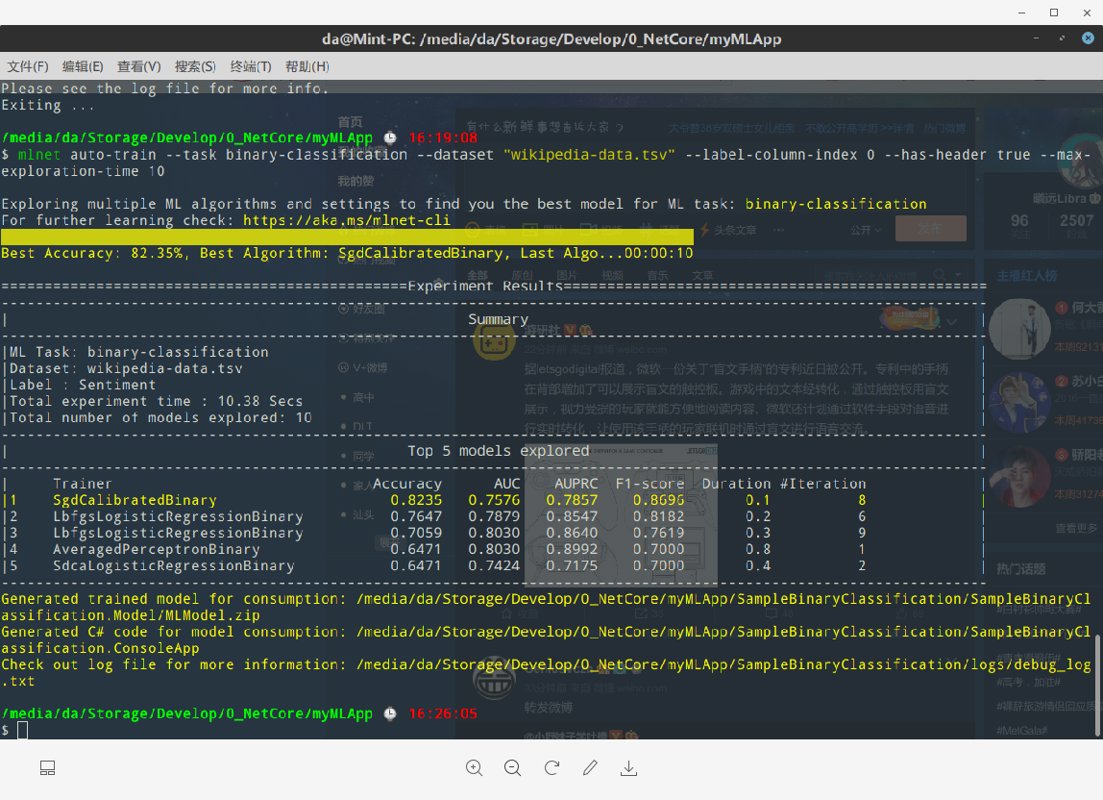
And it will generate code in the directory
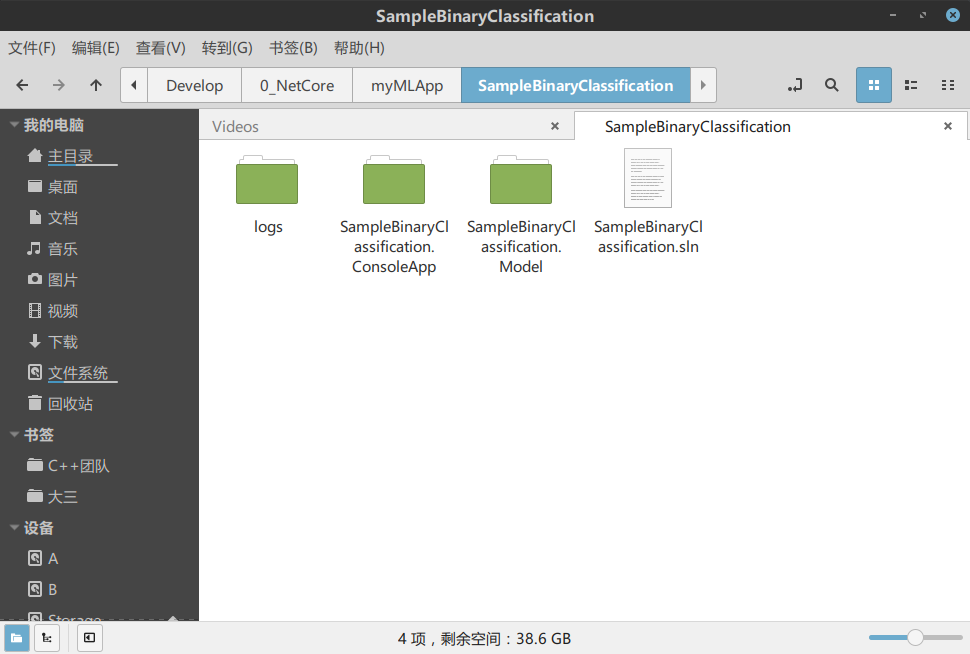
Model Code
Let's take a look at the model code automatically generated by ML.NET:
ModelInput.cs
using Microsoft.ML.Data;

namespace SampleBinaryClassification.Model.DataModels
{
    public class ModelInput
    {
        [ColumnName("Sentiment"), LoadColumn(0)]
        public bool Sentiment { get; set; }

        [ColumnName("SentimentText"), LoadColumn(1)]
        public string SentimentText { get; set; }
    }
}
ModelOutput.cs
using System;
using Microsoft.ML.Data;

namespace SampleBinaryClassification.Model.DataModels
{
    public class ModelOutput
    {
        // ColumnName attribute is used to change the column name from
        // its default value, which is the name of the field.
        [ColumnName("PredictedLabel")]
        public bool Prediction { get; set; }

        public float Score { get; set; }
    }
}
Leaving a Cliffhanger
I'll leave a cliffhanger for now and continue researching tomorrow.
References
_EOF_
Trying Out Machine Learning with .NET Core, Getting the ML-Net Framework Running
- 本文作者:
- 程序设计实验室
- 版权声明:
- 本博客所有文章除特别声明外,均采用 BY-NC-SA 许可协议。转载请注明出处!
相关文章
开发现代化的.NetCore控制台程序:(3)将nuget包发布到GitHubPackages
发布Nuget包到GitHub Packages?不过是配置token和nuget.config的重复劳动。手动关联包与仓库?GitHub的设计真够奇葩的。搞定,但谁有空折腾这些。
2023-11-10 · C# · 约 1 分钟
开发现代化的.NetCore控制台程序:(4)使用GithubAction自动构建以及发布nuget包
GitHub Action自动构建发布nuget包,省时省力。Secrets管理token,workflow一劳永逸。吐槽nuget推送重复输入token,烦人!
2023-11-13 · C# · 约 1 分钟
C#学习(二)匿名方法和委托的多种使用方式
前言 上次简单介绍了委托的概念和使用,今天继续,并且引入匿名方法的概念,匿名方法在很多语言里面都有,比如Python、js、java8,尤其js,前端小伙伴可能深受js回调地狱之苦,这里面匿名方法功不可没。 js的匿名方法就像这样: 这还没用lambda,因为我想下篇再介绍lambda。 document.querySelector('.btn').onclick = function () {
2021-12-18 · C# · 约 1 分钟
C#学习(一)委托的概念和使用
前言 C#学习系列是根据我以前的笔记整理出来复习,顺便发一下文章做个记录。 先引用一个介绍: C# 中的委托(Delegate)类似于 C 或 C++ 中函数的指针。委托(Delegate) 是存有对某个方法的引用的一种引用类型变量。引用可在运行时被改变。 委托(Delegate)特别用于实现事件和回调方法。所有的委托(Delegate)都派生自 System.Delegate 类。 根据使用其他
2021-12-18 · C# · 约 1 分钟
讨论
共 0 条加载评论中…