

Django Admin Usage Collection
Django Admin Django Admin itself is a large and comprehensive system. The official documentation covers many configuration methods, but there are still plenty of clever tricks that aren't in the docs, so looking up the documentation isn't always useful when you run into special requirements. In my view, although Django Admin can quickly generate an admin backend, if you need to customize a large number of special requirements, the cost is no less than rebuilding one with Vue/React. Simple usage isn't costly, but for deep customization you need Django Admin's workflow
目录27 个章节
Django Admin
Django Admin itself is a large and comprehensive system. The official documentation covers many configuration methods, but there are still plenty of clever tricks that aren't in the docs, so looking up the documentation isn't always useful when you run into special requirements.
In my view, although Django Admin can quickly generate an admin backend, if you need to customize a large number of special requirements, the cost is no less than rebuilding one with Vue/React. Simple usage isn't costly, but deep customization requires being fairly familiar with Django Admin's workflow and thoroughly chewing through the source code (some Python source without type annotations is hard to understand) before you can do fine carving on top of the existing foundation, and sometimes there are follow-up maintenance issues as well.
Still, the flaws don't outweigh the merits — who can refuse an admin backend that you can use after configuring just a few lines of code?
And you don't even need to build a RESTful API for frontend-backend separation — just go all-in and take off~
Some Reference Materials
- Django Admin Backend Customization Tips: https://www.cnblogs.com/LyShark/p/12119539.html
- Django Admin Field Autocomplete (django_admin_autocomplete_all Library): Usage and Pitfalls: https://django-admin-autocomplete-all.readthedocs.io/en/latest/readme.html
- Adding a Custom Widget to Django Admin: http://garmoncheg.blogspot.com/2014/07/django-adding-custom-widget-to-django.html
- How to Turn Django Admin Into a Lightweight Dashboard: https://hakibenita.com/how-to-turn-django-admin-into-a-lightweight-dashboard
UI Themes
There are many replacement themes for Django Admin on GitHub, so don't complain that Django Admin's UI is ugly — there are plenty of good-looking themes!
The first one I used was adminx, but it was too invasive and required a lot of modifications to the admin configuration code, which really wasn't worth it. The official project probably realized this too, and it seems to have stopped being updated afterward.
After the Django 2.x era, admin UI themes became more plentiful. There's a Chinese-made SimpleUI that's quite good, implemented based on Vue + ElementUI, with lots of stars, and fairly mature. I'd call it a shining light of Chinese open source.
I've tested most of the others as well, but they always had some compatibility issues in use, so for now I still recommend this shining light of Chinese open source.
SimpleUI
Already used in multiple products. Uses vue+elementUI (not a SPA), supports multiple tabs
Some Related Reference Materials
- Django Admin SimpleUI Custom Columns: https://simpleui.72wo.com/topic/1266
django-jazzmin
URL: https://github.com/farridav/django-jazzmin
I stumbled upon this one by chance. For people who are tired of looking at ElementUI, it can feel like a breath of fresh air
Rewritten with Bootstrap+AdminLTE, and the result is pretty good
(it just randomly freezes occasionally
And the details aren't as polished as SimpleUI, for example the search box has no placeholder hint, and so on.
Customization Cases
This article only records implementations of special requirements; I won't copy-paste Django Admin's regular configuration, which you can find plenty of with a quick search online.
I've already written quite a few articles on Django Admin customization cases, and I've done quite a bit of customization recently as well, but I don't want to write new articles just to record the implementation of a single requirement. I'll record them directly in this article and keep this article updated~
- Adding CAPTCHA and Login Attempt Limits to Django Admin
- Implementing an Admin Backend IP Whitelist with Django Middleware
- Adding a Custom Action to Django Admin and Removing the Object Selection Requirement
- Saying Goodbye to Monotony: Revamping the Django Admin Homepage with AdminLTE Components
Adding Custom Columns
This case is based on SimpleUI
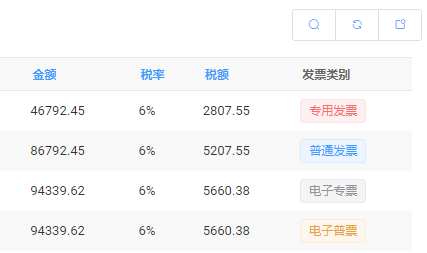
Screenshot
Display Tag components in different colors according to different invoice types
Implementation
Here we use ElementUI's Tag component, docs: https://element.eleme.cn/#/zh-CN/component/tag
As mentioned earlier, SimpleUI is not a single-page application; it uses vue and elementUI directly on the page, and there is no webpack environment
So to add an elementUI component you can't simply use
<el-tag type="success">标签</el-tag>
Instead you have to use what webpack would generate
<div class="el-tag el-tag--success el-tag--light">标签</div>
ok, let's get to the Python code
Suppose there's a model called Invoice, Chinese name 发票, defined as follows
class Invoice(models.Model):
  invoice_type = models.CharField('发票类型')
In the ModelAdmin that needs to be customized, add a method
# 发票类型颜色
@admin.display(description='发票类别')
def invoice_type_tag(self, obj: Invoice):
  def el_tag(color_type, content):
    """
    生成 ElementUI 的 tag 组件
		:param color_type: success, info, warning, danger
		:param content:
    :return:
    """
    from django.utils.safestring import mark_safe
    type_class = '' if len(color_type) == 0 else f'el-tag--{color_type}'
    return mark_safe(f'<div class="el-tag el-tag--small {type_class} el-tag--light">{content}</div>')

  if obj.invoice_type.startswith('普通'):
    return el_tag('', obj.invoice_type)
  if obj.invoice_type.startswith('专用'):
    return el_tag('danger', obj.invoice_type)
  if obj.invoice_type.startswith('电子专票'):
    return el_tag('info', obj.invoice_type)
  if obj.invoice_type.startswith('电子普票'):
    return el_tag('warning', obj.invoice_type)
Then add this invoice_type_tag to list_display
PS: The @admin.display() decorator here was added in Django 3.2, and it's very convenient, equivalent to the old
invoice_type_tag.short_description = '发票类别'
PS: Note that the HTML code needs to be wrapped with the mark_safe method to render properly, otherwise it will be escaped!
Extension: Adding Links
If you want to make it a clickable link, that's easy too.
Here we use ElementUI's Link component.
@admin.display(description='打开链接')
def open_thumb(self, obj: Photo):
  url = reverse('invoice:detail', kwargs={'pk': obj.pk})
  return mark_safe(f'''
  <a class="el-link el-link--primary is-underline" href="{url}" target="_blank">
  	<span class="el-link--inner">打开链接</span>
  </a>
  ''')
Displaying a Progress Bar
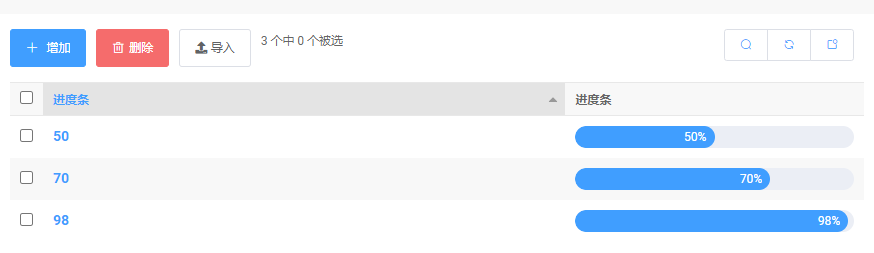
Screenshot
Implementation
The principle is the same as adding custom columns above
The code is as follows
# 进度条
@admin.display(description='进度条')
def progress_bar(self, obj):
    html = f'''
        <div role="progressbar" aria-valuenow="{obj.progress}" aria-valuemin="0" aria-valuemax="100"
            class="el-progress el-progress--line is-light el-progress--text-inside">
            <div class="el-progress-bar">
                <div class="el-progress-bar__outer" style="height: 22px;">
                    <div class="el-progress-bar__inner" style="width: {obj.progress}%;">
                        <div class="el-progress-bar__innerText">{obj.progress}%</div>
                    </div>
                </div>
            </div>
        </div>
    '''
    from django.utils.safestring import mark_safe
    return mark_safe(html)
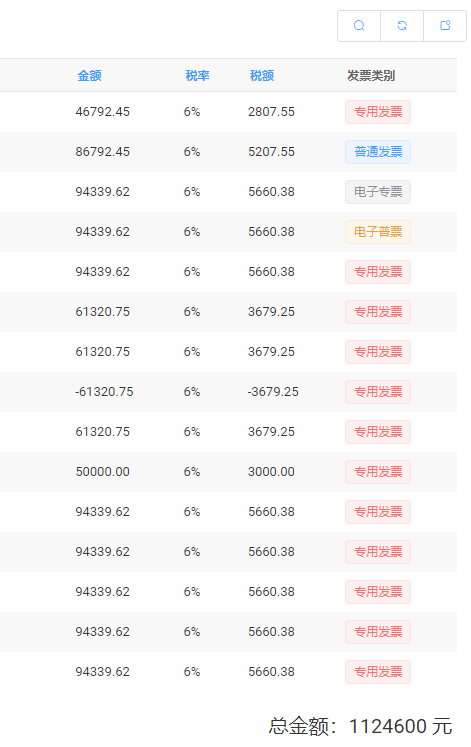
Displaying Total Amounts on the Page
Screenshot
Implementation
This feature is more troublesome because you need to heavily modify the template
First we need to know which template this list corresponds to. After searching around in the templates directory of the admin package for quite a while, I finally found that this page is change_list, and because the page is fairly complex, it was split into several parts
We only need to modify the change_list.html file.
admin.py
OK, never mind the template code for now — let's write Python code to calculate the total amount.
To put data in context and pass it to the template, we have to override a ChangeList object
from django.db.models import Sum
from django.contrib.admin.views.main import ChangeList

class InvoiceChangeList(ChangeList):
    def get_results(self, request):
        super(InvoiceChangeList, self).get_results(request)
        totals = self.result_list.aggregate(Sum('amount'))
        self.total_amount = totals['amount__sum']
Use the Sum aggregation method to calculate the total amount.
Using Python's dynamic nature, add the total_amount attribute to the ChangeList object
This way, in the template you can get this attribute via {{ cl.total_amount }}.
Then modify the ModelAdmin:
class InvoiceAdmin(ImportExportModelAdmin):
  # 如果你改了 template 的名称,这里可以对应修改,否则默认即可
  change_list_template = 'change_list.html'

  # 添加这个代码
  def get_changelist(self, request, **kwargs):
    return InvoiceChangeList
The backend part is done; next is the frontend template part.
template
To add new elements on the page, we'll modify the change_list.html file.
Note: do not copy this file directly to modify it! The reason is that your modified template will override other components, so later when you switch admin themes, or use plugins like import-export that modify admin pages, they won't take effect — the so-called compatibility issue.
Django also anticipated this situation; these templates are componentized, so we just need to write an extending template.
Create a new change_list.html file under the project's templates/admin directory, with the following code
{% extends "admin/change_list.html" %}

{% block result_list %}
    {{ block.super }}
    <div style="text-align: right; margin: 20px 5px; font-size: 20px;">
        总金额:{{ cl.total_amount }} 元
    </div>
{% endblock %}
Note: If you used the django-import-export plugin, you need to add the object-tools-items block according to the features you use.
For example, if your ModelAdmin inherits from ImportExportModelAdmin, then looking at the source we can see it overrode the template
class ImportExportMixin(ImportMixin, ExportMixin):
    """
    Import and export mixin.
    """
    #: template for change_list view
    change_list_template = 'admin/import_export/change_list_import_export.html'

class ImportExportModelAdmin(ImportExportMixin, admin.ModelAdmin):
    """
    Subclass of ModelAdmin with import/export functionality.
    """
Then take a look at the admin/import_export/change_list_import_export.html file
{% extends "admin/import_export/change_list.html" %}

{% block object-tools-items %}
  {% include "admin/import_export/change_list_import_item.html" %}
  {% include "admin/import_export/change_list_export_item.html" %}
  {{ block.super }}
{% endblock %}
You can see that it adds two components in object-tools-items. Just copy this block of code into our change_list.html.
References
Permission-based Soft Delete
The requirement is: regular users perform a soft delete, while administrators can delete directly.
Implementation
Add a field to the model indicating whether it has been deleted, to represent the soft-delete status.
models.py
class SoftDelete(models.Model):
    name = models.CharField('名称', max_length=20)
    is_deleted = models.BooleanField('是否软删除', default=False)

    def __str__(self):
        return self.name

    class Meta:
        verbose_name = '软删除'
        verbose_name_plural = verbose_name
admin.py
@admin.register(SoftDelete)
class SoftDeleteAdmin(admin.ModelAdmin):
    list_display = ['name']
    fields = ['name']

    def get_queryset(self, request: HttpRequest):
        # 管理员可以看到全部记录
        if request.user.is_superuser:
            queryset = super().get_queryset(request)
        # 普通用户不能看到被软删除的记录
        else:
            queryset = super().get_queryset(request).filter(is_deleted=False)
        if not self.has_view_or_change_permission(request):
            queryset = queryset.none()
        return queryset

    def get_list_display(self, request: HttpRequest):
        # 管理员才能查看是否软删除的状态
        if request.user.is_superuser:
            insert_if_not_exists(self.list_display, len(self.list_display), 'is_deleted')
        else:
            # 删掉不给普通用户看的字段
            delete_if_exists(self.list_display, 'is_deleted')
        return self.list_display

    def get_fields(self, request, obj=None):
        # 管理员才能查看是否软删除的状态
        if request.user.is_superuser:
            insert_if_not_exists(self.fields, len(self.fields), 'is_deleted')
        else:
            # 删掉不给普通用户看的字段
            delete_if_exists(self.fields, 'is_deleted')
        return self.fields

    # 在列表删除
    def delete_queryset(self, request: HttpRequest, queryset):
        # 管理员才能真正的删除
        if request.user.is_superuser:
            return queryset.delete()
        # 普通用户使用软删除
        else:
            return queryset.update(is_deleted=True, deleted_user=request.user)

    # 在详情页面删除
    def delete_model(self, request, obj: SoftDelete):
        print('delete_model', obj)
        # 管理员才能真正的删除
        if request.user.is_superuser:
            obj.delete()
        # 普通用户使用软删除
        else:
            obj.is_deleted = True
            obj.save()
Remember that to handle delete operations you need to override both delete_queryset and delete_model.
delete_queryset: delete operation on the list pagedelete_model: delete operation on the detail page
Extension Tools
This section records some interesting extension libraries I found while browsing GitHub.
Django AdminPlus
Address: https://github.com/jsocol/django-adminplus
Makes it easy to add new pages to admin
django-adminactions
Address: https://github.com/saxix/django-adminactions
Can add a series of actions to admin
- Export as CSV
- Export as Excel
- Export as fixture
- Export delete tree
- Mass update records
- Graph queryset
- Merge records
- Find Duplicates
_EOF_
Django Admin Usage Collection
- 本文作者:
- 程序设计实验室
- 版权声明:
- 本博客所有文章除特别声明外,均采用 BY-NC-SA 许可协议。转载请注明出处!
相关文章
Django中间件之实现Admin后台IP白名单
前言 Django自带的Admin管理后台很方便,但是实际生产环境真的会有挺多安全问题的,在admin的安全防护这方面,我之前就研究实现了给admin加上登录验证码和限流功能,可以参考这篇文章:给Django Admin添加验证码和多次登录尝试限制 不过就在内部使用的话就好很多,因此我们可以通过Django的中间件来实现IP过滤,所以本文中涉及到两个知识点,一个是Django的中间件,另外一个是P
2022-08-26 · Django · 约 1 分钟
告别单调,Django后台主页改造
前言 之前我做了个Django的项目,为了让管理后台更加美观,我对Django(应该说是SimpleUI的)默认的Admin后台主页进行改造,具体可以看这篇文章:项目完成 - 基于Django3.x版本 - 开发部署小结 之前的两篇关于Django3.x开发部署小结的文章介绍的都是数据库、接口、性能方面的,看到有朋友留言对后台主页的改造表示有兴趣,所以就写一篇来介绍一下~ 分析 改造基于我定制的
2022-06-28 · Django · 约 1 分钟
Django数据库性能优化之使用Python集合操作
前言 最近有个新需求: 人员基础信息(记作人员A),10w 某种类型的人员信息(记作人员B),1000 要求在后台上(Django Admin)分别展示:已录入A的人员B列表、未录入的人员B列表 团队的DBA提议使用视图可以解决这个问题(不愧是搞数据库的) PS:起先我觉得Django的Model是直接管理数据库表的,使用Model来映射数据库模型怕是有一定的麻烦,不过查了一下资料发现并不会~ 只
2022-08-26 · Django · 约 1 分钟
Django中「强行」使用MVVM设计模式
扫盲 首先带大家了解一下什么是MVVM模式: 什么是MVVM?MVVM是Model-View-ViewModel的缩写。 MVVM是MVC的增强版,实质上和MVC没有本质区别,只是代码的位置变动而已 从名字上看,MVVM比MVC架构中多了一个ViewModel,没错,就是这个ViewModel,他是MVVM相对于MVC改进的核心思想。在开发过程中,由于需求的变更或添加,项目的复杂度越来越高,代码量
2021-12-18 · Django · 约 1 分钟
讨论
共 0 条加载评论中…