

Implementing Tree-Type Storage and Editing with django-treebeard
Simply inherit the MP_Node configuration for TreeAdmin, enabling drag-and-drop editing of tree nodes. For visualization? Only django-treebeard is usable; others are either discontinued or have subpar functionality. For initializing data? Manual import is required; otherwise, the admin interface doesn’t even have a button—buggy. The API output is just path and depth—it’s more comfortable to implement this yourself.
目录9 个章节
Preface
Actually,in many previous projects,I encountered features related to trees. In the past,I always implemented them myself. Later on,many frontend UI component libraries included Tree components,which you could just plug in and use.
However,since we’re using Django,it’s important to make full use of its ecosystem. But after searching for a long time,the only usable option I found was this treebeard. The others have either been discontinued or have very limited functionality—they lack visual tree-editing capabilities.
Could it be that Django has already declined?
Effect
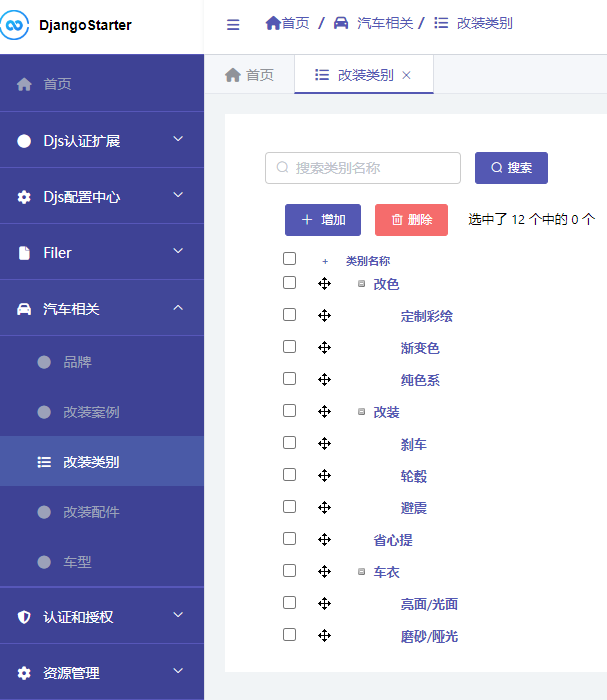
Take this car modification project as an example.
Achieve the following effect, which allows dragging nodes for editing.
Installation
Install dependencies
pdm add django-treebeard
Add treebeard to INSTALLED_APPS
Defining a Model
Just inherit from the MP_Node type.
from treebeard.mp_tree import MP_Node

class CaseCategory(MP_Node):
    name = models.CharField('类别名称', max_length=100)
    node_order_by = ['name']

    def __str__(self):
        return '改装类别: {}'.format(self.name)

    class Meta:
        db_table = 'car_case_category'
        verbose_name = '改装类别'
        verbose_name_plural = verbose_name
Configure admin
To implement visual tree editing, you need to inherit from TreeAdmin.
from treebeard.admin import TreeAdmin

@admin.register(CaseCategory)
class CaseCategoryAdmin(TreeAdmin):
    form = movenodeform_factory(CaseCategory)
    list_display = ['name', 'depth']
    search_fields = ['name']
Initializing Data
You can use code to import the initial Tree data.
(In fact, it's because if you don't import the initialization data first, the admin interface won't even show an add button... I guess it's a bug.)
def seed_data_treebeard():
    from apps.car.models import CaseCategory
    get = lambda node_id: CaseCategory.objects.get(pk=node_id)
    root = CaseCategory.add_root(name='车衣')
    node = get(root.pk).add_child(name='亮面/光面')
    node = get(root.pk).add_child(name='磨砂/哑光')
    root = CaseCategory.add_root(name='改色')
    get(root.pk).add_child(name='纯色系')
    get(root.pk).add_child(name='渐变色')
    get(root.pk).add_child(name='定制彩绘')
    root = CaseCategory.add_root(name='改装')
    get(root.pk).add_child(name='轮毂')
    get(root.pk).add_child(name='刹车')
    get(root.pk).add_child(name='避震')
    root = CaseCategory.add_root(name='省心提')
This way, once you open the admin interface, you'll be able to see the data.
Good enough, I guess.
Write an API Endpoint
Then I'll write a simple API endpoint based on django-ninja
(Actually, this code is auto-generated by DjangoStarter)
from typing import List
from django.shortcuts import get_object_or_404
from ninja import Router, ModelSchema
from django_starter.http.response import responses

router = Router(tags=['case_category'])

class CaseCategoryOut(ModelSchema):
    class Meta:
        model = CaseCategory
        fields = ['id', 'path', 'depth', 'numchild', 'name', ]

@router.get('/', response=List[CaseCategoryOut], url_name='car/case_category/list')
def list_items(request):
    qs = CaseCategory.objects.all()
    return qs
The resulting data looks like this (some data omitted)
{
  "code": 200,
  "data": [
    {
      "id": 4,
      "path": "0001",
      "depth": 1,
      "numchild": 3,
      "name": "Color Change"
    },
    {
      "id": 7,
      "path": "00010001",
      "depth": 2,
      "numchild": 0,
      "name": "Custom Airbrush Painting"
    },
    {
      "id": 6,
      "path": "00010002",
      "depth": 2,
      "numchild": 0,
      "name": "Gradient Color"
    }
  ]
}
Summary
Still more comfortable with a self-implemented solution.
But this one is pretty much out of the box too—it's fine for tinkering around in small projects.
References
_EOF_
Implementing Tree-Type Storage and Editing with django-treebeard
- 本文作者:
- 程序设计实验室
- 版权声明:
- 本博客所有文章除特别声明外,均采用 BY-NC-SA 许可协议。转载请注明出处!
相关文章
DjangoAdmin使用合集
DjangoAdmin DjangoAdmin本身就是一套大而全的系统,官方文档中介绍了很多配置方法,但仍然有大量的骚操作是文档中没有的,所以遇到特殊需求的时候,求助文档不一定有用。 在我看来 DjangoAdmin 虽然能快速生成一套管理后台,但如果要做大量特殊需求的定制,其成本不亚于用 Vue/React 重新开发一套,简单的使用成本不高,但深入定制的话需要对 DjangoAdmin 的工作流
2023-04-09 · Django · 约 1 分钟
Django统一包装接口返回数据格式
前言 最近实在太忙了,开始了一个新的项目,为了快速形成产品,我选择了Django来实现后端,然后又拿起了之前我封装了项目脚手架「DjangoStarter」。 由于前段时间我写了不少.NetCore的后端代码,对CRUD的接口开发又有了一些新的理解,所以肯定也要把DjangoStarter改造一番,改得更加顺手~ 题外话:话说我在前端终于真正用上react,不得不说 ts + react 真好用,
2022-08-26 · Django · 约 1 分钟
设置Django关闭Debug后的静态文件路由
Django在Debug模式关闭掉后请求静态文件时,返回404相应码,后台的请求url是"GET /static/css/404.css HTTP/1.1" 404 1217,找不到静态文件的url。通过配置静态文件的url和命令行启动来实现静态文件的获取。 URL中的配置 django的静态文件是通过``来管理的。配置静态文件的响应是通过serve()函数数显的。url.py中的配置如下: fr
2021-12-18 · Django · 约 1 分钟
Django全文检索实现:HayStack-+-Whoosh-+-Jieba
涉及到的工具 haystack是django的开源搜索框架,该框架支持**Solr**, Elasticsearch, Whoosh, **Xapian搜索引擎,不用更改代码,直接切换引擎,减少代码量。 搜索引擎使用Whoosh,这是一个由纯Python实现的全文搜索引擎,没有二进制文件等,比较小巧,配置比较简单,当然性能自然略低。 中文分词Jieba,由于Whoosh自带的是英文分词,对中文的分
2022-08-26 · Django · 约 1 分钟
讨论
共 0 条加载评论中…