

Implementing WeCom Login in a Django+Taro Project
Preface Still a small project I've been working on recently. The backend uses Django with RestFramework for the APIs, and for the frontend this is my first attempt at using JD's open-source Taro framework for multi-end development (currently we need to support the H5 end for WeCom and WeChat Mini Program) This article records the WeCom login flow. Last week reading the docs made me dizzy, but it's actually quite simple—once wrapped up, it's just a few lines of code~ Two approaches One is to first assemble the login URL authorize_url, set the callback URL to the H5 app's web entry, then set authori
目录7 个章节
Preface
Still a small project I've been working on recently. The backend uses Django with RestFramework for the APIs, and for the frontend this is my first attempt at using JD's open-source Taro framework for multi-end development (currently we need to support the H5 end for WeCom and WeChat Mini Program)
This article records the WeCom login flow. Last week reading the docs made me dizzy, but it's actually quite simple—once wrapped up, it's just a few lines of code~
Two Approaches
- One is to first assemble the login URL
authorize_url, set the callback URL to the H5 app's web entry, then setauthorize_urlas the app homepage in WeCom, and then simply extract the code from the URL - The other is to assemble the
authorize_urlinside the app, with the callback URL likewise set to the H5 app's web entry, then requestauthorize_urlfrom within the app, and extract the code from the URL to log in
They're called two approaches, but the flow is actually the same. The first one just skips the frontend assembling authorize_url and the initial request. For convenience, this article recommends the first approach
The Idea
Assume the frontend URL is http://xxx.com. Then in the WeCom login URL generated by the backend, the frontend URL will be passed in as the callback URL. After visiting the login URL in WeCom, it redirects back to our frontend URL, appending the code parameter in the path, in the following form:
http://xxx.com?code=dkwawen123j13bk1
So all the frontend needs to do is get this code and submit it to the backend, so the backend can take the code to the WeChat server to exchange for user info. That's it~
Backend Code
The WeCom login API is already integrated into my DjangoStarter project template, ready to use~
The backend uses the wechatpy library, which is really handy and wraps common WeChat development features~
Below are the two key methods
from django.conf import settings
from django.contrib.auth import login
from django.contrib.auth.models import User
from rest_framework.authtoken.models import Token
from drf_yasg2.utils import swagger_auto_schema
from drf_yasg2 import openapi
from rest_framework.exceptions import APIException
from rest_framework import viewsets
from rest_framework.response import Response
from rest_framework.request import HttpRequest
from rest_framework.decorators import action
from wechatpy.enterprise import WeChatClient
from apps.core.serializers import UserSerializer

class WechatWork(viewsets.ViewSet):
    """微信企业号相关认证服务"""
    client = WeChatClient(
        settings.WECHAT_WORK_CONFIG['CORP_ID'],
        settings.WECHAT_WORK_CONFIG['SECRET'],
    )

    @swagger_auto_schema(operation_summary='获取微信企业号登录链接')
    @action(detail=False)
    def get_authorize_url(self, request):
        return Response({
            # todo 这里要写上前端应用入口地址
            'url': self.client.oauth.authorize_url('http://xxx.com')
        })

    @swagger_auto_schema(
        operation_summary='通过code登录',
        manual_parameters=[
            openapi.Parameter(
                name='code', in_=openapi.IN_QUERY,
                description='从微信企业号服务器获取到的code',
                type=openapi.TYPE_STRING)
        ])
    @action(detail=False, methods=['POST'])
    def login_by_code(self, request: HttpRequest):
        code = request.GET.get('code', None)
        try:
            user_info = self.client.oauth.get_user_info(code)
        except Exception as e:
            raise APIException(detail=e)

        phone = user_info['UserId']
        is_created_user = False

        if User.objects.filter(username=phone).exists():
            user_obj: User = User.objects.get(username=phone)
        else:
            is_created_user = True
            user_obj: User = User.objects.create_user(username=phone, password=phone)

        # 记录Django登录状态
        login(request, user_obj)
        # 生成drf token
        token, created = Token.objects.get_or_create(user=user_obj)

        return Response({
            'user': UserSerializer(user_obj).data,
            'user_info': user_info,
            'successful': True,
            'is_created_user': is_created_user,
            'token': token.key,
            'message': '企业微信登录成功',
        })
After writing the APIs, configure the routes (won't repeat that here)
Then request this get_authorize_url endpoint, and you'll get a URL
{
  "message": "请求成功",
  "code": 200,
  "data": {
    "url": "https://open.weixin.qq.com/connect/oauth2/authorize?appid=wx386...&redirect_uri=http%3A%2F%2Fxxx.com&response_type=code&scope=snsapi_base#wechat_redirect"
  }
}
For example, the app entry URL I wrote above is http://xxx.com, so the WeCom login URL you get is
https://open.weixin.qq.com/connect/oauth2/authorize?appid=wx386...&redirect_uri=http%3A%2F%2Fxxx.com&response_type=code&scope=snsapi_base#wechat_redirect
For the meaning of each parameter, just check the official WeCom docs; we don't need to go into details
WeCom App Configuration
Next, we set this URL as the homepage of the WeCom app
As shown
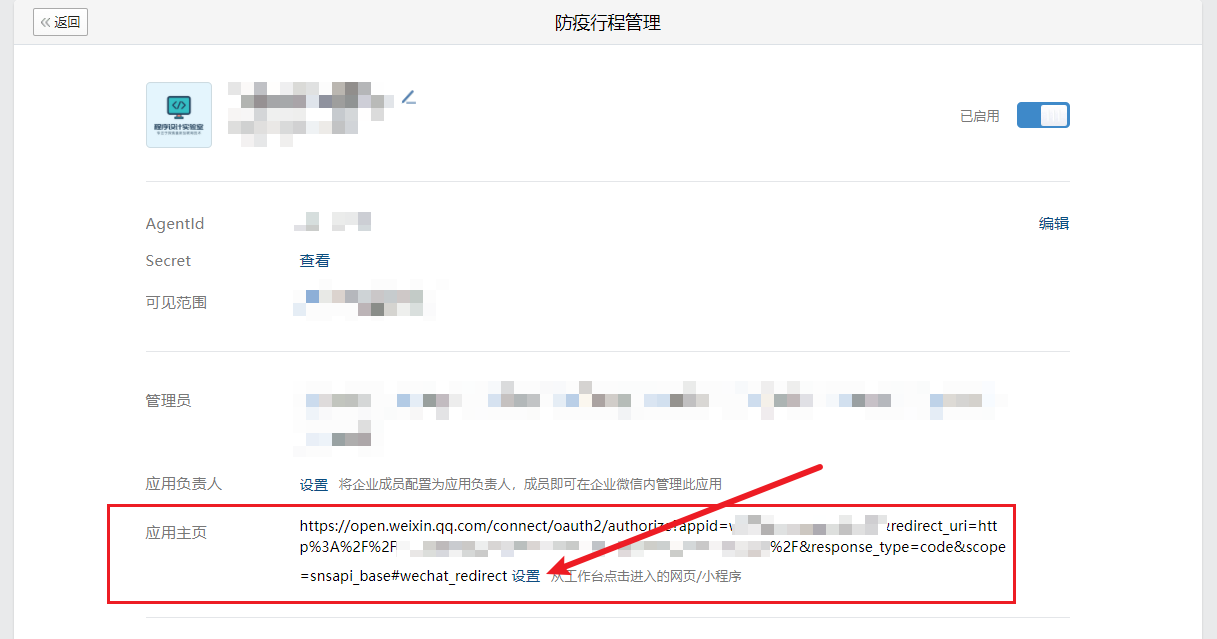
We also need to set the "Trusted Domain". At the very bottom of the same page under "Developer API", fill in the domain and port of the server where the frontend app is deployed (no need for port 80)~
That's the app configuration done
Frontend Code
The frontend uses JD's open-source Taro framework. In my previous article I mentioned I finally got to use React, referring to using React+TypeScript in Taro development. The development experience is really good (except this framework has some speechless pitfalls)
What the frontend needs to do is extract the code from the path parameters
As we can see, the official Taro docs already cover handling route parameters
So we can write it like this to get the code (functional component style)
import { getCurrentInstance } from '@tarojs/taro'
let code getCurrentInstance().router?.params['code']
However! This works for ordinary page navigation
For example this form
http://xxx.com/#/pages/index/index?code=abc
But the URL form that the WeChat login callback redirects to is like this
http://xxx.com?code=abc&state=#/pages/index/index
There's simply no way to get the code like this o(´^`)o
So we have to wrap one ourselves with JS
Here's the code
// 解析微信redirect_uri地址中的code
export const getCodeFromUrl = (url: string) => {
  let code = ''
  let index = url.indexOf('?')
  let paramStr = url.substring(index + 1, url.length);
  let params = paramStr.split('&')
  params.forEach(element => {
    if (element.indexOf('code') >= 0) {
      code = element.substring(element.indexOf('=') + 1, element.length)
    }
  });
  return code
}
When using it
let code = getCodeFromUrl(window.location.href)
and you can get the code
Once you have the code, no need to say more about the rest~
References
- wechatpy library docs: http://docs.wechatpy.org/zh_CN/stable/oauth.html#id4
- WeCom docs: https://developer.work.weixin.qq.com/document/path/91335
- Taro framework docs: https://taro-docs.jd.com/taro/docs/router
- Taro H5 WeChat authorization link getting code; callback page cannot get params via this.$router.params - Jianshu (jianshu.com)
_EOF_
Implementing WeCom Login in a Django+Taro Project
- 本文作者:
- 程序设计实验室
- 版权声明:
- 本博客所有文章除特别声明外,均采用 BY-NC-SA 许可协议。转载请注明出处!
相关文章
关于uwsgi服务器的管理
前言 使用Django开发项目好是好,就是部署的时候太麻烦,使用Uwsgi服务器的话,每次修改了代码,都需要重新启动服务器才可以生效。然后uwsgi服务器的重启也挺麻烦。 看了一下官网的文档,最好是把uwsgi安装到venv虚拟环境里面,这样的话在 ps aux 的时候容易区分啦。 查看uwsgi进程 ps -aux | grep uwsgi 结束原uwsgi进程 kill -9 27543 结论
2025-10-27 · Django · 约 1 分钟
Django的信号机制入门
概念 django自带一套信号机制来帮助我们在框架的不同位置之间传递信息。也就是说,当某一事件发生时,信号系统可以允许一个或多个发送者(senders)将通知或信号(signals)发送给一组接受者(receivers)。 (感觉就很像Qt的信号与槽机制) 信号系统包含以下三要素: 发送者-信号的发出方 信号-信号本身 接收者-信号的接受者 Django内置了一整套信号,下面是一些比较常用的: 在
2022-08-26 · Django · 约 1 分钟
Django全文检索实现:HayStack-+-Whoosh-+-Jieba
涉及到的工具 haystack是django的开源搜索框架,该框架支持**Solr**, Elasticsearch, Whoosh, **Xapian搜索引擎,不用更改代码,直接切换引擎,减少代码量。 搜索引擎使用Whoosh,这是一个由纯Python实现的全文搜索引擎,没有二进制文件等,比较小巧,配置比较简单,当然性能自然略低。 中文分词Jieba,由于Whoosh自带的是英文分词,对中文的分
2022-08-26 · Django · 约 1 分钟
Django过时了吗?从ASGI到AI时代的思考
Django过时?技术趋势变了而已,异步支持短板在AI时代更明显。生态工程化再稳,也挡不住轻量框架和ASGI的冲击。独立开发者该考虑新选择了?
2025-09-12 · Django · 约 1 分钟
讨论
共 0 条加载评论中…