

Using django-import-export, Django's Super Tool for Data Import and Export
Introduction Django is known for rapid development, but if you still have to write your own scripts to handle data import and export, that would go against the “Zen of Python”... And data import/export usually requires different formats—Excel, CSV, JSON, and so on. Writing a script for each format is too much trouble. That's when you bring out django-import-export, this super tool. The official one-liner: django-import-export is a Django application and libra
目录12 个章节
Introduction
Django is known for rapid development, but if you still have to write your own scripts to handle data import and export, that would go against the “Zen of Python”...
And data import/export usually requires different formats—Excel, CSV, JSON, and so on. Writing a script for each format is too much trouble. That's when you bring out django-import-export, this super tool. The official one-liner: django-import-export is a Django application and library for importing and exporting data with included admin integration.
Features:
- support multiple formats (Excel, CSV, JSON, ... and everything else that tablib support)
- admin integration for importing
- preview import changes
- admin integration for exporting
- export data respecting admin filters
Anyway, it's great to use and that's that. Below I'll start the usage introduction.
First, Install
pip install django-import-export
Then you need to add it to INSTALLED_APPS
# settings.py
INSTALLED_APPS = (
    ...
    'import_export',
)
Write a Resource
Have to say, this is very Django.
The way you write a Resource is similar to Model and Form—you define the data format you want to import or export.
I'll borrow the official example here. First, the Model code:
class Author(models.Model):
    name = models.CharField(max_length=100)

    def __str__(self):
        return self.name

class Category(models.Model):
    name = models.CharField(max_length=100)

    def __str__(self):
        return self.name

class Book(models.Model):
    name = models.CharField('Book name', max_length=100)
    author = models.ForeignKey(Author, blank=True, null=True)
    author_email = models.EmailField('Author email', max_length=75, blank=True)
    imported = models.BooleanField(default=False)
    published = models.DateField('Published', blank=True, null=True)
    price = models.DecimalField(max_digits=10, decimal_places=2, null=True, blank=True)
    categories = models.ManyToManyField(Category, blank=True)

    def __str__(self):
        return self.name
Now we want to import data into the Book table, so let's start writing our Resource. I create a resource.py in the app directory to hold the Resource definition code:
from import_export import resources
from core.models import Book

class BookResource(resources.ModelResource):

    class Meta:
        model = Book
That's the simplest Resource defined. You can use code to export data, but I don't want to do that now, because I want to put the export functionality in the Django Admin backend.
Configure Admin
Modify admin.py. The change is to have our defined Admin class inherit from ImportExportModelAdmin instead of the original admin.ModelAdmin. The code is as follows:
from .models import Book
from import_export.admin import ImportExportModelAdmin

class BookAdmin(ImportExportModelAdmin):
    resource_class = BookResource

admin.site.register(Book, BookAdmin)
This way you can see the export and import buttons in the admin.
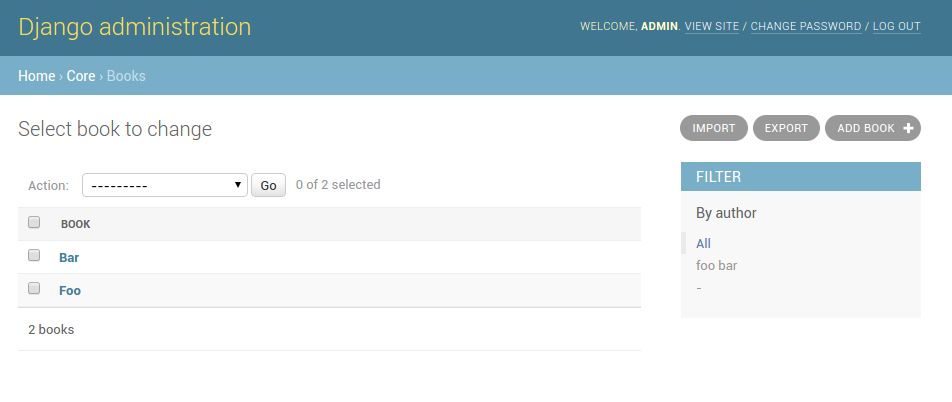
What if you only want export and not import? Change it like this:
from .models import Book
from django.contrib import admin
from import_export.admin import ExportMixin

class BookAdmin(ExportMixin, admin.ModelAdmin):
    resource_class = BookResource

admin.site.register(Book, BookAdmin)
Import only without export works too—just replace ExportMixin with ImportMixin.
Of course these are just the simplest usages. Real requirements are more complex. Next I'll list a few that I've used.
Adjust Field Order
The data to import (Excel, CSV, etc.) may have a different field order from the Model definition. In that case you need to adjust it manually in the Resource.
Since my own code involves company business, I'll continue borrowing the official site's code example:
class BookResource(resources.ModelResource):

    class Meta:
        model = Book
        fields = ('id', 'name', 'author', 'price',)
        export_order = ('id', 'price', 'author', 'name')
Here export_order is the field order for export, and fields specifies which fields need to be imported. Import is based on the column names in the data file, so the field names in the Excel, CSV, or JSON file need to match those in fields or in the Model in order to import.
Exclude Fields
As the name suggests. Take the Book model for example: the Model definition doesn't specify a primary key, so Django will assign a default primary key field id, but the Excel we're importing data from probably doesn't have this id, so import wouldn't work. Thus we need to exclude this id field. It's simple—this line of code in Meta:
exclude = ['id']
Set the Primary Key Field
Also as the name suggests. Suppose our database already has many books, and now we need to update this batch of books by importing an Excel file. Then I need to pick a field to set as the primary key field, otherwise import would become insert. As mentioned earlier, Excel generally won't have the database primary key id, so here I chose the book name (assuming this is a small bookstore where book names aren't duplicated).
Code:
import_id_fields = ['name']
Custom Column Names
With the previous configuration, the exported Excel has column names that are all field names, i.e. in English. But I want Chinese column names. That's possible too—it just takes a bit of code (I won't borrow the official code here; I'll write it myself):
from import_export.fields import Field

class BookResource(resources.ModelResource):
    id = Field(attribute='id', column_name='编号')
    name = Field(attribute='name', column_name='书籍名称')

    class Meta:
        model = Book
        export_order = ('id', 'name', 'author', 'price',)
That's it, so easy. In Field, attribute refers to the corresponding attribute in the Model, i.e. the field name, and column_name as the name suggests is the column name.
Then some of you might ask: the Model already has verbose_name set for each field, so isn't writing it again in column_name redundant?
Don't worry, it's also simple. Since there's verbose_name, just use it directly~
name = Field(attribute='name', column_name=Book.name.field.verbose_name)
And that's it, nice and easy~
Add Custom Columns
Last one: if you want to add a field that doesn't exist in the Model to the exported data, can you?
Of course you can, and it's also simple. Here's the code:
from import_export.fields import Field

class BookResource(resources.ModelResource):
    id = Field(attribute='id', column_name='编号')
    name = Field(attribute='name', column_name='书籍名称')
    new_field = Field(column_name='一个新的字段')

    class Meta:
        model = Book
        export_order = ('id', 'name', 'author', 'price', 'new_field')

    @staticmethod
    def dehydrate_new_field(instance: Book):
        return '新字段内容'
As you can see, first add this field in export_order , then add this line new_field = Field(column_name='一个新的字段'), then add a class method below to generate this field's value. This method is named in the format dehydrate_字段名. You can write the specifics based on your needs.
Summary
The django-import-export plugin has many other features, but at this stage it already meets my work needs, so I haven't gone deeper. If you need other features, you can just look up the docs.
Currently I mainly use it for export. For import it's just updates and inserts, nothing fancy. If I run into other new requirements later, I'll write another article to introduce more of this plugin's features~
References
- Project homepage: https://github.com/django-import-export/django-import-export
- Official documentation: https://django-import-export.readthedocs.io/en/latest/installation.html
Welcome to Discuss
Programming Lab focuses on exploring popular new internet technologies and team agile development practices. Reply with linux, flutter, c#, netcore, android, kotlin, java, python, etc. in the backend of the WeChat official account “程序设计实验室” to get related technical articles and materials. If you have any questions, you can also leave a message in the official account backend~
_EOF_
Using django-import-export, Django's Super Tool for Data Import and Export
- 本文作者:
- 程序设计实验室
- 版权声明:
- 本博客所有文章除特别声明外,均采用 BY-NC-SA 许可协议。转载请注明出处!
相关文章
实测 Django 6.0:模版片段、后台任务、CSP 安全,三大特性体验报告
呵,连WebSocket都没塞进去就敢叫大版本更新?不过模版片段和内置后台任务总算让Django像个现代框架了,至少写HTMX时不用再到处塞碎片文件。原生CSP?早该有了。至于抛弃Python 3.11——跟不上时代的版本留着也是累赘。
2026-01-20 · Django · 约 1 分钟
使用easy_thumbnails轻松为图片创建缩略图
关于Django的缩略图 我在Django的官方文档里看了一下,没有找到有关缩略图的官方库,不过在Django的Wiki里头倒是看到了一篇关于使用缩略图的介绍,请参考:https://code.djangoproject.com/wiki/ThumbNails 关于Problem的描述 The majority of applications that have images, probably
2022-08-26 · Django · 约 1 分钟
Django中「强行」使用MVVM设计模式
扫盲 首先带大家了解一下什么是MVVM模式: 什么是MVVM?MVVM是Model-View-ViewModel的缩写。 MVVM是MVC的增强版,实质上和MVC没有本质区别,只是代码的位置变动而已 从名字上看,MVVM比MVC架构中多了一个ViewModel,没错,就是这个ViewModel,他是MVVM相对于MVC改进的核心思想。在开发过程中,由于需求的变更或添加,项目的复杂度越来越高,代码量
2021-12-18 · Django · 约 1 分钟
轻松搞定Django分页功能
view代码 from django.core.paginator import Paginator def announcement(request): ctx = { 'global': GlobalCtx, 'announcements': models.Announcement.objects.all(), } paginator
2022-05-27 · Django · 约 1 分钟
讨论
共 0 条加载评论中…