

Debian8-stable - Upgrade Python version to 3.6
Foreword I recently deployed a Python project to a server, but the Python version on the server was far too outdated, so I set about updating it. The methods I found online all involved downloading the Python 3.6 source code and manually compiling it. However, I encountered some issues while compiling and installing on the server, which led me to consider using Ubuntu’s PPA method. Since Debian and Ubuntu share common origins, Ubuntu’s PPA should theoretically work on Debian as well. The steps are as follows: Add the software source add-apt-reposito
目录7 个章节
Preface
Recently, I deployed a Python project to a server, but the Python version on the server was quite outdated, so I proceeded to update it.
The methods I found online all involved downloading the Python 3.6 source code and compiling it manually. However, I encountered some issues while compiling and installing it on the server. That's when I thought of using Ubuntu's PPA method. Since Debian and Ubuntu share the same origins, in theory, Ubuntu's PPAs should also work on Debian.
The operation steps are as follows:
Adding Software Repository
add-apt-repository ppa:deadsnakes/ppa
However, Debian does not have add-apt-repository, so you need to install it first.
apt-get install software-properties-common
After installing this, you can use the command above to add the PPA source.
Don't rush at this point, because PPAs are originally for Ubuntu, and using them on Debian always requires a few small modifications.
Open the PPA website: https://launchpad.net/~jonathonf/+archive/ubuntu/python-3.6
Select the Ubuntu version 14.04.
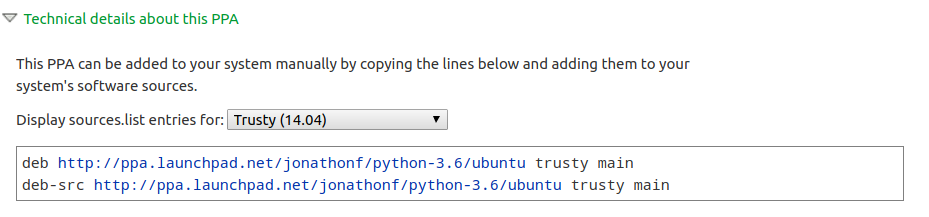
Copy these two lines of code.
Then open the directory for software sources:
cd /etc/apt/sources.list.d
You can see there is a file inside:
-rw-r--r-- 1 root root 290 Jun 19 00:26 jonathonf-python-3_6-jessie.list
Edit it:
deb http://ppa.launchpad.net/jonathonf/python-3.6/ubuntu jessie main
deb-src http://ppa.launchpad.net/jonathonf/python-3.6/ubuntu jessie main
Replace the original content with the content just copied, then save.
Update Software Sources & Installation
apt update
apt install python3.6
Install the corresponding version of pip
su
curl https://bootstrap.pypa.io/get-pip.py | python3.6
(pip -V && pip3 -V && pip3.6 -V) | uniq
Check Version
python3.6 -m pip -V
Creating a Symbolic Link
cd /usr/bin
rm python3
ln -s python3.6 python3
And that's it!
_EOF_
Debian8-stable - Upgrade Python version to 3.6
- 本文作者:
- 程序设计实验室
- 版权声明:
- 本博客所有文章除特别声明外,均采用 BY-NC-SA 许可协议。转载请注明出处!
相关文章
服务器时间漂移,如何开启Linux NTP自动同步
本文记录了作者在服务器运维中发现时间漂移问题,并通过启用NTP同步、使用Chrony等工具进行排查与解决的全过程。文章强调了NTP同步的重要性,介绍了排查思路和高效工具的使用,以及如何同步硬件时钟(RTC),为服务器时间精准同步提供了解决方案。
2025-10-27 · 系统配置 · 约 1 分钟
Ubuntu-18-04-修改登录界面背景图
前言 Ubuntu 18.04用了一段时间了,在Gnome桌面的加持下,兔子 18.04 的颜值还不错,加上自己搭配了几套GTK主题,简直美滋滋,唯一美中不足的就是,Ubuntu的登录管理器换成GDM之后,登录界面背景没办法修改了,这怎么行呢,于是经过一番折腾,有了本文。 首先,准备一张图片 图片的尺寸呢,根据你的屏幕分辨率确定咯。 然后把图片放到/usr/share/backgrounds/目录
2025-10-27 · 系统配置 · 约 1 分钟
Ubuntu-18-04-安装最新版VLC播放器
添加软件源 sudo add-apt-repository ppa:videolan/master-daily sudo apt update Install sudo apt install vlc qtwayland5 运行VLC播放器 安装额外解码器 vlc-plugin-access-extra - multimedia player and streamer (extra access
2025-10-27 · 系统配置 · 约 1 分钟
关闭CentOS-6-防火墙,关闭Linux系统防火墙
前言 最近部署服务的时候需要临时关闭一下防火墙,所以记个笔记,如何关闭CentOS防火墙。 查看系统版本 输入:cat /etc/issue 查看版本 通过service关闭 service命令开启以及关闭防火墙为即时生效,下次重启机器的时候会自动复原。 查看防火墙状态: service iptables status 记得在CentOS6.9中是输入iptables,网上有些教程使用serv
2025-10-27 · 系统配置 · 约 1 分钟
讨论
共 0 条加载评论中…