

Configure Chrome to Support Cross-Origin Frames in Web Pages
Preface Cross-origin restrictions can ensure security, but turning them off is more convenient when debugging. However, the methods for disabling cross-origin restrictions that can be found online nowadays simply don't work on newer versions of Chrome... After some exploration, I found that using an older version of Chrome can bypass the cross-origin restrictions. The page I made that needs a cross-origin embedded frame is just for display, so this happens to fit my needs. Let's go! Then I found an old version of Chrome. After extracting it, it was a portable version that could run directly, but after running it I found it just launched the system's Chrome
目录5 个章节
Preface
Cross-origin restrictions can ensure security, but turning them off is more convenient when debugging. However, the methods for disabling cross-origin restrictions that can be found online nowadays simply don't work on newer versions of Chrome...
After some exploration, I found that using an older version of Chrome can bypass the cross-origin restrictions. The page I made that needs a cross-origin embedded frame is just for display, so this happens to fit my needs. Let's go!
Then I found an old version of Chrome. After extracting it, it was a portable version that could run directly, but after launching it I found it just started the system's Chrome, so I had to run it inside the Windows 10 sandbox (I have to say this sandbox is really convenient)
To disable Chrome's cross-origin restrictions, add the command-line argument --disable-web-security to Chrome's shortcut, as shown in the figure:
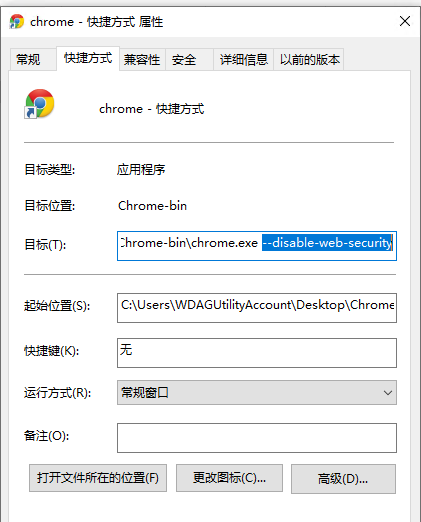
After running it, a prompt will pop up saying that an unsupported command-line argument was used and that it will reduce security, etc., which means it succeeded. At this point, visiting pages with cross-origin frames will work.
Using JS to Manipulate Elements Inside a Frame
This part is extra content, I'll briefly mention it... You can find it all with a search online
First you need to determine when the page inside the frame or iframe has finished loading. I was too lazy to check for that, so I made a button and judged it myself: wait until the page in the frame has loaded, then click this button, and it will automatically fill in the username and password on the page inside the frame and log in automatically
document.querySelector('#btn-login').onclick = function () {
    var iframe_window = document.getElementById('hik').contentWindow
    var iframe = iframe_window.document
}
Then you can use iframe.querySelector to freely manipulate the DOM inside the frame
Download Old Versions of Chrome
Chrome 45 version: https://pan.baidu.com/s/1bCv9W8gcm9oi0tHOKuAgGw (extraction code: 74xr)
For more versions, see this: https://www.zhihu.com/question/20364836
References
- Chrome 80's default SameSite causing cookies to be lost on cross-origin requests: http://www.withcoder.com/articles/server_side/zs/434.html
- iframe cross-origin, is there a way to get elements of the iframe child page: https://segmentfault.com/q/1010000017568917/a-1020000017570521
Feel Free to Discuss
Programming Lab focuses on exploring popular new internet technologies and team agile development practices. Reply with linux, flutter, c#, netcore, android, kotlin, java, python, etc. in the backend of the WeChat official account 「程序设计实验室」 to get related technical articles and materials. If you have any questions, you can also leave a message in the official account backend~
_EOF_
Configure Chrome to Support Cross-Origin Frames in Web Pages
- 本文作者:
- 程序设计实验室
- 版权声明:
- 本博客所有文章除特别声明外,均采用 BY-NC-SA 许可协议。转载请注明出处!
相关文章
Next.js路由段配置选项笔记
Next.js的路由段配置选项?真有这么简单?官方文档写得倒是分散,自己整理下倒也罢了。动态渲染还是静态?缓存策略又该怎么定?开发者还是得自己琢磨。
2025-10-30 · Web前端 · 约 1 分钟
视频中台解决方案:组织树组件+多路视频直播界面开发
这种国产粗犷风格的项目居然能用?16路视频播放界面倒是简单直接,但现场配置和设备管理流程真是够折腾的。WVP和mpegts.js?B站开源的尿性,细节全靠蒙。
2025-07-04 · Web前端 · 约 1 分钟
在HTML中引入React和JSX
Vue 可以非常方便地与 Pure HTML 结合,代替 jQuery 的功能,有一次遇到类似的场景时,我就想 React 能不能也以这种方式接入 HTML 网页,从而提高开发效率。 结果当然是可以的,只不过在 HTML 里直接 JSX 似乎会降低一些性能… 凑合用吧
2023-07-16 · Web前端 · 约 1 分钟
Vue2.x项目整合ExceptionLess监控
前言 一直以来我们都是用Sentry做项目监控,不过前段时间我们的Sentry坏掉了~~(我搞坏的)~~ 但监控又是很有必要的,在sentry修好之前,我想先寻找一个临时的替代方案,同时发现网上关于ExceptionLess的资料少得可怜,ExceptionLess官方的文档也不是很完善,翻了好久文档和源码,于是有了本文…… 关于ExceptionLess 写.NetCore的同学应该不会陌生,这
2022-03-23 · Web前端 · 约 1 分钟
讨论
共 0 条加载评论中…