

Say Goodbye to Monotony: Revamping the Django Admin Homepage
Introduction Previously I built a Django project, and to make the admin backend more visually appealing, I customized Django's (or rather, SimpleUI's) default Admin homepage. You can see the details in this article: Project Complete - Based on Django 3.x - Development and Deployment Notes The previous two articles on Django 3.x development and deployment notes covered databases, APIs, and performance. I noticed some friends left comments expressing interest in the admin homepage customization, so I'm writing this article to introduce it~ Analysis The customization is based on my custom
目录8 个章节
Introduction
Previously I built a Django project, and to make the admin backend more visually appealing, I customized Django's (or rather, SimpleUI's) default Admin homepage. You can see the details in this article: Project Complete - Based on Django 3.x - Development and Deployment Notes
The previous two articles on Django 3.x development and deployment notes covered databases, APIs, and performance. I noticed some friends left comments expressing interest in the admin homepage customization, so I'm writing this article to introduce it~
Analysis
The customization is based on my custom DjangoStarter development template. The code in this article will be synced to GitHub. Project URL: https://github.com/Deali-Axy/DjangoStarter
DjangoStarter's Admin uses SimpleUI, which is an Admin theme based on Vue and ElementUI. It uses ElementUI's tab component to implement multi-tab functionality. This component itself supports custom homepages, so my approach is to write a new page using Django Templates, configure the route, and then replace SimpleUI's default homepage.
The default homepage looks like this — a bit monotonous
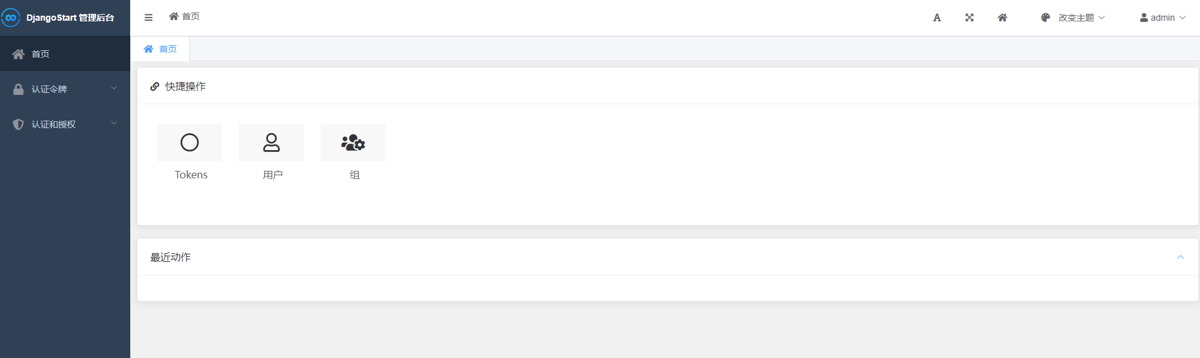
After the makeover, it looks like this
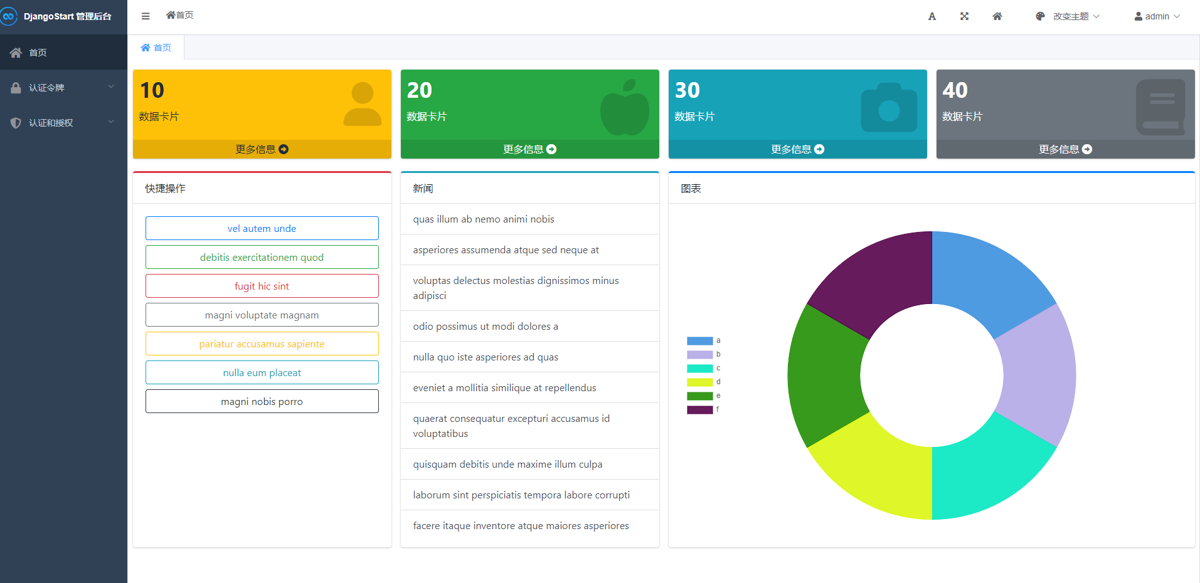
Hey, it's a bit better than before, and the content is richer~
Next, let's implement this homepage makeover step by step.
Dependencies
There are plenty of admin templates online. Domestic ones like ElementUI and Ant Design are all quite usable, but looking good requires knowing CSS~~(unfortunately I'm not very good at it)~~
So I turned my attention to open-source components from abroad, and AdminLTE is pretty great — it extends Bootstrap, which I'm most familiar with, looks good and is simple and easy to pick up~
Let's get started then
The dependencies used by this page are as follows
- Currently the AdminLTE version is 3.2, based on Bootstrap 4.6
- Charts use chart.js, version 3.8
- Icons use Font Awesome, using the free 6.0 version
Just copy the dependencies section of package.json:
"dependencies": {
    "@fortawesome/fontawesome-free": "^6.0.0",
    "admin-lte": "3.2",
    "bootstrap": "^4.6.1",
    "chart.js": "^3.8.0",
    "jquery": "^3.6.0",
}
Copy it, save, then run the yarn command to install the dependencies~
PS: I recommend using yarn to manage npm packages, though you can of course use npm directly
Modifying the Gulp Task
For using and managing frontend assets in Django, you can refer to this article: Introducing NPM and gulp to Manage Frontend Assets in a Django Project
//使用 npm 下载的前端组件包
const libs = [
    {name: "admin-lte", dist: "./node_modules/admin-lte/dist/**/*.*"},
    {name: "chart.js", dist: "./node_modules/chart.js/dist/**/*.*"},
    {name: "jquery", dist: "./node_modules/jquery/dist/**/*.*"},
    {name: "bootstrap", dist: "./node_modules/bootstrap/dist/**/*.*"},
];

// 使用 npm 下载的前端组件,自定义存放位置
const customLibs = [
    {name: 'font-awesome', dist: './node_modules/@fortawesome/fontawesome-free/**/*.*'},
]
After saving, run gulp move in the project root directory~
Start Writing the Page
We create extend_home.html under the templates/admin directory
I won't paste the actual code here; it's already uploaded to GitHub. You can see it here: https://github.com/Deali-Axy/DjangoStarter/blob/master/templates/admin/extend_home.html
For the charts I used fake data to make a pie chart. The data looks like this
let exampleData = [
    {label: 'a', value: 10},
    {label: 'b', value: 10},
    {label: 'c', value: 10},
    {label: 'd', value: 10},
    {label: 'e', value: 10},
    {label: 'f', value: 10},
]
The text for news and quick actions uses Django's built-in random text generation tag
{% lorem 6 w random %}
For specific usage, see the official docs: https://docs.djangoproject.com/zh-hans/4.0/ref/templates/builtins/#lorem
PS: All the content on this page is fake data. In actual use, you can pass data via context or request an API to fill in real data~
After finishing the page template, save it
Next, just configure the route
Write the View
I put this page in DjangoStarter's default App
Edit the apps/core/views.py file
Add a new function
# 扩展admin主页,美化后台
def extend_admin_home(request):
    return render(request, 'admin/extend_home.html')
Configure the routes
urlpatterns = [
    # ...
    path('admin_home', views.extend_admin_home),
]
Configure the SimpleUI Homepage
Edit config/settings.py
Add this line of code in the SimpleUI configuration section
SIMPLEUI_HOME_PAGE = f'/{URL_PREFIX}core/admin_home'
PS: Because DjangoStarter added a URL prefix feature, you need to include
URL_PREFIX
Done
That's it. The actual code is fairly long; you can check out the GitHub project: https://github.com/Deali-Axy/DjangoStarter
If you don't want to follow the steps one by one, feel free to try my DjangoStarter template — everything is already integrated, ready to use out of the box~
_EOF_
Say Goodbye to Monotony: Revamping the Django Admin Homepage
- 本文作者:
- 程序设计实验室
- 版权声明:
- 本博客所有文章除特别声明外,均采用 BY-NC-SA 许可协议。转载请注明出处!
相关文章
Django快速开发实践:Drf框架和xadmin配置指北
步骤 既然是快速开发,那废话不多说,直接说步骤: 安装Djagno 安装Django Rest Framework 定义models 定义Rest framework的serializers 定义Rest framework的viewsets 配置Rest framework的router 配置管理后台admin 根据需要写template和对应的view 经过这些步骤就能得到一个具备完整的后端接
2022-09-06 · Django · 约 1 分钟
使用easy_thumbnails轻松为图片创建缩略图
关于Django的缩略图 我在Django的官方文档里看了一下,没有找到有关缩略图的官方库,不过在Django的Wiki里头倒是看到了一篇关于使用缩略图的介绍,请参考:https://code.djangoproject.com/wiki/ThumbNails 关于Problem的描述 The majority of applications that have images, probably
2022-08-26 · Django · 约 1 分钟
Django更换数据库和迁移数据方案
前言 双十一光顾着买东西都没怎么写文章,现在笔记里还有十几篇半成品文章没写完… 今天来分享一下 Django 项目切换数据库和迁移数据的方案,网络上找到的文章方法不一,且使用中容易遇到各类报错,本文根据 Django 官方文档和工作中的经验,稳定可靠,在博客中长期更新~ 如果你遇到同样的问题,阅读本文应该能得到比较好的解决方案。 基本步骤 Django 默认使用 SQLite 数据库方便开发,同时
2022-11-12 · Django · 约 1 分钟
Django中间件之实现Admin后台IP白名单
前言 Django自带的Admin管理后台很方便,但是实际生产环境真的会有挺多安全问题的,在admin的安全防护这方面,我之前就研究实现了给admin加上登录验证码和限流功能,可以参考这篇文章:给Django Admin添加验证码和多次登录尝试限制 不过就在内部使用的话就好很多,因此我们可以通过Django的中间件来实现IP过滤,所以本文中涉及到两个知识点,一个是Django的中间件,另外一个是P
2022-08-26 · Django · 约 1 分钟
讨论
共 0 条加载评论中…