

Android Development: A Record of Wrestling with Gradle
Preface A bit annoying. I recently upgraded my computer, adding RAM and an SSD, but the new RAM wasn't very compatible and caused frequent crashes. After I went to the seller and swapped the RAM stick, it was fine, but that also led me to rashly reinstall the system = =... I had some files on the system drive that I forgot to save, so they were lost. I only finished setting up the new system this afternoon, so I haven't been able to write posts these past two days. (Gotta say Chrome is really useful; the sync feature saved me a lot of trouble.) First, a rant about Gradle Downsides: it eats a lot of resources, is slow, and the network is even worse when using it in China. This
目录4 个章节
Preface
A bit annoying. I recently upgraded my computer, adding RAM and an SSD, but the new RAM wasn't very compatible and caused frequent crashes. After I went to the seller and swapped the RAM stick, it was fine, but that also led me to rashly reinstall the system = =... I had some files on the system drive that I forgot to save, so they were lost. I only finished setting up the new system this afternoon, so I haven't been able to write posts these past two days. (Gotta say Chrome is really useful; the sync feature saved me a lot of trouble.)
First, a rant about Gradle
Downsides: It eats a lot of resources, is slow, and the network is even worse when using it in China.
This afternoon while setting up the environment, this thing wasted a ton of my time.
At first the Gradle files wouldn't download; after I downloaded them manually, the dependency packages wouldn't download. I was so done. I spent ages hunting for mirrors and downloading things by hand and still couldn't get it working. (No experience.)
You ask why I didn't use a proxy?? What? I did set a SOCKS proxy, but it completely ignored me—the places that wouldn't download still wouldn't download, and the Maven repos still didn't work.
I won't ramble on any further; here's the solution:
The correct way to set a proxy is like this—edit gradle.properties:
Location of this file: Linux/Mac:
~/.gradle/gradle.propertiesWindows:C:\Users\你的用户名\.gradle\gradle.properties
I'll eat my words if setting a SOCKS proxy actually works. Also, you MUST set https!
systemProp.http.proxyHost=127.0.0.1
systemProp.http.proxyPort=1080
systemProp.https.proxyHost=127.0.0.1
systemProp.https.proxyPort=1080
After setting the proxy, run ./gradlew build in the Project Root and there shouldn't be much of a problem. If there are errors, just follow the messages to fix them. I prefer using the command line; it's more straightforward than an IDE.
Optimizing Gradle Speed
Gradle's poor performance is well known. How to fix it? Throw hardware at it, you want to get stronger without paying?
Enough talk—just edit this gradle.properties:
org.gradle.daemon=true
org.gradle.parallel=true
org.gradle.configureondemand=true
org.gradle.jvmargs=-Xmx2048m -XX:MaxPermSize=512m -XX:+HeapDumpOnOutOfMemoryError -Dfile.encoding=UTF-8
And also configure it in the IDE:
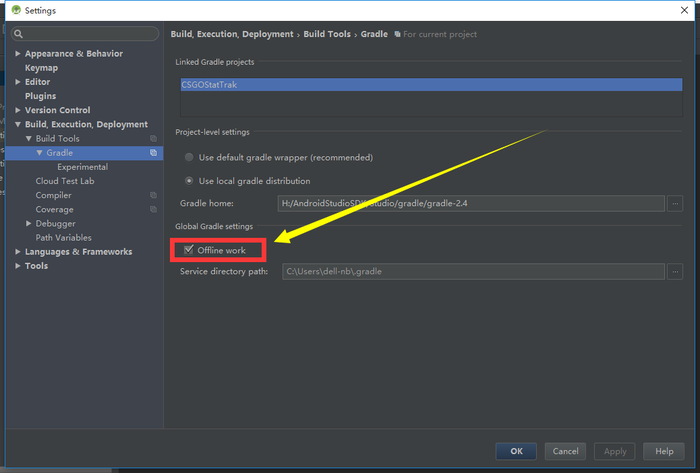
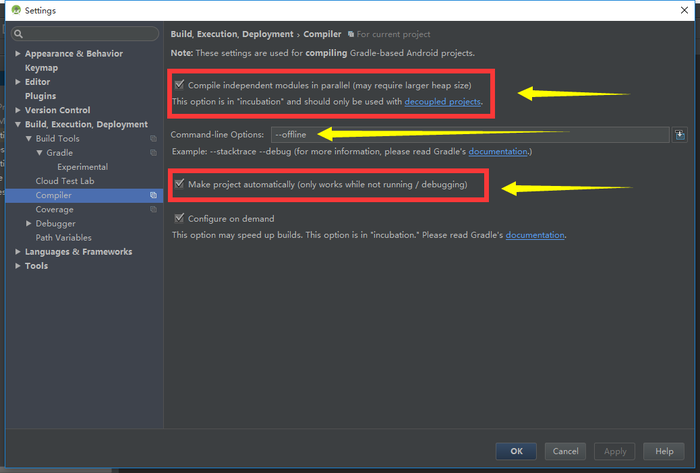
emmmm
Yeah, that's about it for this Gradle configuration. Now I get a bit anxious whenever I see that word—somehow it brings back the fear of being dominated by Gradle.
I'm out~
_EOF_
Android Development: A Record of Wrestling with Gradle
- 本文作者:
- 程序设计实验室
- 版权声明:
- 本博客所有文章除特别声明外,均采用 BY-NC-SA 许可协议。转载请注明出处!
相关文章
Android-ORM-框架:GreenDao入门
GreenDao 简介 GreenDAO 是一款开源的面向 Android 的轻便、快捷的 ORM 框架,将 Java 对象映射到 SQLite 数据库中,我们操作数据库的时候,不在需要编写复杂的 SQL语句, 在性能方面,GreenDAO 针对 Android 进行了高度优化, 最小的内存开销 、依赖体积小 同时还是支持数据库加密。 GreenDAO 官网地址:http://greenrobot
2022-05-27 · Android开发 · 约 1 分钟
Android开发:使用CardView实现卡片式设计
开头引用一段官网的介绍 A FrameLayout with a rounded corner background and shadow. CardView uses elevation property on Lollipop for shadows and falls back to a custom emulated shadow implementation on older platf
2021-12-18 · Android开发 · 约 1 分钟
Android开发:在Linux系统上使用ADB连接Android手机
前言 由于 Linux 系统的安全性设置等原因,非 root 用户使用外部设备或者某些硬件接口会受到限制。Google 官方提供的 SDK 并不能直接工作,如找不到设备或者显示一堆问号以及 Permission Denied。 方法 记得以前有看过 Google 官方提供的解决方案,即将指定的 USB 设备读写权限赋予普通用户。 首先使用 lsusb 命令查看连接到计算机的 usb 设备,找到 A
2021-12-18 · Android开发 · 约 1 分钟
记一次AndroidStudio在Linux环境上的奇葩错误,Argument-for-@NotNull-parameter-'messag
错误信息 Argument for @NotNull parameter 'message' of com/android/tools/idea/gradle/project/sync/GradleSyncState.syncFailed must not be null java.lang.IllegalArgumentException: Argument for @NotNull param
2022-05-27 · Android开发 · 约 1 分钟
讨论
共 0 条加载评论中…