

Personal Data Preservation Plan: A Beginner's Guide to the ZFS File System
ZFS is not just a file system but also a built-in storage solution? Data integrity verification and snapshot mechanisms sound somewhat unnecessary. The self-healing feature is quite appealing, though, but the complexity is not something everyone can handle.
目录22 个章节
Introduction to ZFS
One sentence to understand: ZFS is not just a file system; it is an intelligent storage solution.
ZFS (Zettabyte File System) is an advanced, open-source file system and logical volume manager developed by Sun Microsystems.
Unlike traditional file systems (such as ext4, NTFS), ZFS integrates the file system + RAID + volume management into one.
Keywords: self-healing, snapshots, high reliability, large-capacity support.
Advantages
Data Safety
- Copy-on-Write (COW) Mechanism: Prevents file corruption caused by power outages during write operations.
- Data Integrity Checksumming: Automatically detects and repairs silent corruption (files that are silently corrupted).
- RAID-Z Support: Avoids the traditional RAID 5 write hole vulnerability.
Snapshots and Rollback
- Snapshots have extremely low overhead and can be used for point-in-time backups.
- Supports fast rollback and cloning, making it a powerful tool for development and testing environments.
Resource Management
- Built-in compression (LZ4/ZSTD), deduplication (optional), and caching (ARC) mechanisms.
- Supports setting quotas or reservations for specific datasets.
Performance and Scalability
- Supports capacities up to the zettabyte (10²¹ bytes) level.
- Supports SSD acceleration (L2ARC/ZIL).
- Strong horizontal scalability (especially when using mirrored vdevs).
Why ZFS and NAS are a perfect match
- Large file storage like 4K videos, photos, backup images → Uses ZFS's built-in compression and snapshots to reduce space waste and prevent accidental deletion.
- Important document backups → Relies on data integrity checksums and snapshots to prevent bit rot.
- Multi-person shared folders + multi-device access → Uses ZFS snapshots to roll back accidental changes, so data is always recoverable.
- Managing storage pools with TrueNAS/PVE → A dual approach of CLI + Web interface, the underlying system remains ZFS, rock solid.
Deep Dive: ZFS Principles
ZFS Pool Hierarchy
This diagram visually illustrates the ZFS hierarchy: physical hard drives (Devices) form vdevs, and multiple vdevs combine to form a zpool
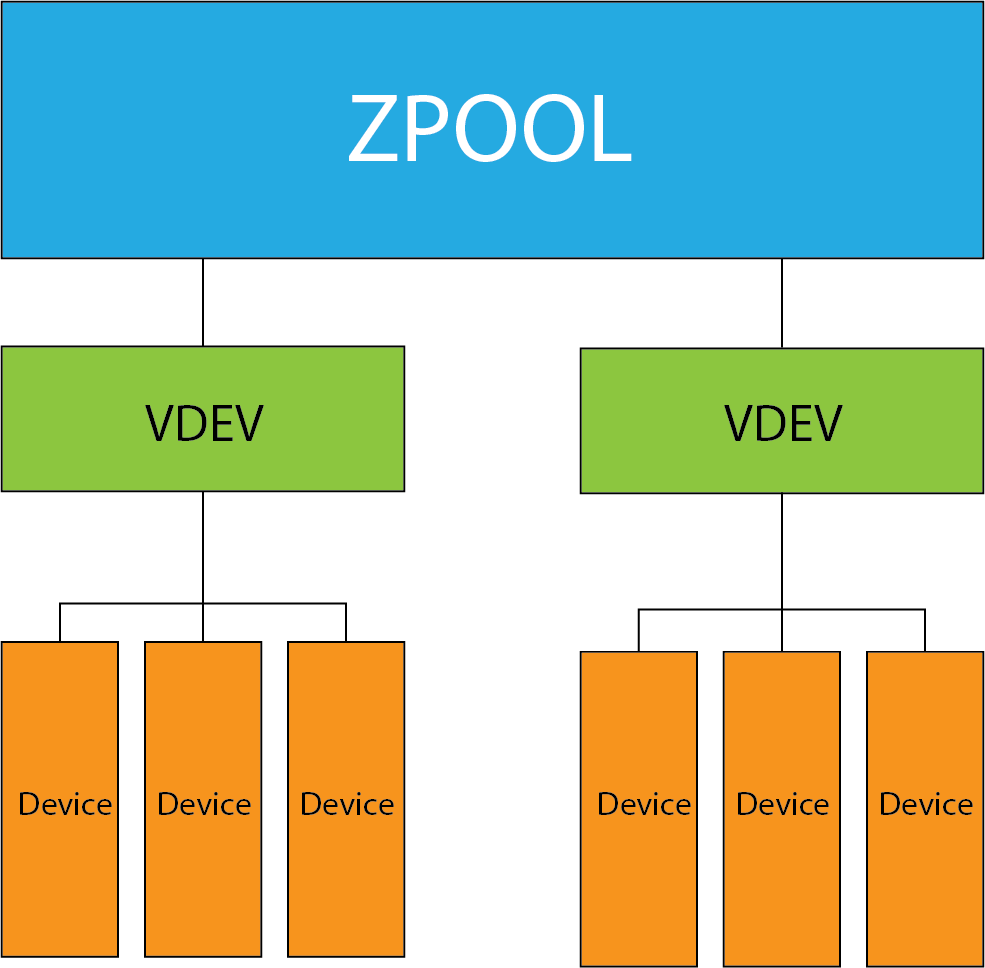
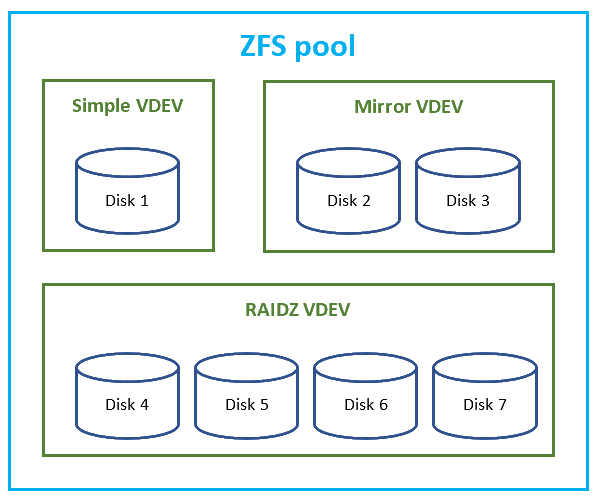
Diagram of Common vdev Types
This diagram illustrates three commonly used configurations: single disk, mirror, and RAID-Z (similar to RAID5/6/7), providing a clear visual comparison of their advantages and disadvantages. From this diagram, it is easy to see:
- Mirrors offer high performance but involve significant storage overhead
- RAID-Z provides better fault tolerance but requires longer rebuild times
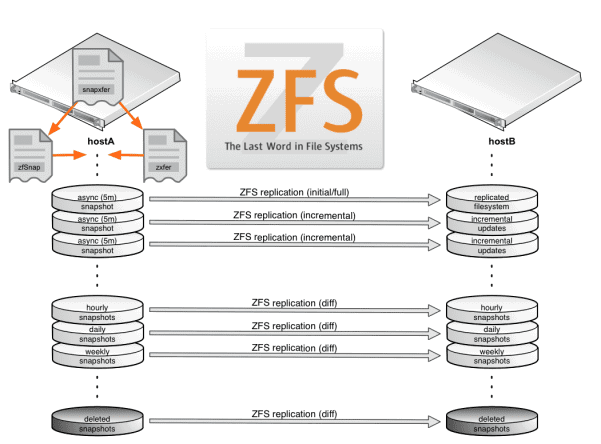
Snapshot and Replication Logic Flow
This diagram illustrates the process of snapshot creation, sending (zfs send), and receiving (zfs recv).
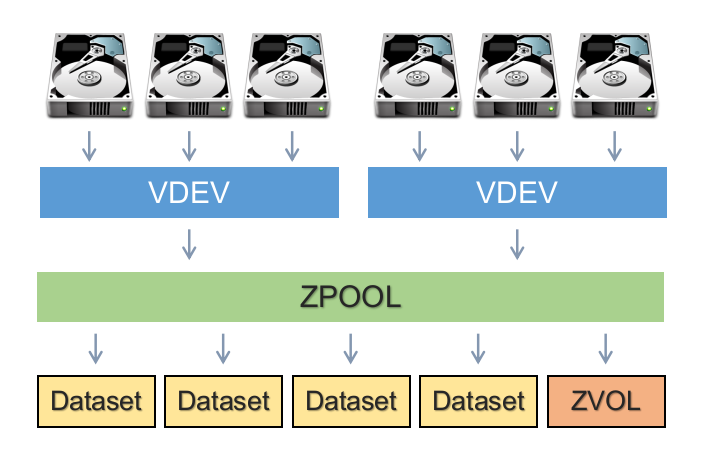
Dataset Hierarchy
The diagram unfolds from vdev → zpool → dataset, clearly illustrating the logical structure of dataset mounting, compression, quotas, and other related configurations.
Summary
As someone who wants to safely store my photos, documents, and project files, I don’t want to risk everything being lost if a disk fails. ZFS gave me a reliable, self-healing, and rollback-capable system—once you use it, there’s no going back.
Recommended Learning Resources
Brother Bird's Linux Private Kitchen (ZFS Chapter)
Although the focus is on FreeBSD/Linux, it is explained very clearly and is suitable for beginners.
The OpenZFS Documentation
Official documentation
Address: https://openzfs.github.io/openzfs-docs/
The content is authoritative and covers core technical points such as zpool, zfs, snapshots, dedup, ARC/L2ARC, etc.
The ZFS on Linux HOWTO
Address: https://zfsonlinux.org/ (now part of OpenZFS)
ZFS Book by Michael W. Lucas & Allan Jude
Book Titles: FreeBSD Mastery: ZFS and FreeBSD Mastery: Advanced ZFS
Even if you don't use FreeBSD, the explanations of principles in the book are exceptionally clear and suitable for in-depth learning.
Proxmox Official Documentation (Including ZFS Storage Configuration)
Link: https://pve.proxmox.com/wiki/ZFS_on_Linux
Building a virtualization platform with ZFS is an excellent learning scenario, and Proxmox serves as a great example.
TrueNAS CORE / SCALE Official Documentation
TrueNAS is an enterprise-level NAS system that comes with ZFS.
Address: https://www.truenas.com/docs/
It supports both GUI and CLI, making it suitable for beginners to try.
zpool.org
zpool.org is a website personally maintained by a tech blogger (Phil Steinbach) dedicated to sharing experiences and tutorials related to ZFS. While it is not the official ZFS project homepage, its content focuses on:
- ZFS snapshots and remote replication;
- Configuring ZFS in real-world environments (e.g., Home Lab, Proxmox, SmartOS, etc.);
- Daily management tips, such as how to create, export, import, and upgrade zpool and vdev settings;
- Various practical project examples, such as "Using a UDM-Pro Docker container as a Proxmox quorum device."
These articles have been continuously updated from 2013 to the present, aiming to help programmers and system administrators interested in ZFS better understand zpool operations and maintenance practices.
This blog is a valuable resource, especially for in-depth explanations and experience sharing on zpool management, snapshot backups, vdev architecture design, and related topics.
References
关于本文
Personal Data Preservation Plan: A Beginner's Guide to the ZFS File System
本文作者:程序设计实验室
- 版权声明:
- 本博客所有文章除特别声明外,均采用 BY-NC-SA 许可协议。转载请注明出处!
讨论
共 0 条加载评论中…
相关文章
个人数据保全计划:安装docker
快速开始 App Center 中安装 Container Station 然后建议先在 FileStation 里自行创建一个 Container 文件夹,这样可以控制要在哪个卷上保存 docker 的数据,我是放在固态盘上。 安装后第一次打开会提示创建 Container 共享文件夹,直接选之前创建好的 Container 目录就行。 然后全部回归命令行 默认自带 docker-compose
2022-11-13 · 个人数据保全计划 · 约 1 分钟
PVE折腾笔记 (3) 在原QNAP使用的硬盘上创建ZFS
QNAP硬盘换ZFS?自愈功能挺好用,但折腾Linux兼容性够闹心。LVM残留导致擦盘失败?内核对象得一个个干掉。Pool创建时参数选错?那可真是后患无穷。
2025-06-19 · 个人数据保全计划 · 约 1 分钟
个人数据保全计划:(3)RAID与存储方案
iNode越小,可用空间也越小
2022-11-04 · 个人数据保全计划 · 约 1 分钟
个人数据保全计划:(1)NAS开箱
前言 从几年前第一个硬盘故障导致参赛的文件丢失之后,我就开始意识到数据安全的重要性,开始用各种云盘做备份,当时还不是百度云一家独大,我们也都没意识到网盘备份是极其不靠谱的行为,直到因为某些不可抗力因素,一夜之间所有网盘都宣布停服,这时才意识到,数据始终是掌握在自己手中才安全可控。 随着数据量增大,我又购入一个2T硬盘,但因为不懂 + 被无良奸商坑了,买到手发现是叠瓦盘,用了一年多就频繁卡顿和丢数据
2022-11-13 · 个人数据保全计划 · 约 1 分钟