

About the management of the uwsgi server
Foreword It's great to use Django for project development, but the deployment is too troublesome. With the Uwsgi server, every time you modify the code, you need to restart the server for the changes to take effect. Restarting the uwsgi server is also quite cumbersome. After looking at the official documentation, it's best to install uwsgi into the venv virtual environment so that it's easy to distinguish when running `ps aux`. Checking uwsgi processes `ps -aux | grep uwsgi` Terminating the original uwsgi process `kill -9 27543` Conclusion
目录6 个章节
Preface
Using Django to develop projects is great, but deployment is quite troublesome. When using the Uwsgi server, every time the code is modified, the server needs to be restarted for the changes to take effect. Moreover, restarting the Uwsgi server is also quite a hassle.
After reviewing the official documentation, it's best to install Uwsgi inside a venv virtual environment. This way, it's easier to differentiate when running
ps aux.
View uwsgi processes
ps -aux | grep uwsgi
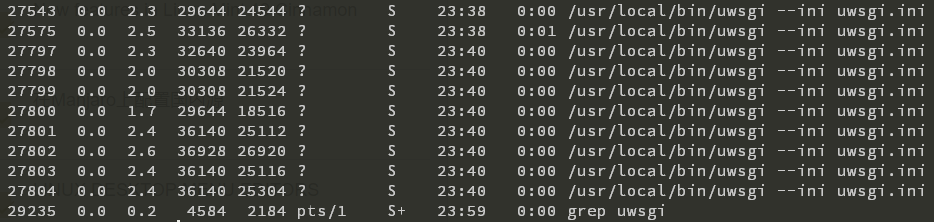
Terminate the original uwsgi process
kill -9 27543
Conclusion
This is still cumbersome—you have to manually locate the uwsgi process and terminate it. Next, I should look for a more convenient approach, such as adding uwsgi as a service for systemctl to manage, though the official documentation advises against doing this?
Supplementary
There are a few other ways to simplify the management of the uwsgi server.
- Using Supervisor to manage the uwsgi service
Supervisor (http://supervisord.org/) is a client/server service developed in Python. It's a process management tool for Linux/Unix systems and does not support Windows. It can conveniently monitor, start, stop, and restart one or multiple processes. When a process managed by Supervisor is unexpectedly killed, the supervisor detects the process death and automatically restarts it, providing a convenient automatic process recovery feature without needing to write shell scripts yourself.
References:
-
Emperor mode
uWSGI can run in 'emperor' mode. In this mode, it monitors a directory of uWSGI configuration files and generates an instance ('vassal') for each configuration file it finds. Whenever a configuration file is modified, the emperor will automatically restart the vassal.
Reference: http://uwsgi-docs-zh.readthedocs.io/zh_CN/latest/tutorials/Django_and_nginx.html
Following international convention, a picture is placed at the end of the article as a cover.

About

For more interesting tips, follow my WeChat public account: DealiAxy All articles are also available on my blog: blog.deali.cn
_EOF_
About the management of the uwsgi server
- 本文作者:
- 程序设计实验室
- 版权声明:
- 本博客所有文章除特别声明外,均采用 BY-NC-SA 许可协议。转载请注明出处!
相关文章
Django-Filter介绍与刁钻需求的实现方法
Django-Filter是一个非常好用的第三方库,很好的利用了Django ORM的特性,可以使用很少的代码就扩展原有的接口,实现多种筛选功能~ 场景 Model定义的部分代码,可以看到需求模型包括了 关键词 keyword、区域 region、需求状态 require_status,这三个字段 class Require(models.Model): 需求 keyword =
2021-12-18 · Django · 约 1 分钟
聊聊Django应用的部署和性能的那些事儿
前言 随着工作的深入,我越来越发现Python Web开发中有很多坑,也一直在羡慕AspNetCore和Go等的可执行文件部署和高性能,以及Spring生态的丰富,不过因为工作用了Django,生活还是要继续的嘛,这Django好歹也是有很大份额的Web框架,也没那么不堪,至少开发速度上就吊打一众框架了~ 在之前的文章里我介绍过使用Docker部署Django应用的方法,不过那种部署方式只适合上线
2022-05-27 · Django · 约 1 分钟
Django应用部署:uwsgi+Nginx方式
环境准备 nginx+uwsgi方式部署顾名思义,需要nginx和uwsgi两个软件包。 nginx不用说,是必备的,关于nginx的安装本文不再赘述,详情可以自行搜索或者参考我以前的文章: Debian8搭建LEMP环境 安装uwsgi pip install uwsgi 上传项目代码 & 测试 # 进入项目目录,具体目录请自行选择 cd /path/to/project # 建立虚拟环境 v
2022-04-02 · Django · 约 1 分钟
Django项目引入NPM和gulp管理前端资源
前言 之前写了一篇《Asp-Net-Core开发笔记:使用NPM和gulp管理前端静态文件》,现在又来用Django开发项目了,之前我搞了一个Django的快速开发脚手架「DjangoStarter」,正好给升级一下~ 关于npm和gulp我就不多重复了,之前那篇文章都写了,直接上操作 安装依赖 安装依赖的操作跟上一篇文章是一样的,不过我这里直接提供package.json文件,复制到项目根目录里
2022-04-02 · Django · 约 1 分钟
讨论
共 0 条加载评论中…