Ubuntu-16-04-Upgrade Python version to 3-6
Preface I had no choice, the Unity desktop is just too convenient. While I had installed the Unity desktop on Ubuntu 18.04, it still wasn't perfect. So yesterday, I downgraded to Ubuntu 16.04 to enjoy the native Unity desktop experience. Everything was okay, but the Python version was a bit outdated, so I needed to use the versatile PPA repository to upgrade it. Action Install Python 3.6 sudo add-apt-repository ppa:jonathonf/python-3.6 sudo apt-get update sudo apt-get install python3.6
目录5 个章节
Preface
There's no way around it—the Unity desktop is just too good. While having Unity installed on Ubuntu 18.04 works, it's not entirely seamless. So yesterday, I decided to downgrade to Ubuntu 16.04 to enjoy the native Unity desktop experience.
Everything is working smoothly, but the default Python version is a bit outdated. Therefore, I need to upgrade it using the trusty PPA repository.
Operations
Installing Python 3.6
sudo add-apt-repository ppa:jonathonf/python-3.6
sudo apt-get update
sudo apt-get install python3.6
Switching Python Versions: Warning! After a period of testing, it's best not to switch the Python3 version here; just keep version 3.5. Many Ubuntu system software depend on Python, and I've personally experienced that upgrading to 3.6 causes many programs to malfunction!
sudo update-alternatives --install /usr/bin/python3 python3 /usr/bin/python3.5 2
sudo update-alternatives --install /usr/bin/python3 python3 /usr/bin/python3.6 2
sudo update-alternatives --config python3
Verification
python3 -V
Result:
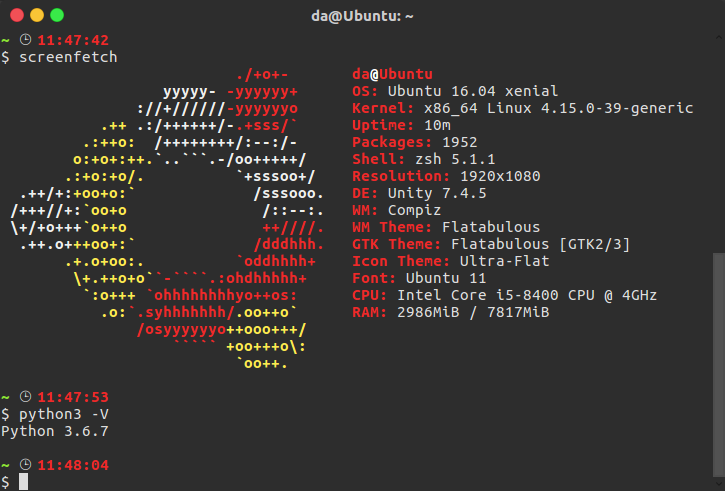
OK!
Installing pip3
curl https://bootstrap.pypa.io/get-pip.py | sudo python3.6
Terminal Won't Open Issue
After upgrading to Python 3.6, if the built-in terminal fails to open, you can press Ctrl+Alt+F1 to switch to the command line and execute the following commands:
cd /usr/lib/python3/dist-packages/gi/
sudo cp _gi.cpython-35m-x86_64-linux-gnu.so _gi.cpython-36m-x86_64-linux-gnu.so
sudo cp _gi_cairo.cpython-35m-x86_64-linux-gnu.so _gi_cairo.cpython-36m-x86_64-linux-gnu.so
After that, press Ctrl+Alt+F7 to switch back to the graphical interface, and everything should be back to normal~
About
For more interesting content, follow my WeChat public account (微信公众号): DealiAxy. Every article is also featured on my blog: blog.deali.cn
_EOF_
Ubuntu-16-04-Upgrade Python version to 3-6
- 本文作者:
- 程序设计实验室
- 版权声明:
- 本博客所有文章除特别声明外,均采用 BY-NC-SA 许可协议。转载请注明出处!
相关文章
Ubuntu-18-04-修复-Telegram-中文输入法
前言 Ubuntu 18.04,新的 Gnome 桌面的确好看很多。但同时出现了很多之前在 Unity 没有出现过的 BUG,例如在 Telegram 下无论怎么切换输入法都不能输入中文。 大概是所有 QT 编写的应用程序在 Gnome3 下都会出现这个问题,解决方法是引入 QT_IM_MODULE 变量。大致 步骤如下 编辑~/.local/share/applications/telegram
2025-10-27 · 系统配置 · 约 1 分钟
配置MariaDB数据库服务端远程访问
操作步骤 开启远程访问权限 连接MariaDB数据库,执行以下命令开启远程访问。 grant all privileges on *.* to 'root'@'192.168.248.248' identified by 'password'; flush privileges; 如果需要任意IP地址访问,就把IP地址换成%。 修改配置文件 在网络上能搜索到的资料都只说了第一点,然而亲测之后并没有
2025-10-27 · 系统配置 · 约 1 分钟
在Manjaro上配置国内源
前言 之前我一直用官方源的,但是最近发现官方源变慢了,于是想要切换国内源,顺手做个笔记。 操作 使用以下命令,生成可用中国镜像站列表: sudo pacman-mirrors -i -c China -m rank 刷新完列表之后会弹出来一个框让你选择软件源,这里的就都是国内源了,选择一个喜欢的就行(当然要选择两个以上也没问题。) 日常桌面截图
2025-10-27 · 系统配置 · 约 1 分钟
在Nginx上配置https加密服务器
前言 最近开发微信小程序需要使用Https,于是折腾了一番。 超简单步骤 1. 申请SSL证书 一般云服务器提供商就会提供这种服务,我在腾讯云上申请了,十分钟就完成了。 2. 上传证书 上传到一个文件夹里面 3. 配置nginx 网络上的资料都是直接修改 /etc/nginx/nginx.conf 这个文件。 不过我的服务器上这个文件里头没有 server 这个节点可以配置。 因此需要修改 /et
2025-10-27 · 系统配置 · 约 1 分钟
讨论
共 0 条加载评论中…