

Ubuntu-16-04-Upgrade Python version to 3-6
Preface I had no choice, the Unity desktop is just too convenient. While I had installed the Unity desktop on Ubuntu 18.04, it still wasn't perfect. So yesterday, I downgraded to Ubuntu 16.04 to enjoy the native Unity desktop experience. Everything was okay, but the Python version was a bit outdated, so I needed to use the versatile PPA repository to upgrade it. Action Install Python 3.6 sudo add-apt-repository ppa:jonathonf/python-3.6 sudo apt-get update sudo apt-get install python3.6
目录5 个章节
Preface
There's no way around it—the Unity desktop is just too good. While having Unity installed on Ubuntu 18.04 works, it's not entirely seamless. So yesterday, I decided to downgrade to Ubuntu 16.04 to enjoy the native Unity desktop experience.
Everything is working smoothly, but the default Python version is a bit outdated. Therefore, I need to upgrade it using the trusty PPA repository.
Operations
Installing Python 3.6
sudo add-apt-repository ppa:jonathonf/python-3.6
sudo apt-get update
sudo apt-get install python3.6
Switching Python Versions: Warning! After a period of testing, it's best not to switch the Python3 version here; just keep version 3.5. Many Ubuntu system software depend on Python, and I've personally experienced that upgrading to 3.6 causes many programs to malfunction!
sudo update-alternatives --install /usr/bin/python3 python3 /usr/bin/python3.5 2
sudo update-alternatives --install /usr/bin/python3 python3 /usr/bin/python3.6 2
sudo update-alternatives --config python3
Verification
python3 -V
Result:
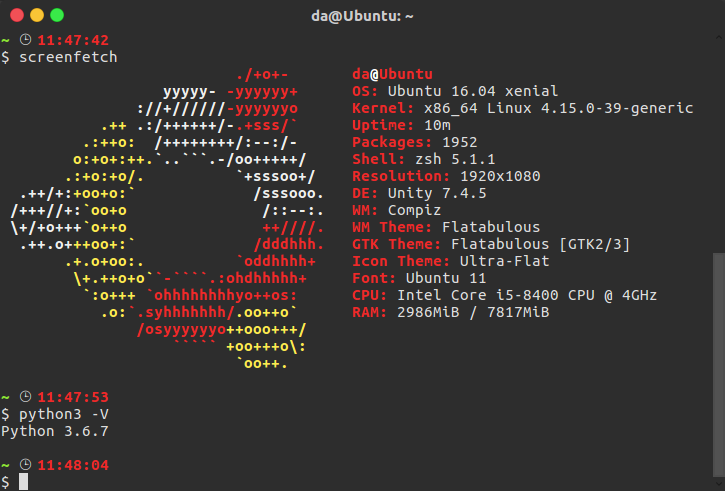
OK!
Installing pip3
curl https://bootstrap.pypa.io/get-pip.py | sudo python3.6
Terminal Won't Open Issue
After upgrading to Python 3.6, if the built-in terminal fails to open, you can press Ctrl+Alt+F1 to switch to the command line and execute the following commands:
cd /usr/lib/python3/dist-packages/gi/
sudo cp _gi.cpython-35m-x86_64-linux-gnu.so _gi.cpython-36m-x86_64-linux-gnu.so
sudo cp _gi_cairo.cpython-35m-x86_64-linux-gnu.so _gi_cairo.cpython-36m-x86_64-linux-gnu.so
After that, press Ctrl+Alt+F7 to switch back to the graphical interface, and everything should be back to normal~
About

For more interesting content, follow my WeChat public account (微信公众号): DealiAxy. Every article is also featured on my blog: blog.deali.cn
_EOF_
Ubuntu-16-04-Upgrade Python version to 3-6
- 本文作者:
- 程序设计实验室
- 版权声明:
- 本博客所有文章除特别声明外,均采用 BY-NC-SA 许可协议。转载请注明出处!
相关文章
Debian配置默认不开启图形界面
前言 Linux的图形界面实在是太耗资源了,同时开几个虚拟机感觉已经hold不住了,赶紧把这些Linux服务器的图形界面都关掉。 CLI:command Line Interface,命令行界面。 现在的Linux发行版默认登陆界面几乎都是默认为GUI界面,如果按照旧版本的修改inittab文件,在一些比较新的版本是没有这个文件的(Linux的启动服务机制发生改变) 修改Grub配置文件 打开gr
2025-10-27 · 系统配置 · 约 1 分钟
在Linux上安装Windows字体
前言 Linux系统下为安装WPS后,由于版权问题并没有自带字体,而这些字体又是平时必须使用的,下面介绍为Linux系统添加字体的方法。 操作 由于Windows系统自带了完善的字体,所以可以从安装的windows系统下拷贝。首先执行命令: mkdir /usr/share/fonts/wps_symbol_fonts/ //创建WPS的字体目录 然后到windows字体目录下,C:/Win
2025-10-27 · 系统配置 · 约 1 分钟
关闭CentOS-6-防火墙,关闭Linux系统防火墙
前言 最近部署服务的时候需要临时关闭一下防火墙,所以记个笔记,如何关闭CentOS防火墙。 查看系统版本 输入:cat /etc/issue 查看版本 通过service关闭 service命令开启以及关闭防火墙为即时生效,下次重启机器的时候会自动复原。 查看防火墙状态: service iptables status 记得在CentOS6.9中是输入iptables,网上有些教程使用serv
2025-10-27 · 系统配置 · 约 1 分钟
Linux终端输入密码显示星号
Linux默认密码星号?这体验真不错。一行sudoers配置搞定,真就有人非要用脚本整这些。关闭?那不是自讨没趣吗。
2025-10-01 · 系统配置 · 约 1 分钟
讨论
共 0 条加载评论中…