使用twinkle-tray快捷调整多个显示器的亮度
自从安装了这个小工具,我再也没用过笔记本键盘上的快捷键了~
目录5 个章节
前言
自从安装了这个小工具,我再也没用过笔记本键盘上的快捷键了~
介绍
Twinkle Tray enables brightness control on external displays in Windows 10 & 11. Even though Windows is capable of adjusting the backlight on most monitors, it doesn't support external monitors natively. Windows also lacks any options to manage the brightness of multiple displays. This app inserts a new icon into your system tray, where you can click to have instant access to the brightness levels of all compatible displays.
翻译:Twinkle Tray可以对Windows 10和11中的外部显示器进行亮度控制。即使Windows能够调整大多数显示器的背光,但它并不能本地支持外部监视器。Windows还缺乏管理多个显示器亮度的任何选择。该应用程序将一个新图标插入您的系统托盘中,您可以在其中单击以即时访问所有兼容显示器的亮度级别。
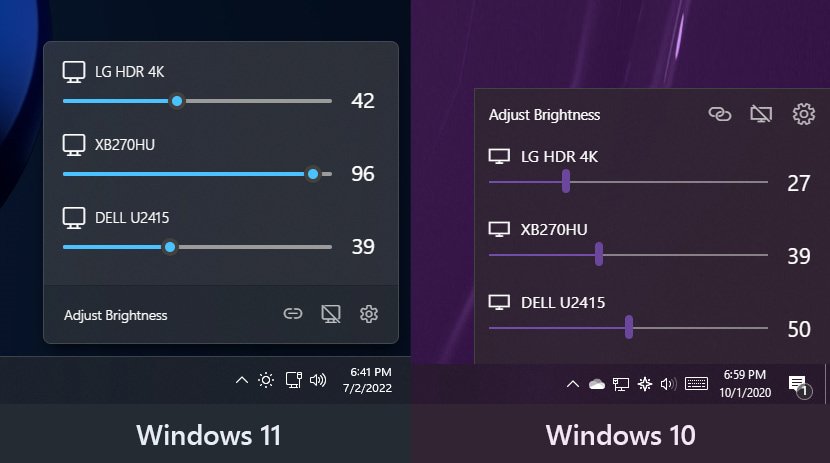
截图
在 win11 和 win10 下略有不同
不过都挺好看的
安装
提供了多种方式
- 直接在 Github 下载安装包: https://github.com/xanderfrangos/twinkle-tray
- Microsoft 商店安装
- scoop 安装
参考资料
_EOF_
使用twinkle-tray快捷调整多个显示器的亮度
- 本文作者:
- 程序设计实验室
- 版权声明:
- 本博客所有文章除特别声明外,均采用 BY-NC-SA 许可协议。转载请注明出处!
相关文章
在Windows上将git与ssh-agent搭配使用
Windows git 还自带 ssh?真是老土的兼容性思路。一行配置就能解决,不过得先管好 ssh-agent 的连接。 ProxyCommand 居然又添乱,难怪老出毛病。
2025-08-21 · Windows · 约 1 分钟
从SSH远程到Git Push:在Windows上一步到位实现免密码登录
我一直希望在Windows上能像在Linux系统中那样,通过SSH密钥实现免密码远程连接。每次远程连接到服务器时,手动输入密码既麻烦又不太安全,尤其是在我需要频繁操作的情况下。
2025-02-10 · Windows · 约 1 分钟
2024年,提升Windows开发和使用体验的实践经验 - RIME输入法
上一篇文章介绍了 Windows 下的包管理器,本文继续介绍输入法。 事实上 Windows 的输入法生态比 Linux/Mac 丰富很多,不过很多国产输入法存在窃取隐私、植入广告、乱安装流氓软件等问题,现在有开源的 RIME 输入法可以选择,何必受这气呢
2024-02-29 · Windows · 约 1 分钟
Windows10-快捷键大全,整理+排版
前言 偶然在微软官网看到的,整理了一下,非常全面。不只有Windows10能用,大部分快捷键在7/8/8.1里都是通用的。 发现这东西对提高效率帮助很大啊,下面是整理之后的。 复制、粘贴及其他常规的键盘快捷方式 | 按键 | 操作
2021-12-18 · Windows · 约 1 分钟
讨论
共 0 条加载评论中…