

StarBlog Blog Development Notes (24): Unified API Data Response Format
Introduction APIs are built for clients (web frontends, apps). RESTFul, mentioned earlier, is the API specification. With a unified API style, client developers can find the endpoints they need more quickly when accessing backend functionality, and can write more maintainable code. The API data response format is also an important part of the API specification. Otherwise, if one API returns JSON and another returns a plain string, the client will be completely dumbfounded when it receives the data and won't be able to handle it. A proper API response should include a status code, a message, and data. Like this: { st
目录14 个章节
Introduction
APIs are built for clients (web frontends, apps). RESTFul, mentioned earlier, is the API specification. With a unified API style, client developers can find the endpoints they need more quickly when accessing backend functionality, and can write more maintainable code.
The API data response format is also an important part of the API specification. Otherwise, if one API returns JSON and another returns a plain string, the client will be completely dumbfounded when it receives the data and won't be able to handle it.
A proper API response should include a status code, a message, and data.
Like this:
{
  "statusCode": 200,
  "successful": true,
  "message": null,
  "data": {}
}
By default, AspNetCore's WebAPI template has no specific response format, because these business-related things need to be defined and completed by the developer.
In previous articles, you can see that this project's API return values are all ApiResponse and its derived types—this is the unified response format customized in StarBlog. In fact, my other projects also use this set of API response values; it already counts as a Utilities-style component.
PS: While writing this article today, I went ahead and published this response type as a NuGet package, so I won't have to copy and paste when using it in other projects anymore~
Let's Analyze This
When writing a WebApi in AspNetCore, our Controller needs to inherit the ControllerBase class
An API Action can set its return type to IActionResult or ActionResult<T>, and when returning data, you can use methods encapsulated by ControllerBase such as Ok(), NotFound(), etc. These methods automatically set the HTTP status code of the response while returning data.
PS: For the difference between
IActionResultandActionResult<T>, please refer to the official documentation.This article only mentions one key point: the
ActionResult<T>return type lets you intuitively see the returned data type in the swagger documentation.
So we not only need to encapsulate a unified return value, but also implement convenience methods similar to Ok(), NotFound(), BadRequest().
Obviously, when all API return types are ApiResponse<T>, the returned status codes would all be 200, which doesn't meet the requirements.
And some APIs were already written with return types like List<T>, so we also need to wrap those APIs' return values to unify the response format.
To solve these problems, we need to understand AspNetCore's pipeline model.
AspNetCore Pipeline Model
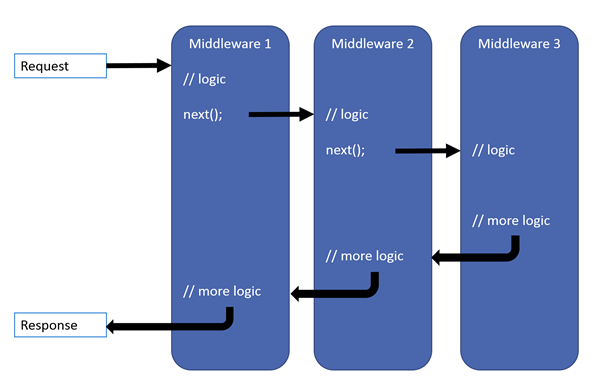
The outermost layer is middleware. A request comes in, passes through middleware one by one, reaches the last middleware, generates a response, then walks back out through the middleware one by one, producing the final response.
Common AspNetCore project middleware includes these, as shown in the figure below:
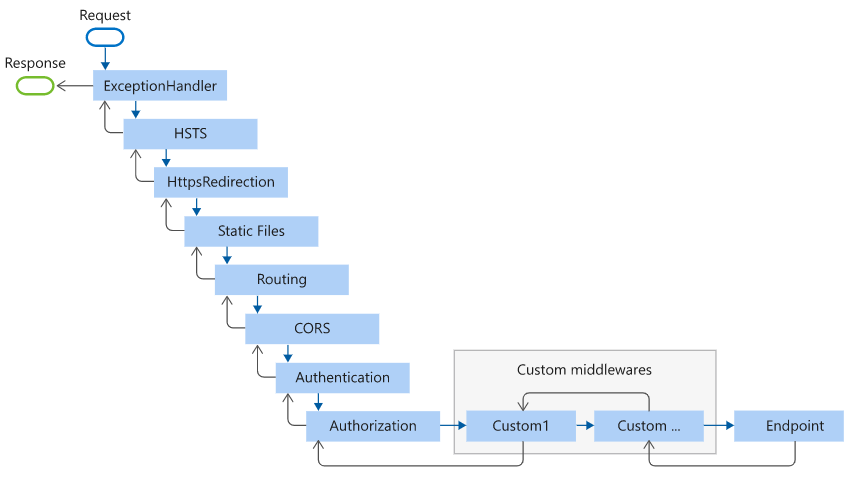
The last Endpoint is the middleware that ultimately generates the response.
In this project, the last middleware in the Program.cs configuration adds an Endpoint that handles MVC
app.MapControllerRoute(
    name: "default",
    pattern: "{controller=Home}/{action=Index}/{id?}");
The structure of this Endpoint looks like this:
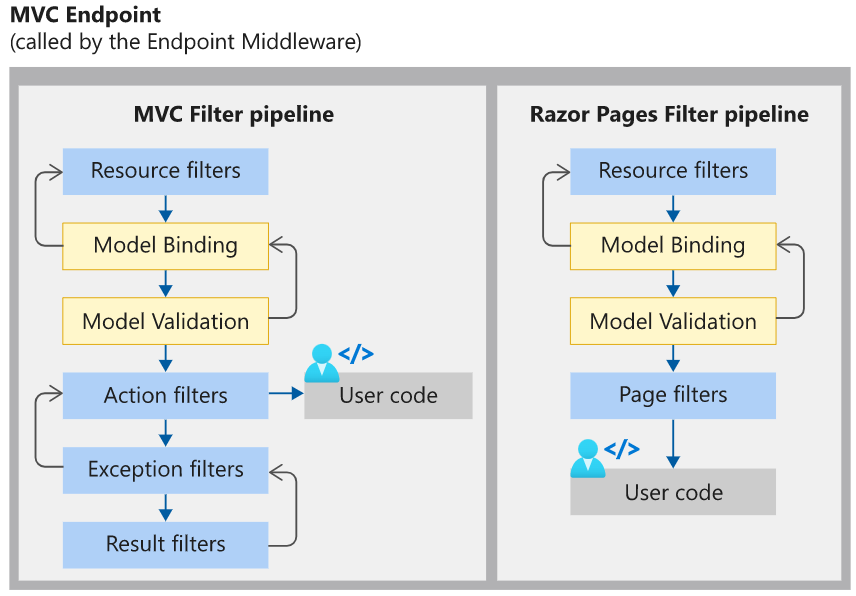
You can see there are many Filters surrounding the user code, both before and after.
So the conclusion is, to modify a request's response, we can choose:
- Write a middleware to handle it
- Use a Filter
So, let's start writing code~
Defining ApiResponse
First up is this frequently appearing ApiResponse—time to reveal it at last~
Under the StarBlog.Web/ViewModels/Response namespace, I created three files:
- ApiResponse.cs
- ApiResponsePaged.cs: paged response
- IApiResponse.cs: several related interfaces
In ApiResponse.cs, there are actually two classes: one ApiResponse<T> and another ApiResponse, with and without generics.
PS: C# generics are a bit complicated. I got dizzy working on this at the time, and also reviewed some contravariance and covariance, but ultimately didn't use them.
Interface Code
Here's the code, starting with the interfaces
public interface IApiResponse {
    public int StatusCode { get; set; }
    public bool Successful { get; set; }
    public string? Message { get; set; }
}

public interface IApiResponse<T> : IApiResponse {
    public T? Data { get; set; }
}

public interface IApiErrorResponse {
    public Dictionary<string,object> ErrorData { get; set; }
}
This ensures that all related objects come from the IApiResponse interface.
ApiResponse<T>
Next, look at the ApiResponse<T> code.
public class ApiResponse<T> : IApiResponse<T> {
    public ApiResponse() {
    }

    public ApiResponse(T? data) {
        Data = data;
    }

    public int StatusCode { get; set; } = 200;
    public bool Successful { get; set; } = true;
    public string? Message { get; set; }

    public T? Data { get; set; }

    /// <summary>
    /// 实现将 <see cref="ApiResponse"/> 隐式转换为 <see cref="ApiResponse{T}"/>
    /// </summary>
    /// <param name="apiResponse"><see cref="ApiResponse"/></param>
    public static implicit operator ApiResponse<T>(ApiResponse apiResponse) {
        return new ApiResponse<T> {
            StatusCode = apiResponse.StatusCode,
            Successful = apiResponse.Successful,
            Message = apiResponse.Message
        };
    }
}
Here, operator overloading is used to implement implicit conversion from ApiResponse to ApiResponse<T>.
You'll see what this is for in a moment~
ApiResponse
Continuing with the ApiResponse code, which is fairly long and encapsulates several commonly used methods, with some duplicated code.
This class implements two interfaces: IApiResponse, IApiErrorResponse
public class ApiResponse : IApiResponse, IApiErrorResponse {
    public int StatusCode { get; set; } = 200;
    public bool Successful { get; set; } = true;
    public string? Message { get; set; }
    public object? Data { get; set; }

    /// <summary>
    /// 可序列化的错误
    /// <para>用于保存模型验证失败的错误信息</para>
    /// </summary>
    public Dictionary<string,object>? ErrorData { get; set; }

    public ApiResponse() {
    }

    public ApiResponse(object data) {
        Data = data;
    }

    public static ApiResponse NoContent(string message = "NoContent") {
        return new ApiResponse {
            StatusCode = StatusCodes.Status204NoContent,
            Successful = true, Message = message
        };
    }

    public static ApiResponse Ok(string message = "Ok") {
        return new ApiResponse {
            StatusCode = StatusCodes.Status200OK,
            Successful = true, Message = message
        };
    }

    public static ApiResponse Ok(object data, string message = "Ok") {
        return new ApiResponse {
            StatusCode = StatusCodes.Status200OK,
            Successful = true, Message = message,
            Data = data
        };
    }

    public static ApiResponse Unauthorized(string message = "Unauthorized") {
        return new ApiResponse {
            StatusCode = StatusCodes.Status401Unauthorized,
            Successful = false, Message = message
        };
    }

    public static ApiResponse NotFound(string message = "NotFound") {
        return new ApiResponse {
            StatusCode = StatusCodes.Status404NotFound,
            Successful = false, Message = message
        };
    }

    public static ApiResponse BadRequest(string message = "BadRequest") {
        return new ApiResponse {
            StatusCode = StatusCodes.Status400BadRequest,
            Successful = false, Message = message
        };
    }

    public static ApiResponse BadRequest(ModelStateDictionary modelState, string message = "ModelState is not valid.") {
        return new ApiResponse {
            StatusCode = StatusCodes.Status400BadRequest,
            Successful = false, Message = message,
            ErrorData = new SerializableError(modelState)
        };
    }

    public static ApiResponse Error(string message = "Error", Exception? exception = null) {
        object? data = null;
        if (exception != null) {
            data = new {
                exception.Message,
                exception.Data
            };
        }

        return new ApiResponse {
            StatusCode = StatusCodes.Status500InternalServerError,
            Successful = false,
            Message = message,
            Data = data
        };
    }
}
ApiResponsePaged<T>
This paged version is the simplest—it just adds a Pagination property.
public class ApiResponsePaged<T> : ApiResponse<List<T>> where T : class {
    public ApiResponsePaged() {
    }

    public ApiResponsePaged(IPagedList<T> pagedList) {
        Data = pagedList.ToList();
        Pagination = pagedList.ToPaginationMetadata();
    }

    public PaginationMetadata? Pagination { get; set; }
}
Implicit Type Conversion
Take a look at this API
public ApiResponse<Post> Get(string id) {
    var post = _postService.GetById(id);
    return post == null ? ApiResponse.NotFound() : new ApiResponse<Post>(post);
}
From the code above, you can see that ApiResponse.NotFound() returns an ApiResponse object
But this API's return type is clearly ApiResponse<Post>—isn't that a type mismatch?
However, in ApiResponse<T>, we defined an operator overload that implements implicit conversion from the ApiResponse type to ApiResponse<T>, so this problem is perfectly solved, greatly reducing the amount of code.
Otherwise it would have to be written like this
return post == null ?
    new ApiResponse<Post> {
	    StatusCode = StatusCodes.Status404NotFound,
    	Successful = false, Message = "未找到"
	} :
	new ApiResponse<Post>(post);
Now you just need a simple ApiResponse.NotFound(), as neat as the one built into AspNetCore~
Wrapping Return Values
Besides these endpoints that use ApiResponse or ApiResponse<T> as their return type, there are many other endpoints with different return types, for example
public List<ConfigItem> GetAll() {
    return _service.GetAll();
}
And also
public async Task<string> Poem() {
    return await _crawlService.GetPoem();
}
When AspNetCore generates the response for these endpoints, it classifies these return values as ObjectResult. If left unhandled, they will be serialized directly into a format that doesn't match our return value specification.
That won't do; we must unify the return format for these endpoints as well.
For various reasons, I ultimately chose to implement this with a filter.
For detailed usage of filters, you can refer to the official documentation; this article won't go into that. Let's jump straight to the code.
Create the file StarBlog.Web/Filters/ResponseWrapperFilter.cs
public class ResponseWrapperFilter : IAsyncResultFilter {
    public async Task OnResultExecutionAsync(ResultExecutingContext context, ResultExecutionDelegate next) {
        if (context.Result is ObjectResult objectResult) {
            if (objectResult.Value is IApiResponse apiResponse) {
                objectResult.StatusCode = apiResponse.StatusCode;
                context.HttpContext.Response.StatusCode = apiResponse.StatusCode;
            }
            else {
                var statusCode = objectResult.StatusCode ?? context.HttpContext.Response.StatusCode;

                var wrapperResp = new ApiResponse<object> {
                    StatusCode = statusCode,
                    Successful = statusCode is >= 200 and < 400,
                    Data = objectResult.Value,
                };

                objectResult.Value = wrapperResp;
                objectResult.DeclaredType = wrapperResp.GetType();
            }
        }

        await next();
    }
}
In the code we check: when the response type is ObjectResult, we take out that result and then check whether it is of type IApiResponse.
As we introduced earlier, all ApiResponse types implement the IApiResponse interface, so we can check whether it is of type IApiResponse to determine whether this return result has already been wrapped.
If it hasn't been wrapped, wrap it. It's that simple.
Then register this filter in Program.cs.
var mvcBuilder = builder.Services.AddControllersWithViews(
    options => { options.Filters.Add<ResponseWrapperFilter>(); }
);
Done
And that's it~
In the end, all endpoints (the serializable ones) have their return format become like this
{
  "statusCode": 200,
  "successful": true,
  "message": null,
  "data": {}
}
My OCD is satisfied~
PS: Oh, except for those endpoints that return files.
Using It in Other Projects
This ApiRepsonse has already been published as a NuGet package
If you need to use it in other projects, you can install the CodeLab.Share package directly
Just import the CodeLab.Share.ViewModels.Response namespace and you're done~
No more copying and pasting these classes every time and having to change the namespace.
PS: This package does not include the filter!
References
Series Articles
- Developing a Blog Project Based on .NetCore: StarBlog - (1) Why Write Your Own Blog?
- Developing a Blog Project Based on .NetCore: StarBlog - (2) Environment Setup and Creating the Project
- Developing a Blog Project Based on .NetCore: StarBlog - (3) Model Design
- Developing a Blog Project Based on .NetCore: StarBlog - (4) Batch Import of Markdown Blog Posts
- Developing a Blog Project Based on .NetCore: StarBlog - (5) Starting to Build the Web Project
- Developing a Blog Project Based on .NetCore: StarBlog - (6) Page Development: Blog Post List
- Developing a Blog Project Based on .NetCore: StarBlog - (7) Page Development: Post Detail Page
- Developing a Blog Project Based on .NetCore: StarBlog - (8) Displaying the Category Hierarchy
- Developing a Blog Project Based on .NetCore: StarBlog - (9) Batch Image Import
- Developing a Blog Project Based on .NetCore: StarBlog - (10) Image Waterfall Layout
- Developing a Blog Project Based on .NetCore: StarBlog - (11) Implementing Visit Statistics
- Developing a Blog Project Based on .NetCore: StarBlog - (12) Dynamic Compilation of Razor Pages
- Developing a Blog Project Based on .NetCore: StarBlog - (13) Adding Friend Links
- Developing a Blog Project Based on .NetCore: StarBlog - (14) Implementing Theme Switching
- Developing a Blog Project Based on .NetCore: StarBlog - (15) Generating Random-Size Images
- Developing a Blog Project Based on .NetCore: StarBlog - (16) Some New Features (Monitoring/Statistics/Configuration/Initialization)
- Developing a Blog Project Based on .NetCore: StarBlog - (17) Automatically Downloading External Images in Posts
- Developing a Blog Project Based on .NetCore: StarBlog - (18) Implementing Local Typora Post Packaging and Upload
- Developing a Blog Project Based on .NetCore: StarBlog - (19) Exploring Markdown Rendering Solutions
- Developing a Blog Project Based on .NetCore: StarBlog - (20) Image Display Optimization
- Developing a Blog Project Based on .NetCore: StarBlog - (21) Starting to Develop RESTFul APIs
- Developing a Blog Project Based on .NetCore: StarBlog - (22) Developing Blog Post Related APIs
- Developing a Blog Project Based on .NetCore: StarBlog - (23) Post List API: Pagination, Filtering, Search, and Sorting
- Developing a Blog Project Based on .NetCore: StarBlog - (24) Unifying the API Data Return Format
_EOF_
StarBlog Blog Development Notes (24): Unified API Data Response Format
- 本文作者:
- 程序设计实验室
- 版权声明:
- 本博客所有文章除特别声明外,均采用 BY-NC-SA 许可协议。转载请注明出处!
相关文章
StarBlog博客开发笔记(8):分类层级结构展示
系列文章 基于.NetCore开发博客项目 StarBlog - (1) 为什么需要自己写一个博客? 基于.NetCore开发博客项目 StarBlog - (2) 环境准备和创建项目 基于.NetCore开发博客项目 StarBlog - (3) 模型设计 基于.NetCore开发博客项目 StarBlog - (4) markdown博客批量导入 基于.NetCore开发博客项目 StarBl
2022-05-24 · StarBlog博客开发笔记 · 约 1 分钟
StarBlog博客开发笔记(6):页面开发之博客文章列表
系列文章 基于.NetCore开发博客项目 StarBlog - (1) 为什么需要自己写一个博客? 基于.NetCore开发博客项目 StarBlog - (2) 环境准备和创建项目 基于.NetCore开发博客项目 StarBlog - (3) 模型设计 基于.NetCore开发博客项目 StarBlog - (4) markdown博客批量导入 基于.NetCore开发博客项目 StarBl
2023-05-07 · StarBlog博客开发笔记 · 约 1 分钟
博客上线
终于上线啦! StarBlog博客项目从春节开始,跨越三个季节终于上线了~ 其实服务器这几天已经部署好了,然后我又测试了一会,暂时觉得OK,终于可以和大家分享了~ 博客地址是:blog.deali.cn 欢迎访问哈~ PS:友链模块即将完成,欢迎各位站长大佬们来交换友链~! 系列文章 顺便回顾一下已更新的12篇文章,接下来要介绍RESTFul接口和管理后台的前端开发了,欢迎继续关注~ 基于.Net
2022-06-20 · StarBlog博客开发笔记 · 约 1 分钟
StarBlog博客开发笔记:上传图片功能
后端实现,前端的后面说 可以先在swagger里测试 ImageSharp组件文档:https://docs.sixlabors.com/articles/imagesharp/gettingstarted.html service private string GetPhotoFilePath(Photo photo) { return Path.Combine(_environment
2022-02-28 · StarBlog博客开发笔记 · 约 1 分钟
讨论
共 0 条加载评论中…