StarBlog Open Source Blog Project - Update Overview at the End of 2023
The front-end UI is bearable, and the back-end is finally not so eye-hurting. The database pagination is fixed correctly now, otherwise the performance would have been terribly poor. Added slug checks? Oh, finally figured out how to avoid duplicates.
目录15 个章节
Preface
Let me first talk about my plan for the StarBlog series of articles. In the StarBlog 1.x version, I will be updating two series of articles simultaneously.
- Blog Frontend + API Development Notes (which is the currently published series of articles)
- Blog Vue Admin Panel Development Notes (to be continuously published later on)
It has been a while since I last updated the StarBlog series. In fact, I have mostly completed the [Blog Vue Admin Panel Development Notes], but I wanted to wait until the features of the StarBlog 1.x version were improved and the [Frontend + API Development Notes] series was finished before starting to update the [Vue Admin Panel Development Notes].
Therefore, in recent times, I have made many modifications to the backend and frontend code of this project, including performance optimization, UI adjustments, and feature enhancements. This article provides a brief record of these changes. (Of course, optimization and improvement are endless. Everyone is welcome to submit issues and PRs!)
Frontend UI Adjustments
In this update, I have made some adjustments to both the frontend and backend UI. For users, UI adjustments are the most noticeable changes, so I will introduce them first.
Article List
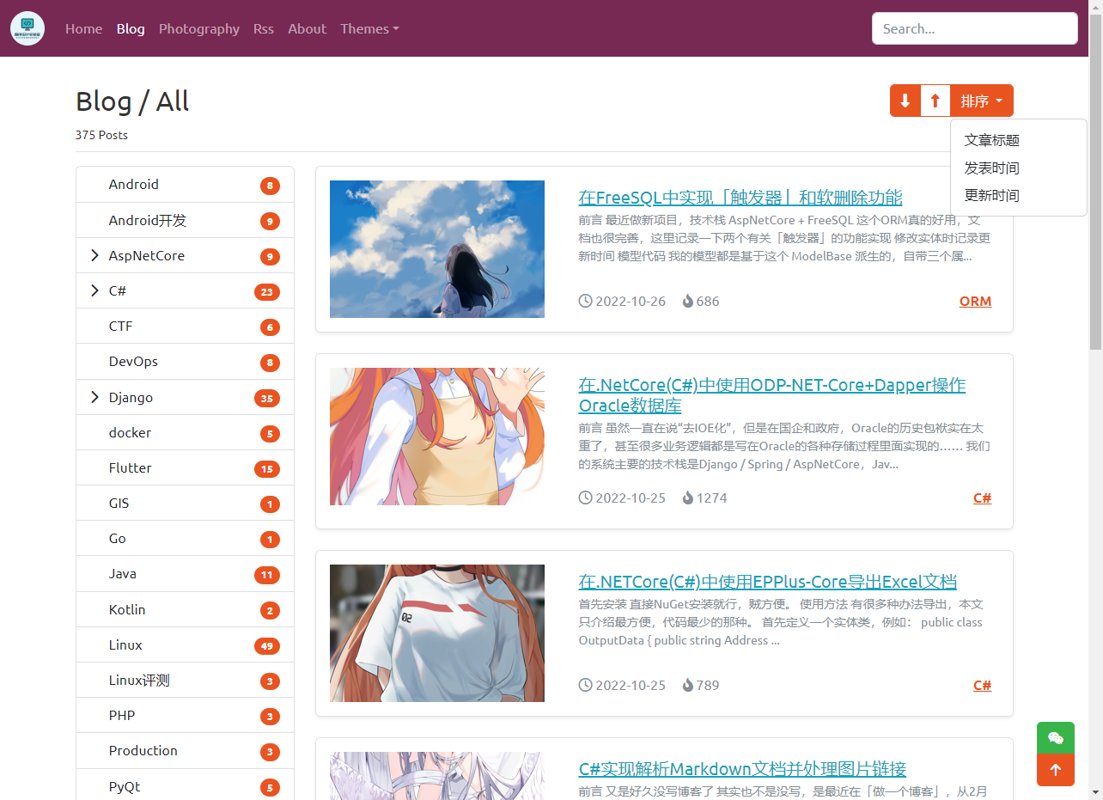
The adjustments to the article list interface include the article sorting options in the upper right corner and a redesigned article list.
The old article list directly used Bootstrap4-styled Cards, with the category name placed in the card-header and the article title and summary in the card-body. While it was somewhat unsightly, the more significant issue was the lack of additional information such as the article's publication time, making it less intuitive to view. The old UI is shown below:
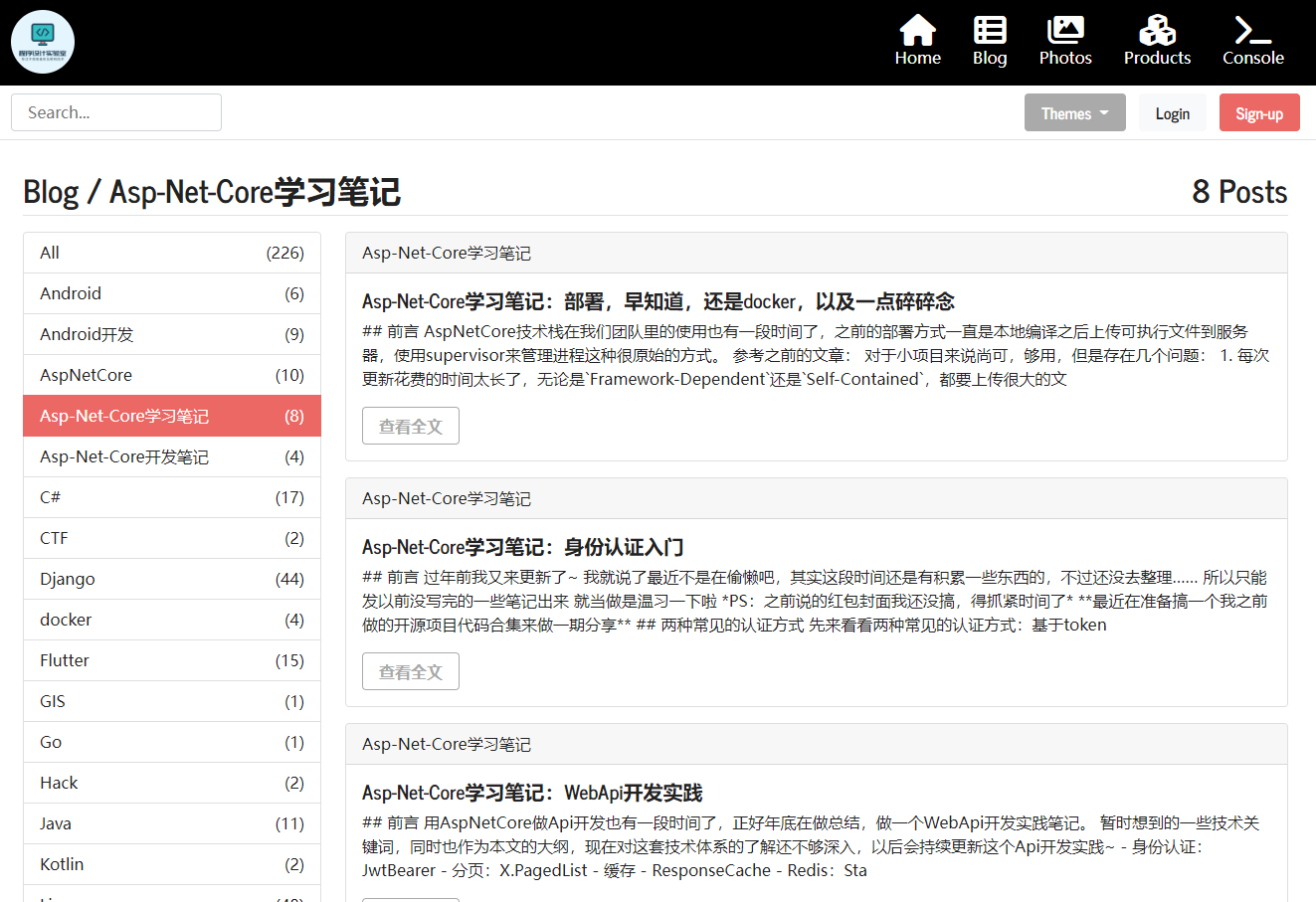
The new article list is shown in the image. Article sorting has been added in the upper right corner, allowing sorting in ascending/descending order based on title, publication time, or update time.
The elements within the article list have also been redesigned, incorporating cover images, publication time, reading count, and other informational elements. In terms of details, I added a subtle shadow effect to each article card. The text for the article summary uses a smaller font size and the text-muted style, better distinguishing it from the title.
Navigation Bar
In the previous article list UI, you can see the top navigation bar has also been changed. This modification cannot be said to be better than the old version, only that some compromises have been made to adapt to mobile devices. The original navigation bar also had icons and richer visual effects, but its compatibility with mobile devices was relatively limited—each navigation menu couldn't be hidden in a sidebar and would occupy a lot of space when laid out flat. The new version is an ordinary Bootstrap-style navigation bar, unremarkable but adaptable enough.
The old version's navigation bar in adaptive mode

The new version's navigation bar in adaptive mode

Backend UI Adjustment
The management backend is a major area for aesthetic challenges
The current management backend is based on a modified version from my previous SpringCloud project
Due to historical issues, there were some rather odd and unattractive styles, which I have addressed comprehensively in this update
Compared to before, the backend UI now looks much better 😃
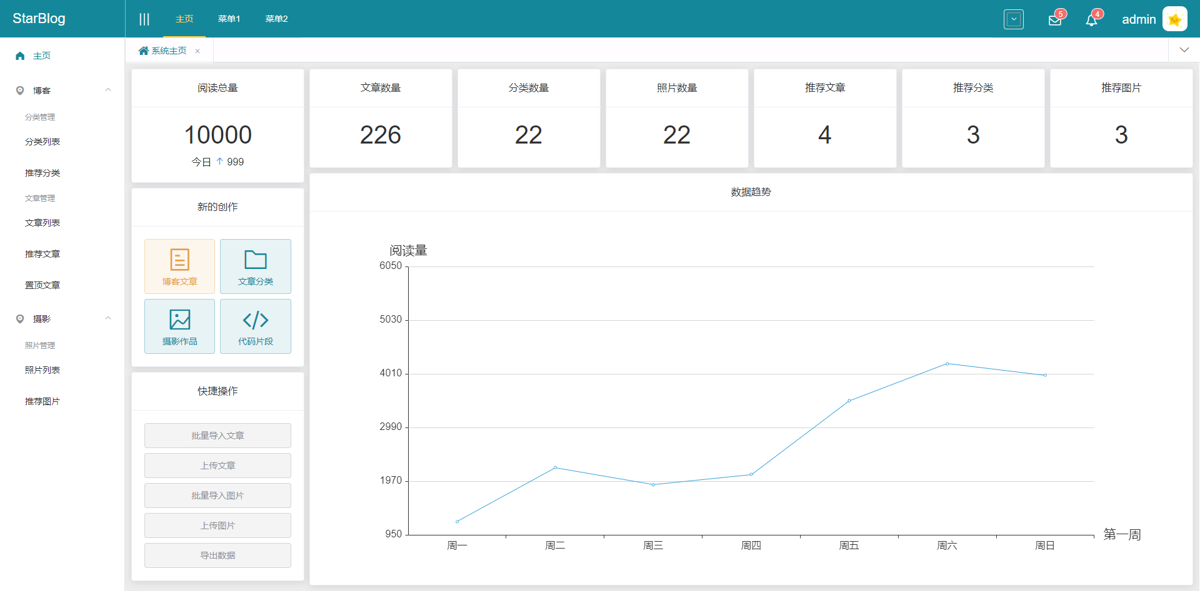
It originally looked like this
Now it looks like this
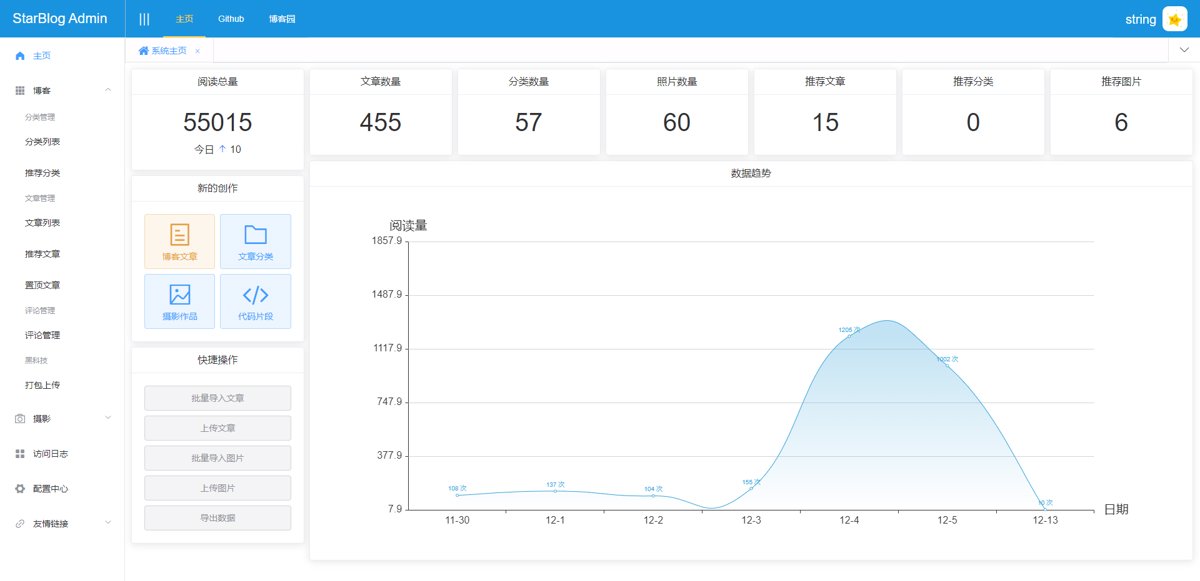
Just looking at the main interface, the change isn't very obvious
This time, the main adjustments were to the background colors and the simplification of layouts across various interfaces. You can see the navigation bar has also been streamlined with many buttons removed, leaving only a user button.
A Brand-New Article Editing Interface
I have redesigned the article editing interface this time.
A breadcrumb has been added at the top.
If in edit mode, a link to the article is added on the right side of the title, inspired by the design of Cnblogs, allowing you to click and jump directly to the article page.
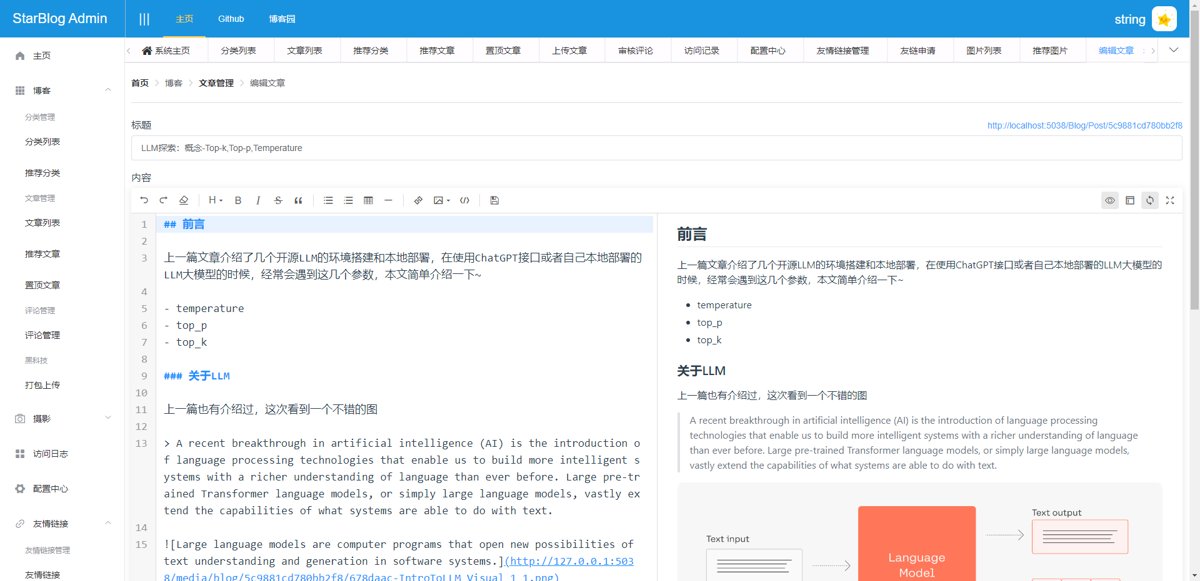
The bottom section contains article information and various settings.
The newly added slug feature can shorten the article's link address. This feature is relatively minor, so I didn't write a separate article to introduce it before. After setting the slug, you can access the article via starblog.com/p/slug.
The article options below allow you to set the article's publication status, tags, introduction, etc., which don't require any special introduction.
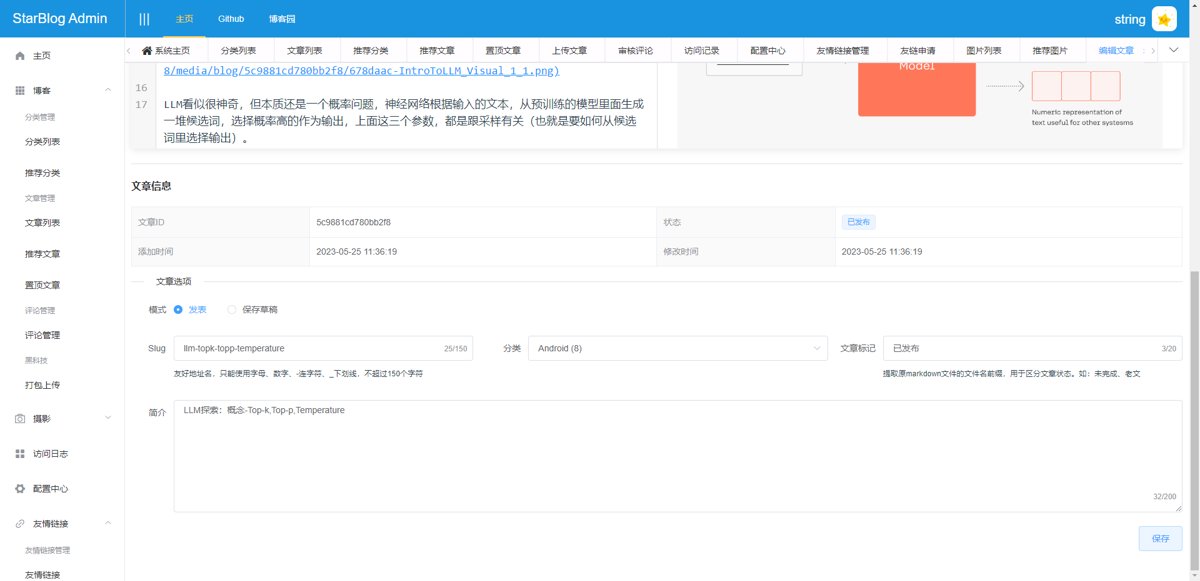
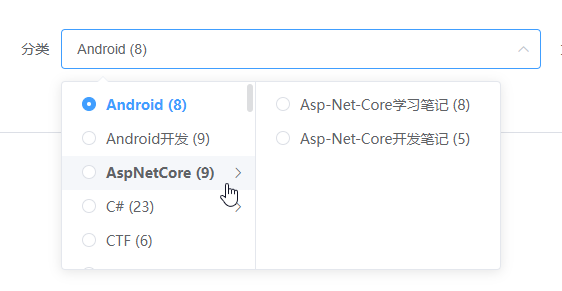
Article categories support multi-level selection.
Article Management
Let's start with the old version—ugly background, inexplicable margins—simply put, it's ugly.
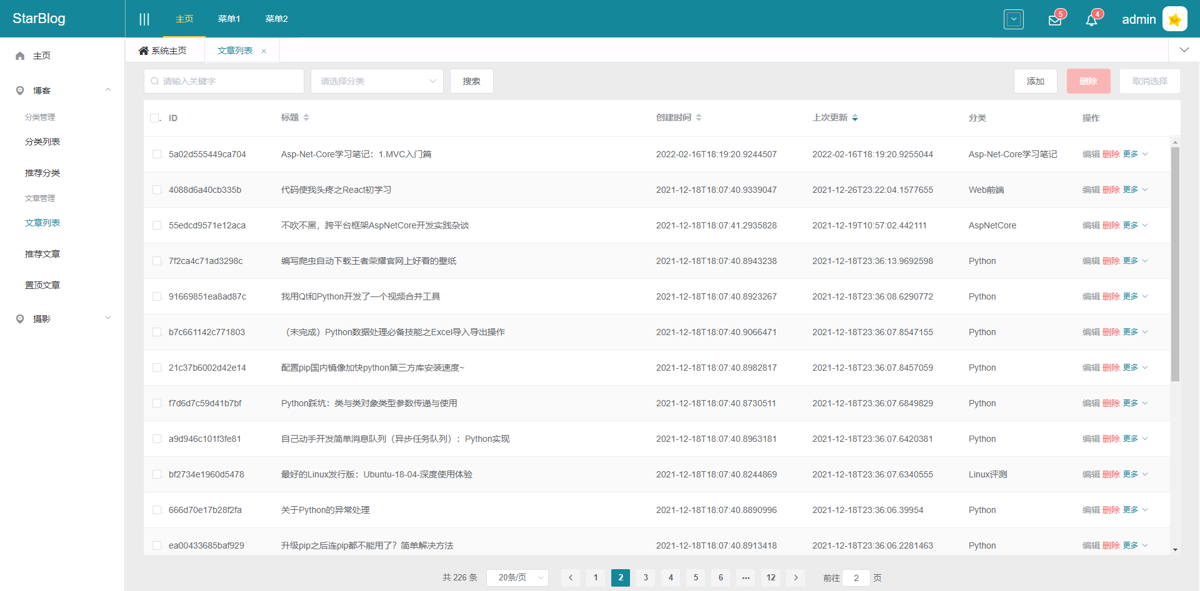
The new interface looks much cleaner, and the article filtering features have been enhanced. Now, in addition to search and category filters, you can also filter articles by publication status and article tags.
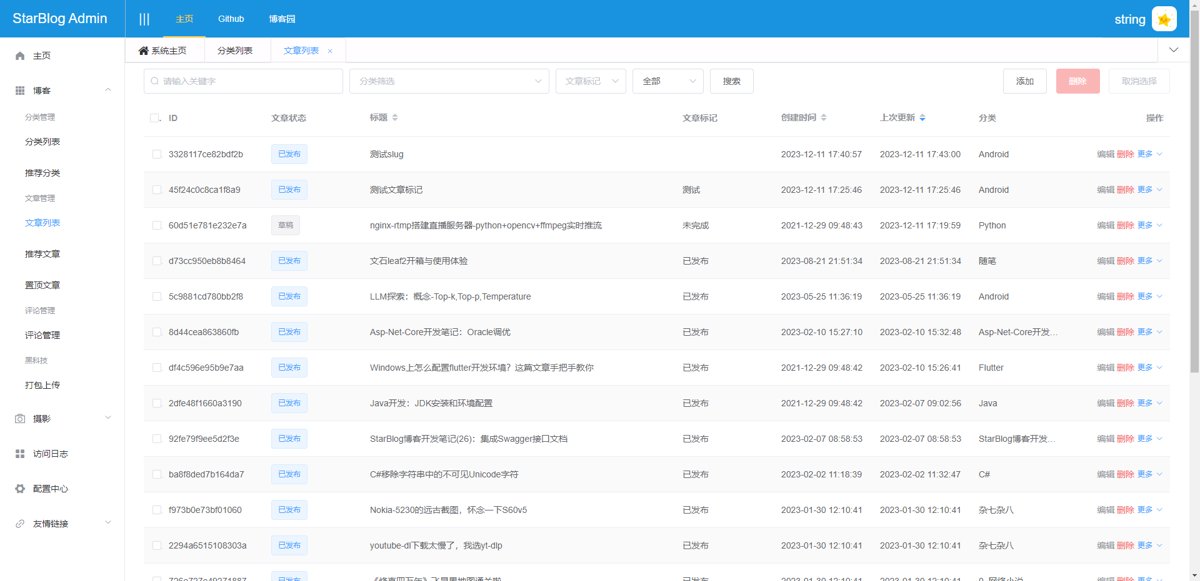
Other pages follow a similar design approach, so I won't post pictures or describe each one individually.
Upload Article
Originally, the entire UI was on the left, and the widths of the controls were inconsistent. Now, everything has been centered, and the control styles have been unified.
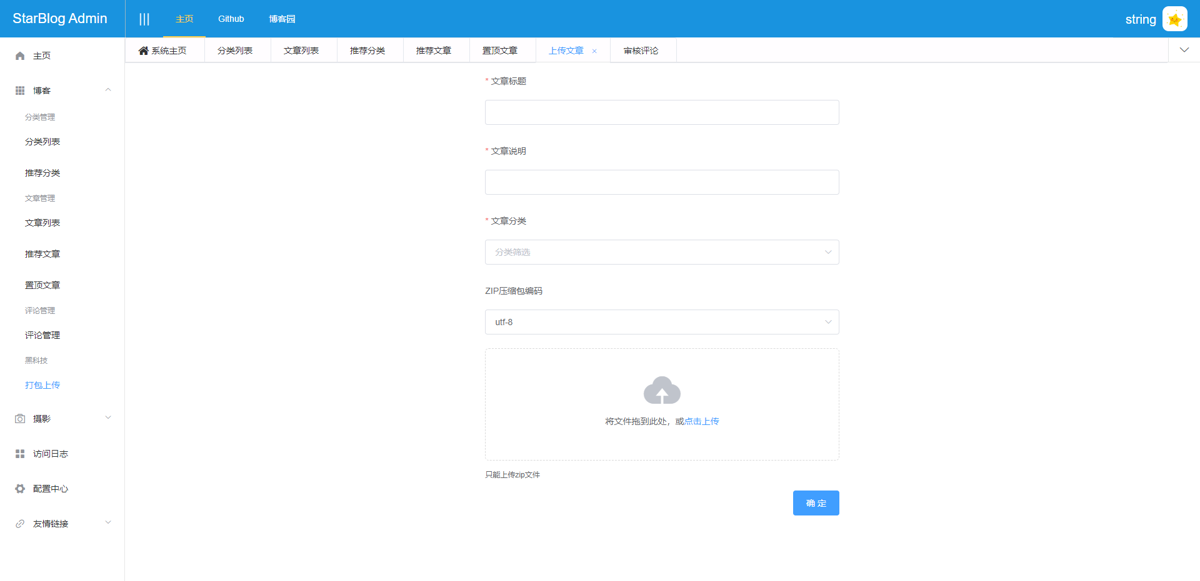
The article category selection here also supports multi-level structure selection.
Animations
Most pages previously had no animations—when loading data, they would show blank space and then abruptly display content once loading was complete, which felt quite rigid.
Now I've added loading animations to all of them, making the experience much smoother. Additionally, I've continued adjusting UI details.
These animations are applied to all interfaces requiring network interactions, such as article lists, saving articles, and uploading articles. The implementation is also straightforward: most ElementUI components support loading animations by simply adding the loading attribute.
Performance Optimization
Most performance bottlenecks are in database I/O, with some in memory management, primarily related to the image functionality provided by the blog.
Pagination
The most impactful optimization in the database area was changing the pagination implementation. Previously, I directly used the X.PagedList component to handle pagination, but that approach had a flaw—it would load all the data first and then paginate it. With large datasets, the performance became very poor. Now, all pagination has been switched to database-level pagination.
Currently, the ORM in use is FreeSQL. Pagination can be achieved via the ISelect.Page method, which generates SQL that includes clauses like offset and limit. This is pagination implemented at the database level and offers much better performance compared to loading all data and then paginating it.
PS: If the data volume becomes even larger, this method may no longer work well, but that is outside the scope of this project at present.
The X.PagedList component can still be used—just for its metadata. A typical code block would look like this:
IPagedList<Post> pagedList = new StaticPagedList<Post>(
    await querySet.Page(param.Page, param.PageSize).Include(a => a.Category).ToListAsync(),
    param.Page, param.PageSize, Convert.ToInt32(await querySet.CountAsync())
);
When using it, you can separately retrieve the data and the pagination metadata:
return new ApiResponsePaged<Post> {
    Message = "Get posts list",
    Data = pagedList.ToList(),
    Pagination = pagedList.ToPaginationMetadata()
};
The amount of code changed is relatively small, making migration straightforward.
Image Library
This project provides a random image API. Testing has shown that this feature consumes a considerable amount of memory, likely due to its design—it requires adjusting and cropping images to the appropriate size based on input parameters before returning them, a process that happens in memory.
I noticed that the ImageSharp (ImageSharp) middleware offers an idea: by caching images locally, the system can return directly from the file system when the same parameters are requested again. This could save some memory but introduces new issues, as it would occupy disk space, especially when the image library is large. That's why I haven't yet reworked this feature using that approach.
PS: Memory is so cheap these days—surely no one's server has less than 128GB of RAM, right? 😃

Business Logic
- Check if the slug is available when saving or adding an article
// When creating
if (!string.IsNullOrWhiteSpace(dto.Slug) && !await _postService.CheckSlugAvailable(dto.Slug)) {
    return ApiResponse.BadRequest("The specified slug is already in use by another article!");
}

// When updating
if (!string.IsNullOrWhiteSpace(dto.Slug)) {
    if (dto.Slug!= post.Slug && !await _postService.CheckSlugAvailable(dto.Slug)) {
        return ApiResponse.BadRequest("The specified slug is already in use by another article!");
    }
}
- The article list interface is finally refined; it can filter articles with different statuses based on whether the user is an administrator. (The comment list is similar)
// If logged in, set to admin mode
// todo: Later change to determine admin based on role
var adminMode = User.Identity?.IsAuthenticated ?? false;
var pagedList = await _postService.GetPagedList(param, adminMode);
- When modifying an article, you can simultaneously modify its tags and draft status. This is too simple, so no code is attached.
bugfix
There's not much to say here, see details in the GitHub commits.

Without realizing it, there are already 475 commits! What a diligent person! (possibly padding the commit count)
Summary
OK, that's about it. This is likely the last feature update for the StarBlog project in 2023. Next, I will continue to publish articles and aim to complete the "Blog Frontend + API Development Notes" series within this year! (Then I can start working on a new project~)
PS: Of course, StarBlog will also continue to be updated. There is already a preliminary plan for the 2.x version. I plan to make some architectural adjustments to better accommodate other new features. Meanwhile, I'll rewrite two sets of admin dashboards using Blazor and Next.js, to practice and compare the strengths and weaknesses of Blazor and front-end development.
Wishing everyone an early happy Chinese New Year! Stay tuned for upcoming new projects. 😃
_EOF_
StarBlog Open Source Blog Project - Update Overview at the End of 2023
- 本文作者:
- 程序设计实验室
- 版权声明:
- 本博客所有文章除特别声明外,均采用 BY-NC-SA 许可协议。转载请注明出处!
相关文章
基于.NetCore开发博客项目 StarBlog - (28) 开发友情链接相关接口
之前介绍的友情链接功能,只实现了友情链接的展示和管理接口。 还缺失友情链接申请、审核管理、通知,现在把这块功能补全。 Model 什么的之前那篇文章都有,本文直接补全逻辑代码~
2023-06-02 · StarBlog博客开发笔记 · 约 1 分钟
StarBlog博客开发笔记(6):页面开发之博客文章列表
系列文章 基于.NetCore开发博客项目 StarBlog - (1) 为什么需要自己写一个博客? 基于.NetCore开发博客项目 StarBlog - (2) 环境准备和创建项目 基于.NetCore开发博客项目 StarBlog - (3) 模型设计 基于.NetCore开发博客项目 StarBlog - (4) markdown博客批量导入 基于.NetCore开发博客项目 StarBl
2023-05-07 · StarBlog博客开发笔记 · 约 1 分钟
基于.NetCore开发博客项目 StarBlog - (31) 发布和部署
部署?老生常谈。dotnet8的AOT吹得天花乱坠,StarBlog还没用上,只能选框架依赖或自包含。supervisor、docker、流水线,随便选,反正都一样麻烦。
2024-02-08 · StarBlog博客开发笔记 · 约 1 分钟
StarBlog博客开发笔记(24):统一接口数据返回格式
前言 开发接口,是给客户端(Web前端、App)用的,前面说的RESTFul,是接口的规范,有了统一的接口风格,客户端开发人员在访问后端功能的时候能更快找到需要的接口,能写出可维护性更高的代码。 而接口的数据返回格式也是接口规范的重要一环,不然一个接口返回JSON,一个返回纯字符串,客户端对接到数据时一脸懵逼,没法处理啊。 合格的接口返回值应该包括状态码、提示信息和数据。 就像这样: { st
2023-01-02 · StarBlog博客开发笔记 · 约 1 分钟
讨论
共 0 条加载评论中…