StarBlog Bonus (4): Major Upgrade to One-Click Publishing Tool Publisher, with Enhanced AI Features and Interface Optimization
"StarBlogPublisher" is a tool designed to enhance the efficiency of creating blog and public account articles. The author has made numerous optimizations on the original version, including interface adjustments (improved space utilization, unified Font Awesome icons) and feature enhancements (new article Slug configuration, a dedicated AI configuration window, and management of multiple AI configuration files). The new features support dynamic loading of AI models and flexible API Key switching, significantly boosting the efficiency of large model-based content creation. The author plans to continue developing AI-assisted tools to free up productivity.
目录15 个章节
Preface
Since I developed the StarBlogPublisher — that powerful tool for article creation —
the workflow efficiency for my blog and official account (公众号) content has improved significantly.
However, the software still had some functional gaps and areas I wasn't satisfied with.
This rainy weekend provided the perfect opportunity to refine the software.
And there's an added bonus: to support the implementation of some software features, I also developed a suite of surrounding tools, which will be introduced in the following articles.
Welcome to download and try it out: https://github.com/star-blog/starblog-publisher/releases/tag/v1.6
Icon
This icon was previously generated using AI.
It's fairly ordinary, but let's stick with it for now—I'm too lazy to change it. I'll update it later when I have time.
First, let's solve the problem of getting started.
The software icon is transparent, making it hard to see the details, so I added a background:

Interface Optimization
The biggest change is still the interface optimization.
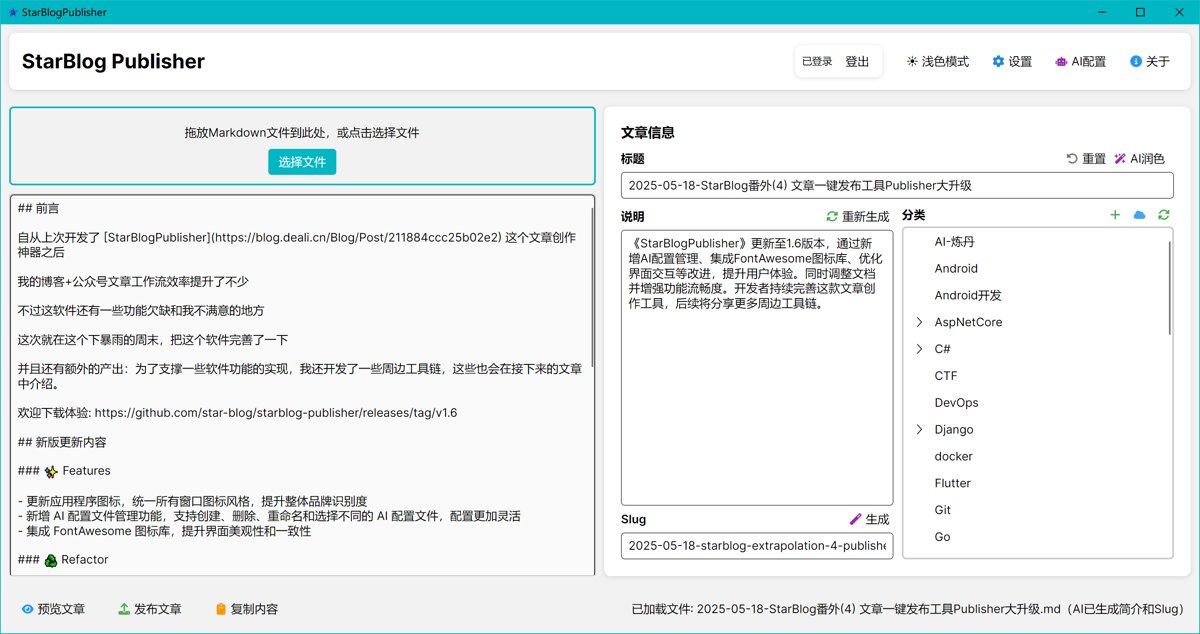
The original interface had low space utilization. Now the right side is divided into two columns for categories and descriptions, making better use of space.
Click View the old interface to compare.
Moreover, the original interface had many emojis.
If it were only used on a single system (e.g., Windows), it might not be a problem.
But when switching between multiple devices, I found the display was not good on macOS—some emojis appeared differently from Windows.
Now, everything has been replaced with Font Awesome, making it much more unified and aesthetically pleasing. I feel the topic of changing icons could warrant a separate article.
Here, I am using the third-party library Icon.Avalonia.
Key New Features
Here are a few highlights of the key new features introduced.
A detailed update log is provided later in this article. However, it was summarized by a large language model. I know many readers prefer not to view AI-generated content, so it's placed at the end of the article.
Slug Configuration
From the interface screenshots, you can intuitively see the addition of the Slug configuration feature.
As we all know, StarBlog supports article slugs, but previously, this article publishing tool did not have this configuration.
This time, I've added it, along with an AI auto-generation feature to free up your hands~
Independent AI Configuration
The previous AI configuration was relatively simple, unified within the settings window.
However, now AI features are the highlight of this software, with more and more configuration options appearing. The settings window can no longer meet the needs.
Therefore, the place for configuring AI within the original settings window has been changed to a button. Clicking it opens a new AI configuration window.
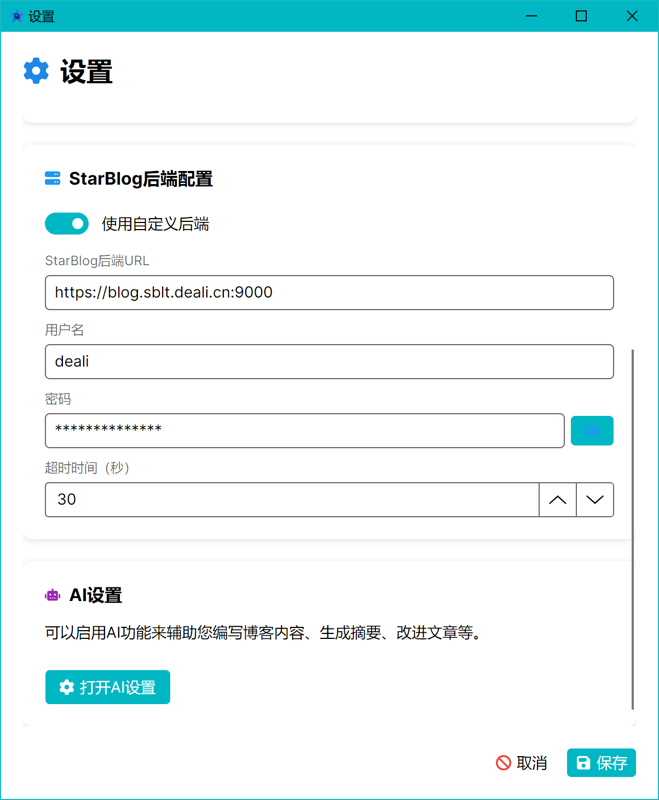
Of course, the AI configuration can also be opened directly from the main page.
The AI settings window looks like this:
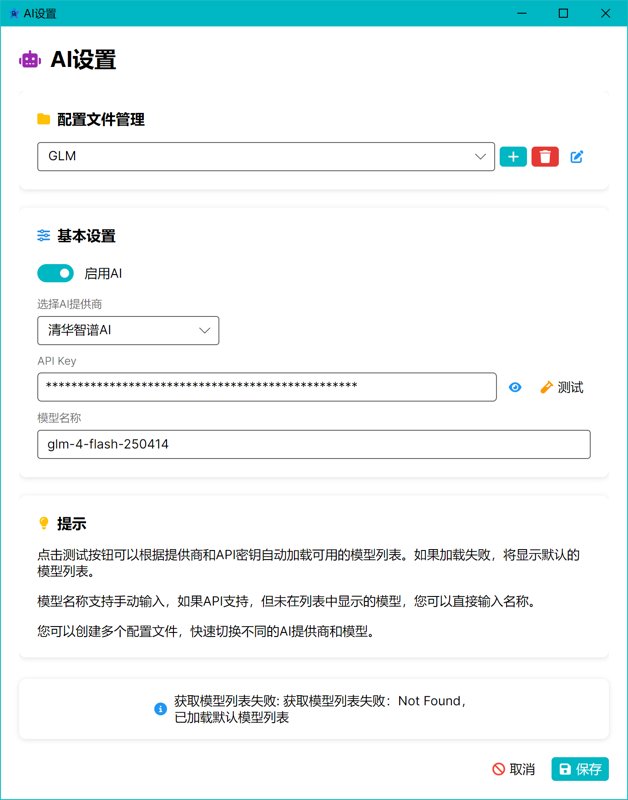
This AI settings now includes several new features.
Automatic Model List Retrieval
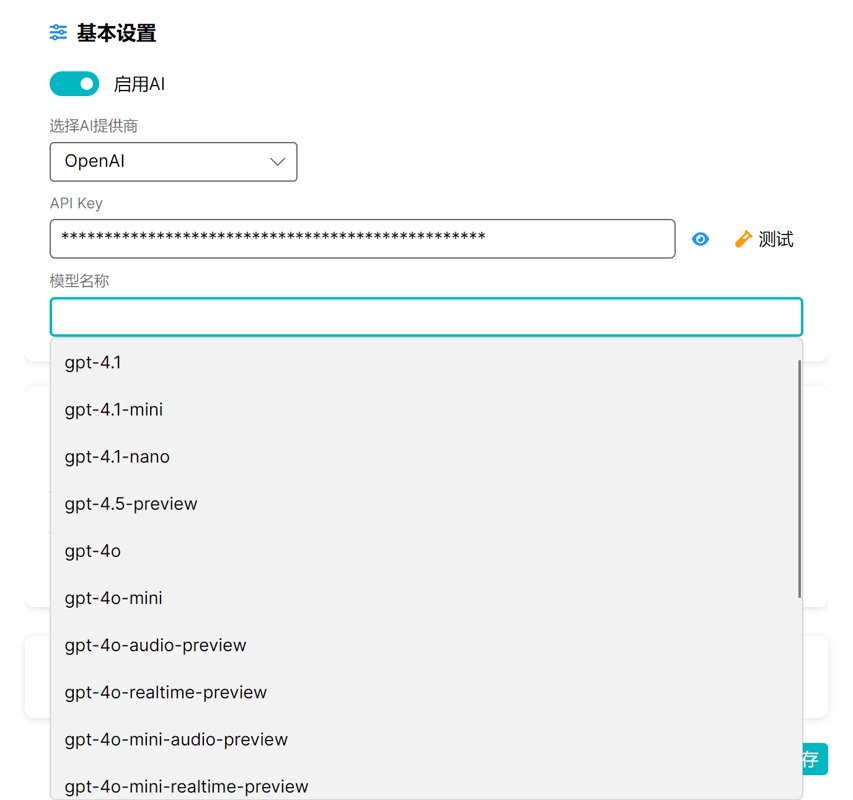
First is the automatic model list retrieval feature. OpenAI's interface provides the functionality to fetch a list of available models. Other model providers are also largely compatible with OpenAI's interface protocol, but it's not guaranteed they offer this feature.
After entering the API Key, clicking the "Test" button can retrieve the model list.
If the list cannot be retrieved, a default model list is used, which has been updated to the latest models.
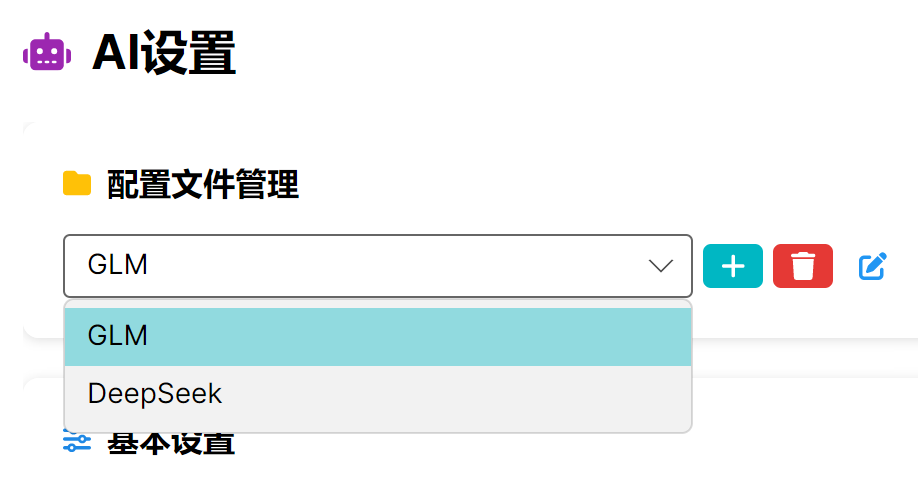
Multiple Configuration File Management
Now, the demand for large models is very high.
Many people might be using multiple model services simultaneously.
In the context of this software, a user might use a cheaper model (like DeepSeek) for everyday use.
When higher model performance is required, they can switch to a more expensive model (like GPT-o3).
Previously, without multiple configuration files, entering settings to modify a new API Key was very cumbersome.
Now, once added, you can freely switch between them.
Summary
In the era of AI, the efficiency gains that large models bring to independent developers are quite significant.
Recently, I have used the capabilities of large models to complete many tasks that I had planned for a long time but never had the time to tackle.
Thanks to the productivity boost brought by technological advancements, I will continue to develop more small tools that leverage AI to improve efficiency, further unleashing productivity~
Detailed Update Content
From the language style, you might be able to tell that the following update content is AI-generated.
Yes, I developed a tool that can automatically generate detailed and professional update content with a single click based on Git commit history. I will write an article to introduce it later.
✨ Features
- Updated application icon, unifying the icon styles across all windows to enhance overall brand recognition.
- Added AI configuration file management feature, supporting creating, deleting, renaming, and selecting different AI configuration profiles for more flexible configuration.
- Integrated the FontAwesome icon library to improve the interface's aesthetics and consistency.
- Added AI Settings Window, supporting the configuration of AI providers, API keys, and models, with integrated test connection and dynamic model loading functions.
- Added Article Slug Generation Feature, which uses AI to automatically generate URL-compliant slugs and optimizes the article information editing experience.
- The autocomplete input box now supports "dropdown on focus," improving the convenience of AI settings operation.
- Added a status information area in the AI Settings Window to provide real-time feedback on model loading progress and results.
- Enhanced the description of the Tsinghua Zhipu AI models, indicating that they are completely free and listing representative models.
♻️ Refactor
- Optimize button styles, unify the styles of
IconButton,Primary,Danger, etc., and improve visibility under different backgrounds - Add hover and pressed states to icon buttons to enhance user experience
- Replace text emoticons in buttons with FontAwesome icons for a more unified and readable interface
- Refactor AIService to support automatic reload on configuration changes, and adjust private field modifiers to improve maintainability.
- Optimize AIProviderInfo by extending the model list and model description information.
- Refactor the build.py build script: extract platform detection and target system handling logic into independent functions, support multiple build configurations, and improve cross-platform compatibility.
- The release directory cleanup script supports automatic removal of platform-specific symbol files (e.g., Windows PDB, debug files for other platforms).
📦 Dependencies
- Added
Projektanker.Icons.Avalonia.FontAwesomedependency to support rich icon display - Added dependency description in README:
Sdcb.WordCloud,LoadingIndicators.Avalonia
📄 Docs
- Update README document to add core feature descriptions, AI-related functions, and interface previews; optimize interface preview layout.
- Add and replace some image resources; delete obsolete unused resources.
- Adjust About page height to fit new version content.
- Enhance document visual effects; add/optimize image resources and word cloud image categorization.
- Update AboutWindow and AboutWindowViewModel to reflect new features.
🔧 Others
- Project version upgraded to 1.6.
- Optimized AI configuration file loading and settings saving logic to improve the smoothness of the settings process.
- Deleted unused categorized word cloud images to clean up redundant resources.
- Merged remote branch updates to ensure trunk synchronization.
_EOF_
StarBlog Bonus (4): Major Upgrade to One-Click Publishing Tool Publisher, with Enhanced AI Features and Interface Optimization
- 本文作者:
- 程序设计实验室
- 版权声明:
- 本博客所有文章除特别声明外,均采用 BY-NC-SA 许可协议。转载请注明出处!
相关文章
StarBlog小更新,文章管理体验巨大提升,重写了几个管理后台页面
面对破破烂烂的后台,只能先缝缝补补。重写了丑出水平的登录页,还做了分类树和照片墙。看着几年前写的代码直呼好家伙,这种临时方案迟早要重构。
2025-10-30 · StarBlog番外 · 约 1 分钟
StarBlog番外(5) 从1.6到1.10,Publisher的半年进化之路
StarBlog Publisher半年从v1.6滚到v1.10.7,核心就三件事:AI塞进去(封面/关键词/标题模板)、图片处理自动化(压缩/正则匹配/画廊)、框架升到.NET 10外加Scoop安装。20多个版本硬是把“能用”磨成了“好用”。别的工具还在手动找图,它已经能抢Prompt工程师的活了。
2026-05-21 · StarBlog番外 · 约 1 分钟
StarBlog 番外篇 (2) 深入解析Markdig源码,优化ToC标题提取和文章目录树生成逻辑
本文介绍了作者在开发博客发布工具时,针对Markdown目录生成逻辑的改进。作者深入研究了Markdig源码,优化了目录生成逻辑,使用AutoIdentifiers扩展自动生成标题ID,提高了代码的可维护性和准确性。文章详细解析了Markdig的heading处理部分和ID生成机制,并提供了解决ID冲突的方法。最终,作者实现了与Markdig一致的ToC提取功能。
2025-03-25 · StarBlog番外 · 约 1 分钟
StarBlog v1.3.0 新版本,一大波更新以及迁移服务器部署
服务器故障逼得更新,直接上云服务器迁移。v1.3.0版本来了,架构、界面、SEO全升级,还加了图片压缩工具,代码总算整理干净点。来看看这波大更新如何?
2025-08-19 · StarBlog番外 · 约 1 分钟
讨论
共 0 条加载评论中…