

StarBlog Blog Development Notes (16): Some New Features
Series articles Developing a Blog Project with .NetCore: StarBlog - (1) Why Write Your Own Blog? Developing a Blog Project with .NetCore: StarBlog - (2) Environment Setup and Creating the Project Developing a Blog Project with .NetCore: StarBlog - (3) Model Design Developing a Blog Project with .NetCore: StarBlog - (4) Batch Import of Markdown Blog Posts Developing a Blog Project with .NetCore: StarBl
目录9 个章节
Series Articles
- Developing a Blog Project with .NetCore: StarBlog - (1) Why Write Your Own Blog?
- Developing a Blog Project with .NetCore: StarBlog - (2) Environment Setup and Creating the Project
- Developing a Blog Project with .NetCore: StarBlog - (3) Model Design
- Developing a Blog Project with .NetCore: StarBlog - (4) Batch Import of Markdown Blog Posts
- Developing a Blog Project with .NetCore: StarBlog - (5) Starting to Build the Web Project
- Developing a Blog Project with .NetCore: StarBlog - (6) Page Development: Blog Post List
- Developing a Blog Project with .NetCore: StarBlog - (7) Page Development: Post Detail Page
- Developing a Blog Project with .NetCore: StarBlog - (8) Displaying the Category Hierarchy
- Developing a Blog Project with .NetCore: StarBlog - (9) Batch Image Import
- Developing a Blog Project with .NetCore: StarBlog - (10) Image Waterfall Layout
- Developing a Blog Project with .NetCore: StarBlog - (11) Implementing Visit Statistics
- Developing a Blog Project with .NetCore: StarBlog - (12) Dynamic Compilation of Razor Pages
- Developing a Blog Project with .NetCore: StarBlog - (13) Adding a Friend Links Feature
- Developing a Blog Project with .NetCore: StarBlog - (14) Implementing Theme Switching
- Developing a Blog Project with .NetCore: StarBlog - (15) Generating Random-Sized Images
- Developing a Blog Project with .NetCore: StarBlog - (16) Some New Features (Monitoring/Stats/Config/Initialization)
Preface
I've been busy writing code for the past few days and haven't posted any articles. Recently I added some features to the blog, so this post will cover them all at once~
The new features are as follows:
- System monitoring: Sentry, Exceptionless, CLRStats
- Visit statistics
- Configuration management
- Initialization
System Monitoring
PS: Actually, the previous two articles introducing log collection tools were also laying the groundwork for this post
System monitoring here includes log collection, performance monitoring, and system status monitoring.
I handed log collection and performance monitoring over to ExceptionLess and Sentry. These two open-source tools can handle this work well. For details, see the two articles I wrote previously:
For status monitoring, I based it on an open-source GitHub project that I heavily modified: CLRStats
This component can view CPU, GC, and thread status in real time. However, the original implementation is embedded in an AspNetCore project as middleware, and the access URL only supports Basic authentication, which doesn't work for me.
So I cloned the code and modified it into a callable service, and rewrote the API endpoints. Finally it's convenient~
The data returned by this API looks like this, which will also make it convenient to turn into visualization charts in the admin dashboard later.
{
  "server": {
    "machineName": "machineName",
    "systemDateTime": "7/26/2022 11:30:22 PM"
  },
  "application": {
    "cpu": {
      "usagePercent": 0
    },
    "gc": {
      "gen0CollectCount": 24,
      "gen1CollectCount": 23,
      "gen2CollectCount": 22,
      "heapMemory": 38328872,
      "heapMemoryFormat": "36 M",
      "isServerGC": true
    },
    "thread": {
      "availableCompletionPortThreads": 1000,
      "availableWorkerThreads": 32766,
      "usedCompletionPortThreads": 0,
      "usedWorkerThreads": 1,
      "usedThreadCount": 29,
      "maxCompletionPortThreads": 1000,
      "maxWorkerThreads": 32767
    }
  }
}
I won't copy-paste the specific code here. I put it in the StarBlog.Contrib project as a standalone component for easy reuse.
Visit Statistics
Although a previous article already covered implementing visit statistics: Developing a Blog Project with .NetCore: StarBlog - (11) Implementing Visit Statistics
It only covered recording visits via middleware. After being stored in the database, that data wasn't actually used.
Now I've implemented some simple statistics. Currently the main features are overview data (total visits, today's visits, yesterday's visits), trend data, and stats for a given date.
The logic is in StarBlog.Web/Services/VisitRecordService.cs
Overview Data Code
PS: I found that FreeSQL's ISelect object behaves strangely with chained operations. I know it's lazy loading, but even after calling
.Count()it seems not to have executed, and the next line of code even appends the previous filter conditions. I had no choice but to write a nested method inside the method…That's this
GetQuerySet. This feels quite uncomfortable for someone like me who's used to DjangoORM = =..
This endpoint calculates total visits, today's visits, and yesterday's visits, for easy comparison (inspired by Zhihu's Creator Center)
public object Overview() {
  ISelect<VisitRecord> GetQuerySet() => _repo.Where(a => !a.RequestPath.StartsWith("/Api"));

  return new {
    TotalVisit = GetQuerySet().Count(),
    TodayVisit = GetQuerySet().Where(a => a.Time.Date == DateTime.Today).Count(),
    YesterdayVisit = GetQuerySet().Where(a => a.Time.Date == DateTime.Today.AddDays(-2).Date).Count(),
  };
}
Trend Data
That is, visit counts for the last n days
PS: C#'s date handling is pretty pleasant
public object Trend(int days = 7) {
  return _repo.Where(a => !a.RequestPath.StartsWith("/Api"))
    .Where(a => a.Time.Date > DateTime.Today.AddDays(-days).Date)
    .GroupBy(a => a.Time.Date)
    .ToList(a => new {
      time = a.Key,
      date = $"{a.Key.Month}-{a.Key.Day}",
      count = a.Count()
    });
}
Stats by Date
This one's straightforward, no need to elaborate
public object Stats(DateTime date) {
  var data = _repo.Where(a => a.Time.Date == date.Date && !a.RequestPath.StartsWith("/Api"));
  return new { Count = data.Count() };
}
Note that in all of these stats I filter out URLs starting with /Api, because I only need to count visits to the blog frontend.
Configuration Management
A blog still has quite a few things that need configuration, for example the Host
Previously I put these in the appsettings.json file, which is fine in principle—after modifying the file it can even hot reload. The problem is you can't modify and save them from the admin dashboard.
So I decided to implement a configuration management feature
At first I set my sights on a KV database, and even required it to be an embedded, C#-implemented open-source project. With that many requirements stacked on, unsurprisingly I didn't find anything suitable
(Though a few days ago I think I saw some expert post an article about writing a KV database in C# by hand—awesome!)
So I just implemented it with the blog's own data store. It's not hard anyway
As usual, I wrote another Service: StarBlog.Web/Services/ConfigService.cs
I'll only show the key code here; the full code is on GitHub
public class ConfigService {
    private readonly IConfiguration _conf;
    private readonly IBaseRepository<ConfigItem> _repo;

    public ConfigItem? GetByKey(string key) {
        var item = _repo.Where(a => a.Key == key).First();
        if (item == null) {
            // 尝试读取初始化配置
            var section = _conf.GetSection($"StarBlog:Initial:{key}");
            if (!section.Exists()) return null;
            item = new ConfigItem { Key = key, Value = section.Value, Description = "Initial" };
            item = AddOrUpdate(item);
        }

        return item;
    }

    public ConfigItem AddOrUpdate(ConfigItem item) {
        return _repo.InsertOrUpdate(item);
    }

    public int? Update(string key, string value, string? description = default) {
        var item = GetByKey(key);
        if (item == null) return null;

        item.Value = value;
        if (description != null) item.Description = description;
        return _repo.Update(item);
    }

    public string this[string key] {
        get {
            var item = GetByKey(key);
            return item == null ? "" : item.Value;
        }
        set {
            var item = GetByKey(key) ?? new ConfigItem { Key = key };
            item.Value = value;
            AddOrUpdate(item);
        }
    }
}
This ConfigService implements an indexer, making it fairly convenient to read and save configuration
For example
var conf = xxx; // 注入 ConfigService
// 读取配置
Console.WriteLine(conf["host"]);
// 修改配置
conf["host"] = "http://dealiaxy.com";
I also wrote a few APIs so configuration can be managed over HTTP. I won't include that code here~
Initialization
In my design, this feature depends on configuration management
So after finishing configuration management, I also built the initialization page
It looks like this
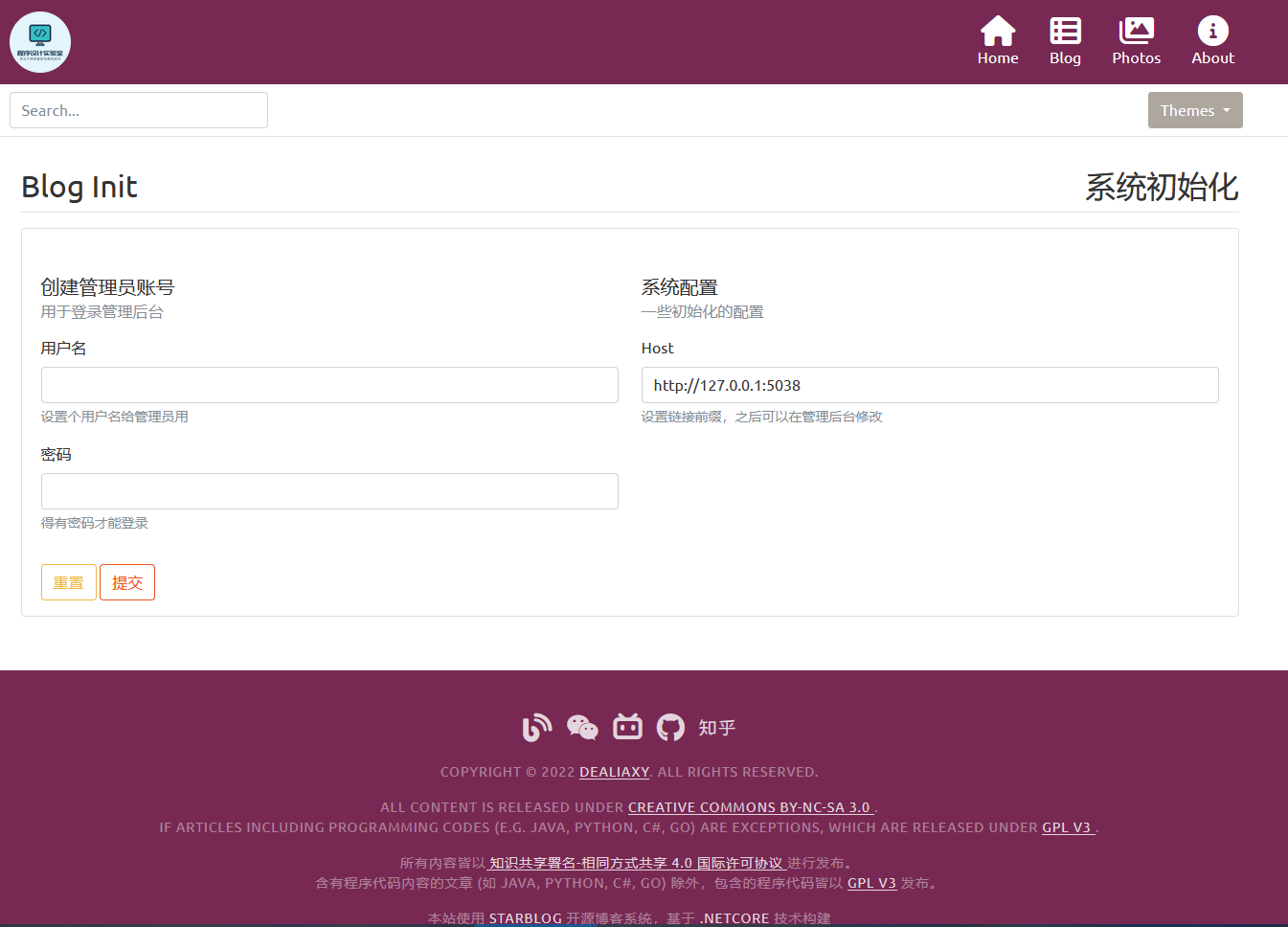
That is, when you run this project for the first time, you'll land on this page. Currently the initialization settings are only creating an admin and setting the Host; more will probably be added gradually later
The backend uses the is_init field to determine whether initialization has been done
Here's the Controller code directly
[HttpGet]
public IActionResult Init([FromServices] ConfigService conf) {
    if (conf["is_init"] == "true") {
        _messages.Error("已经完成初始化!");
        return RedirectToAction(nameof(Index));
    }

    return View(new InitViewModel {
        Host = conf["host"]
    });
}

[HttpPost]
public IActionResult Init([FromServices] ConfigService conf, [FromServices] IBaseRepository<User> userRepo, InitViewModel vm) {
    if (!ModelState.IsValid) return View();

    // 保存配置
    conf["host"] = vm.Host;
    conf["is_init"] = "true";

    // 创建用户
    // todo 这里暂时存储明文密码,后期要换成MD5加密存储
    userRepo.Insert(new User {
        Id = Guid.NewGuid().ToString(),
        Name = vm.Username,
        Password = vm.Password
    });

    _messages.Success("初始化完成!");
    return RedirectToAction(nameof(Index));
}
We also need to implement a View page. This is relatively simple, so I won't include the code.
_EOF_
StarBlog Blog Development Notes (16): Some New Features
- 本文作者:
- 程序设计实验室
- 版权声明:
- 本博客所有文章除特别声明外,均采用 BY-NC-SA 许可协议。转载请注明出处!
相关文章
StarBlog博客开发笔记(21):开始开发RESTFul接口
前言 最近电脑坏了,开源项目的进度也受到一些影响 这篇酝酿很久了,作为本系列第二部分(API接口开发)的第一篇,得想一个好的开头,想着想着就鸽了好久,索性不扯那么多了,直接开写吧~ 关于RESTFul 网上很多相关的文章都要把RESTFul历史来龙去脉给复制一遍,所以我这就不重复了,现在主要的HTTP接口风格就俩:RPC和RESTFul。 举个例子就可以看出这俩的区别 RPC风格 分别是增删改查的
2023-01-02 · StarBlog博客开发笔记 · 约 1 分钟
StarBlog博客开发笔记(14):实现主题切换功能
系列文章 基于.NetCore开发博客项目 StarBlog - (1) 为什么需要自己写一个博客? 基于.NetCore开发博客项目 StarBlog - (2) 环境准备和创建项目 基于.NetCore开发博客项目 StarBlog - (3) 模型设计 基于.NetCore开发博客项目 StarBlog - (4) markdown博客批量导入 基于.NetCore开发博客项目 StarBl
2022-07-03 · StarBlog博客开发笔记 · 约 1 分钟
StarBlog博客开发笔记(3):模型设计
系列文章 基于.NetCore开发博客项目 StarBlog - (1) 为什么需要自己写一个博客? 基于.NetCore开发博客项目 StarBlog - (2) 环境准备和创建项目 基于.NetCore开发博客项目 StarBlog - (3) 模型设计 ... 基于.NetCore开发博客项目 StarBlog - 接口返回值包装 基于.NetCore开发博客项目 StarBlog - 上传
2022-04-22 · StarBlog博客开发笔记 · 约 1 分钟
StarBlog开源博客项目 - 2023年底更新内容一览
前台UI勉强能看,后台总算不那么辣眼睛了。数据库分页改对了,不然性能差得离谱。新增slug检查?哦,终于知道避免重复了。
2023-12-16 · StarBlog博客开发笔记 · 约 1 分钟
讨论
共 0 条加载评论中…