StarBlog Development Notes (29): Adding RSS Subscription Feature
The opposite of RSS is algorithmic recommendation, as seen on platforms like WeChat Official Accounts, Zhihu, Weibo, Toutiao, and others. Beyond the issues of excessive ads and the hassle of migration on algorithm-driven platforms, the core characteristic of algorithmic recommendation is that you don't need to actively choose; the algorithm pushes content to you based on your preferences. In this way, you are left with little room for choice, gradually losing the ability to make judgments as you are constantly "fed" information.
目录13 个章节
Preface
Recently, amidst the busyness, I found some time to complete the blog's comment feature. I can confidently say that this comment feature has reached a level of "refined" quality 😃
But before the official release, let me tease a bit and introduce another new feature — RSS subscription 🔊
What is RSS
From the HK Gov News website:
RSS is short for Really Simple Syndication, an XML-based file format. By adding the RSS feed URL to your RSS reader software (RSS Reader), whenever the website content is updated, the updated summary will be automatically added to your reading software, notifying you of the relevant content. Through the use of RSS, content providers can easily generate and distribute news links, titles, summaries, and other data.
When a website supports RSS, it means that every time a new article is published, a new record will be added to a file at a specific URL using a specific syntax (specifically, XML markup language or JSON), listing information such as the article's title, author, publication time, and content (which can be either the full text or a summary). This way, users can simply collect the URLs of these files provided by all the websites they are interested in, and periodically check for updates to these files to know if, when, and what content these websites have published. The core function of an RSS reader is to store the RSS feed URLs subscribed to by the user, automatically check for updates at a fixed frequency, and convert the content into an easy-to-read format for presentation to the user.
Why Develop an RSS Feature
Initially, a user raised an issue in the StarBlog project's GitHub repository.
I thought it was a great idea and not too difficult to implement, so I went ahead and arranged to develop it.
For today's internet users, RSS is a relatively unfamiliar and niche concept. The opposite of RSS is algorithm-driven recommendation, like the kind found on platforms such as WeChat Official Accounts, Zhihu, Weibo, and Toutiao. Setting aside issues like excessive advertising and the hassle of migrating across algorithm-driven platforms, the nature of algorithmic recommendations means you don't need to make deliberate choices; the algorithm pushes content to you based on your preferences. This leaves you with almost no room for choice, gradually losing your ability to judge as you are constantly "fed." What's even more alarming is that it defines your profile for you and subtly shapes you into the person it believes you to be. The exposure of "big data-based price discrimination" (大数据杀熟) was no accident—using algorithms to spy on user privacy is a common practice among today's internet companies.
Be the master of information, not its slave. RSS is an open protocol that allows you to freely switch platforms and clients. Crucially, the power to access information is entirely in your own hands. Compared to algorithmic recommendations, RSS offers controllability and a sense of security, with privacy fully under your control.
RSS Versions - Atom vs RSS 2.0
I initially thought RSS 2.0 was newer than Atom 1.0, but it turns out I was completely wrong~
In short: Atom is an improved version of RSS 2.0. Since the RSS 2.0 standard has been frozen, Atom was introduced. The main improvement is that Atom can identify through tags whether content is full-text output, whereas RSS 2.0 cannot.
At the same time, Atom not only determines whether the content is full-text output but also allows terminal software using the feed to distinguish which parts are "summary" and which are "full text," facilitating differentiated display.
So, naturally, I’ll go with the newer version and use Atom 1.0 directly.
Implementation
Initially, I was planning to find a third-party library that could integrate well with AspNetCore.
However, I couldn't find one, but I discovered that the C# standard library actually provides support for RSS~ What more could you ask for? Let's get it done right away! 🆗
Installing Dependencies
Although it is a "standard library," since .NET Core is now very lightweight, you still need to manually add a NuGet package to use it.
dotnet add package System.ServiceModel.Syndication
This Syndication library provides a convenient way to create RSS subscriptions.
Below is the step-by-step implementation.
Add Interface
Add the StarBlog.Web/Controllers/RssController.cs file
[ApiController]
[Route("feed")]
[ApiExplorerSettings(IgnoreApi = true)]
public class RssController : ControllerBase {
  private readonly IBaseRepository<Post> _postRepo;

  public RssController(IBaseRepository<Post> postRepo) {
    _postRepo = postRepo;
  }

  [ResponseCache(Duration = 1200)]
  [HttpGet]
  public async Task<IActionResult> Index() {
  }
}
Next, write the code inside the Index method.
Creating a Feed
var feed = new SyndicationFeed("StarBlog", "程序设计实验室,一个技术探索与知识分享的平台", new Uri("http://blog.deali.cn"), "RSSUrl", DateTime.Now) {
  Copyright = new TextSyndicationContent($"{DateTime.Now.Year} DealiAxy")
};
The passed parameters are the title, description, website address, subscription ID (订阅ID), and last update time.
This is just an example, so the update time is set directly to the current time. In practice, the time of the latest article should be used.
Adding Articles
Adding blog articles to the feed source
var items = new List<SyndicationItem>();
var posts = await _postRepo.Where(a => a.IsPublish && a.CreationTime.Year == DateTime.Now.Year)
  .Include(a => a.Category)
  .ToListAsync();
foreach (var item in posts) {
  var postUrl = Url.Action("Post", "Blog", new { id = item.Id }, HttpContext.Request.Scheme);
  items.Add(new SyndicationItem(item.Title, item.Summary, new Uri(postUrl), item.Id, item.LastUpdateTime) {
    Categories = { new SyndicationCategory(item.Category?.Name) },
    Authors = { new SyndicationPerson("admin@deali.cn", "DealiAxy", "https://deali.cn") },
    PublishDate = item.CreationTime
  });
}
feed.Items = items;
Here, I've included all published articles from this year in the feed.
The RSS article content is passed through the second parameter of the SyndicationItem constructor method. For the sake of keeping the example code concise, I lazily used the plain-text summary.
To make the RSS reader display articles with rich visuals (图文并茂), you should use HTML-formatted article content. You can replace item.Summary with the following code:
new TextSyndicationContent(PostService.GetContentHtml(item), TextSyndicationContentKind.Html)
Generating XML
Finally, since RSS uses XML format, we need to make this interface return XML data.
var settings = new XmlWriterSettings {
  Async = true,
  Encoding = Encoding.UTF8,
  NewLineHandling = NewLineHandling.Entitize,
  NewLineOnAttributes = true,
  Indent = true
};
using var stream = new MemoryStream();
await using var xmlWriter = XmlWriter.Create(stream, settings);
var rssFormatter = new Atom10FeedFormatter(feed);
rssFormatter.WriteTo(xmlWriter);
await xmlWriter.FlushAsync();

return File(stream.ToArray(), "application/rss+xml; charset=utf-8");
Note the line of code var rssFormatter = new Rss20FeedFormatter(feed, false);, which indicates that the RSS version we are using is Atom 1.0.
If you want to use RSS 2.0, you can switch to the following code, where the second parameter set to false means not to render the extension syntax into the Atom 1.0 style.
var rssFormatter = new Rss20FeedFormatter(feed, false);
Full Code
For the full code, visit GitHub ~
https://github.com/Deali-Axy/StarBlog/blob/dev/StarBlog.Web/Controllers/RssController.cs
Final Result
RSS subscriptions require a client to read.
Here I used an open-source Windows client, Fluent Reader.
After adding blog.deali.cn/feed as a subscription source, you can see the articles published this year.
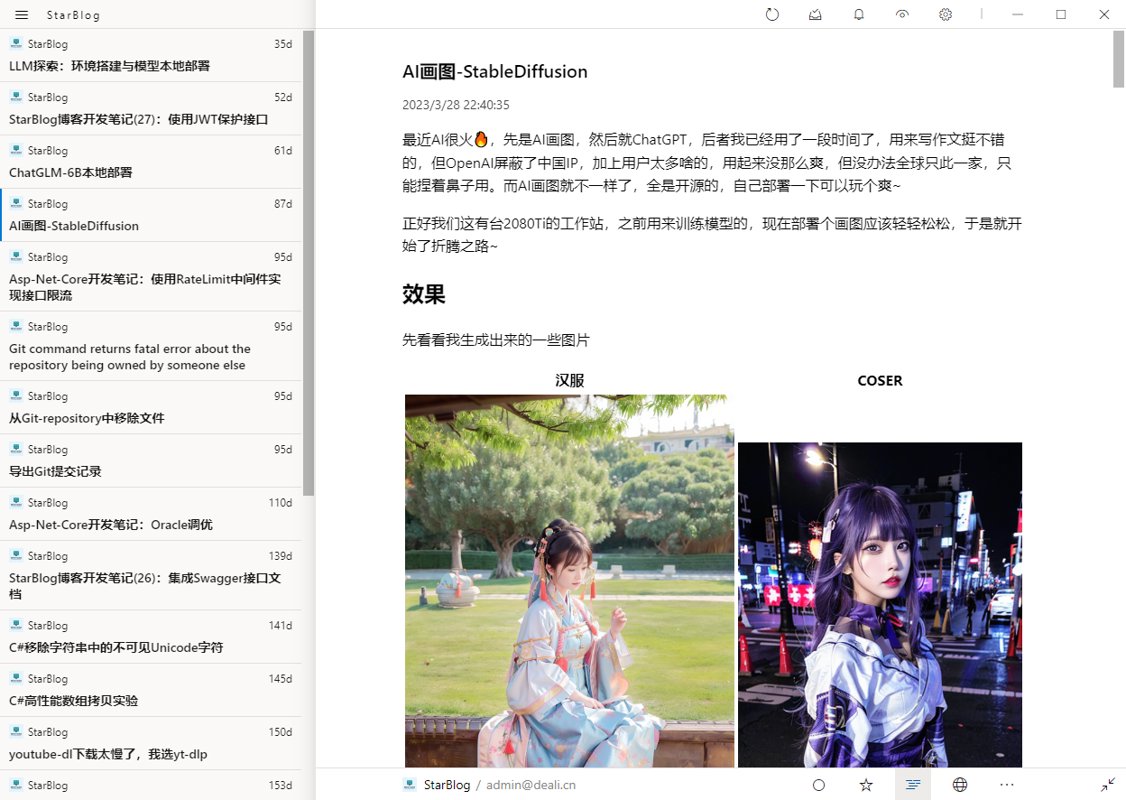
Done and dusted.
References
_EOF_
StarBlog Development Notes (29): Adding RSS Subscription Feature
- 本文作者:
- 程序设计实验室
- 版权声明:
- 本博客所有文章除特别声明外,均采用 BY-NC-SA 许可协议。转载请注明出处!
相关文章
StarBlog博客开发笔记(24):统一接口数据返回格式
前言 开发接口,是给客户端(Web前端、App)用的,前面说的RESTFul,是接口的规范,有了统一的接口风格,客户端开发人员在访问后端功能的时候能更快找到需要的接口,能写出可维护性更高的代码。 而接口的数据返回格式也是接口规范的重要一环,不然一个接口返回JSON,一个返回纯字符串,客户端对接到数据时一脸懵逼,没法处理啊。 合格的接口返回值应该包括状态码、提示信息和数据。 就像这样: { st
2023-01-02 · StarBlog博客开发笔记 · 约 1 分钟
StarBlog博客开发笔记(21):开始开发RESTFul接口
前言 最近电脑坏了,开源项目的进度也受到一些影响 这篇酝酿很久了,作为本系列第二部分(API接口开发)的第一篇,得想一个好的开头,想着想着就鸽了好久,索性不扯那么多了,直接开写吧~ 关于RESTFul 网上很多相关的文章都要把RESTFul历史来龙去脉给复制一遍,所以我这就不重复了,现在主要的HTTP接口风格就俩:RPC和RESTFul。 举个例子就可以看出这俩的区别 RPC风格 分别是增删改查的
2023-01-02 · StarBlog博客开发笔记 · 约 1 分钟
StarBlog博客开发笔记:接口返回值包装
我的做法: 自己定义一套返回值包装对象 用过滤器处理状态码 用过滤器包装错误信息 参考资料 【5min+】美化API,包装AspNetCore的返回结果:https://www.cnblogs.com/uoyo/p/12895627.html HTTP 状态码:https://www.runoob.com/http/http-status-codes.html Filters in ASP.NET
2022-02-28 · StarBlog博客开发笔记 · 约 1 分钟
StarBlog博客开发笔记(11):实现访问统计
系列文章 基于.NetCore开发博客项目 StarBlog - (1) 为什么需要自己写一个博客? 基于.NetCore开发博客项目 StarBlog - (2) 环境准备和创建项目 基于.NetCore开发博客项目 StarBlog - (3) 模型设计 基于.NetCore开发博客项目 StarBlog - (4) markdown博客批量导入 基于.NetCore开发博客项目 StarBl
2022-06-20 · StarBlog博客开发笔记 · 约 1 分钟
讨论
共 0 条加载评论中…