

A Proper-Looking Solution to Flutter WebView Unable to Access HTTP Pages
The Exploration Process Starting from Android 9 (I think?), Google by default no longer lets developers access insecure HTTP content. If you really need to use HTTP, you must configure cleartextTrafficPermitted in networkSecurityConfig. Google's intention behind this design is good—we all know HTTPS is more secure—but sometimes you don't get to choose whether the backend API is HTTP or HTTPS, for example when using a third-party service that doesn't provide HTTPS, or in the case of this article: in
目录5 个章节
The Exploration Process
Starting from Android 9 (I think?), Google by default no longer lets developers access insecure HTTP content. If you really need to use HTTP, you must configure cleartextTrafficPermitted in networkSecurityConfig. Google's intention behind this design is good—we all know HTTPS is more secure—but sometimes you don't get to choose whether the backend API is HTTP or HTTPS, for example when using a third-party service that doesn't provide HTTPS, or in the case of this article: accessing pages without HTTPS in an embedded WebView~
In a normal Android app, embedding a WebView and configuring cleartextTrafficPermitted is enough to access HTTP content. But Flutter's official WebView component is a bit of a trap—after you configure cleartextTrafficPermitted in the Android project inside your Flutter project, it doesn't work...
Every time it hits an HTTP page, it throws this error. Super annoying.
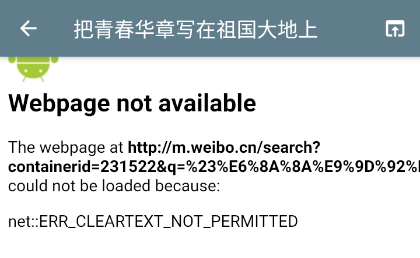
I looked into this problem for a long time and couldn't find a good solution. I saw that someone had filed issues with the Flutter team, but they still hadn't been resolved, so I had to force a solution myself...
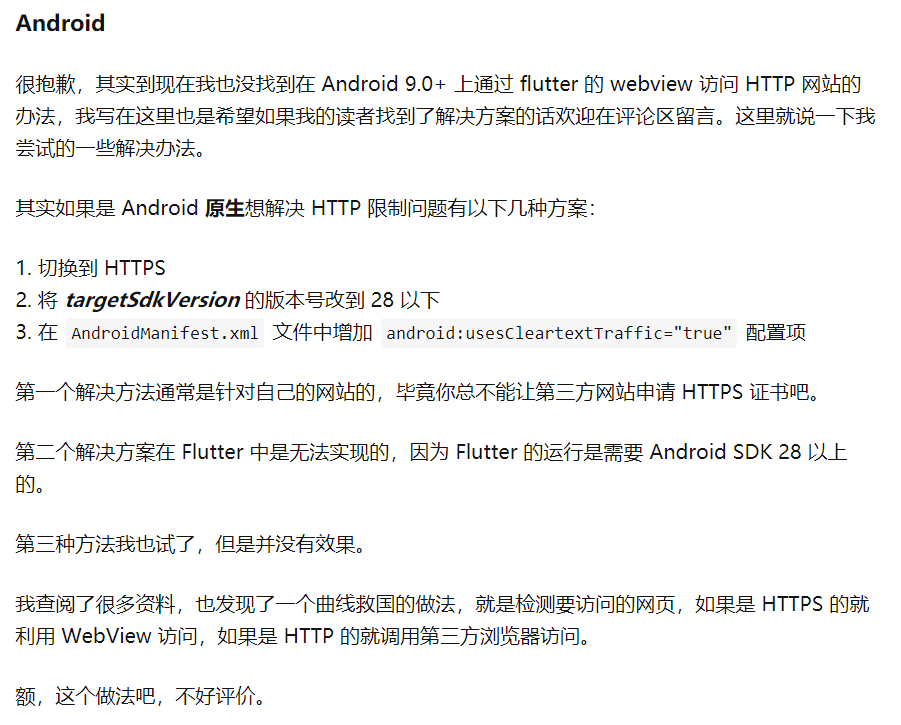
My idea: when encountering an HTTP URL, convert it to HTTPS and access that instead. But this only works for sites that have both HTTP and HTTPS; if a site only has HTTP, you're out of luck~
The Forced Implementation
The implementation code is very simple. First, use the WebView's onWebViewCreated event to get a WebViewController instance, then in the onPageFinished page-load-complete event, check whether the current page URL starts with http; if so, replace it with HTTPS and reload~
Because loading an HTTP page results in a white screen on iOS and an error message on Android, to improve the user experience we can add a loading dialog in the onPageStarted event.
The result looks like this:

The relevant code is as follows:
WebView(
  initialUrl: _url,
  allowsInlineMediaPlayback: true,
  javascriptMode: JavascriptMode.unrestricted,
  onWebViewCreated: (controller) => _webViewController = controller,
  onProgress: (value) => print('page progress: $value'),
  onPageStarted: (url) {
    print('onPageStarted: $url');
    if (url.contains('http://')) {
      _httpFlag = true;
      showLoading(context);
    }
  },
  onPageFinished: (value) {
    print('onPageFinished: $value');
    if (value.contains('http://')) {
      setState(() {
        _url = value.replaceAll('http://', 'https://');
      });
      _webViewController.loadUrl(_url);
    }
    if (value.contains('https://') && _httpFlag) {
      _httpFlag = false;
      Navigator.of(context).pop();
    }
  },
),
A pretty dumb solution. As you can see from the demo, the improvement to user experience is actually quite limited. It's treating the symptom, not the root cause. To really solve this, we still have to rely on the official team~
The Real Solution
After all that talk, the real solution still depends on Flutter officially filling the hole. The good news is that in the latest Flutter 2, the Flutter team has successfully filled it. Now we only need to configure usesCleartextTraffic and network_security_config in AndroidManifest.xml!
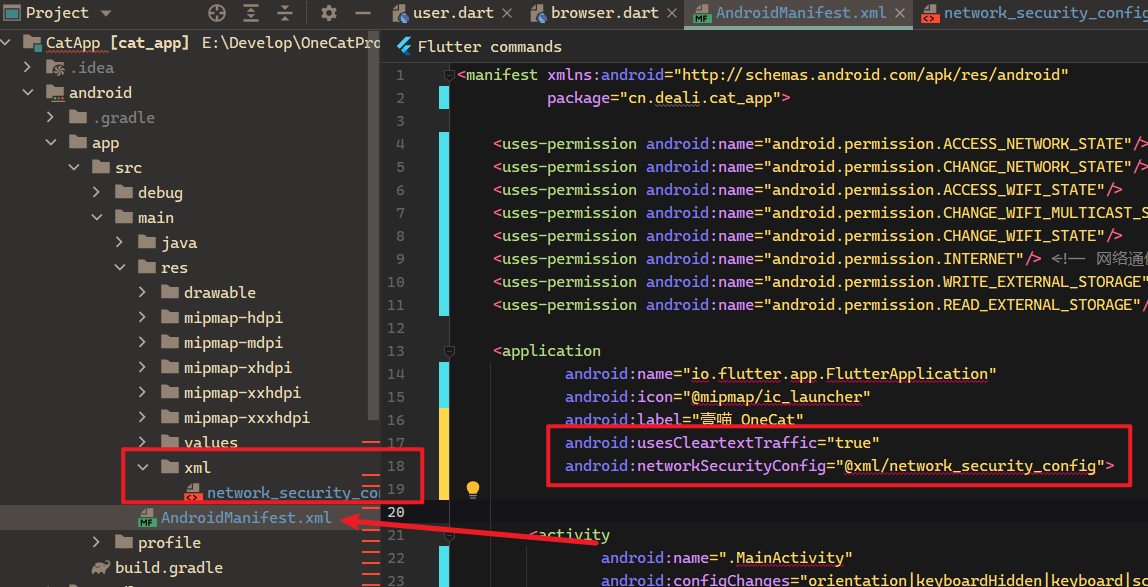
The specific steps: create the file /android/app/src/main/res/xml/network_security_config.xml in your Flutter project, and fill in the config:
<?xml version="1.0" encoding="utf-8"?>
<network-security-config>
    <base-config cleartextTrafficPermitted="true">
        <trust-anchors>
            <certificates src="system" />
            <certificates src="user" />
        </trust-anchors>
    </base-config>
</network-security-config>
Then modify /android/app/src/main/AndroidManifest.xml, and add the following two attributes to the application node:
android:usesCleartextTraffic="true"
android:networkSecurityConfig="@xml/network_security_config"
After that, your project structure should look something like this
Then run flutter clean in the console, run again, and you'll see that the WebView in the app can open HTTP sites normally. Nice~
References
- How to fix 'net::ERR_CLEARTEXT_NOT_PERMITTED' in flutter: https://stackoverflow.com/questions/55592392/how-to-fix-neterr-cleartext-not-permitted-in-flutter
- Using WebView in Flutter: https://zhuanlan.zhihu.com/p/77083307
Come Chat
Programming Lab focuses on exploring popular new internet technologies and team agile development practices. Reply with linux, flutter, c#, netcore, android, kotlin, java, python, and so on in the backend of the WeChat official account "Programming Lab" to get related technical articles and materials. If you have any questions, you can also leave a message in the official account backend~

- Cnblogs: https://www.cnblogs.com/deali/
- Coding livestream: https://live.bilibili.com/11883038
- Zhihu: https://www.zhihu.com/people/dealiaxy
_EOF_
A Proper-Looking Solution to Flutter WebView Unable to Access HTTP Pages
- 本文作者:
- 程序设计实验室
- 版权声明:
- 本博客所有文章除特别声明外,均采用 BY-NC-SA 许可协议。转载请注明出处!
相关文章
Flutter移动应用快速构建实践——状态管理、国际化、数据持久化、性能优化(二)
继续上一篇:极简诗词开发背后:Flutter移动应用快速构建实践——状态管理、国际化、数据持久化、性能优化(一) 前文中说到了项目结构、状态管理和国际化的方案,本文继续聊聊数据持久化和粗略的性能优化。 数据持久化 目前的话,flutter用的比较多比较成熟的数据持久化就是shared_preferences和SQFLite,一个是ini配置文件,一个是SQLite数据库,小应用我比较倾向只用前者,
2021-12-18 · Flutter · 约 1 分钟
从细节入手改善用户体验,Flutter跨平台App开发中设置Android和iOS的启动页
前言 flutter开发App方便快捷,就是冷启动的时候要加载dart引擎有短暂的白屏,严重影响用户体验,这个时候我们就需要设置一个启动图片,像国内大部分App那样(例如微信那个地球),启动App的时候显示这个图片,加载完再进入App,不至于影响用户体验。 Android启动页 首先要准备好启动图,本文命名为splash.png,按照不同的分辨率添加到对应的mipmap-hdpi / mipmap
2021-12-18 · Flutter · 约 1 分钟
极简诗词app开发背后:Flutter移动应用快速构建实践——状态管理、国际化、数据持久化、性能优化(一)
前言 在开始之前的提示:虽然Flutter背靠Google这棵大树,但是毕竟还是一个年轻的技术,项目还处于初期阶段,更新非常快,问题也不是一般的多,使用Flutter的话就意味着必须忍受各种奇怪的bug和没有丰富中文资料的头疼,本文不是安利同学们入坑,只是对“极简诗词”app的开发过程进行记录。 另外app已经上架,有兴趣的同学可以下载试试:https://www.coolapk.com/apk/
2022-03-23 · Flutter · 约 1 分钟
Flutter开发:ListView手动滚动到底部
这个问题搜了很久都没找到,国内关于flutter的研究好像还没多少,不过stackoverflow真的是万能的,这里记录一下~ 原文 Use ScrollController.jumpTo() or ScrollController.animateTo() method to achieve this. Here is code snippet (After 1 second, the ListV
2021-12-18 · Flutter · 约 1 分钟
讨论
共 0 条加载评论中…