Personal Data Preservation Plan: How to Safely Back Up Data
Huh, using something like mc, that prehistoric file manager, to back up data and feeling smug about it? The way rsync does checksumming is barely passable. And then, to top it off, generating a sha256 manifest with such seriousness—do people actually still manually verify cold backups these days?
目录5 个章节
Introduction
Backup data can be both simple and complex.
The simplest way is using the cp command to directly copy files.
However, once there is a large amount of data to back up, things become more involved.
How to show progress? How to ensure the backed-up data is error-free?
There is still quite a bit to consider here.
Basic Idea
I plan to use the SSD originally prepared for QNAP to install PVE.
This drive contains some docker and QTS software; the data to back up is the docker data.
There are several methods:
- rsync:
rsync -a --info=progress2 /mnt/disk1/your-folder /mnt/disk2/ - Midnight Commander (mc) (visual)
Using mc
I ultimately chose mc — it's user-friendly and simple.
After installing with sudo dnf install mc, open it in the terminal.
The left and right panels allow browsing different directories on the hard drive. Use Ctrl+T to select multiple files/directories, then press F5 to copy.
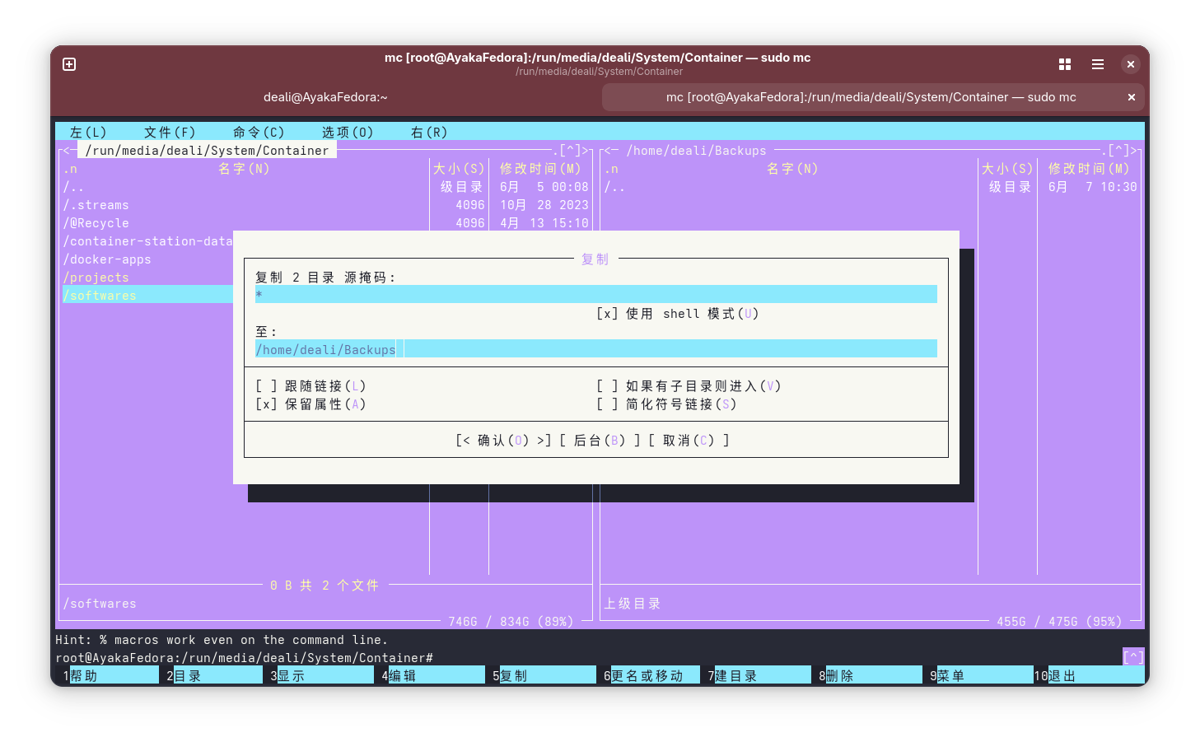
Press Enter to start copying. The interface has a nice retro aesthetic, which feels quite appealing~
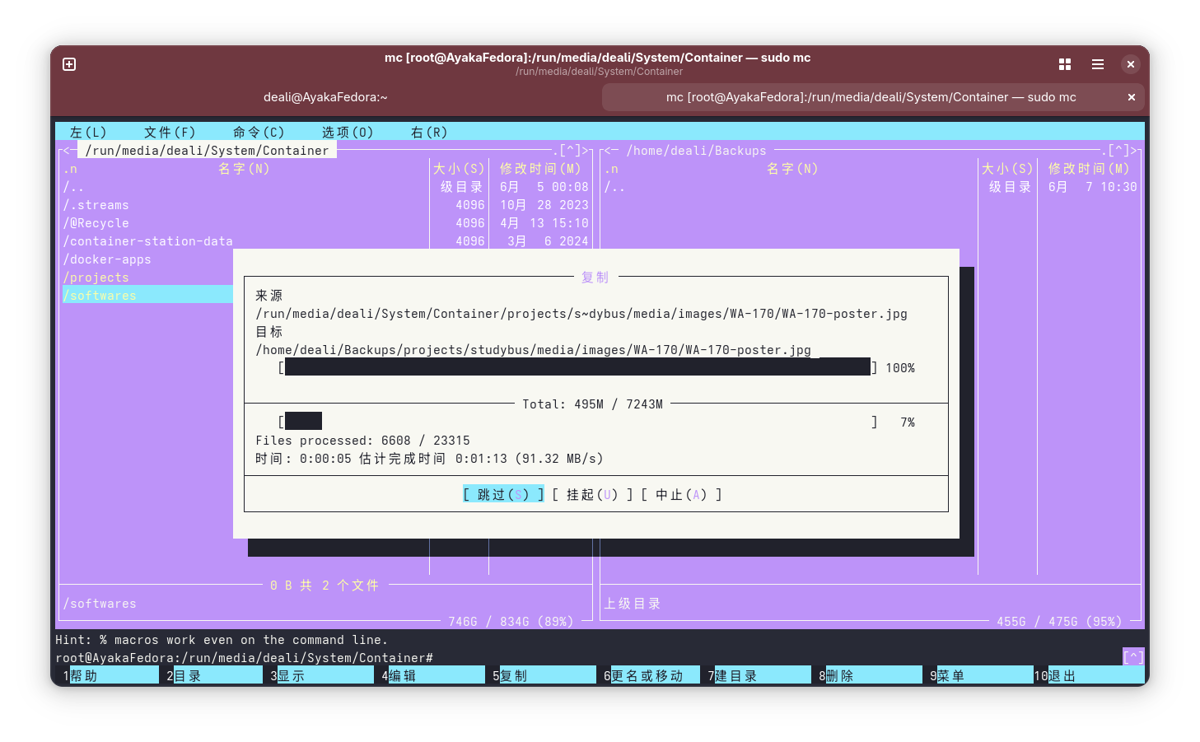
Verify Data
After the copy is complete, verify the integrity of the data.
The simplest way is to use rsync.
rsync -avhn /path/to/src/ /path/to/target/
You will get output similar to this:
sending incremental file list

sent 426.77K bytes  received 2.90K bytes  859.33K bytes/sec
total size is 1.45G  speedup is 3,367.09 (DRY RUN)
sending incremental file list ➜ Only lists differences (specific files are not listed now → indicates no changes).
By default, rsync's dry-run verification determines whether two files are "the same" based on: whether the file size is consistent and whether the last modification timestamp is consistent.
If you want it to be more reliable, you can verify the MD5 and SHA of the files. Add the --checksum (or -c) parameter to the rsync command.
rsync -avhnc --info=progress2 /src/ /dst/
-c/--checksum: Compares the checksum of the content (not the timestamp, not the size).- This causes rsync to read all source and target file contents, calculate, and compare checksums. The precision is equivalent to MD5 verification, but it is smarter than
md5sum(it can skip files that have already been compared).
The output after running the command will look something like this:
sending incremental file list
              0   0%    0.00kB/s    0:00:00 (xfr#0, to-chk=0/18633)

sent 680.95K bytes  received 2.90K bytes  91.18K bytes/sec
total size is 1.45G  speedup is 2,115.56 (DRY RUN)
Let's interpret this output:
xfr#0: The actual number of files that need to be copied/replaced is 0.to-chk=0/18633: A total of 18,633 files were compared, and all have been checked (0 remaining).0%,0.00kB/s: This is because there is no actual data flow in dry-run mode, so the speed is displayed as zero.
Output sha256sum List
If you plan to archive, cold backup, or leave it untouched for a long time, you can optionally create a sha256sum list for long-term verification:
find /home/deali/Backups/projects -type f -exec sha256sum {} \; > backup-sha256.txt
You can verify it in the future like this:
sha256sum -c backup-sha256.txt
If the file path changes, you can replace it with the following command:
sed -i 's|/home/deali/Backups|/var/lib/vz/backups|g' project-sha256.txt
After running the verification, it will output the result for each file, for example:
/var/lib/vz/backups/softwares/navidrome/cache/images/af/e9/afe97c40758c021a2de1f781ab14d4d3fc30b244: OK
If everything is correct, no error messages will be output.
_EOF_
Personal Data Preservation Plan: How to Safely Back Up Data
- 本文作者:
- 程序设计实验室
- 版权声明:
- 本博客所有文章除特别声明外,均采用 BY-NC-SA 许可协议。转载请注明出处!
相关文章
个人数据保全计划:安装docker
快速开始 App Center 中安装 Container Station 然后建议先在 FileStation 里自行创建一个 Container 文件夹,这样可以控制要在哪个卷上保存 docker 的数据,我是放在固态盘上。 安装后第一次打开会提示创建 Container 共享文件夹,直接选之前创建好的 Container 目录就行。 然后全部回归命令行 默认自带 docker-compose
2022-11-13 · 个人数据保全计划 · 约 1 分钟
PVE折腾笔记 (2) 挂载之前在QNAP里使用的硬盘
QNAP硬盘数据迁移真够折腾的,RAID、DRBD、LVM层层嵌套,读出来比解方程还难。mdadm能识别但挂载失败,还得激活LVM才能看到文件,这坑比啥玩意儿。直接重做系统最省事,留原方案也行但风险不小,QTS的鸡贼设计简直让人想砸机器。
2025-06-15 · 个人数据保全计划 · 约 1 分钟
个人数据保全计划:从印象笔记迁移到joplin
事实上我已经很多年没用印象笔记了,上次使用似乎还是很多年前大学时,当时还开了好几年会员,用来收藏网页、微信公众号文章,挺好用的。 可惜印象笔记(evernote)从某一年开始搞了中国特供版和国际版彻底切割,吃相越来越难看,而且导出格式也改成了专有格式,越来越封闭,这不是一个好兆头,我最怕被绑定在某个平台或者生态里。
2025-01-24 · 个人数据保全计划 · 约 1 分钟
个人数据保全计划:(1)NAS开箱
前言 从几年前第一个硬盘故障导致参赛的文件丢失之后,我就开始意识到数据安全的重要性,开始用各种云盘做备份,当时还不是百度云一家独大,我们也都没意识到网盘备份是极其不靠谱的行为,直到因为某些不可抗力因素,一夜之间所有网盘都宣布停服,这时才意识到,数据始终是掌握在自己手中才安全可控。 随着数据量增大,我又购入一个2T硬盘,但因为不懂 + 被无良奸商坑了,买到手发现是叠瓦盘,用了一年多就频繁卡顿和丢数据
2022-11-13 · 个人数据保全计划 · 约 1 分钟
讨论
共 0 条加载评论中…