

A small but elegant refactoring: Generate truly beautiful word clouds using C# in Avalonia
The process of refactoring the word cloud display feature in StarBlogPublisher. The author compared two popular C# word cloud libraries and ultimately selected the more powerful Sdcb.WordCloud. The article details how to use this library to obtain word frequency data and generate word cloud images, and presents a comparison of the effects before and after refactoring.
目录11 个章节
Preface
Didn't I previously develop StarBlogPublisher (a Markdown article publishing tool designed for StarBlog) using Avalonia?
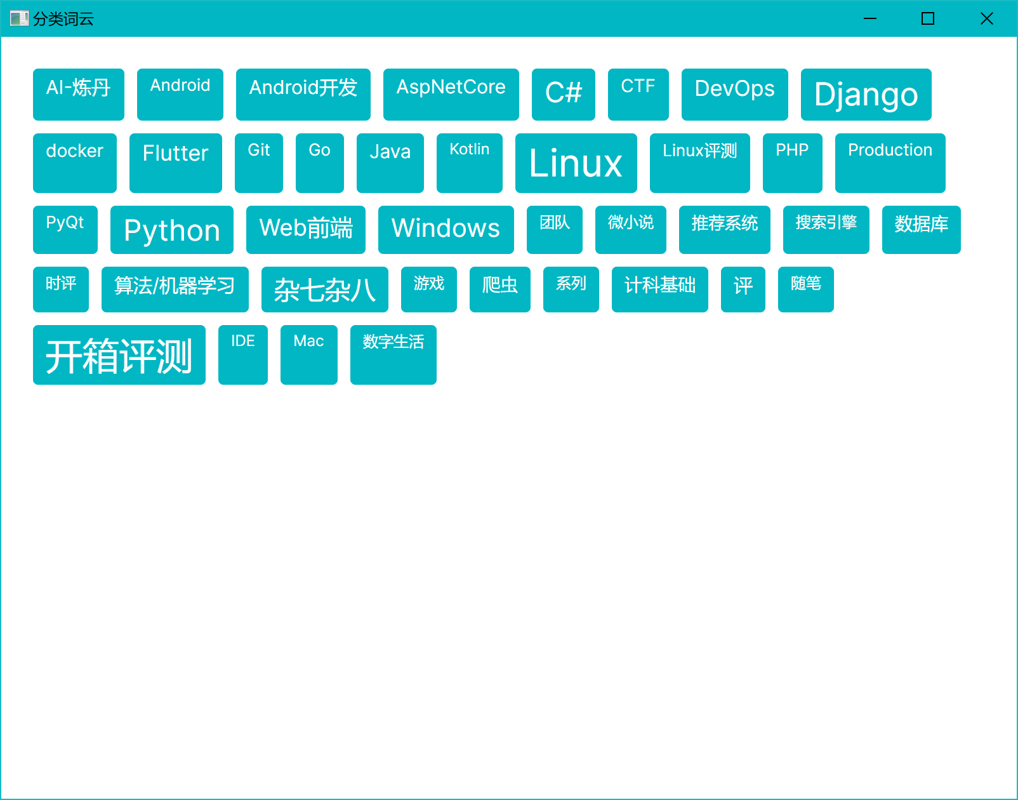
At the time, it included a Word Cloud category display feature. Although the initial version of the word cloud was "usable," the result was extremely crude—essentially just a simple stacking of text, with none of the lively, dense, and staggered aesthetic that a word cloud should have.
Therefore, I decided to completely refactor this module and search anew for a suitable word cloud generation solution.
Selection
Within the Avalonia ecosystem, there is no readily available word cloud component.
However, that's not an issue. The C# ecosystem is relatively rich, offering almost everything you need, and word clouds are certainly no exception.
During my research phase, I found two fairly popular C# word cloud libraries:
Here's a brief comparison:
| Feature | Sdcb.WordCloud | KnowledgePicker.WordCloud |
|---|---|---|
| Rendering Engine | SkiaSharp (cross-platform) | SkiaSharp (cross-platform) |
| Output Format | Image (PNG), SVG, JSON | Image (Bitmap), SVG (requires custom drawing) |
| Customization Level | High (masks, fonts, multi-direction, JSON output, etc.) | Medium (fonts, colors, layout customizable, but no mask support) |
| Mask Functionality | ✅ Natively supports mask images to generate word clouds in specific shapes | ❌ Does not support masks, generates standard rectangular word clouds |
| Recent Maintenance | Actively updated (continuous updates in 2024) | Active (commits in 2024) |
| Usage Complexity | Medium (more configuration, high flexibility) | Medium (simpler, suitable for quick integration) |
Common Points
- Both use
SkiaSharp, which means they can run on Windows, Linux, macOS and other platforms. - Both support flexible configuration of fonts, layouts, and colors, and are very fast.
Key Differences
- Sdcb.WordCloud focuses more on visual effects (supports complex mask patterns), making it suitable for scenarios that pursue custom shapes and cool effects.
- KnowledgePicker.WordCloud prioritizes performance and simplicity, making it ideal for standard rectangular word cloud generation without pursuing complex shapes.
Ultimately, I chose Sdcb.WordCloud for its stronger functionality and better compatibility.
Introduction to Sdcb.WordCloud
Sdcb.WordCloud is a cross-platform word cloud generation library based on SkiaSharp, featuring the following characteristics:
- Cross-platform compatibility: Usable on Windows, Linux, and macOS.
- Multiple output options: Supports generating images, SVG files, or JSON data.
- Highly customizable: Customize fonts, colors, mask patterns, text layout arrangements, and more.
- No dependency on System.Drawing: Easy to deploy in server environments as well.
- Open-source friendly: Licensed under the MIT License, allowing developers to extend it freely.
Installation
dotnet add package Sdcb.WordCloud
Application in StarBlogPublisher: Practical Implementation
The refactored word cloud generation logic primarily consists of two steps:
Get Word Frequency Data
First, request the categorized word frequency data from the backend API and perform a simple expansion (to increase the word cloud density).
private async Task<List<WordScore>?> GetWordScores() {
  var response = await ApiService.Instance.Categories.GetWordCloud();
  if (response.Data == null) throw new Exception("Failed to retrieve word cloud data");

  var originalScores = response.Data
    .Select(e => new WordScore(Score: e.Value, Word: e.Name))
    .ToList();

  var extendedScores = new List<WordScore>();
  foreach (var score in originalScores) {
    for (int i = 0; i < 10; i++) {
      extendedScores.Add(score);
    }
  }

  return extendedScores;
}
A small tip here: 👉 Duplicating the original frequency for each word multiple times can effectively enhance the visual density and richness of the word cloud.
Generating a Word Cloud Image
Once you have the word frequency data, use WordCloud.Create() to create a word cloud object. By customizing it with a mask pattern and font, you can generate the final word cloud image.
private async Task GenerateWordCloudImage() {
  var wordScores = await GetWordScores();
  if (wordScores == null || !wordScores.Any()) {
    ErrorMessage = "No available word cloud data.";
    return;
  }

  var wc = WordCloud.Create(new WordCloudOptions(900, 900, wordScores) {
    FontManager = new FontManager([
      SKTypeface.FromFamilyName("Times New Roman")
    ]),
    Mask = MaskOptions.CreateWithForegroundColor(
      SKBitmap.Decode(await new HttpClient().GetByteArrayAsync(
        "https://io.starworks.cc:88/cv-public/2024/alice_mask.png"
      )),
      SKColors.White
    )
  });

  using var skImage = wc.ToSKBitmap();
  using var data = skImage.Encode(SKEncodedImageFormat.Png, 100);
  using var stream = new MemoryStream(data.ToArray());
  WordCloudImage = new Bitmap(stream);
}
Two simple techniques are used here to enhance the experience:
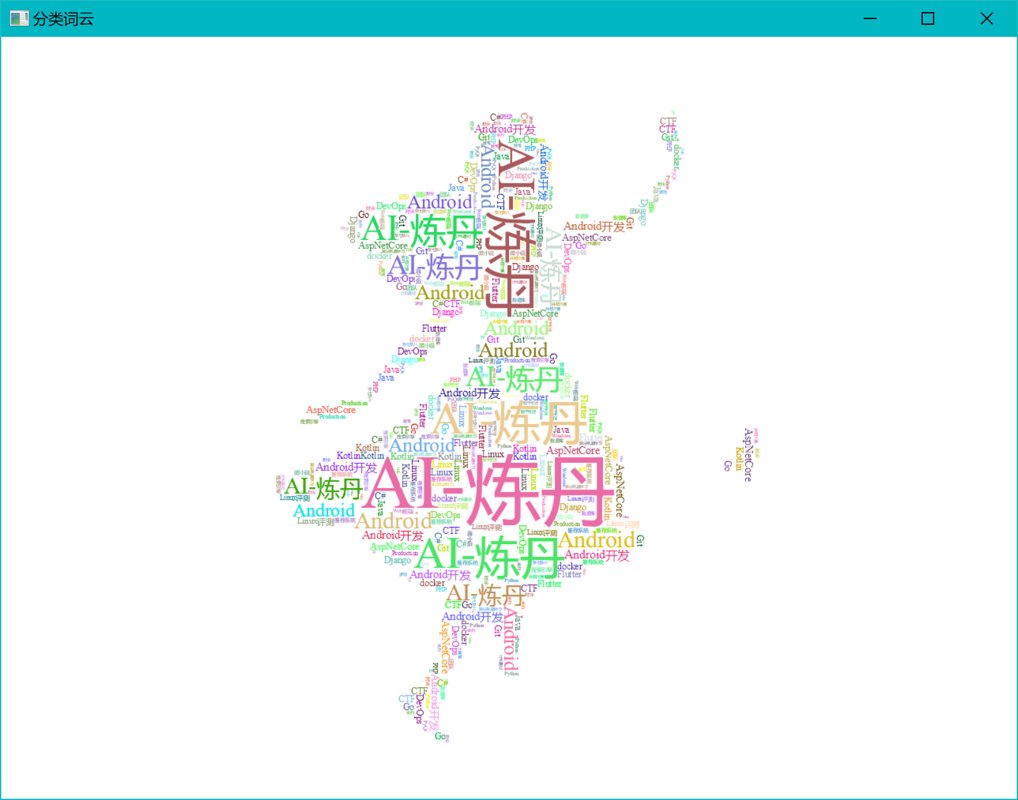
- 📄 Mask Image: By using a transparent image with a specific shape, the word cloud can form silhouettes like people or logos, greatly improving its visual appeal.
- 🖋 Custom Font: Changing the font allows the overall style to better match the design of your website or application.
Effect Demonstration
Could that really count as a word cloud from before??
| Before Modification | After Modification |
|---|---|
 |  |
Summary
Through this refactoring, I've summarized a few key takeaways:
- Choosing the right library is crucial—cross-platform support and high extensibility are the top priorities.
- The aesthetics of a word cloud hinge on the combination of density, mask shape, and font style.
- Prioritize asynchronous requests (异步请求) and local optimization (局部优化) whenever possible to prevent UI lag.
If you also need to integrate word cloud functionality into your C# project, give Sdcb.WordCloud a try—it's simple, efficient, and delivers great results.
_EOF_
A small but elegant refactoring: Generate truly beautiful word clouds using C# in Avalonia
- 本文作者:
- 程序设计实验室
- 版权声明:
- 本博客所有文章除特别声明外,均采用 BY-NC-SA 许可协议。转载请注明出处!
相关文章
C#爬虫:CatSpider#-开发笔记
前言 (PS:我这里用了#号代替了Sharp这个单词) CatSpider是毕设里的数据采集模块,本来爬虫类的应用肯定使用python来开发嘛,不过用request_html做解析的时候,python的动态类型真的把我恶心到了,而且感觉这个库也不是很成熟,html5lib也不好用,也没心思去深入了,之前看到有大佬用.net core平台做爬虫,于是我也来试试,没想到效果贼好,特别是配合LinqPa
2022-05-27 · C# · 约 1 分钟
C#中的Attribute与Python-TypeScript的装饰器是同个东西吗
前言 最近成功把「前端带师」带入C#的坑~~(实际是前端带师开始从cocos转unity游戏开发了)~~ 某天,「前端带师」看到这段代码后问了个问题:[这个是装饰器]? [HttpGet] public Response Get() { return ... } 我第一反应觉得不是,这玩意在C#中叫“特性”(英文名Attribute,下文统称为特性),在Java中叫注解,虽然写法和Pyth
2022-06-26 · C# · 约 1 分钟
C#实现解析Markdown文档并处理图片链接
前言 又是好久没写博客了 其实也不是没写,是最近在「做一个博客」,从2月21日开始,大概一个多星期的时间,疯狂刷进度,边写代码边写了一整系列的博客开发笔记,目前为止已经写了16篇了,然后上3月之后工作有点忙~~加上有点沉迷原神~~,然后进度就暂时慢下来了 事实证明做什么事情一旦停下来就会产生惰性,于是停了这么久,我终于下定决心继续更新! 这次开发的博客用的是C#语言,搭配.netcore技术栈;前
2022-03-19 · C# · 约 1 分钟
开发现代化的.NetCore控制台程序:(3)将nuget包发布到GitHubPackages
发布Nuget包到GitHub Packages?不过是配置token和nuget.config的重复劳动。手动关联包与仓库?GitHub的设计真够奇葩的。搞定,但谁有空折腾这些。
2023-11-10 · C# · 约 1 分钟
讨论
共 0 条加载评论中…