

PyQt5 Development Practice (Part 1: Preparation)
Preface Over the past year I've developed quite a few small PyQt projects. Since I hadn't used Qt with C++ before, you could say I started from scratch, learning as I went. In the process I once again felt how lacking the domestic tech community is... There's not exactly little material on PyQt in China, but not a lot either—it's mainly scattered, and there aren't really any decent systematic learning resources... So for this PyQt, it all came down to reading the docs and overseas communities, plus the most important thing: figuring it out myself... Setting Up the Development Environment The development environment setup in this article is partly learned from a book, and partly from practice tot
目录8 个章节
Preface
Over the past year I've developed quite a few small PyQt projects. Since I hadn't used Qt with C++ before, you could say I started from scratch, learning as I went. In the process I once again felt how lacking the domestic tech community is... There's not exactly little material on PyQt in China, but not a lot either—it's mainly scattered, and there aren't really any decent systematic learning resources... So for this PyQt, it all came down to reading the docs and overseas communities, plus the most important thing: figuring it out myself...
Setting Up the Development Environment
The development environment setup in this article is partly learned from a book and partly summarized from practice. In short, given that there currently isn't a particularly good PyQt integrated development tool, this achieves a reasonably efficient development workflow for the time being.
The PyQt development approach I currently use follows the traditional MVC architecture, separating UI layout from logic implementation~
Specifically:
- Design the UI with QtDesigner, save it as a
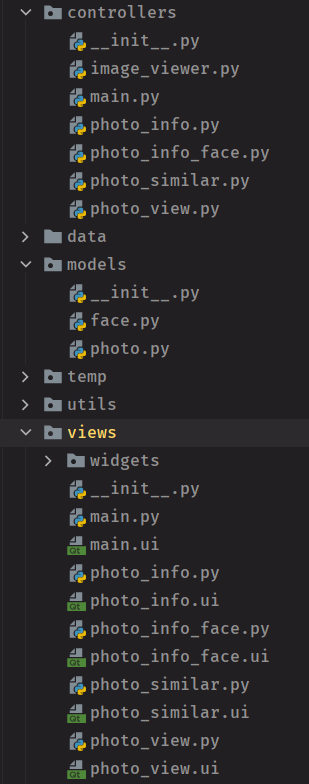
*.uifile, then usepyuic5from the PyQt tools to convert the ui file into a py file—this is the view - Create corresponding py files in the controller package to implement the corresponding UI logic
Project structure for reference:
Using QtDesigner
This QtDesigner is pretty crude. Never mind comparing it to VS—even compared to the Swing UI designer in Android Studio or IDEA, it's the little brother. It's maybe about 60–70% of the level of VB 6.0 from 1998...
Still, it's better than nothing. At least you can design simple UIs, and that's enough.
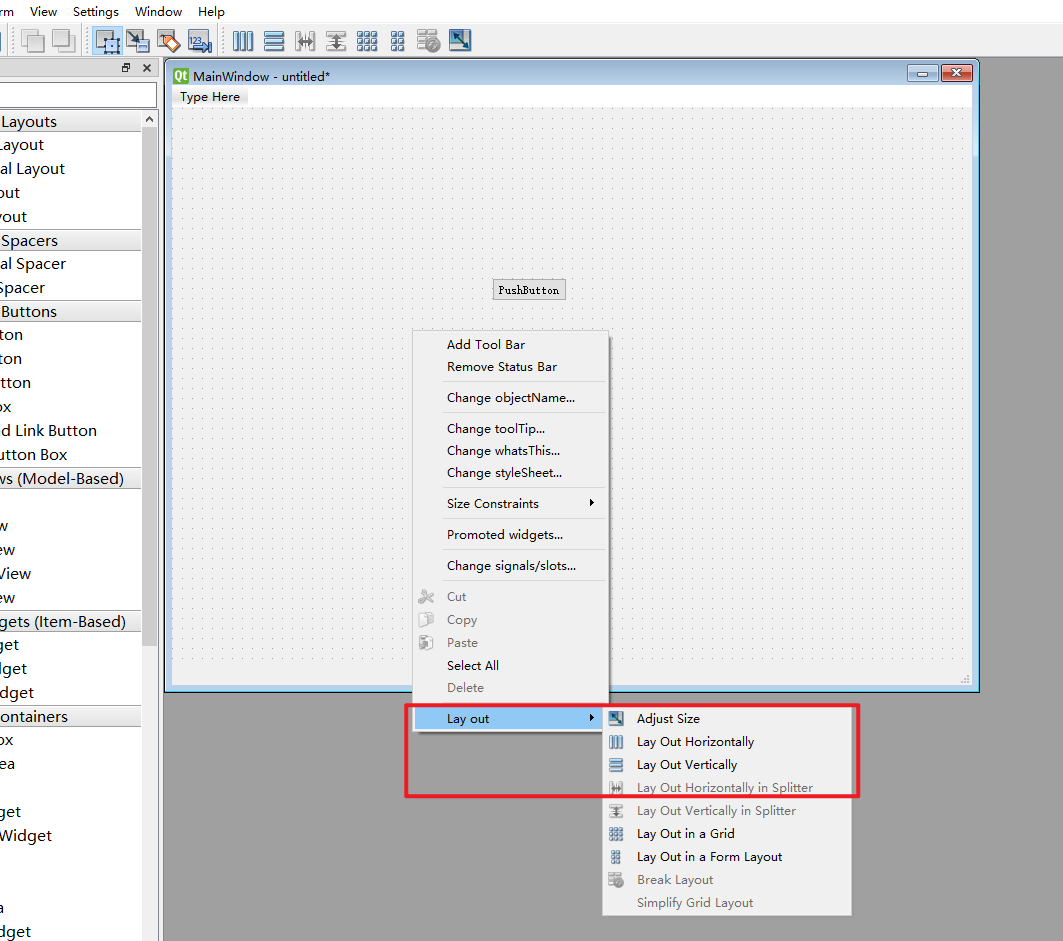
Having written a lot of Flutter and Android apps, I'm very used to various linear layouts. Qt isn't bad at layout either—there are Hlayout and Vlayout you can use, and they're convenient in QtDesigner as well: create a Main window, drop a few widgets on it, right-click to set the layout, then you can freely use HLayout, VLayout, GridLayout and other components for layout, as shown:
Installing PyQt Tools
To use the tools mentioned above such as QtDesigner and pyuic5, you need to install them first.
pip install pyqt5
pip install pyqt5-tools
After installation, you can find the PyQt5 and pyqt5-tools folders under Lib/site-packages in the Python installation directory. The tools we need, such as QtDesigner and pyuic5, are in the pyqt5-tools folder.
Configuring External Tools in PyCharm
To make PyQt development more convenient in PyCharm, you also need to configure a few external tools. After configuring them you can do some quick operations: for example, right-click a ui file to open it directly with QtDesigner, or convert a UI file to a py file, as shown:
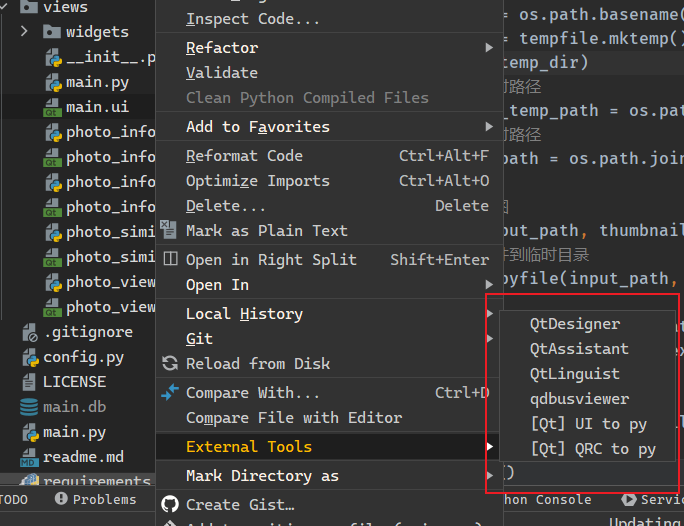
The specific configuration method is as follows:
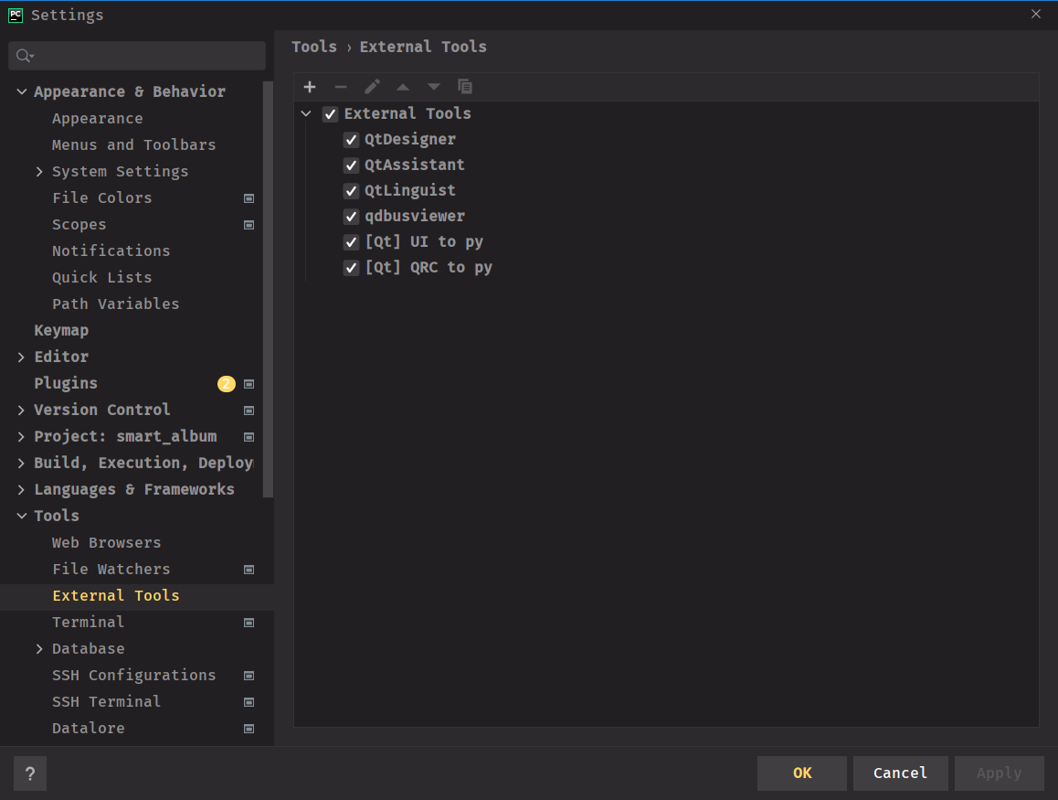
First, File->Settings, open PyCharm's settings, and go to the External Tools screen, as shown
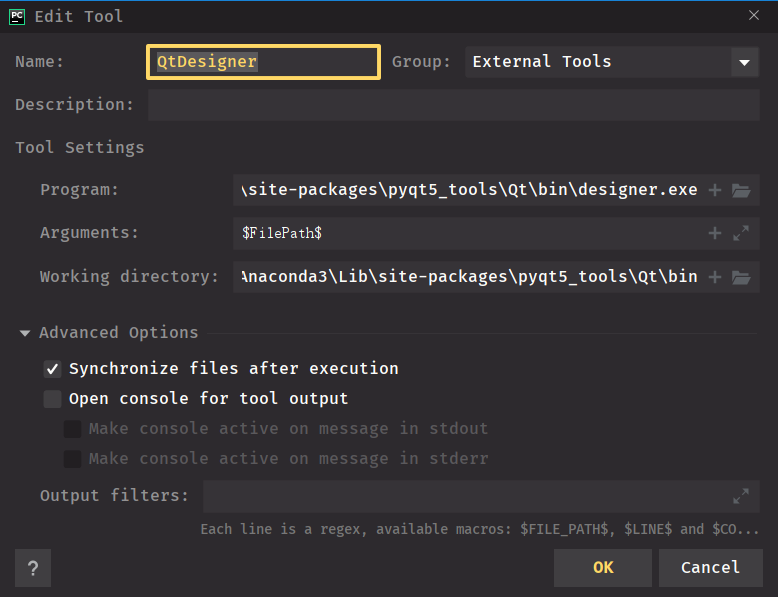
Here click the plus button to open the add page. We'll add QtDesigner first, as shown
Next add the pyuic5 tool. This tool's command argument format is as follows:
{pyuic5_path} -o {target_path} {file_path}
So the configuration is like this:
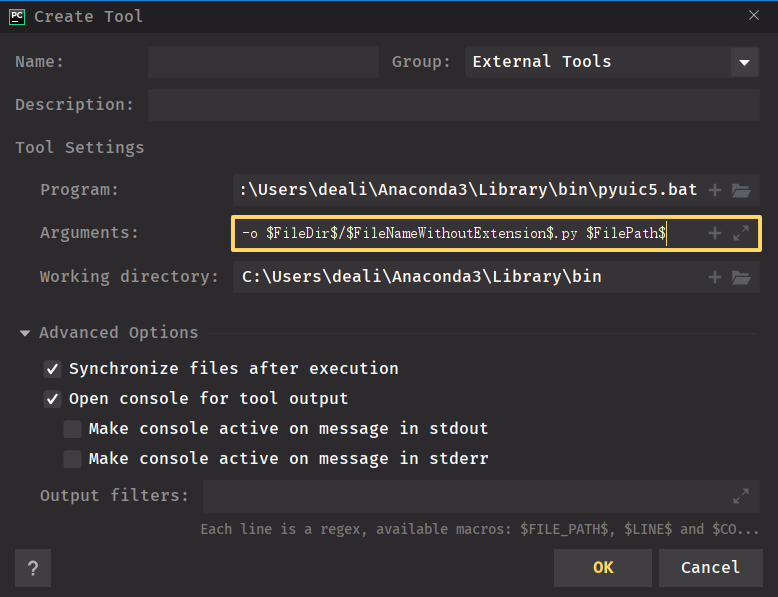
I'll copy the arguments part again:
-o $FileDir$/$FileNameWithoutExtension$.py $FilePath$
Recommending a Small Open Source Project
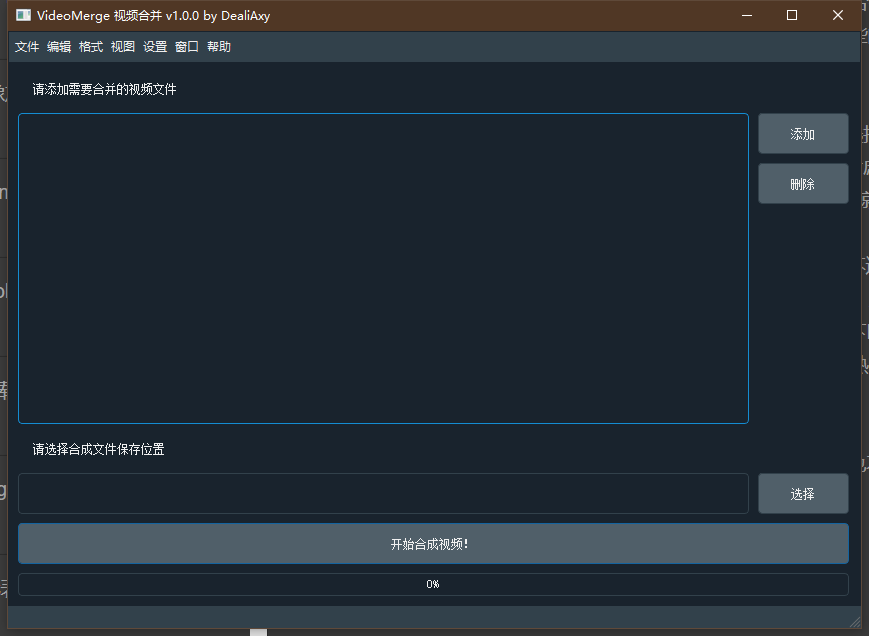
This is a simple video merging tool I wrote before. Below is a brief project introduction
I wanted to merge videos but couldn't find a decent tool—many of them charge money. I thought, "This crappy feature and they still want to charge?", so I decided to make one myself. At first I made one with Python; it worked pretty well and perfectly completed my video merging tasks, but it had no GUI, so I couldn't share it with friends to use. Then I wrote a GUI with Qt and put it on top, and that's how this project came about
Link: https://github.com/Deali-Axy/VideoMerge
Recommending a Book
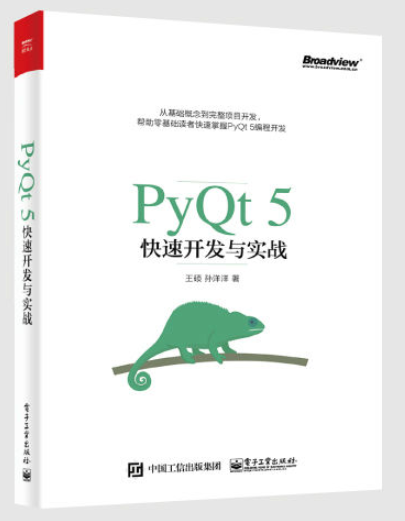
Although systematic learning materials in China are scarce, I did manage to find this one
I forget where I found the PDF. It has no table of contents, so looking things up is a pain. I spent time going through the whole book and manually marked up a table of contents, as shown
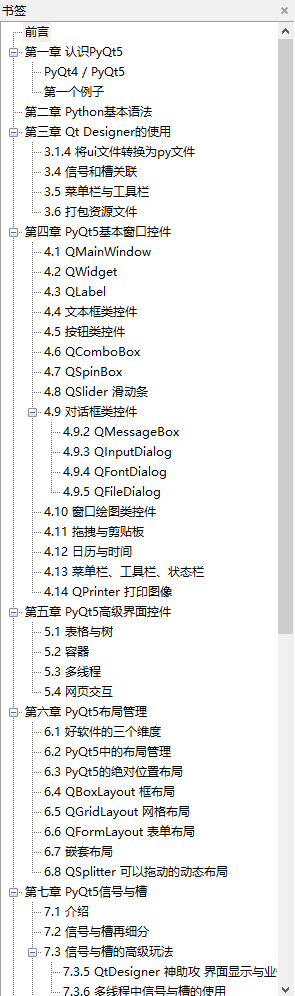
I'd say I more or less understand the contents of the whole book. The earlier parts on setting up a PyQt development environment and such are still somewhat helpful; later on, the introductions to various widgets aren't that detailed. Some useful things aren't even covered in the book, so you still have to rely on Google. So, this book can only be described as the tallest among dwarfs—barely satisfactory~
Welcome to Discuss
Programming Lab focuses on exploring popular new internet technologies and team agile development practices. Reply linux, flutter, c#, netcore, android, kotlin, java, python, etc. in the backend of the WeChat official account "Programming Lab" to get related technical articles and materials. You can also leave a message in the official account backend if you have any questions~

- Blog Garden: https://www.cnblogs.com/deali/
- Coding livestream: https://live.bilibili.com/11883038
- Zhihu: https://www.zhihu.com/people/dealiaxy
_EOF_
PyQt5 Development Practice (Part 1: Preparation)
- 本文作者:
- 程序设计实验室
- 版权声明:
- 本博客所有文章除特别声明外,均采用 BY-NC-SA 许可协议。转载请注明出处!
相关文章
数据分析必备技能!3分钟教会你如何在PyQt中画好看的图表
先看看我们要实现的效果: 这是一个基于机器学习的数据分析结果展示,可以看到元素包括了坐标轴标注,两条折线和图例。 为了实现在PyQt中画图,我们用到了pyqtgraph这个绘图库,它是完全python实现的,与PyQt程序可以完美融合,并且具备很多优势: 拥有丰富的图形种类; 能够快速地实时更新绘图数据; 能够进行交互式的操作; 多种标记功能; 接下来进入正题,开始使用pyqtgraph来实现我们
2021-12-18 · PyQt · 约 1 分钟
LittleWhiteOne基本设计
LittleWhite One 魔改chatterbot框架实现的新版小白~ 简介 core:核心框架,魔改版chatterbot corpus:英文和中文训练语料 nltk_data:需要用到的nltk数据集 文本相似度算法 LevenshteinDistance SpacySimilarity JaccardSimilarity Levenshtein Distance算法 中文名:莱文斯坦距
2021-12-18 · 算法/机器学习 · 约 1 分钟
Python-Web:Django模板继承
模板可以用继承的方式来实现复用。 接下来我们先创建之前项目的 templates 目录中添加 base.html 文件,代码如下: !DOCTYPE html html head meta charset=utf-8 title标题/title /head body h1Hello World!/h1 pDA Django 测试。/p {% block mainbody %
2021-12-18 · 0_Python-Web-Django入门系列笔记 · 约 1 分钟
我最后悔看的电影之一《挪威的森林》
最近开始金工实习,每天早出晚归超级忙,而且身体还有点不舒服,所以难得有点空闲时间的时候,和我家猪猪看了一下这个电影,全程感觉超级压抑(结果看完就开始发烧),这谁顶得住啊。 可能是电影时长太短的缘故,剧情很紧凑,场景的切换很突兀,没读过原著的人可能很难跟得上。 这电影总的来说,对原著的还原度算挺高的,几个主要角色的代入感都很强,特别是直子,她刚刚出场的时候,还感觉她不如原著描述的漂亮,虽然有几个画面
2022-11-27 · 评 · 约 1 分钟
讨论
共 0 条加载评论中…