

An interesting plugin that turns coding into a game of leveling up by defeating monsters.
CodeStats is a plugin and accompanying website that gamifies the coding process. Every time you write code, it accumulates experience points for you, helping you level up in different programming languages. You can visually see which languages you excel in and which areas have room for improvement.
目录7 个章节
Introduction
Originally, I was going to install a statistics plugin to count the number of lines of code.
By chance, I came across the Code::Stats plugin.
After reading the introduction, I found it quite interesting.
Results
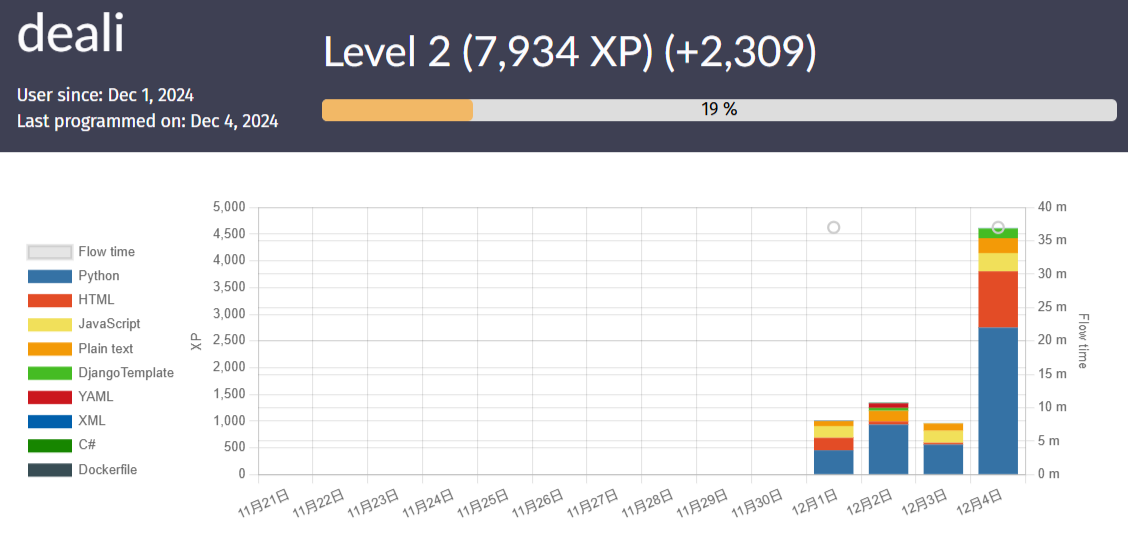
This is the outcome after I used this plugin to write code for two days. Now I've reached level 2.
Here's the overview:
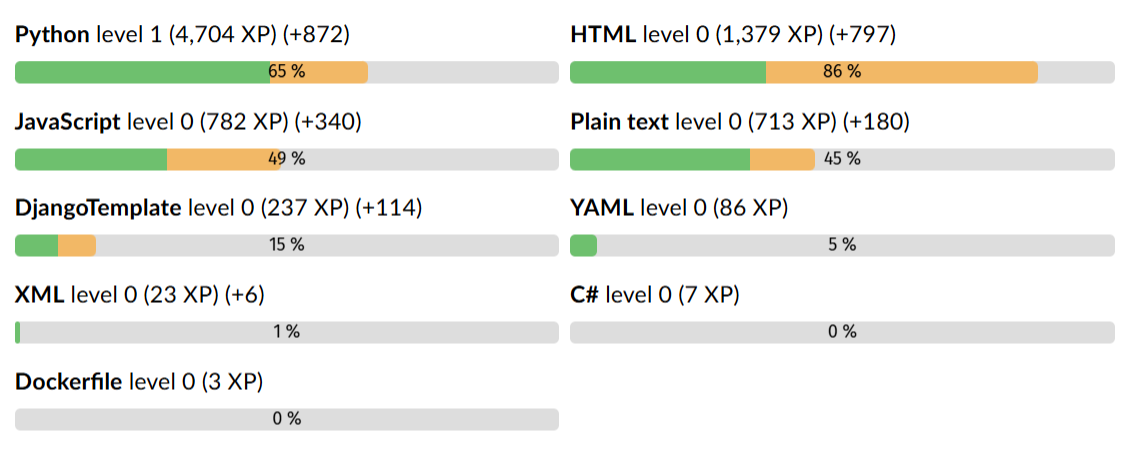
You can see the experience points for each language in detail:
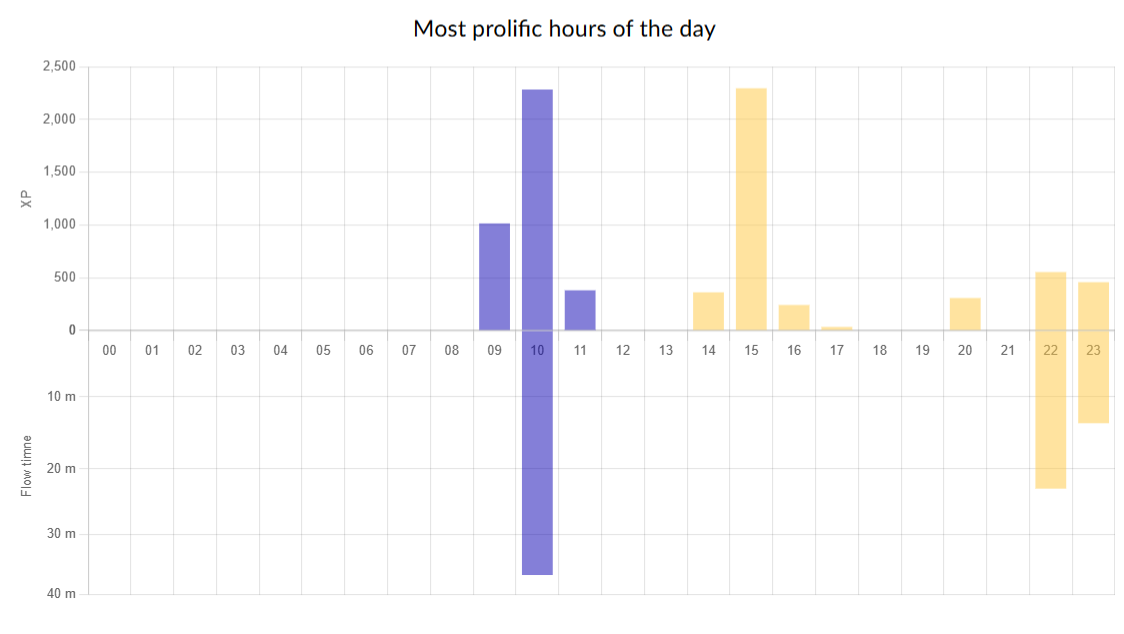
Activity levels at different times of the day:
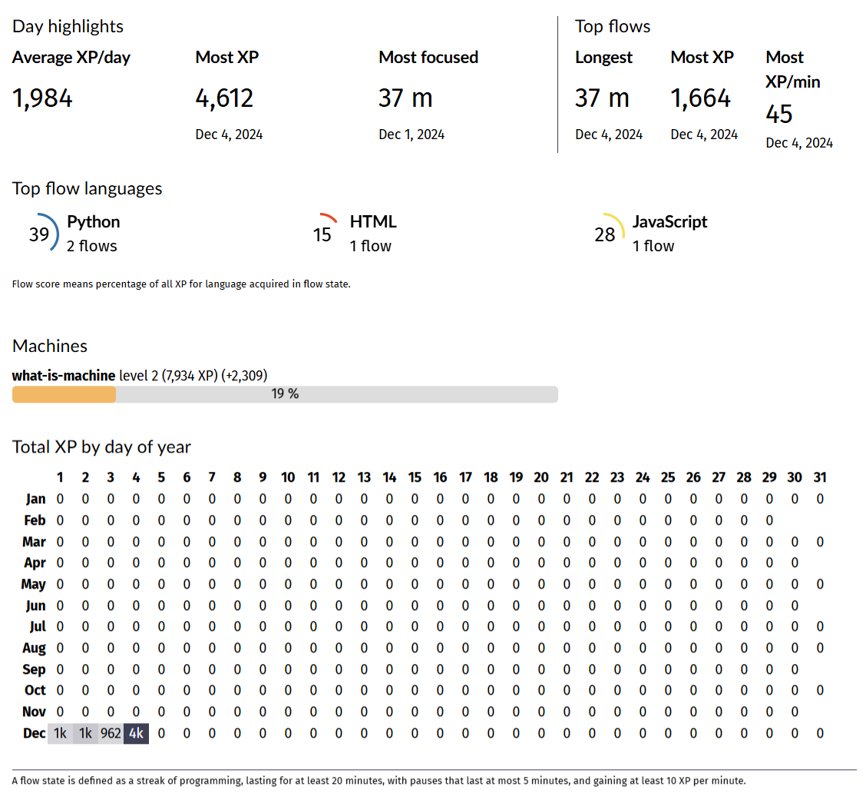
There are also some other detailed statistics in the following sections:
About Code::Stats
CodeStats is a plugin and accompanying website that gamifies the coding process. Every time you write code, it accumulates experience points for you, helping you level up in different programming languages. You can visually see which languages you excel in and which areas have room for improvement.
Beyond self-improvement, CodeStats also offers the fun of sharing and competition. You can showcase your personal statistics page, share progress with friends, or even engage in coding challenges. If you prefer to keep a low profile, you can choose to keep your information private and enjoy the joy of growth in solitude.
Whether you want to enhance your coding skills or seek new motivation, CodeStats adds fun and challenge to your coding journey.
Official Website Introduction
Level up
You will be awarded experience points for the amount of programming you do. Watch your levels grow for each language you use. Identify your strong skill sets and use the data to see where you still have room for improvement.
Show off
Display your personal statistics page to your friends and compare your progress with others. Maybe even organize a competition! Or, if you prefer, you can keep all your information private and enjoy it in secret.
How to Use?
- First, go to the official website to register an account: https://codestats.net/
- On the "machines" page, create a machine and give it any name.
- Copy the API key from the created machine and enter it in the plugin's configuration settings.
PS: I have currently only installed this plugin in JetBrains IDEs. The configuration path is Settings -> Code:: Stats.
_EOF_
An interesting plugin that turns coding into a game of leveling up by defeating monsters.
- 本文作者:
- 程序设计实验室
- 版权声明:
- 本博客所有文章除特别声明外,均采用 BY-NC-SA 许可协议。转载请注明出处!
相关文章
点咖啡不再纠结:了解常见咖啡种类及口味
咖啡入门指南:轻松选择适合你的那杯
2025-10-28 · 2024 · 约 1 分钟
聊聊一个差点被放弃的项目以及近期的开源计划
差点放弃的单点认证项目,硬撑着做完了。计划重构开源,叫StarSSO。其他项目如EchoSubs、SnapMix?随缘。
2024-05-23 · 2024 · 约 1 分钟
聊聊键盘旋钮对体验的影响
我比较喜欢旋钮和小屏幕,所以购买的时候尽量都选择了带有旋钮和小屏幕的,至少也得有旋钮
2024-04-28 · 2024 · 约 1 分钟
298 元买了个没人听过的便携屏,我到底图啥?
买Eimio便携屏就为了试试皮套?298块,参数一般,包装简陋,亮度调到20%还是最亮,这DDC/CI功能简直是反人类设计。还不如直接买个内胆包+支架,至少稳定。
2025-11-22 · 显示器 · 约 1 分钟
讨论
共 0 条加载评论中…