

Odd Operating System Related Exercises~4-21
Operating system homework Which layer does the operating system occupy in the computer system hierarchy? How does it connect with the layers above and below it? The layers of a computer system: Level 1 is the microprogram machine layer, which is a real hardware layer; microinstructions are executed directly by the machine hardware. Level 2 is traditional machine language, which is also an actual machine layer; the machine instruction set is interpreted by microprograms. Level 3 is the operating system layer, implemented by operating system programs. Operating system programs consist of machine instructions and generalized instructions; these generalized instructions are provided to extend machine functionality, and they are software defined and interpreted by the operating system
目录20 个章节
Operating System Homework
Which layer does the operating system occupy in the computer system hierarchy? How does it connect with the layers above and below it?
The layers of a computer system:
- Level 1 is the microprogram machine layer, which is a real hardware layer; microinstructions are executed directly by the machine hardware.
- Level 2 is traditional machine language, which is also an actual machine layer; the machine instruction set is interpreted by microprograms.
- Level 3 is the operating system layer, implemented by operating system programs. Operating system programs consist of machine instructions and generalized instructions; these generalized instructions are provided to extend machine functionality. They are software instructions defined and interpreted by the operating system, so this layer is also called a hybrid layer.
- Level 4 is the assembly language layer, which provides users with a symbolic language with which they can write assembly language source programs. This layer is supported and executed by assembly language.
- Level 5 is the high-level language layer, which is user-oriented and provided to make it convenient for users to write application programs. This layer is supported and executed by high-level language compilation.
- Above the high-level language layer, there can also be an application layer, consisting of processing programs that solve practical and application problems, such as word-processing software, database software, multimedia software, and office automation software.
The lower layer is the foundation of the upper layer; the upper layer is an extension of the lower layer.
How are they connected?
The operating system is the intermediate bridge connecting hardware and software. As the interface between the user and the computer hardware system, it works through system calls and commands (command line and graphical interface); as the manager of computer system resources, it manages the processor, memory, I/O devices, and information (programs and data); it implements an abstraction of computer resources: a layer of I/O device management software is overlaid on the bare machine, then another layer of file management software is overlaid on that first software layer (the second level of abstraction), and then a further layer of user-oriented windowing software is overlaid on top.
Please use examples to explain how to understand that the operating system is a resource manager. How should one understand that the operating system is a resource management machine?
The operation of a computer system requires software and hardware working together. Treating each hardware functional component and software functional module in the system as a system resource, the operating system is the manager of these resources. How to use various resources effectively and reasonably and provide users with the best service is the main work of the operating system. Resource management includes the following:
- Track and record resource usage: In a multiprogramming system, system resources must meet the needs of multiple tasks, but a task’s need for resources may not be continuous. This requires tracking and recording resource usage to know the current resource state or remaining amount, so as to satisfy tasks’ resource requests.
- Allocate or reclaim resources: When conditions are met, allocate resources to the requesting task; after allocation, record the current remaining resources and state in preparation for the next allocation; according to task completion, reclaim system resources in a timely manner to guarantee requests from new processes.
- Improve resource utilization: Under the management of the operating system, strive to make system resources used reasonably and efficiently.
- Coordinate conflicts among multiple processes requesting resources: When a small amount of resources serves multiple requests, resource-use conflicts arise. The operating system then needs to analyze the characteristics of the requesting processes, make decisions about resource use, and coordinate the processes so they use resources reasonably.
Using examples
Regarding the operating system as a concept that provides basic abstractions to application programs is a top-down view. According to another, bottom-up view, the operating system is used to manage the various parts of a complex system. Modern computers contain processors, memory, clocks, disks, mice, network interfaces, printers, and many other devices. From this perspective, the operating system’s task is to control in an orderly way the allocation of the processor, memory, and other I/O interface devices among competing programs.
Modern operating systems allow multiple programs to run in memory at the same time. Suppose three programs running on a computer try to output computation results on the same printer at the same time; then the first few lines might be program 1’s output, the next few lines program 2’s output, then program 3’s output, and so on, and the final result would be a mess. By sending print results to a buffer on disk, the operating system can bring potential chaos into order. After a program finishes, the operating system can send the file temporarily stored on disk to the printer for output, while other programs can continue producing more output; clearly, these programs’ output has not yet actually been sent to the printer.
When a computer (or network) has multiple users, the need to manage and protect memory, I/O devices, and other resources becomes strong, because users may interfere with one another. In addition, users typically share not only hardware but also information (files, databases, etc.). In short, this view of the operating system holds that the OS’s main tasks are to record which program is using what resource, allocate resources in response to requests, assess usage costs, and mediate conflicting resource requests among different programs and users.
Resource management includes implementing multiplexing (sharing) of resources in the following two different ways: multiplexing in time and multiplexing in space. When a resource is multiplexed in time, different programs or users take turns using it. First the first one obtains use of the resource, then the next, and so on. For example, if there is only one CPU in the system and multiple programs need to run on that CPU, the operating system first allocates the CPU to some program; after it has run long enough, another program gets the CPU, then the next, and so on, until eventually it is the first program’s turn to run again. As for how the resource is time-multiplexed—who should be next and for how long, etc.—that is the operating system’s task. Another example of time multiplexing is printer sharing. When multiple print jobs queue up waiting to print on one printer, it must be decided which job’s turn it is to print.
The other kind of multiplexing is space multiplexing. Each client gets a portion of the resource, thereby replacing client queuing. For example, memory is usually partitioned among several running programs so that each running program can reside in memory at the same time (for example, in order to take turns using the CPU). Assuming there is enough memory to hold multiple programs, the efficiency of storing several programs in memory at once is much higher than giving all memory to one program—especially if a program needs only a small fraction of the entire memory, this is even more the case. Of course, doing so raises issues such as fairness and protection, which depend on the operating system to resolve them. Other resources related to space multiplexing also include disks. In many systems, one disk holds files for many users at the same time. Allocating disk space and recording who is using which disk block is a typical operating system task.
What are the differences and connections between processes and programs? Please try your best to describe how the operating system implements processes.
The differences and connections between processes and programs are shown in the following respects:
- A program is only an ordered collection of instructions; it itself has no meaning of running; it is only a static entity. A process is different: it is the execution of a program on some data set. A process is a dynamic entity with its own life cycle. It comes into being by being created, runs by being scheduled, is placed in a waiting state because it waits for a resource or event, and is destroyed because it has completed its task. It reflects the entire dynamic process of a program running on a certain data set.
- Processes and programs are not in one-to-one correspondence. The same program executing on different data sets becomes different processes; each process can be uniquely identified by a process control block. This is something a program cannot do: because a program has no direct association with data, even programs that execute different data still have the same set of instructions, so those programs running on different data sets cannot be uniquely identified. In general, a process certainly has a corresponding program, and only one. A program may have no corresponding process (because it is not executing), or it may have multiple corresponding processes (running on several different data sets).
- Processes also have concurrency and interactivity, which also differs from the closedness of programs.
How processes are implemented
A process contains the following:
- The program’s code
- The program’s data
- The values of CPU registers, including general-purpose registers and the program counter
- The heap (heap) is used to hold memory space dynamically allocated while the process is running
- The stack (stack) has two uses: 1. saving running context information. 2. saving the formal parameters or local variables of the called function during function calls
- A set of system resources occupied by the process, such as open files
PCB
A process is represented inside the operating system by a process control block (process control block, PCB). The PCB is the proof of a process’s existence. The PCB contains process state, program counter, CPU registers, CPU scheduling information, memory management information, accounting information, I/O status information, and so on.
PCB contents:
- Process state (Process state): States may include new, ready, running, waiting, terminated, etc.
- Program counter (Program counter): The counter indicates the address of the next instruction the process is to execute.
- CPU registers (CPU registers): Together with the program counter, the state information of these registers also needs to be saved when an interrupt occurs, so that the process can later execute correctly.
- CPU scheduling information (CPU scheduling information): This kind of information includes process priority, scheduling queue pointers, and other scheduling parameters.
- Memory-management information (Memory-management information): Depending on the memory system, this kind of information includes the values of base and limit registers, page tables or segment tables.
- Accounting information (Accounting information): This kind of information includes CPU time, actual elapsed time, time limits, accounting data, job or process numbers, etc.
- I/O status information (I/O status information): This kind of information includes the list of I/O devices allocated to the process, the list of open files, etc.
Process state management
There are three kinds of process state model diagrams: three-state, five-state, and seven-state. Below we mainly look at the five-state model, as shown:
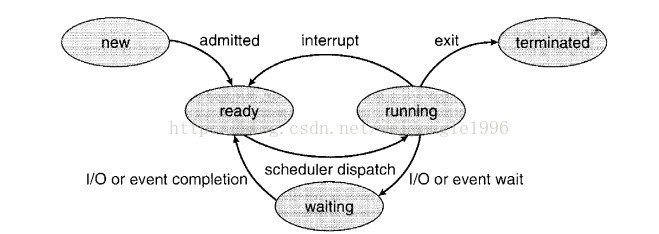
- New (NEW): The process is being created
- Running (RUNNING): Instructions are being executed
- Waiting (WAIT): The process is waiting for some event to occur (such as I/O completion or receiving a signal)
- Ready (READY): The process is ready and only needs to be allocated the CPU in order to execute (waiting for the CPU)
- Terminated (TERMINAL): The process has finished execution
The three-state model is a simplified version of the five-state model; the seven-state model is divided in more detail, as shown in the figure below:
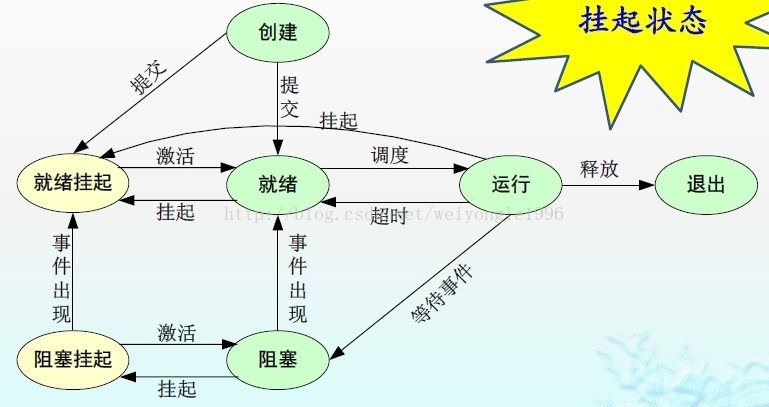
- Ready-suspended: refers to the ready state when the process has been swapped out to secondary storage; it is a state that cannot be scheduled directly. Only when there is no ready-state process in main memory, or a suspended-ready process has higher priority, will the system swap the suspended-ready process back into main memory and convert it to ready.
- Blocked-suspended: refers to the blocked state when the process is swapped out to secondary storage; once the waited-for event occurs, it enters the blocked-suspended state.
Process scheduling
The purpose of multiprogramming is that there is a process executing at all times, thereby maximizing CPU utilization. How to make it so that there is always a process executing on the CPU, and which process should execute, is what process scheduling deals with. Simply put, the purpose of process scheduling is to use resources better.
Scheduling queues
- Job queue: When a process enters the system it is added to the job queue, which contains all processes in the system.
- Ready queue: Programs residing in memory waiting to run are kept in the ready queue. This queue is commonly implemented as a linked list; its head node contains pointers to the first and last PCB blocks of the list. Each PCB includes a pointer field pointing to the next PCB in the ready queue.
- Device queue: The operating system also has other queues. The list of processes waiting for a particular I/O device is called a device queue. Each device has its own device queue.
A new process starts in the ready queue; it waits in the ready queue until it is selected for execution or dispatched. When the process is allocated the CPU and executes, the following may occur:
- The process issues an I/O request and is placed in an I/O queue.
- The process creates a new child process and waits for it to finish
- The process is forcibly released from the CPU due to an interrupt and is put back into the ready queue.
Schedulers
Processes migrate among various scheduling queues. For scheduling, the operating system must select processes from these queues in some way. Process selection is performed by the corresponding scheduler (scheduler). Schedulers can be classified as follows:
- Short-term scheduler (short-term scheduler), also called CPU scheduling. It selects one from the already ready processes and puts it on the CPU to execute, i.e., changes the process from the ready state to the running state.
- Medium-term scheduler (medium-term scheduler), moves a process from memory to secondary storage; the corresponding process state change is from the ready/waiting state to the suspended state.
- Long-term scheduler (long-term scheduler), also called job scheduler (job scheduler). It selects a process from the input well and loads it into memory to execute; the corresponding process state change is from the new state to the ready state.
Context switch
An interrupt causes the CPU to change from the current task to running a kernel subroutine. When an interrupt occurs, the system needs to save the context of the process currently running on the CPU so that the context can be restored after it has been handled. A process’s context is represented by the PCB. Usually the current CPU state is saved by performing a state save (state save), after which a state restore (state restore) is performed to resume running. Switching the CPU to another process requires saving the current state and restoring another process’s state; this is called a context switch (context switch). When a context switch occurs, the kernel saves the old process’s state in the PCB, then loads the already saved context of the new process that has been scheduled to execute.
Process operations
- Process creation
- Process termination
- Orphan processes and zombie processes
Why do processes need to synchronize? Why do they need mutual exclusion?
Why synchronization is needed
Events occurring among multiple processes in the system have some kind of timing relationship; they need to cooperate with each other to complete a task together. For example, suppose process A produces data and process B prints the data; then before printing, B must wait for A to produce data.
Typical example: the producer-consumer problem
Why mutual exclusion is needed
Because the various processes of the operating system need to use shared resources, and these resources require exclusive use, processes compete with each other to use these resources. For example: the problem of reading and writing a file. When a file is being read, a write operation cannot be performed at the same time.
_EOF_
Odd Operating System Related Exercises~4-21
- 本文作者:
- 程序设计实验室
- 版权声明:
- 本博客所有文章除特别声明外,均采用 BY-NC-SA 许可协议。转载请注明出处!
相关文章
操作系统学习一:NetCore-实现模拟多道程序设计的简单处理机调用
前言 道程序设计中,经常是若干个进程同时处于就绪状态,为了使系统中的各进程有条不紊地运行,必须选择某种调度策略,以选择一个进程占用处理机。本次实验设计一个模拟单处理机调度的算法,以加深对处理机调度算法的理解。 要求 按照时间片轮转算法设计模拟调度程序。 输出进程的调度过程。 思路分析 由于本实验是按照处理机调度算法模拟实现处理机的调度,与真正的处理机调度过程并不完全相同,比如没有实现中断(时间片设
2022-06-17 · 计科基础 · 约 1 分钟
编译原理学习一,去除代码中的注释
前言 开始学习编译原理了耶~ 关于编译原理的所有练习,按照老规矩,还是用我最喜欢的C#语言来实现,运行在.NetCore平台上~ 关于这个系列的所有代码已经上传到github了,项目主页: https://github.com/Deali-Axy/CompilerConstructionLearning 本次题目 对C或C++等高级程序设计语言编写的源程序中的//注释和/…/注释进行删除,保留删除
2022-06-17 · 计科基础 · 约 1 分钟
操作系统学习三:进程调度与死锁-以及银行家算法避免死锁--NetCore实现
前言 这是操作系统学习的第三篇啦,关于进程调度有很多内容,操作系统在调度进程的时候最容易遇到的问题就是死锁了,银行家算法是一个典型的避免死锁算法。 死锁的概念 先来了解一下死锁的基本概念:一组竞争系统资源或相互通信的进程相互的“永久”阻塞。若无外力作用,这组进程将永远不能继续执行。 看下面两幅图片,左边是可能产生死锁的状态,四辆汽车(进程)要竞争同一个资源(通过路口),如果系统调度不当,就会陷入死
2021-12-18 · 计科基础 · 约 1 分钟
设计模式之代理模式浅析
代理模式 在客户端与实体之间建立一个代理对象(proxy),客户端对实体进行操作全部委派给代理对象, 隐藏实体的具体实现细节。 Proxy还可以与业务代码分离,部署到另外的服务器。业务代码中通过RPC来委派任务。 代理模式与父类和接口的异同 相同点:代理模式的作用和父类以及接口和组合的作用类似,都是为了聚合共用部分,减少公共部分的代码 不同点: 相比起父类,他们的语境不同,父类要表达的含义是 is
2022-06-17 · 计科基础 · 约 1 分钟
讨论
共 0 条加载评论中…