Nginx configuration for HTTP to HTTPS redirect - force HTTPS access
Preface Several projects have recently gone live, and I have applied for the corresponding SSL certificates. However, I discovered an issue: when users directly enter a domain name in the browser, the browser defaults to accessing the HTTP site, but our website only supports HTTPS access, so they cannot access it. Actually, in the global Nginx configuration, all visits can be redirected to HTTPS. But since some sites on the server provide HTTP services, the configuration must be done separately for each site. Based on information found through search engines, this article summarizes three configuration methods. Those in need can choose the one they prefer.
目录13 个章节
Preface
Recently, several projects went live, and corresponding SSL certificates were applied for. However, I discovered an issue: when users type the domain directly in the browser, the browser defaults to the HTTP site, but our website only supports HTTPS access, so it becomes inaccessible.
You can actually redirect all access to HTTPS in the global nginx configuration, but some sites on the server provide HTTP services, so each site needs to be configured separately.
Based on the information found through search engines, this article summarizes three configuration methods. If needed, you can choose the one that suits you best.
nginx's Rewrite Method
Description
This should be the most straightforward method everyone thinks of: simply redirect all HTTP requests to HTTPS using rewrite rules.
Configuration
server {
	listen	192.168.1.111:80;
	server_name	test.com;

	rewrite ^(.*)$	https://$host$1	permanent;
}
Once this virtual host is set up, all requests to http://test.com will be rewritten to https://test.com.
nginx's 497 Status Code
Error Code 497
497 - normal request was sent to HTTPS
Explanation: This error code occurs when a virtual site only allows HTTPS access, but an attempt is made to access it via HTTP. In this case, Nginx returns the 497 error code.
Instructions
Use the error_page directive to redirect links with a 497 status code to the domain https://test.com.
Configuration
server {
	listen       192.168.1.11:443;	# SSL port
	listen       192.168.1.11:80;	# Users are accustomed to accessing via http, so port 80 is added. Later, through the 497 status code, it automatically redirects to port 443.
	server_name  test.com;
	# Enable SSL support for a server block {......}
	ssl                  on;
	# Specify the certificate file in PEM format
	ssl_certificate      /etc/nginx/test.pem;
	# Specify the private key file in PEM format
	ssl_certificate_key  /etc/nginx/test.key;

	# Redirect http requests to https requests
	error_page 497	https://$host$uri?$args;
}
index.html Refresh Method
Explanation
Both of the above methods require server-side computation and will consume server resources. The page refresh method was learned from Baidu.
Let's use curl to access baidu.com to see how Baidu implements the redirect from baidu.com to www.baidu.com.
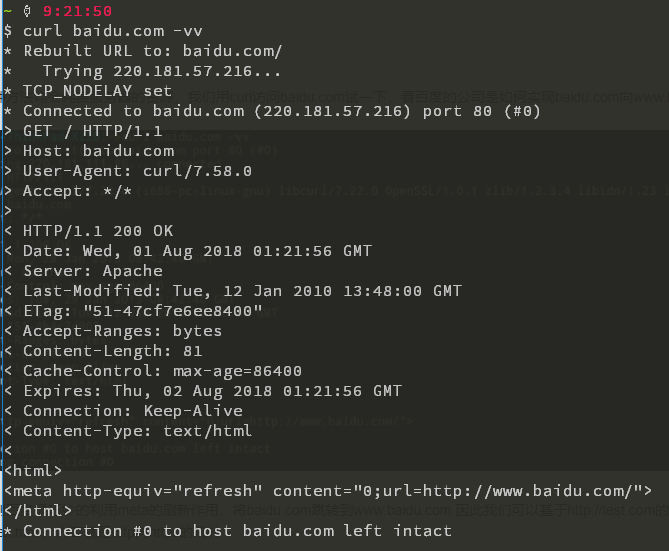
As you can see, Baidu cleverly uses the meta refresh to redirect baidu.com to www.baidu.com. Therefore, we can also create an index.html file in the virtual host path for http://test.com, with content that redirects from http to https.
index.html Web Content
<html>
<meta http-equiv="refresh" content="0;url=https://test.com/">
</html>
Site Configuration
Add an HTTP site configuration in the server configuration to provide access to the index.html file mentioned earlier.
server {
	listen 80;
	server_name	test.com;

	location / {
                #index.html is placed in the root directory listened by the virtual host
		root /srv/www/http.test.com/;
	}
        #Redirect 404 page to the https homepage
	error_page	404	https://test.com/;
}
References
_EOF_
Nginx configuration for HTTP to HTTPS redirect - force HTTPS access
- 本文作者:
- 程序设计实验室
- 版权声明:
- 本博客所有文章除特别声明外,均采用 BY-NC-SA 许可协议。转载请注明出处!
相关文章
设置Linux默认的文件管理器
搜索了半天,也试了很久。 用以下命令可以: 使用Xfce的文件管理器 xdg-mime default Thunar.desktop inode/directory thunar.desktop换成你想要的文件管理器名称 再不行就只能把原来的那个文件管理器卸载掉= =。 我比较喜欢用Gnome的文件管理器: xdg-mime default org.gnome.Nautilus.desktop i
2025-10-27 · 系统配置 · 约 1 分钟
Ubuntu-18-04-安装最新版VLC播放器
添加软件源 sudo add-apt-repository ppa:videolan/master-daily sudo apt update Install sudo apt install vlc qtwayland5 运行VLC播放器 安装额外解码器 vlc-plugin-access-extra - multimedia player and streamer (extra access
2025-10-27 · 系统配置 · 约 1 分钟
在Nginx上配置https加密服务器
前言 最近开发微信小程序需要使用Https,于是折腾了一番。 超简单步骤 1. 申请SSL证书 一般云服务器提供商就会提供这种服务,我在腾讯云上申请了,十分钟就完成了。 2. 上传证书 上传到一个文件夹里面 3. 配置nginx 网络上的资料都是直接修改 /etc/nginx/nginx.conf 这个文件。 不过我的服务器上这个文件里头没有 server 这个节点可以配置。 因此需要修改 /et
2025-10-27 · 系统配置 · 约 1 分钟
在Manjaro上配置国内源
前言 之前我一直用官方源的,但是最近发现官方源变慢了,于是想要切换国内源,顺手做个笔记。 操作 使用以下命令,生成可用中国镜像站列表: sudo pacman-mirrors -i -c China -m rank 刷新完列表之后会弹出来一个框让你选择软件源,这里的就都是国内源了,选择一个喜欢的就行(当然要选择两个以上也没问题。) 日常桌面截图
2025-10-27 · 系统配置 · 约 1 分钟
讨论
共 0 条加载评论中…