LLM Exploration: Environment Setup and Local Deployment of Models
Here we go again with LLM local deployment? ChatGLM-6B can run with just 6GB of VRAM, but MOSS requires double that—what a gap. The hardware requirements are absurdly high, yet the author actually got it working on Ubuntu. Respect? This is the open-source LLM local deployment guide?
目录32 个章节
Preface
Recently, I've been focusing on "alchemy" (working in the AIGC field), and suddenly found that business code has become tasteless...
In my last article on AI image generation, although ChatGPT cannot be self-hosted, there are quite a few open-source LLMs available. As long as you have a decent graphics card, local deployment of an LLM is certainly feasible.
This article will introduce the local deployment of the following two domestic open-source LLMs:
- ChatGLM-6B
- MOSS
In this article, we'll first simply get the models up and running. Later on, I'll continue with some of my recent exploration records in the LLM direction~
Concepts
Before we begin, let's look at some basic concepts.
AIGC
Quoting the following content from mbalib
AIGC (AI Generated Content), also known as "Generative AI," is considered a new form of content creation following Professionally Generated Content (PGC) and User Generated Content (UGC).
Internet content production methods have gone through the process of PGC——UGC——AIGC. PGC (Professionally Generated Content) refers to professionally produced content, such as text and videos created by professionals in the Web1.0 era and the broadcasting industry. Its characteristics are professionalism and guaranteed content quality. UGC (User Generated Content) is user-generated content that emerged with the concept of Web2.0. It is characterized by users being able to freely upload content, resulting in a rich variety of material. AIGC (AI Generated Content) is content generated by AI, characterized by automated production and high efficiency. With the maturation of Natural Language Generation (NLG) technology and AI models, AIGC has gradually attracted widespread attention. Currently, it can automatically generate text, images, audio, video, and even 3D models and code.
Many recent phenomena, such as ChatGPT and AI drawing, fall within this field.
LLM
The following content is cited from Wikipedia:
A large language model (LLM) is a language model consisting of a neural network with many parameters (typically billions of weights or more), trained on large quantities of unlabeled text using self-supervised learning or semi-supervised learning. LLMs emerged around 2018 and perform well at a wide variety of tasks. This has shifted the focus of natural language processing research away from the previous paradigm of training specialized supervised models for specific tasks.
In Chinese, it is known as「大语言模型」(Large Language Model). The currently popular ChatGPT is a representative example of LLMs. A key attribute of large models is their parameter count — the number of parameters determines the capability of a large model (it cannot be said to be absolute, but there is definitely a positive correlation).
The following table lists the parameter counts of common LLMs:
| LLM Name | Parameter Count |
|---|---|
| ChatGPT 3.5 | 175B |
| ChatGLM | 6B |
| MOSS | 16B |
| LLaMA | 7B/13B/33B/65B |
Due to space constraints, only these few are listed. For more, please refer to the references at the end of the article.
Environment Setup
Hardware
First, you need a Linux server/computer equipped with an NVIDIA GPU.
At least 8GB of VRAM (显存) is required, otherwise it won't run~
It is recommended to use the latest Ubuntu (22.04) or its derivative versions. Below are the configurations of the two servers I used during testing.
Server 1
- CPU: Intel(R) Core(TM) i9-10940X CPU @ 3.30GHz
- RAM (内存): 64GB
- GPU (显卡): NVIDIA GeForce RTX 2080 Ti
Server 2
- CPU: Intel(R) Xeon(R) Gold 5318Y CPU @ 2.10GHz x2
- RAM (内存): 128GB
- GPU (显卡): Tesla T4 x4
Software
Now that we've covered the hardware, let's take a look at the software.
Drivers
First, you need GPU drivers. Installing GPU drivers on Ubuntu-based distributions is as easy as drinking water, which is why Ubuntu is recommended for deep learning tasks.
PS: It can be done completely in a one-click manner. There's no need to search online for blogs that have been copied hundreds of times, download a bunch of stuff, or go through the hassle of compiling and uninstalling nouveau, etc.
The Ubuntu Desktop Edition allows you to install GPU drivers directly via the "Software & Updates" app with a single click.
For the Ubuntu Server Edition, use the nvidia-detector command to detect the required driver version. Example:
$ nvidia-detector
nvidia-driver-530
Use ubuntu-drivers list to get a list of installable drivers. Example:
$ ubuntu-drivers list
nvidia-driver-418-server, (kernel modules provided by nvidia-dkms-418-server)
nvidia-driver-530, (kernel modules provided by linux-modules-nvidia-530-generic-hwe-22.04)
nvidia-driver-450-server, (kernel modules provided by linux-modules-nvidia-450-server-generic-hwe-22.04)
nvidia-driver-515, (kernel modules provided by linux-modules-nvidia-515-generic-hwe-22.04)
nvidia-driver-470-server, (kernel modules provided by linux-modules-nvidia-470-server-generic-hwe-22.04)
nvidia-driver-525-server, (kernel modules provided by linux-modules-nvidia-525-server-generic-hwe-22.04)
nvidia-driver-515-server, (kernel modules provided by linux-modules-nvidia-515-server-generic-hwe-22.04)
nvidia-driver-510, (kernel modules provided by linux-modules-nvidia-510-generic-hwe-22.04)
nvidia-driver-525, (kernel modules provided by linux-modules-nvidia-525-generic-hwe-22.04)
nvidia-driver-470, (kernel modules provided by linux-modules-nvidia-470-generic-hwe-22.04)
Then, install the driver using ubuntu-drivers install nvidia-driver-530. Example:
$ ubuntu-drivers install nvidia-driver-530

All the available drivers are already installed.
It's that simple.
PS: Of course, you can also choose to download directly from the NVIDIA official website. For details, you can refer to the references.
Python
For AI development, Python is essential. However, we don't use the system's Python environment directly. Instead, we use conda for management.
It is recommended to use miniconda3, which is lighter than anaconda.
After installing miniconda3 according to the official website instructions, you can create a Python environment with a specific version using the following command:
conda create -n environment_name python=3.10
If you encounter network issues, you can refer to my previous article to configure a domestic mirror to speed up the installation of Python third-party libraries: Configure pip domestic mirror to accelerate the installation of Python third-party libraries~
ChatGLM-6B
Introduction
This is an open-source LLM developed by Tsinghua University and Zhipu Company. As of the time of writing this article, it is considered the top-tier existence among domestic open-source LLMs~
ChatGLM-6B is an open-source, bilingual (Chinese-English) conversational language model based on the General Language Model (GLM) architecture, with 6.2 billion parameters. Combining model quantization technology, users can deploy it locally on consumer-grade GPUs (requiring as little as 6GB of video memory under the INT4 quantization level). ChatGLM-6B utilizes techniques similar to ChatGPT and is optimized for Chinese question-answering and dialogue. Trained on approximately 1 trillion tokens of bilingual (Chinese-English) data, and enhanced with techniques like supervised fine-tuning, feedback bootstrap (反馈自助), and reinforcement learning from human feedback (RLHF), the 6.2-billion-parameter ChatGLM-6B is capable of generating responses that align well with human preferences.
Hardware Requirements
| Quantization Level | Minimum GPU VRAM (Inference) | Minimum GPU VRAM (Efficient Parameter Fine-tuning) |
|---|---|---|
| FP16 (No Quantization) | 13 GB | 14 GB |
| INT8 | 8 GB | 9 GB |
| INT4 | 6 GB | 7 GB |
Local Deployment
Download the Project Code
git clone https://github.com/THUDM/ChatGLM-6B.git
PS: You can also use my forked and modified version, which mainly includes the following changes:
- Deployment and model fine-tuning enable multi-GPU acceleration by default.
- Rewritten API interface, more intuitive.
Simply switch to the following command:
git clone https://github.com/Deali-Axy/ChatGLM-6B.git
Create a Virtual Environment
It is recommended to use conda for management.
conda create -n chatglm python==3.8
Install Dependencies
cd ChatGLM-6B
conda activate chatglm
pip install -r requirements.txt
conda install cudatoolkit=11.7 -c nvidia
PS: If
cudatoolkitis not installed, you will encounter the errorRuntimeError: Library cudart is not initialized.However, some people in the issues suggest it can be resolved by using a CPU output quantized model and calling it directly. This has not been tried yet.
Issues address: https://github.com/THUDM/ChatGLM-6B/issues/115
Download Model and Launch
The project code includes two demo options: a command-line interface and a web interface. Choose either one to run, and the program will automatically download the pretrained model from Hugging Face.
PS: The Hugging Face model should theoretically be directly downloadable. If you encounter network issues, please use a proxy or download the model from an official cloud storage link provided by the developers.
# Command Line Demo
python cli_demo.py
# Simple Web Interface Using Gradio
python web_demo.py
Gradio's default port is 7860, which can be customized by passing the server_port parameter in the launch() method.
Using Quantized Models
If there is less than 13G of VRAM (显存), it is not possible to run FP16 precision models. You can only run quantized models and need to modify the code.
Open the cli_demo.py or web_demo.py code mentioned above.
Find the following model loading code and modify the parameters.
model = AutoModel.from_pretrained("THUDM/chatglm-6b", trust_remote_code=True).half().cuda()
Change the code above to the following to use a quantized model.
# Modify as needed, currently only supports 4/8-bit quantization
model = AutoModel.from_pretrained("THUDM/chatglm-6b", trust_remote_code=True).quantize(4).half().cuda()
Operational Results
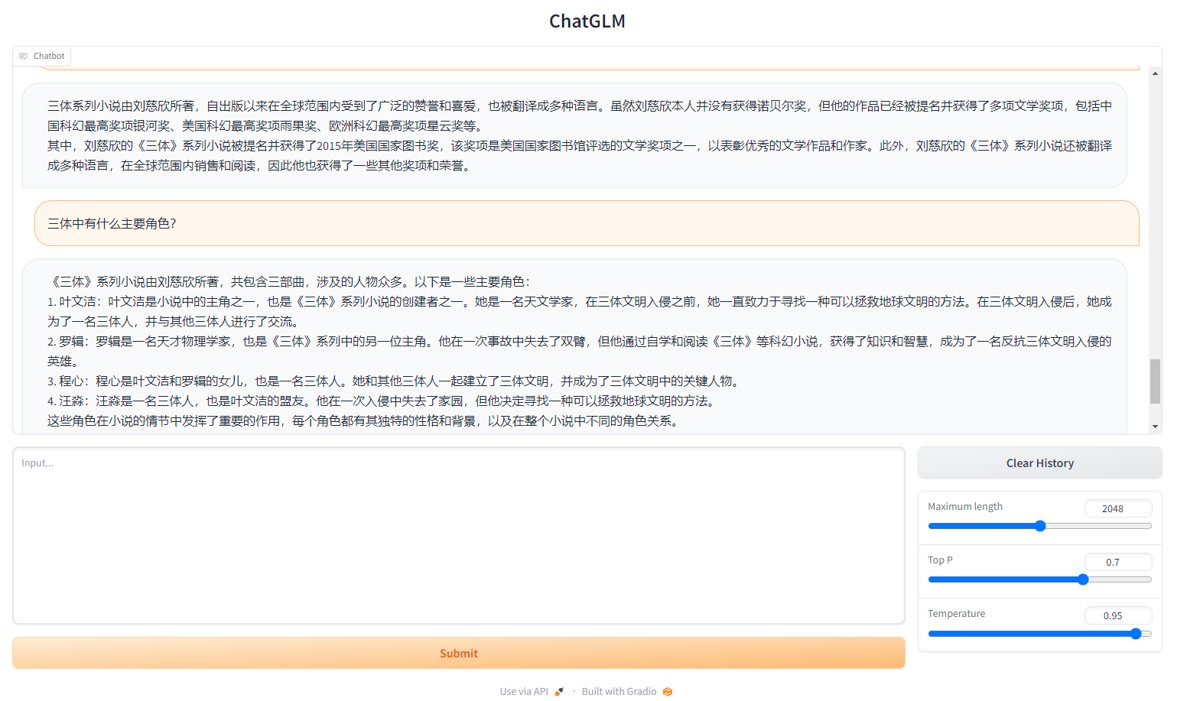
Multi-GPU Acceleration
If you have multiple GPUs, you can use multi-GPU processing to accelerate inference.
Once again, open the aforementioned cli_demo.py or web_demo.py code.
Locate the following model loading code
model = AutoModel.from_pretrained("THUDM/chatglm-6b", trust_remote_code=True).half().cuda()
Modify it to
from utils import load_model_on_gpus
model = load_model_on_gpus("THUDM/chatglm-6b", num_gpus=4)
The num_gpus parameter specifies the number of GPUs to use.
I reviewed the code for the load_model_on_gpus method. It works by using the auto_configure_device_map method to split the transformer into 30 layers, which are then allocated to the specified number of GPUs. It cannot be flexibly assigned by GPU ID like the CUDA_VISIBLE_DEVICES environment variable; it can only allocate resources sequentially.
If you need to run other models on the machine simultaneously, consider running this ChatGLM model first before running the others, or rewrite the auto_configure_device_map method to allow for more flexible GPU specification.
Authorization
The model cannot be used directly for commercial purposes. Reportedly, commercial use requires purchasing a license costing 1.8 million yuan (180w) per year.
MOSS
Introduction
This is Fudan University's open-source large language model. The biggest difference from ChatGLM during use is that its inference speed is particularly slow.
MOSS is an open-source conversational language model that supports Chinese and English bilingualism as well as various plugins. The
moss-moonseries models have 16 billion parameters and can run on a single A100/A800 or two 3090 graphics cards under FP16 precision, and on a single 3090 graphics card under INT4/8 precision. The MOSS base language model was pre-trained on approximately 700 billion Chinese and English tokens as well as code tokens, and subsequently acquired multi-turn dialogue capabilities and the ability to use various plugins through conversational instruction fine-tuning, plugin-enhanced learning, and human preference training.
Hardware Requirements
| Quantization Level | Loading Model | Completing One Dialogue Round (estimated) | Reaching maximum dialogue length of 2048 tokens |
|---|---|---|---|
| FP16 | 31GB | 42GB | 81GB |
| Int8 | 16GB | 24GB | 46GB |
| Int4 | 7.8GB | 12GB | 26GB |
Local Deployment
Download Code
git clone https://github.com/OpenLMLab/MOSS.git
Create Virtual Environment
It is recommended to use conda for management.
conda create -n moss python==3.8
Install Dependencies
cd MOSS
conda activate moss
pip install -r requirements.txt
conda install cudatoolkit=11.7 -c nvidia
Download Model and Start
The project code includes two types of demos: a command-line interface (CLI) and a web interface. You can choose either one to run, and the program will automatically download the pre-trained model from Hugging Face.
# Command Line Demo
python moss_cli_demo.py
# Simple Web Interface Implemented with Gradio
python moss_web_demo_gradio.py
Modifying Default Model and Multi-GPU Acceleration
Since MOSS has high memory requirements, the default uses a 4-bit quantized model. Here, I deployed on a server with 4 T4 GPUs, so I directly used the FP16 model.
Modify moss_web_demo_gradio.py and locate the following code:
parser.add_argument("--model_name", default="fnlp/moss-moon-003-sft-int4",
                    ...)
Change the default parameter to fnlp/moss-moon-003-sft
Then configure multi-GPU acceleration by setting the GPU parameter to the IDs of the four graphics cards:
parser.add_argument("--gpu", default="0,1,2,3", type=str)
After starting, you can see that all four GPUs are fully utilized.
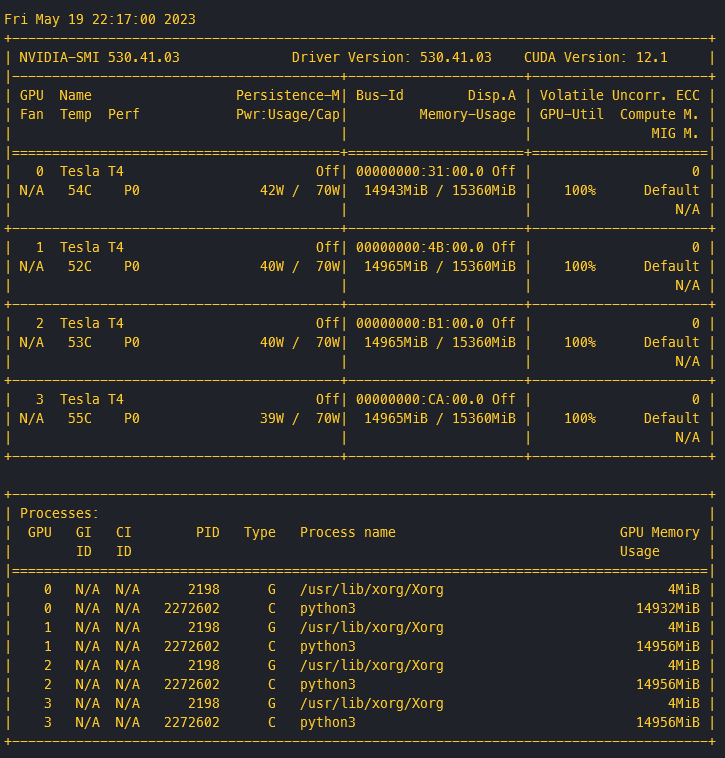
The biggest takeaway from using it is that it's slow—often taking one or two minutes to generate a response.
I checked the GitHub issues, and many people have raised the same problem. Two A100 GPUs still require at least 10 seconds, with generation times around 100 seconds. It seems there is no short-term solution; we can only wait for official optimization~
For details, see:
Licensing
The model is licensed under the GNU AFFERO GENERAL PUBLIC LICENSE and is free for commercial use.
Reference Materials
_EOF_
LLM Exploration: Environment Setup and Local Deployment of Models
- 本文作者:
- 程序设计实验室
- 版权声明:
- 本博客所有文章除特别声明外,均采用 BY-NC-SA 许可协议。转载请注明出处!
相关文章
本地部署大模型哪个性能好?在 8845HS (780M核显) 上的 LM Studio 基准测试
省流:目前用下来 `google/gemma-4-e4b` 是比较均衡的,在速度和性能方面表现都不错
2026-09-15 · LLM · 约 1 分钟
LLM探索:GPT类模型的几个常用参数 Top-k, Top-p, Temperature
A recent breakthrough in artificial intelligence (AI) is the introduction of language processing technologies that enable us to build more intelligent systems with a richer understanding of language than ever before. Large pre-trained Transformer language models, or simply large language models, vastly extend the capabilities of what systems are able to do with text.
2026-05-09 · LLM · 约 1 分钟
用本地大模型驱动中文输入法,我做了一个实验性的项目
一个拿350MB小模型给输入法做语境排序的实验,思路倒是比那些堆参数的玩意儿清醒。不过老哥,先用着Web版就别急着吹原生输入法框架,等你能把打字延迟压到100ms以下再说。
2026-05-09 · LLM · 约 1 分钟
LLM探索:DeepSeek火爆全网,官网宕机?本地部署一个随便玩
DeepSeek官网又崩?本地部署14b模型,web界面倒还凑合。国产大模型热度高,服务器不行就自己搭,呵。代码能力待验证,反正比官网强。
2026-05-09 · LLM · 约 1 分钟
讨论
共 0 条加载评论中…